Welcome Guest ( Log In | Register )

Outline · [ Standard ] · Linear+

 Change Your iPhone 5/4/ & iPad’s Carrier to Logo, IOS 6 supported. NO JAILBREAK! with logo

views
     
TSsugen
post Jan 15 2013, 03:27 PM, updated 13y ago

Regular
******
Senior Member
1,357 posts

Joined: Jul 2007


Support Maxis, DIGI, Celcom etc

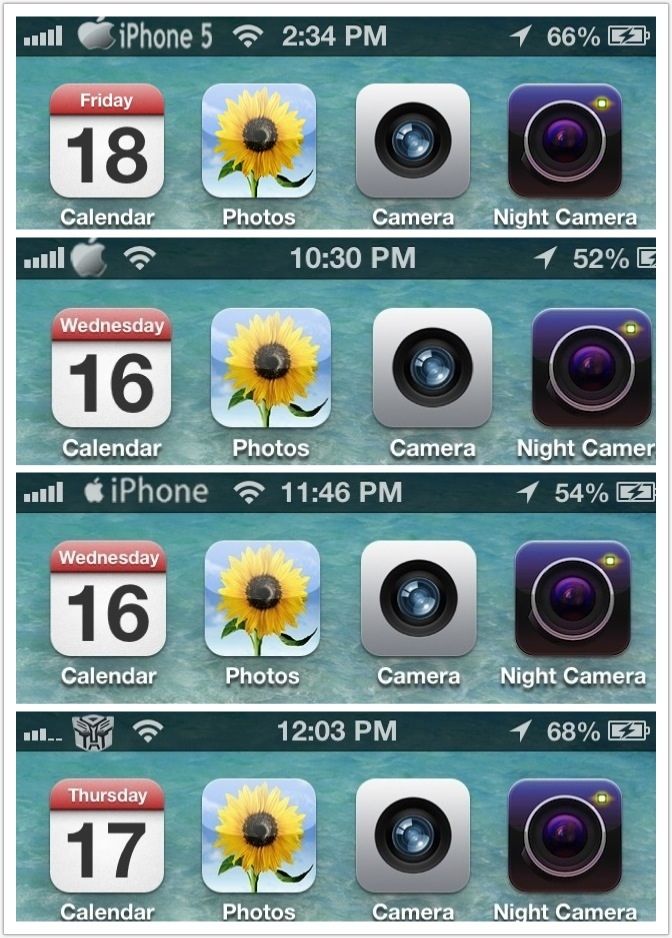
Here i created some logo on my iphone 5. You can download these files at the bottom & unzip the picture file
1.)iphone5.png.
2.)apple log.png
3.)apple iphone.png
4.)transformers.png
user posted image

CustomCarrierLogo allows you to customize your iOS device’s carrier logo to something totally different. This is limited to devices that can support data/phone service, so no WiFi-only devices. Some carriers might not be supported because they do not use images for their logos (e.g. Sprint). The good part is that CustomCarrierLogo works WITHOUT a jailbreak on any firmware, so iPhone 5’s and iPad LTE’s work. If you do not see your device/carrier within CarrierEditor in the drop down lists, it means that your device is incompatible.

Jump over the break to check out how to use CarrierEditor to change your carrier logo…


NOTE: to learn how to enable numeric signal strength on your iPhone, check out this post

NOTE: Mac users, check out this post

1. Download CustomCarrierLogo
http://api.viglink.com/api/click?format=go..._13582346625853

2. Unzip the file

3. Load CustomCarrierLogo

4. Click ‘Let’s Get Started’
user posted image

5. On your iOS devices go to Settings > General > About > scroll down until you find ‘Carrier’
user posted image

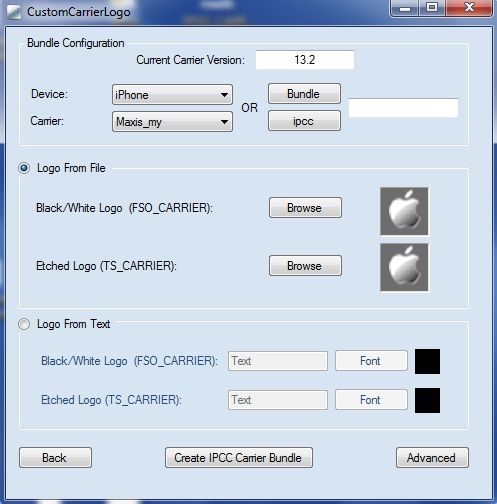
6. Go back to CustomCarrierLogo, enter your carrier version, choose your iOS device and carrier and choose what type of logo you want. An image or text.[COLOR=red]
(Select Celcom, DIGI, MAXIS etc)
user posted image
7. Click ‘Create IPCC Carrier Bundle’

8. You will notice two new files on your desktop. In this case ‘ATT_US_13.3.ipcc’ and ‘ATT_US_original.ipcc’.
user posted image

9. Plug-in your device to your PC and load iTunes.

10. Hold Shift and click on ‘Restore iPhone’.
user posted image

11. From the drop-down menu in the bottom right corner, slect ‘iPhone/iPad carrier configuration file ( .ipcc )’ and select the appropriate .ipcc file ( not the original )
user posted image
user posted image

12. Reboot your iPhone ( or turn on/off airplane mode )

13. Enjoy.

NOTE: to reverse the process, repeat steps 10-12 but this time choose the ‘ATT_US_original.ipcc’ file

This post has been edited by sugen: Jan 18 2013, 02:42 PM


Attached File(s)
Attached File  FSO_CARRIER_MY_MAXIS.zip ( 39.63k ) Number of downloads: 118
Attached File  iphone_logo.zip ( 46.89k ) Number of downloads: 76
Attached File  transformer.zip ( 46.06k ) Number of downloads: 50
Attached File  iphone5.zip ( 49.31k ) Number of downloads: 65
WimpyKid
post Jan 15 2013, 03:30 PM

We fix your Devices!
*******
Senior Member
2,673 posts

Joined: Aug 2010
From: Puchong, Selangor


Good stuff!
Blues89
post Jan 15 2013, 03:40 PM

☆*:.。. o(≧▽≦)o .。.:*☆
*******
Senior Member
4,892 posts

Joined: Feb 2012
From: Mars


this looks great o.O"
nvr knew such way existed
changing ipcc...hmmm
apimoi
post Jan 15 2013, 04:16 PM

New Member
*
Junior Member
8 posts

Joined: Apr 2007
is it only mac user can use the software ?

TSsugen
post Jan 15 2013, 04:27 PM

Regular
******
Senior Member
1,357 posts

Joined: Jul 2007


this is windows version
l4nc3k
post Jan 15 2013, 04:59 PM

Nerd
*****
Senior Member
968 posts

Joined: Aug 2012
From: Subang Jaya


what does "current carrier version" means? blink.gif
TSsugen
post Jan 15 2013, 05:01 PM

Regular
******
Senior Member
1,357 posts

Joined: Jul 2007


just follow it... check what is yours.. and select form the list..
QUOTE(l4nc3k @ Jan 15 2013, 04:59 PM)
what does "current carrier version" means? blink.gif
*
l4nc3k
post Jan 15 2013, 05:10 PM

Nerd
*****
Senior Member
968 posts

Joined: Aug 2012
From: Subang Jaya


can put any picture as the logo?
TSsugen
post Jan 15 2013, 05:17 PM

Regular
******
Senior Member
1,357 posts

Joined: Jul 2007


yes.. any png file size with 90x36 pixel. Share with us when u had done that..

QUOTE(l4nc3k @ Jan 15 2013, 05:10 PM)
can put any picture as the logo?
*
tisumuka
post Jan 15 2013, 09:20 PM

Getting Started
**
Junior Member
70 posts

Joined: Oct 2008
From: Selayang / Country Homes


can i put apple logo?

rathian_mhfu
post Jan 15 2013, 09:43 PM

Rioreia Kishou Shu
*******
Senior Member
2,302 posts

Joined: Jan 2011
From: Monster Hunter Freedom Unite
huuu i just wait for jailbreak..sounds complicated..
stevenng97
post Jan 15 2013, 09:51 PM

Regular
******
Senior Member
1,057 posts

Joined: Jul 2009
can i know how to backup back ? i already back up many times still same =.=
krishtiano86
post Jan 15 2013, 10:04 PM

6 STAR HOTEL
******
Senior Member
1,173 posts

Joined: Dec 2012


Good stuff..but i'll just wait for Zepellin

rathian_mhfu
post Jan 15 2013, 10:08 PM

Rioreia Kishou Shu
*******
Senior Member
2,302 posts

Joined: Jan 2011
From: Monster Hunter Freedom Unite
QUOTE(krishtiano86 @ Jan 15 2013, 10:04 PM)
Good stuff..but i'll just wait for Zepellin
*
yes more simple and practical
stevenng97
post Jan 15 2013, 10:31 PM

Regular
******
Senior Member
1,057 posts

Joined: Jul 2009
i tried many time to get it original logo but still cant how somebody help T_T
stevenng97
post Jan 15 2013, 11:12 PM

Regular
******
Senior Member
1,057 posts

Joined: Jul 2009
help help y u cant resotre back original logo pls help
really lousy this software cant even help me restore back my original logo sad case =.= rclxub.gif anyone can help ?? TS?

This post has been edited by stevenng97: Jan 15 2013, 11:23 PM
x132755
post Jan 15 2013, 11:59 PM

How To Own A Property Without Spending Your Money? Got 1 Way....
********
All Stars
13,313 posts

Joined: Jan 2008


seem cool~
paeGMX
post Jan 16 2013, 04:42 PM

Getting Started
**
Junior Member
135 posts

Joined: Nov 2012
From: In Your Pocket`


QUOTE(rathian_mhfu @ Jan 15 2013, 09:43 PM)
huuu i just wait for jailbreak..sounds complicated..
*
haha. still got a looottt weekkss,dayysss to wait. =(

JayF1
post Jan 16 2013, 07:35 PM

New Member
*
Junior Member
49 posts

Joined: Aug 2009
From: Kuala Lumpur


Looking good. Will try it after this. Thanx for sharing bro. smile.gif
deelern
post Jan 16 2013, 10:47 PM

New Member
*
Junior Member
8 posts

Joined: Sep 2009
From: Subang Jaya, Klang


QUOTE(rathian_mhfu @ Jan 15 2013, 09:43 PM)
huuu i just wait for jailbreak..sounds complicated..
*
Jailbreaking is complicated compared to this. This is just replacing your carrier settings, very simple biggrin.gif
I used Zeppelin.
TSsugen
post Jan 16 2013, 10:48 PM

Regular
******
Senior Member
1,357 posts

Joined: Jul 2007


Hey guys,
I had create apple logo to replace our telco log.. enjoy !
TSsugen
post Jan 17 2013, 12:07 PM

Regular
******
Senior Member
1,357 posts

Joined: Jul 2007


transformer logo added for download..
DreamChaser
post Jan 17 2013, 09:43 PM

Dreamer
*******
Senior Member
2,171 posts

Joined: Oct 2004
From: Selangor


Any One Piece fans?

Attached Image

rclxms.gif
edan1979
post Jan 18 2013, 10:02 AM

*GruMpy_MoDe*
*******
Senior Member
5,511 posts

Joined: Jun 2006
From: On Earth.


ahhh i use to do that long time ago... change the icon to the colored telco icon... i wonder if i still keep the file...

nice info...
TSsugen
post Jan 18 2013, 02:43 PM

Regular
******
Senior Member
1,357 posts

Joined: Jul 2007


Maybe you can help to contribute some custom logo here.. Just created iphone 5 logo..
QUOTE(edan1979 @ Jan 18 2013, 10:02 AM)
ahhh i use to do that long time ago... change the icon to the colored telco icon... i wonder if i still keep the file...

nice info...
*
dino89
post Jan 18 2013, 05:30 PM

Dino89 Trading
*******
Senior Member
4,966 posts

Joined: Mar 2011


I missed zepplin for this. Thumbs up for ts for sharing this smile.gif
winkiedilwy
post Jan 18 2013, 06:46 PM

Imma farting carrots.
*******
Senior Member
2,343 posts

Joined: Oct 2010
From: Place known for existence of men.


Not bad! But i wished we can change the carrier name without jailbreaking... i think there is a way to do that rite??

can this be done on iPod touch/iPad??
TSsugen
post Jan 18 2013, 06:53 PM

Regular
******
Senior Member
1,357 posts

Joined: Jul 2007


Instead of logo, This program allows u to change the carrier name wat..just type in the text that U want. No jailbreak needed.

QUOTE(winkiedilwy @ Jan 18 2013, 06:46 PM)
Not bad! But i wished we can change the carrier name without jailbreaking... i think there is a way to do that rite??

can this be done on iPod touch/iPad??
*
winkiedilwy
post Jan 18 2013, 07:11 PM

Imma farting carrots.
*******
Senior Member
2,343 posts

Joined: Oct 2010
From: Place known for existence of men.


QUOTE(sugen @ Jan 18 2013, 06:53 PM)
Instead of logo, This program allows u to change the carrier name wat..just type in the text that U want. No jailbreak needed.
*
under dat "Logo from text" there?? which one should i enter? first one or second one?
syzwn
post Jan 18 2013, 08:16 PM

Casual
***
Junior Member
358 posts

Joined: Dec 2009
From: bolehland


This is a good alternative for unjailbroken iDevice smile.gif
TSsugen
post Jan 18 2013, 11:17 PM

Regular
******
Senior Member
1,357 posts

Joined: Jul 2007


Yes. U r rite. Type in the text that u want. Give a try la..
QUOTE(winkiedilwy @ Jan 18 2013, 07:11 PM)
under dat "Logo from text" there?? which one should i enter? first one or second one?
*
luq91_mufc
post Jan 19 2013, 09:38 AM

Getting Started
**
Junior Member
118 posts

Joined: Nov 2010
From: Sri Iskandar, Perak / Kelantan


I changed mine to iClarified, but I forgot where did I put the IPCC file.
Now, I cant change it anymore because my original is missing. Anyone happens to use CELCOM and has the original IPCC files?

I include also France Carrier pack logos. Enjoice!

This post has been edited by luq91_mufc: Jan 19 2013, 09:40 AM


Attached thumbnail(s)
Attached Image Attached Image

Attached File(s)
Attached File  ZeppelinLogos.zip ( 255.17k ) Number of downloads: 18
winkiedilwy
post Jan 19 2013, 10:14 AM

Imma farting carrots.
*******
Senior Member
2,343 posts

Joined: Oct 2010
From: Place known for existence of men.


Works with iPod Touch / iPad 4g??
winkiedilwy
post Jan 20 2013, 10:30 PM

Imma farting carrots.
*******
Senior Member
2,343 posts

Joined: Oct 2010
From: Place known for existence of men.


Hi anyone can provide Maxis_my 13.1 Original IPCC file?? i can't seem to go back...
winkiedilwy
post Jan 21 2013, 05:38 PM

Imma farting carrots.
*******
Senior Member
2,343 posts

Joined: Oct 2010
From: Place known for existence of men.


@sugen Do you have the original IPCC file for Maxis 13.1?? Mine doesn't seem to work. After installing the original IPCC and rebooted, still the same. But it did downgrade to 13.0 den only i update to 13.1.

This post has been edited by winkiedilwy: Jan 21 2013, 05:40 PM
winkiedilwy
post Jan 21 2013, 10:27 PM

Imma farting carrots.
*******
Senior Member
2,343 posts

Joined: Oct 2010
From: Place known for existence of men.


Anyone please help, tried to install Maxis_my_original.IPCC and this is what happened.

user posted image

NOT EVEN WIFI LOGO!!

HOW?!
kekorok
post Jan 22 2013, 03:54 PM

Casual
***
Junior Member
308 posts

Joined: Oct 2011


better not to change at all tongue.gif
MrGrape
post Jan 22 2013, 09:36 PM

New Member
*
Junior Member
5 posts

Joined: Nov 2012


Ip 4s can ?
TSsugen
post Jan 22 2013, 09:48 PM

Regular
******
Senior Member
1,357 posts

Joined: Jul 2007


Yes.. i had change on iphone4 & 4S too..
MrGrape
post Jan 22 2013, 10:53 PM

New Member
*
Junior Member
5 posts

Joined: Nov 2012


Cannot la on my phone. Try it a couple of times. 😞
zer016
post Jan 22 2013, 10:55 PM

Casual
***
Junior Member
343 posts

Joined: May 2009
why the carrier font so small? so big different compare to the original.. >.<"
MrGrape
post Jan 22 2013, 11:19 PM

New Member
*
Junior Member
5 posts

Joined: Nov 2012


Yup. Why so small? How reset back to the original carrier?
Reus
post Jan 23 2013, 11:05 AM

New Member
*
Junior Member
4 posts

Joined: Jun 2012


wow,can change operator logo.. how to change it back to normal?
TSsugen
post Jan 23 2013, 01:47 PM

Regular
******
Senior Member
1,357 posts

Joined: Jul 2007


u can change the font size rite on the program itself.. how big and how small u like..
QUOTE(MrGrape @ Jan 22 2013, 11:19 PM)
Yup. Why so small? How reset back to the original carrier?
*
DreamChaser
post Jan 31 2013, 12:07 AM

Dreamer
*******
Senior Member
2,171 posts

Joined: Oct 2004
From: Selangor


does it work for IOS 6.1? I tried but doesn't work.

maxis carrier 14.0 by the way...
decavalera
post Feb 3 2013, 12:31 AM

bloody roots
*******
Senior Member
2,317 posts

Joined: Sep 2008
From: Selangor


For those who got prob, not sure this old thread will do any help or not.
decavalera
post Feb 5 2013, 04:56 PM

bloody roots
*******
Senior Member
2,317 posts

Joined: Sep 2008
From: Selangor


Since my casing is from element case. I custom made it's logo & use Zeppelin

user posted image
TSsugen
post Feb 6 2013, 03:39 PM

Regular
******
Senior Member
1,357 posts

Joined: Jul 2007


Nice logo..
QUOTE(decavalera @ Feb 5 2013, 04:56 PM)
Since my casing is from element case. I custom made it's logo & use Zeppelin

user posted image
*
gengstapo
post Feb 6 2013, 03:49 PM

Retired enthusiast
********
All Stars
10,688 posts

Joined: Jan 2005
Sorry, wrong thread doh.gif whistling.gif

This post has been edited by gengstapo: Feb 6 2013, 03:55 PM
Xirality
post Feb 6 2013, 04:28 PM

10k Club
Group Icon
Moderator
12,176 posts

Joined: Sep 2009

QUOTE(decavalera @ Feb 5 2013, 04:56 PM)
Since my casing is from element case. I custom made it's logo & use Zeppelin

user posted image
*
Looks nice! Can send me without the 'case' word? drool.gif
decavalera
post Feb 6 2013, 07:42 PM

bloody roots
*******
Senior Member
2,317 posts

Joined: Sep 2008
From: Selangor


QUOTE(Xirality @ Feb 6 2013, 04:28 PM)
Looks nice! Can send me without the 'case' word?  drool.gif
*
Thanks. How to send, PM me? I only used the windows stock paint software. But bare in mind that the background is black, not transparent.
Memories_Fallen
post Feb 6 2013, 07:47 PM

:)
*******
Senior Member
2,119 posts

Joined: Apr 2012


Lol if now use jb even easier and less confusing..Zeppelin is the like one of the best tweak from cydia..haha
fazrulhata
post Feb 8 2013, 03:39 PM

Getting Started
**
Junior Member
123 posts

Joined: Jan 2013
nice one cheers.gif
idvdi
post Feb 21 2013, 08:40 AM

Getting Started
**
Junior Member
84 posts

Joined: Apr 2009
i found mine not working, any certified that still working on 6.1.1?
maxis btw.
pehe_cs
post Feb 27 2013, 04:24 PM

New Member
*
Junior Member
16 posts

Joined: Jan 2013


NICE..have to try it!! icon_idea.gif
dikae
post Feb 28 2013, 01:21 AM

an apple a day
Group Icon
Staff
9,185 posts

Joined: Aug 2010


thanks bro for sharing, its good stuff indeed
zul26
post Mar 13 2013, 09:54 AM

New Member
*
Junior Member
21 posts

Joined: Apr 2012
QUOTE(sugen @ Jan 15 2013, 03:27 PM)
Support Maxis, DIGI, Celcom etc

Here i created some logo on my iphone 5. You can download these files at the bottom & unzip the picture file
1.)iphone5.png.
2.)apple log.png
3.)apple iphone.png
4.)transformers.png

user posted image

CustomCarrierLogo allows you to customize your iOS device’s carrier logo to something totally different. This is limited to devices that can support data/phone service, so no WiFi-only devices. Some carriers might not be supported because they do not use images for their logos (e.g. Sprint). The good part is that CustomCarrierLogo works WITHOUT a jailbreak on any firmware, so iPhone 5’s and iPad LTE’s work. If you do not see your device/carrier within CarrierEditor in the drop down lists, it means that your device is incompatible.

Jump over the break to check out how to use CarrierEditor to change your carrier logo…
NOTE: to learn how to enable numeric signal strength on your iPhone, check out this post

NOTE: Mac users, check out this post

1. Download CustomCarrierLogo
http://api.viglink.com/api/click?format=go..._13582346625853

2. Unzip the file

3. Load CustomCarrierLogo

4. Click ‘Let’s Get Started’
user posted image

5. On your iOS devices go to Settings > General > About > scroll down until you find ‘Carrier’
user posted image

6. Go back to CustomCarrierLogo, enter your carrier version, choose your iOS device and carrier and choose what type of logo you want. An image or text.[COLOR=red]
(Select Celcom, DIGI, MAXIS etc)
user posted image
7. Click ‘Create IPCC Carrier Bundle’

8. You will notice two new files on your desktop. In this case ‘ATT_US_13.3.ipcc’ and ‘ATT_US_original.ipcc’.
user posted image

9. Plug-in your device to your PC and load iTunes.

10. Hold Shift and click on ‘Restore iPhone’.
user posted image

11. From the drop-down menu in the bottom right corner, slect ‘iPhone/iPad carrier configuration file ( .ipcc )’ and select the appropriate .ipcc file ( not the original )
user posted image
user posted image

12. Reboot your iPhone ( or turn on/off airplane mode )

13. Enjoy.

NOTE: to reverse the process, repeat steps 10-12 but this time choose the ‘ATT_US_original.ipcc’ file
*
i dont know why i cannot change my carrier logo..i tried it on my iphone 5 several times..need help from the sifu here..is it because i choose automatic network selection ?
harryfoo
post Mar 13 2013, 04:46 PM

Look at all my stars!!
*******
Senior Member
2,296 posts

Joined: Feb 2010


QUOTE(zul26 @ Mar 13 2013, 09:54 AM)
i dont know why i cannot change my carrier logo..i tried it on my iphone 5 several times..need help from the sifu here..is it because i choose automatic network selection ?
*
Is your phone on 6.1.2?
zul26
post Mar 14 2013, 09:09 AM

New Member
*
Junior Member
21 posts

Joined: Apr 2012
QUOTE(harryfoo @ Mar 13 2013, 04:46 PM)
Is your phone on 6.1.2?
*
yes it is..so this version does not support it??
TechHub-Asia
post Mar 14 2013, 09:18 AM

Getting Started
**
Junior Member
84 posts

Joined: Oct 2010
Amazing works, thank you very much for your sharing... smile.gif
whereis the love
post Mar 14 2013, 09:25 AM

Look at all my stars!!
*******
Senior Member
2,546 posts

Joined: Apr 2012
From: I can be anywhere


Zeppelin easier to use..
INGfusion
post Mar 14 2013, 11:39 AM

iPong Oren Leh
*******
Senior Member
7,500 posts

Joined: Jun 2007
From: Kuala Lumpur


QUOTE(whereis the love @ Mar 14 2013, 09:25 AM)
Zeppelin easier to use..
*
Yup +1
decavalera
post Mar 14 2013, 12:53 PM

bloody roots
*******
Senior Member
2,317 posts

Joined: Sep 2008
From: Selangor


QUOTE(Xirality @ Feb 6 2013, 04:28 PM)
Looks nice! Can send me without the 'case' word?  drool.gif
*
Just learn how to create a transparent background .PNG file today, so here you are...

This post has been edited by decavalera: Mar 14 2013, 01:01 PM


Attached File(s)
Attached File  EC.zip ( 1017bytes ) Number of downloads: 23
INGfusion
post Mar 14 2013, 03:09 PM

iPong Oren Leh
*******
Senior Member
7,500 posts

Joined: Jun 2007
From: Kuala Lumpur


QUOTE(decavalera @ Mar 14 2013, 12:53 PM)
Just learn how to create a transparent background .PNG file today, so here you are...
*
Nice design u got there
decavalera
post Mar 14 2013, 04:21 PM

bloody roots
*******
Senior Member
2,317 posts

Joined: Sep 2008
From: Selangor


QUOTE(INGfusion @ Mar 14 2013, 03:09 PM)
Nice design u got there
*
Thanks, if i were you, i'll create the lunatik carrier logo bro...
INGfusion
post Mar 15 2013, 12:08 AM

iPong Oren Leh
*******
Senior Member
7,500 posts

Joined: Jun 2007
From: Kuala Lumpur


QUOTE(decavalera @ Mar 14 2013, 04:21 PM)
Thanks, if i were you, i'll create the lunatik carrier logo bro...
*
I don't know how to create cry.gif
harryfoo
post Mar 15 2013, 08:27 AM

Look at all my stars!!
*******
Senior Member
2,296 posts

Joined: Feb 2010


QUOTE(zul26 @ Mar 14 2013, 09:09 AM)
yes it is..so this version does not support it??
*
I think so. I'm on 6.1.2 also, I couldn't change it. sad.gif
zul26
post Mar 15 2013, 09:33 AM

New Member
*
Junior Member
21 posts

Joined: Apr 2012
QUOTE(harryfoo @ Mar 15 2013, 08:27 AM)
I think so. I'm on 6.1.2 also, I couldn't change it. sad.gif
*
aiya..unlucky for us...i was so excited to change the carrier logo the other day..
harryfoo
post Mar 15 2013, 12:06 PM

Look at all my stars!!
*******
Senior Member
2,296 posts

Joined: Feb 2010


QUOTE(zul26 @ Mar 15 2013, 09:33 AM)
aiya..unlucky for us...i was so excited to change the carrier logo the other day..
*
Have you tried zeppelin?
zul26
post Mar 15 2013, 12:33 PM

New Member
*
Junior Member
21 posts

Joined: Apr 2012
QUOTE(harryfoo @ Mar 15 2013, 12:06 PM)
Have you tried zeppelin?
*
nope..what is that?does it work?
decavalera
post Mar 15 2013, 02:39 PM

bloody roots
*******
Senior Member
2,317 posts

Joined: Sep 2008
From: Selangor


QUOTE(zul26 @ Mar 15 2013, 12:33 PM)
nope..what is that?does it work?
*
That is a free jailbreak apps download from cydia which can easily change the carrier logo...
zul26
post Mar 15 2013, 02:48 PM

New Member
*
Junior Member
21 posts

Joined: Apr 2012
QUOTE(decavalera @ Mar 15 2013, 02:39 PM)
That is a free jailbreak apps download from cydia which can easily change the carrier logo...
*
i see.. i didn't jailbreak my iphone..sorry i am new in apple's world..

INGfusion
post Mar 16 2013, 01:31 AM

iPong Oren Leh
*******
Senior Member
7,500 posts

Joined: Jun 2007
From: Kuala Lumpur


nice huh ?
Attached Image
Attached Image

This post has been edited by INGfusion: Mar 16 2013, 10:42 AM
decavalera
post Mar 16 2013, 12:59 PM

bloody roots
*******
Senior Member
2,317 posts

Joined: Sep 2008
From: Selangor


QUOTE(zul26 @ Mar 15 2013, 02:48 PM)
i see.. i didn't jailbreak my iphone..sorry i am new in apple's world..
*
No prob.. I always tell my friends that just venture with the iPhone world to feel the stock iOS 1st. Then when they start to jb they'll know what the stock iOS is missing with lots of customization...
sasuke8678
post Mar 16 2013, 01:49 PM

WhySoSerious!!
*******
Senior Member
2,013 posts

Joined: Sep 2009
From: Kuala Lumpur


awesome!!!
INGfusion
post Mar 16 2013, 02:31 PM

iPong Oren Leh
*******
Senior Member
7,500 posts

Joined: Jun 2007
From: Kuala Lumpur


QUOTE(sasuke8678 @ Mar 16 2013, 01:49 PM)
awesome!!!
*
What so awesome !!!!
lyl_bgr
post Apr 29 2013, 09:56 PM

Casual
***
Junior Member
441 posts

Joined: Feb 2012
From: @Kuala Lumpur


does the work with ios 6.1.3? :/
zul26
post May 15 2013, 09:24 AM

New Member
*
Junior Member
21 posts

Joined: Apr 2012
QUOTE(sugen @ Jan 15 2013, 03:27 PM)
Support Maxis, DIGI, Celcom etc

Here i created some logo on my iphone 5. You can download these files at the bottom & unzip the picture file
1.)iphone5.png.
2.)apple log.png
3.)apple iphone.png
4.)transformers.png

user posted image

CustomCarrierLogo allows you to customize your iOS device’s carrier logo to something totally different. This is limited to devices that can support data/phone service, so no WiFi-only devices. Some carriers might not be supported because they do not use images for their logos (e.g. Sprint). The good part is that CustomCarrierLogo works WITHOUT a jailbreak on any firmware, so iPhone 5’s and iPad LTE’s work. If you do not see your device/carrier within CarrierEditor in the drop down lists, it means that your device is incompatible.

Jump over the break to check out how to use CarrierEditor to change your carrier logo…
NOTE: to learn how to enable numeric signal strength on your iPhone, check out this post

NOTE: Mac users, check out this post

1. Download CustomCarrierLogo
http://api.viglink.com/api/click?format=go..._13582346625853

2. Unzip the file

3. Load CustomCarrierLogo

4. Click ‘Let’s Get Started’
user posted image

5. On your iOS devices go to Settings > General > About > scroll down until you find ‘Carrier’
user posted image

6. Go back to CustomCarrierLogo, enter your carrier version, choose your iOS device and carrier and choose what type of logo you want. An image or text.[COLOR=red]
(Select Celcom, DIGI, MAXIS etc)
user posted image
7. Click ‘Create IPCC Carrier Bundle’

8. You will notice two new files on your desktop. In this case ‘ATT_US_13.3.ipcc’ and ‘ATT_US_original.ipcc’.
user posted image

9. Plug-in your device to your PC and load iTunes.

10. Hold Shift and click on ‘Restore iPhone’.
user posted image

11. From the drop-down menu in the bottom right corner, slect ‘iPhone/iPad carrier configuration file ( .ipcc )’ and select the appropriate .ipcc file ( not the original )
user posted image
user posted image

12. Reboot your iPhone ( or turn on/off airplane mode )

13. Enjoy.

NOTE: to reverse the process, repeat steps 10-12 but this time choose the ‘ATT_US_original.ipcc’ file
*
hello..now i am having problem to downgrade to maxis 14.1 back.. i try to use the original or 14.1 carrier..but it says that it has expired..i need help .. please..
ronnie
post May 23 2013, 03:49 PM

Not enough stars
*********
All Stars
21,308 posts

Joined: Jan 2003
From: Kuala Lumpur


Will the E/3G/LTE be replaced as well ?
jfarm86
post May 23 2013, 04:31 PM

Getting Started
**
Junior Member
286 posts

Joined: Nov 2007
From: Digiworld


QUOTE(ronnie @ May 23 2013, 03:49 PM)
Will the E/3G/LTE be replaced as well ?
*
Nope, i don't think so...only network logo can be replace by thread starter guide.
lyl_bgr
post May 23 2013, 07:22 PM

Casual
***
Junior Member
441 posts

Joined: Feb 2012
From: @Kuala Lumpur


QUOTE(ronnie @ May 23 2013, 03:49 PM)
Will the E/3G/LTE be replaced as well ?
*
nope only the network name change only blush.gif
ronnie
post May 23 2013, 11:17 PM

Not enough stars
*********
All Stars
21,308 posts

Joined: Jan 2003
From: Kuala Lumpur


Cos the screenshots doesn't show E/3G/LTE
Strawberry<3
post May 26 2013, 09:51 AM

Trusted and Best Seller
******
Senior Member
1,763 posts

Joined: Sep 2009
From: Ai Syoping


Cool.. I'm gonna try it~


Change to:
| Lo-Fi Version
0.0408sec    0.24    6 queries    GZIP Disabled
Time is now: 1st December 2025 - 01:27 PM