

Hi,
New user reporting in, the ver i got is 2.2, believe its the latest in the market....
I am not sure whether able to flash the OpenWRT.... ?
Any ver 2.2 user with OpenWRT here?
Tp LInk TL-MR3420 Owner CLub V2.5, need a pro here
Tp LInk TL-MR3420 Owner CLub V2.5, need a pro here
|
|
 May 23 2013, 11:46 PM May 23 2013, 11:46 PM
Return to original view | Post
#1
|
 
Junior Member
421 posts Joined: Jan 2005 From: Penang  
|
Hi,
New user reporting in, the ver i got is 2.2, believe its the latest in the market.... I am not sure whether able to flash the OpenWRT.... ? Any ver 2.2 user with OpenWRT here? |
|
|
|
|
|
May 24 2013, 12:24 AM
Return to original view | Post
#2
|
|
Junior Member
421 posts Joined: Jan 2005 From: Penang
|
QUOTE(chuahcs79 @ Apr 15 2013, 03:40 PM) flashing firmware wont void the warranty,.. is there a guide on how to flash back to stock firmware from openwrt?just make sure when u flashing openwrt or any other firmware, USE LAN CABLE only ( dont use wireless when flashing ) and always download your original stock firmware first from tp link websites for backup in case anything happen u can always flash back to original stock firmware,.. to claim warranty in your warranty period, just flash it back to tp link stock firmware before u hand it over to your retailer/tplink CS,.. almost all huawei modem model is instant recognize detect and dial,..   i am keen to study in detail before moving further..... |
|
|
May 24 2013, 12:31 AM
Return to original view | Post
#3
|
|
Junior Member
421 posts Joined: Jan 2005 From: Penang
|
QUOTE(blacktubi @ May 24 2013, 12:29 AM) No specific steps, just upload the file and do nothing upload the file from openwrt web ui? |
|
|
May 24 2013, 11:00 AM
Return to original view | Post
#4
|
|
Junior Member
421 posts Joined: Jan 2005 From: Penang
|
QUOTE(xphr3ak @ May 24 2013, 10:32 AM) How to make Huawei E398 to work on MR3420 router? if urs is v2 then it should plug and play, the router able to identify the model itself.Please help. Thanks. |
|
|
May 24 2013, 12:59 PM
Return to original view | Post
#5
|
|
Junior Member
421 posts Joined: Jan 2005 From: Penang
|
i think i have a bad signal and rssi with E398...
 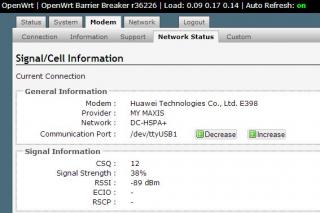
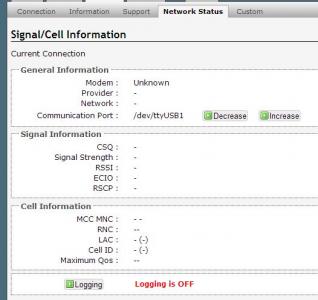
--------------------------- i swap E398 with E1550, OpenWRT claimed the modem is unknow... anyone having the same issue? 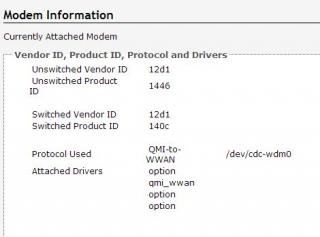
This post has been edited by ooikl: May 24 2013, 03:27 PM |
|
|
May 24 2013, 06:26 PM
Return to original view | Post
#6
|
|
Junior Member
421 posts Joined: Jan 2005 From: Penang
|
QUOTE(chuahcs79 @ May 24 2013, 06:07 PM) u need to manually increase or decrease the port until the info show ok, thanks.btw, is there any at command to force e398 to WCDMA mode? |
|
|
|
|
|
May 30 2013, 08:49 PM
Return to original view | Post
#7
|
|
Junior Member
421 posts Joined: Jan 2005 From: Penang
|
QUOTE(lukemanz @ May 30 2013, 07:48 PM) Hurm I'm using the following command: thanks for the command tips...CODE AT^FREQLOCK? : To check current setting AT^FREQLOCK=1,5302 : To lock to specific cell id, 5302 is cell id in hexadecimal AT^FREQLOCK=0 : To unlock/remove setting Only works when the modem has been registered to the cell id  Tested on Huawei E398 U1V2 like below, which is the cell id? 5142? Cell ID : 5142 (20802) |
|
|
Jun 13 2013, 11:55 PM
Return to original view | Post
#8
|
|
Junior Member
421 posts Joined: Jan 2005 From: Penang
|
QUOTE(ioi84 @ Jun 13 2013, 11:15 PM) Hi sifus. due to there is a delay 60 sec for connection setting. so its normal.I'm a new user of this interesting router. (MR3420 v2 + E398) So, I need help from sifus here. Is it normal after I flashed to latest Huntsman, my router will only got 27% space left? [attachmentid=3486364] And using openWRT, I need to wait about 1 minute + before internet connection available. Are this also normal? And FYI, I already applied all tricks stated on the 1st page. TQ you can check at modem page. This post has been edited by ooikl: Jun 13 2013, 11:56 PM |
|
|
Jun 14 2013, 12:04 AM
Return to original view | Post
#9
|
|
Junior Member
421 posts Joined: Jan 2005 From: Penang
|
Wahroonga Farm i encountered an issue, which is not able to access the ROOTER UI page 192.168.1.1 on latest version of HM.
Is there a way to bring up that service via telnet or SSH without reboot the router? @update - SSH into the device and start the web service, /etc/init.d/uhttpd start This post has been edited by ooikl: Jun 14 2013, 05:35 PM |
|
|
Nov 7 2013, 10:23 PM
Return to original view | Post
#10
|
|
Junior Member
421 posts Joined: Jan 2005 From: Penang
|
Hi,
Anyone know how to flash back to TP Link stock firmware from ROOTER? |
|
|
Nov 7 2013, 10:56 PM
Return to original view | Post
#11
|
|
Junior Member
421 posts Joined: Jan 2005 From: Penang
|
QUOTE(gastacopz @ Nov 7 2013, 10:34 PM) |
|
|
Nov 7 2013, 10:58 PM
Return to original view | Post
#12
|
|
Junior Member
421 posts Joined: Jan 2005 From: Penang
|
sigh.... dunno what is wrong with my ROOTER 3420 and e398, it keep on failed to dial on maxis...
if plug the e398 on notebook, able to dial via mdma or mobile partner.... anyone facing same issue like me? |
|
|
Nov 7 2013, 11:06 PM
Return to original view | Post
#13
|
|
Junior Member
421 posts Joined: Jan 2005 From: Penang
|
QUOTE(chuahcs79 @ Nov 7 2013, 11:03 PM) it should be on auto gear recognize, dialing and connect,. latest version - Huntsman 2013-10-16red which version rooter you are using ? yes, it used to be working well, but recently it fail, and i thought tower issue, until i swap e1550 it works well try e398 on computer, it works well. from the system log, its saying failed to connect. |
|
|
|
|
|
Nov 7 2013, 11:23 PM
Return to original view | Post
#14
|
|
Junior Member
421 posts Joined: Jan 2005 From: Penang
|
QUOTE(blacktubi @ Nov 7 2013, 11:20 PM) Try the latest E398 firmware in case you haven't alright.... will tryhttp://blacktubi.com/files/E398%20Firmware...33.61.10.55.exe |
|
|
Nov 8 2013, 08:52 PM
Return to original view | Post
#15
|
|
Junior Member
421 posts Joined: Jan 2005 From: Penang
|
QUOTE(ooikl @ Nov 7 2013, 11:23 PM) alright.... will try blacktubi after updated to new firmware, it looks good, and connection stick for 3 hours without any dc.just that rooter modem information cant show any info, thats fined for me, as long as the connection is up.... thank you for your help.  |
|
|
Nov 8 2013, 09:54 PM
Return to original view | Post
#16
|
|
Junior Member
421 posts Joined: Jan 2005 From: Penang
|
QUOTE(chuahcs79 @ Nov 8 2013, 09:23 PM) if u using rooter, under modem -> network status u need to find correct port for the communication, go to modem tab -> support -> communication port -> try either ttyUSB0 or ttyUSB1 or ttyUSB2 -> click save and apply i did a router reboot, it works again...or u can go to modem tab -> network status -> decrease or increase port till u see the info display out ,. confirm either one of these port will work |
|
Topic ClosedOptions
|
| Change to: |  0.0526sec 0.0526sec
 0.51 0.51
 7 queries 7 queries
 GZIP Disabled GZIP Disabled
Time is now: 6th December 2025 - 04:35 AM |
 Quote
Quote