Welcome Guest ( Log In | Register )

Bump Topic Topic Closed RSS Feed
7 Pages « < 3 4 5 6 7 >Bottom

Outline · [ Standard ] · Linear+

 Tp LInk TL-MR3420 Owner CLub V2.5, need a pro here

views
     
Wahroonga Farm
post Apr 24 2013, 07:09 PM

Getting Started
**
Junior Member
97 posts

Joined: Feb 2013


QUOTE(chuahcs79 @ Apr 24 2013, 10:01 PM)
this is how the new huntsman,..  sweat.gif

my huawei E1820 not recognize at all

i have to manually setup the 3G modem device

*
We haven't seen an E1820

Manually setting the modem will create a PPP connection and it will be erased at restart.

Try adjusting the modem communication port (up/ down) to find the correct communication port (Signal Information tab).

Dairyman will need the port information as well as the details on the Modem Information Tab. Scroll down to the Device Debug Information. Copy and paste this information.

If you find the port, support for this modem can be included in the next release, which won't be far away. wink.gif

Cheers

John k

This post has been edited by Wahroonga Farm: Apr 24 2013, 07:10 PM
Wahroonga Farm
post Apr 24 2013, 08:46 PM

Getting Started
**
Junior Member
97 posts

Joined: Feb 2013


Hi guys,

Whilst I'm not 100% on this, it does appear that router/ modem instability may well be a consequence of the 'modem turbo mod', particularly lifting the modem Tx power.

So if your router modem combo is suffering stability problems, consider putting the modem back to standard factory setting. cool2.gif

Cheers
Wahroonga Farm
post Apr 25 2013, 05:28 AM

Getting Started
**
Junior Member
97 posts

Joined: Feb 2013


QUOTE(Wahroonga Farm @ Apr 24 2013, 10:09 PM)
We haven't seen an E1820

Manually setting the modem will create a PPP connection and it will be erased at restart.

Try adjusting the modem communication port (up/ down) to find the correct communication port (Signal Information tab).

Dairyman will need the port information as well as the details on the Modem Information Tab. Scroll down to the Device Debug Information. Copy and paste this information.

If you find the port, support for this modem can be included in the next release, which won't be far away. wink.gif

Cheers

John k
*
An E1820 for DM to have a look at.

DM says

"This is another of the oddball Huawei modems floating around.

It has a cdc-ether interface but is really a PPP modem. The E173 is the same.

Since I added cdc-ether support for the host-less modems these other ones get picked up as cdc-ether modems as well when they should be picked up as PPP.

Not hard to fix since a host-less modem doesn't have a serial driver attached to it and these do.

One more for the ToDo list."

DM may be able to connect with CDC-ether; if not it will be PPP which will be fine for this modem. He'll no doubt report back.

Cheers

John k

This post has been edited by Wahroonga Farm: Apr 25 2013, 05:32 AM
Wahroonga Farm
post Apr 25 2013, 05:15 PM

Getting Started
**
Junior Member
97 posts

Joined: Feb 2013


Hi Guys 'n Gals,

Just a peak into the future. Here is the current ROOter ToDo list:

To Do – Fixes to cron and Keep Alive, fix for old cdc-ether modems so they run as PPP, fix so getsig won't run on a WAN reboot, update to new Luci GUI (SVN package update), driver-less modem support (testing required for existing fixes), entry of SIM Pin code (for QMI based modems), update to QOS system (traffic quotas and WAN traffic counter), mode and band selection, the odd stray modem and SMS messaging.

Many of these will be addressed in the next Huntsman release.

ROOter development is shifting gears.

With the next release, most current and old modems should be supported. There will be the odd old one that won't work, but there are other software that may support these.

The focus will shift towards:

- ROOter features
and
- support for new 4G modems that enter the market

We aim to be the first to provide USB modem support for a new modem, but we cannot do it, without your help.

BTW ROOter comes from it's Australian heritage ... Kangaroo's and routers. smile.gif

But our brilliant programmer is Dairyman from Canada.


Wahroonga Farm
post Apr 26 2013, 08:48 AM

Getting Started
**
Junior Member
97 posts

Joined: Feb 2013


QUOTE(xphonerz @ Apr 26 2013, 01:49 AM)
@Wahroonga Farm

do you have any idea why if i use my ZTE MF680, the WAN dhcp lease time only 7200 sec ?

from system log :

CODE
Apr 22 16:20:43 ROOter daemon.notice netifd: wan (2473): Lease of x.x.x.x obtained, lease time 7200


while if i use my 320U, the lease time longer (200k something) ?

great firmware btw! thumbup.gif thumbup.gif
*
One of those things we suspect:

DM says

"The Sierra gets a very long lease time and the MF668 using QMI gets 7200 seconds. It has to be protocol related.

But it isn't a problem since the lease renews when it expires and the connection remains up.

Chalk it up to "One of those things"."


So as long as your connection is not stopping with the lease, there is no issue
Wahroonga Farm
post May 2 2013, 06:54 AM

Getting Started
**
Junior Member
97 posts

Joined: Feb 2013


Hi Guys,

As you already know, there is a new Hunstsman release available. rclxms.gif

The big ticket item in this release is bandwidth/usage monitoring. rclxm9.gif

Huntsman 2013-04-30 Keep Alive is working again. E173 and E1820 will be detected as PPP modems and should work correctly. Bandwidth Monitoring in all its glory is implemented. Some minor bug fixes and script enhancements. DDNS, Time Sync and RNDIS driver reinstated.
Note: There is a little bug with usage calculation in excess of 1Gb


http://www.rfactory.org/OpenWRT/

One problem that may be occurring with the ROOter software is that it unleashes the full speed capability of the modem. This is because the appropriate fast modem protocol is used by the ROOter, rather than PPP, which is used in standard OpenWRT and TPLINK firmware. The fast protocol causes maximum speed and maximum modem power consumption. For this reason the Turbo mod is discouraged, as additional power may be used.

The underlying problem here is that many routers appear to be incapable of providing enough power to support the new power hungry 3G DC HSPA+, 4G devices at full speed.

Some folk have experimented and found that turning off the wifi and using a LAN cable connection, can provide enough power for the modem.

The use of a Y-cable and an additional USB power supply or the use of a hub to power the modem are other ways of overcoming the router power deficiency problem.

PS Chuahcs79's modem should be good to go on this version. wink.gif
Wahroonga Farm
post May 2 2013, 07:41 PM

Getting Started
**
Junior Member
97 posts

Joined: Feb 2013


QUOTE(fitzhex @ May 2 2013, 09:05 PM)
if the router keep restarting, is it the sign lack of power?
*
Is "Keep Connection Alive with restart" enabled?
Wahroonga Farm
post May 12 2013, 04:27 PM

Getting Started
**
Junior Member
97 posts

Joined: Feb 2013


With the ROOter software and Modem Gui you can select mode frequency bands.

user posted image

Cheers

John k

PS These Modem Gui features will be included in the ROOter software in due course.

Read the ROOter WIKI for further details

This post has been edited by Wahroonga Farm: May 12 2013, 04:34 PM
Wahroonga Farm
post May 13 2013, 06:03 AM

Getting Started
**
Junior Member
97 posts

Joined: Feb 2013


Huntsman 2013-05-12 New Luci GUI (SVN package update). Fixed the GB problem with Bandwidth Monitoring so the values are now correct. Support for the WDR4900, MR11U and MR3040V2 have been added. And the big one – display and selection of the modem's Cellular Mode so you can change to 2G, 3G or 4G, depending on the modem. This needs testing for all 4G modems just to make sure that the drop-down selection box is correct for that modem. If a modem doesn't support a particular mode then it won't appear. Also, newer Huawei modems need testing. Huawei uses two different AT Commands to display and select Cellular Mode, one for older modems and one for newer modems. I have tested the older version and it works. The newer version is untested but should work.

.... is released for your viewing pleasure.

http://www.rfactory.org/OpenWRT/index.html#downloads
Wahroonga Farm
post May 13 2013, 01:07 PM

Getting Started
**
Junior Member
97 posts

Joined: Feb 2013


Thanks Digilife.

Looks like the ZTE MF680 is not covered for Mode. sad.gif

You can assist by providing the following information requested by Dairyman to fault find:

QUOTE
"I need to see the Network Status page where it shows the Modem Manufacturer and Model. I need to see exactly what the model name is since that is used to determine if it should be 4G or 3G.

Then go to the bottom of the page and turn on Logging.

Look at the System Log and post the response from the AT Commands being sent.

This way I can see what is needed to get this working. "


Wahroonga Farm
post May 13 2013, 05:24 PM

Getting Started
**
Junior Member
97 posts

Joined: Feb 2013


Thanks,

I'll report back after Dairyman has a look.

Cheers
Wahroonga Farm
post May 14 2013, 05:23 AM

Getting Started
**
Junior Member
97 posts

Joined: Feb 2013


Hi Doomguard (and everyone else),

There was a wee html coding error in the latest version for this tab. It displayed in Widows Firefox ok.

Please visit Dairyman's website and download 2013-05-12b.

A fix for later model Huawei (e.g. E398 etc) modems which don't display the mode selection, will arrive shortly.
Wahroonga Farm
post May 14 2013, 08:11 AM

Getting Started
**
Junior Member
97 posts

Joined: Feb 2013


QUOTE(digilife @ May 14 2013, 08:40 AM)
I am testing Huawei E372 on 2013-05-12a at this time rite now

That will be fixed in the next release

QUOTE(digilife @ May 14 2013, 08:40 AM)
Will try 12b later in the day, gonna catch some sleep now....... yawn.gif

Hopefully 12b will fix the MF680 problem ...

Cheers

Thanks for testing rclxms.gif

This post has been edited by Wahroonga Farm: May 14 2013, 08:12 AM
Wahroonga Farm
post May 14 2013, 03:51 PM

Getting Started
**
Junior Member
97 posts

Joined: Feb 2013


QUOTE(digilife @ May 14 2013, 12:23 PM)
I have this to add, at the same location and almost the same time, Modem Huawei E372 performed more than double the download speed when being used on Barrier Breaker ( 1043ND ) compared to Huntsman 2013-05-12a ( MR3420 ) I believe the Dual Channel HSPA+ was activated on HM 2013-05-12a during that time.

Ping on the 1043ND was superb too.

DC-HSPA+ is a feature of the modem (and the tower), not the router.

BB will use PPP and Huntsman will be using a faster protocol to communicate router <-> modem on the USB link.

No reason why one firmware would be faster than the other given the 3G speed is well below 25Mbps. 25Mbps is the max that PPP can provide and rarely achieved on any 3G connections.

Perhaps just luck of the test?

PS It is considered best practice by the ROOter team to connect via a good quality USB extension cable, router <-> modem, rather than plug the modem directly into the router. Perhaps it is more necessary with the faster USB protocol? Some modems appear to create RF noise, that affect the modem performance.

QUOTE(digilife @ May 14 2013, 12:23 PM)
p/s MF680 and E372 dun show Cell Mode on 12a , 12b not tried yet , maybe later this evening.

Hmm. The 680 should as it is well tested ...

Hopefully this is simply due to the HTML coding error and will be fixed by release 'b'.

Note: The lack of signal data is most probably due to these features lacking in the tower. I think we've commented on this before?

Cheers

Wahroonga Farm
post May 14 2013, 03:58 PM

Getting Started
**
Junior Member
97 posts

Joined: Feb 2013


QUOTE(JEHUTHI @ May 14 2013, 05:39 PM)
Hi, I need help.

I plug my 3G modem to MR3420 and connect my computer with LAN cable. The download speed is kind of slow.  When I plug my 3G modem directly to the computer, the download speed is 5 times faster. 

Is there any setting I need to do on MR3420 so that I can gain full speed of my 3G modem ??

Thanks.
*
I wonder if the speed increases when you connect the modem to the router via a good quality USB extension cable, rather than plug the modem directly into the router?

If you have one with a ferrite bead, all the better.

Some modems appear to create RF noise, that affect the modem performance.

These are the collective recommendations from the ROOter teams field testing:

QUOTE
    A number of testers have experienced problems (disconnection etc) with 4G modems (320U, E3276, MF821, E392 etc) in low signal strength areas or other situations. The most likely reason is insufficient USB router power when the modem is operating at the fast ROOter speeds. Fast USB modems can draw in excess of 750mA @ 5 volt. These USB modems may require a Y – cable, to provide additional USB power. You can also use a powered hub or a higher power ROOter AC plug pack if you have one available. There is also evidence that a USB cable with ferrite bead may also assist in a suspect interference issue. Turning off wifi and using a LAN only connection is often sufficient to achieve stable modem operation. This is due to a reduction in ROOter power consumption leaving more power for the USB modem.

    If you set a modem to a particular Mode e.g. 2G, 3G, 4G, Auto; the mode is set in the modem and is permanent until changed ie you can shift the modem between devices and the mode configuration remains. This is also true for the modems connection manager software. The permanent setting of Mode can trip you up at times; so beware!

    The MR3040 travel router appears to have limited battery power when used with the newer power hungry USB modems. This is widely reported on the web. It will probably require a permanent AC power connection to work successfully.

    The 703N (and it's stable mates) will likely benefit from a larger AC power pack when used with power hungry USB modems. The standard power pack specification is 5V @ 1A or 5 watts. The 703n internal current regulator limits @ 1.25A, or a total ROOter power availability of 6.25 watts. A 5v @ 1.5A (or 2A) AC power pack, will provide more power for the modem; before internal current limiting kicks in.


Wahroonga Farm
post May 15 2013, 10:48 AM

Getting Started
**
Junior Member
97 posts

Joined: Feb 2013


Top Tip

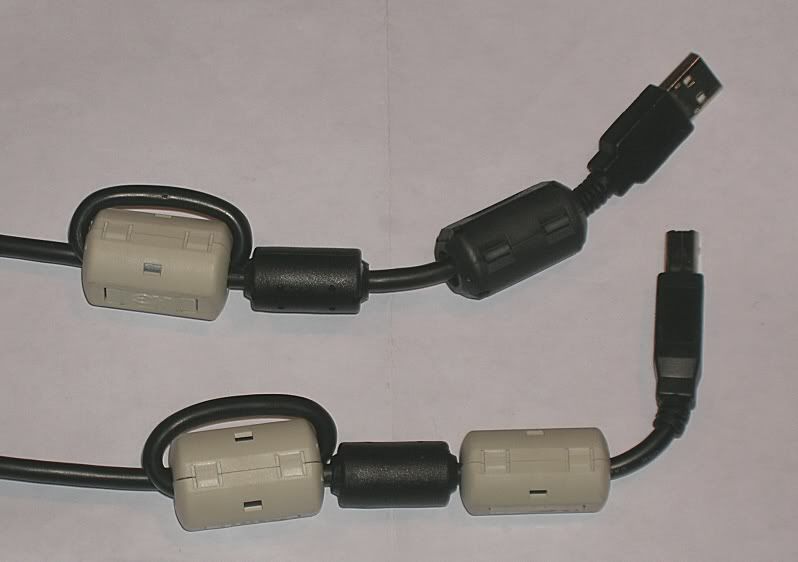
For my money the single best thing you can do to improve performance and reliability of a Router + USB Modem set-up, is to use a quality USB extension cable between the router and modem, preferably one with a ferrite bead in line.

I know that Dovado and Netgear (and I'm sure others ... but certainly not TP-Link) provide a USB extension cable and stand, to enable locating the modem away from the router.

Intriguingly, this old slow 160E benefited from a USB cable on a TP-LINK in a weak signal area.

So it's not just the new 4G high power modems that have issues ...

PS The problem, what ever it is (interference of some sort no doubt), seems to be much less apparent when modems are directly connected to USB ports in a laptop.

This post has been edited by Wahroonga Farm: May 15 2013, 10:48 AM
Wahroonga Farm
post May 15 2013, 04:23 PM

Getting Started
**
Junior Member
97 posts

Joined: Feb 2013


QUOTE(digilife @ May 15 2013, 04:38 PM)
I have a TD-W8968 which face slow speed without a USB cable connectionm ( <1.5Mbps ), even with an extension cable it rarely touches 4Mbps. I hope Dairyfarm can come out with a Rooter version of the OpenWRT Fw for this model.

Btw, where can i buy ferrite bead / core to tie to my usb cable ?

This is the sort of thing:

user posted image

or buy a cable with one inserted

user posted image

QUOTE(digilife @ May 15 2013, 04:38 PM)
Can i use a 1.5A power adaptor for my MR3420 ?

The MR3420's come with a 12v 1A supply.

I intend to run a full range of USB power tests with a number of routers to determine if we can get a bit more power to the router's USB port.

The TP-LINKS appear to have good internal regulators and current limiting built in (e.g you can short out the USB connector), so I don't believe the larger power supply will cause any problems and may provide more power to the USB port.

As an example, the TP-Link 703n has an internal current limit of 1.25A @ 5v; but the AC plug pack is only 1A, so it will benefit from say a 1.5A @ 5v plug pack. smile.gif

Suck it and see ....


Wahroonga Farm
post May 26 2013, 07:35 AM

Getting Started
**
Junior Member
97 posts

Joined: Feb 2013


Dairyman has today launched a brand new website to support the ROOter firmware.

http://ofmodemsandmen.com/index.html

There is support information on the whirlpool WIKI which is also re-vamped.

http://whirlpool.net.au/wiki/router_openwrt

The latest Huntsman release is 2013-05-21

Fixes for the Cellular Mode on newer Huawei so they, at least, will show the current mode. Mode changing may also work for some Huawei modems now. A change was made during modem connection from restarting the network to restarting the WAN. This may correct some problems that occur during connection. The pkill function was added to the build so that extra copies of getsig are removed and the Network Status page does not get messed up. A new value was added to the Modem->Connection page dealing with delay during connection. It is now possible, for QMI modems and the E3276, to change the delay before the connection takes place. It must be a minimum of 60 secs but can be increased if you are having delay problems with the connection.
Wahroonga Farm
post May 29 2013, 08:59 PM

Getting Started
**
Junior Member
97 posts

Joined: Feb 2013


QUOTE(stevenlee @ May 29 2013, 11:48 PM)
any1 has complete guide setting huntsman firmware?
Please follow the correct configuration procedure here:

http://ofmodemsandmen.com/configure.html

http://ofmodemsandmen.com/conmodem.html

Cheers

John k

PS Home page here

http://ofmodemsandmen.com/index.html
Wahroonga Farm
post May 30 2013, 05:27 AM

Getting Started
**
Junior Member
97 posts

Joined: Feb 2013


QUOTE(lukemanz @ May 30 2013, 01:42 AM)
Anyone knows AT commands to lock to spesific cell ID?  icon_question.gif
*
Most modems do not support the required AT commands.

Here is how it is done for Sierra modems:

http://www.rfactory.org/OpenWRT/locking.html

7 Pages « < 3 4 5 6 7 >Top
Topic ClosedOptions
 

Change to:
| Lo-Fi Version
0.4443sec    0.70    7 queries    GZIP Disabled
Time is now: 8th December 2025 - 11:14 AM