Outline ·
[ Standard ] ·
Linear+
Home Networking ASUS Malaysia Networking User & Technical Support, Managed by ASUS Malaysia Representative
|
warlove3
|
 Feb 5 2014, 06:47 PM Feb 5 2014, 06:47 PM
|

|
hmm cant seem to configure IPv6 on stock firmware with AC68U, is there any tutorial for WAN IPv6 ? managed to get LAN IPv6 running only
|
|
|
|
|
|
warlove3
|
Feb 6 2014, 03:49 PM
|
|
|
Did this, ntg came up, do i need to manually enter? BTW only 6to4 works which translate only ipv4 to ipv6, how to do pure native ipv6 like others =( This post has been edited by warlove3: Feb 6 2014, 04:01 PM Attached thumbnail(s)
|
|
|
|
|
|
warlove3
|
Feb 7 2014, 01:25 AM
|
|
|
QUOTE(ASUSmy @ Feb 6 2014, 05:37 PM) Hi warlove3, Maybe this is because the UNIFI are using dual stack platform? http://unifidr.blogspot.com/2013/09/congra...ipv6-ready.htmlDo let me know if I am wrong. Thank you it might be my exchange server not implemented yet, so far seen a few of them worked only on native ipv6 |
|
|
|
|
|
warlove3
|
Feb 7 2014, 04:52 PM
|
|
|
QUOTE(ASUSmy @ Feb 6 2014, 05:37 PM) Hi warlove3, Maybe this is because the UNIFI are using dual stack platform? http://unifidr.blogspot.com/2013/09/congra...ipv6-ready.htmlDo let me know if I am wrong. Thank you Is there a fix for DHCPv6 for AC68U ? seems to be broken for now, is there any possible for the technician to test the router for IPv6 on their site to confirm this? BTW, PPPoE dialer worked as advertised just that the router one does not work accordingly... This post has been edited by warlove3: Feb 7 2014, 06:25 PM Attached thumbnail(s)

|
|
|
|
|
|
warlove3
|
Feb 7 2014, 06:35 PM
|
|
|
eb 7 18:33:12 pppd[2213]: PAP authentication succeeded
Feb 7 18:33:12 pppd[2213]: peer from calling number 00:00:5E:00:01:04 authorized
Feb 7 18:33:12 pppd[2213]: local LL address fe80::xxxx:xxxx:da97:2b53
Feb 7 18:33:12 pppd[2213]: remote LL address fe80::xxxx:xxxx:fe64:ce48
Feb 7 18:33:12 pppd[2213]: local IP address 175.139.xxx.xx
Feb 7 18:33:12 pppd[2213]: remote IP address 175.139.xxx.xxx
Feb 7 18:33:12 pppd[2213]: primary DNS address 1.9.1.9
Feb 7 18:33:12 pppd[2213]: secondary DNS address 202.188.0.133
Feb 7 18:33:13 syslog: module nf_conntrack_ipv6 not found in modules.dep
Feb 7 18:33:13 start_nat_rules: apply the nat_rules(/tmp/nat_rules_ppp0_vlan500)!
Feb 7 10:33:13 WAN Connection: WAN was restored.
Feb 7 10:33:13 rc_service: wanduck 520:notify_rc start_apps_update
Feb 7 18:33:15 rc_service: ip-up 2224:notify_rc stop_upnp
Feb 7 18:33:15 rc_service: ip-up 2224:notify_rc start_upnp
Feb 7 18:33:15 rc_service: waitting "stop_upnp" via ip-up ...
Feb 7 18:33:15 miniupnpd[1985]: received signal 15, good-bye
Feb 7 18:33:17 miniupnpd[2347]: HTTP listening on port 49681
Feb 7 18:33:17 miniupnpd[2347]: Listening for NAT-PMP traffic on port 5351
Feb 7 18:33:22 rc_service: ipv6-up 2222:notify_rc start_rdnssd
Feb 7 18:33:22 syslog: module nf_conntrack_ipv6 not found in modules.dep
Feb 7 18:33:23 start_nat_rules: apply the nat_rules(/tmp/nat_rules_ppp0_vlan500)!
What does the bold line mean? ipv6 module isnt working?
EDIT: My old RT-N16 is running fine with IPv6, so this could be firmware issues in the router, hopefully more testing is done to resolve the issue.
This post has been edited by warlove3: Feb 9 2014, 12:40 AM
|
|
|
|
|
|
warlove3
|
Feb 10 2014, 12:04 PM
|
|
|
I will do so when I reach home tq...
|
|
|
|
|
|
warlove3
|
Jul 25 2018, 10:35 PM
|
|
|
QUOTE(yaphong @ Jul 21 2018, 08:15 PM) Anyone used ASUS GT-AC5300 before? Any feedback or reviews? Is it worth the money over AC86U? Too buggy, better wait for the newer one. Wifi radar not working well, some of the basic functions doesnt seem to work such as GPN WTFAST This post has been edited by warlove3: Jul 25 2018, 11:19 PM |
|
|
|
|
|
warlove3
|
Jul 28 2018, 10:53 AM
|
|
|
QUOTE(yaphong @ Jul 28 2018, 06:17 AM) So I guess AC86U will be a better choice. Yes and if u plan to use 3rd party firmware as well it would be better since 3rd party such as Merlin, GT-AC5300 is still not a good choice without 3rd party support as the update is quite slow and there is a newer model GT-AX11000 coming out soon This post has been edited by warlove3: Jul 28 2018, 10:57 AM |
|
|
|
|
|
warlove3
|
Nov 8 2018, 04:52 PM
|
|
|
Hi, I would like to report some VPN Fusion bugs over here, hopefully @ASUSmy can help or send feedback to technical team to fix this before the next update is issued for GT-AC5300
Not just me though, almost all VPN Fusion users are ranting in ROG forums regarding about it.
This condition can be reproduce by connecting your router to any VPN servers you have, such as ExpressVPN and activate the vpn connection on the list then restart your router then you will see the problem I'm talking about.
1. VPN > VPN Fusion often restarts the router and display incorrect information after rebooting, such as internet is connected but displayed not connected on the Dash Board/Network Map.
2. VPN Fusion always hangs when clicked on it and render internet lags so bad until VPN Fusion tab page is loaded.
|
|
|
|
|
|
warlove3
|
Dec 21 2018, 12:00 PM
|
|
|
QUOTE(GreenSamurai @ Dec 19 2018, 01:39 PM) Other than that. I am not interested in reviewers review. I want real life experience reviews. The setup time is damn long compared to deco m5/m9plus Other than that is ui bugs, ntg to worry about, but i still prefer tp-link simplified and fast process. Performance from ground floor to 3rd floor with 3 nodes placed nearest to the ladder are able to cover 100Mbps on each room. (my unifi is 100Mbps) ASUS/TP-Link did the same performance for my phone. Did not test wireless speed from the adapter as i'm connected to LAN all the time. Just wifi for phones mostly. If you have Asus router, then go for Lyra (AIMesh via latest firmware) This post has been edited by warlove3: Dec 21 2018, 12:01 PM |
|
|
|
|
|
warlove3
|
Jan 16 2019, 09:02 AM
|
|
|
QUOTE(hnr2802 @ Jan 15 2019, 08:15 PM) Thanks bro. I thought i configured the router wrongly. Update : tested using nordvpn mobile app, i can view netflix us content. However as per my previous post. I can't view the content when i set up router level. Hope anyone can share their settings. Do you have different US servers in NordVPN? If yes, you need to try connecting one by one and try which is able to bypass, not every server supports as I was told. Oh ya, the DNS server in NordVPN 10. Now you need to set up NordVPN DNS’es. Go to WAN in the left menu bar. In the Connect to DNS Server automatically field select No and enter NordVPN DNS servers as following: 103.86.96.100 103.86.99.100 There are 3 tests to see if you are connected to the VPN throughly, IP/DNS/WebRTC, if there is no problem and all is connected to US server means you are doing it right, and the problem now lies in NordVPN to provide Netflix support in their VPN servers. https://www.expressvpn.com/webrtc-leak-testThis post has been edited by warlove3: Jan 16 2019, 09:12 AM |
|
|
|
|
|
warlove3
|
Jan 16 2019, 09:17 AM
|
|
|
QUOTE(wwloon @ Jan 13 2019, 07:49 AM) I just bought the GT-AC5300 to replace an RT-AC66U, and I'm happy to report that I can now achieve download speeds matching my upgraded Unifi package 800Mbps (vs max 550Mbps for my older Asus router). However, I am unable to get HyppTV to work. That's because the LAN port number for HyppTV appears to be different in the GT-AC5300 settings page. Previously, for the RT-AC66U, I used LAN4 for HyppTV. For the GT-AC5300, the settings page asks me to use LAN1. Still, it cannot work. Please help. Thanks. SETTINGS IN ROUTER ADMIN PAGE (USING LATEST FIRMWARE 3.0.0.4.384.45149) [attachmentid=10158960] HYPPTV ERROR PAGE [attachmentid=10158961] HYPPTV NETWORK SETTINGS [attachmentid=10158962] Change to LAN Port 5, and turn off Bonding/ Link aggregation on Switch Control Try again. This post has been edited by warlove3: Jan 16 2019, 09:20 AM Attached thumbnail(s)

|
|
|
|
|
|
warlove3
|
Mar 18 2023, 09:27 AM
|
|
|
QUOTE(sHawTY @ Mar 15 2023, 08:45 AM) Who says that? I'm using ASUS GT-AC5300 and all Digi configurations is already pre-configured into the firmware 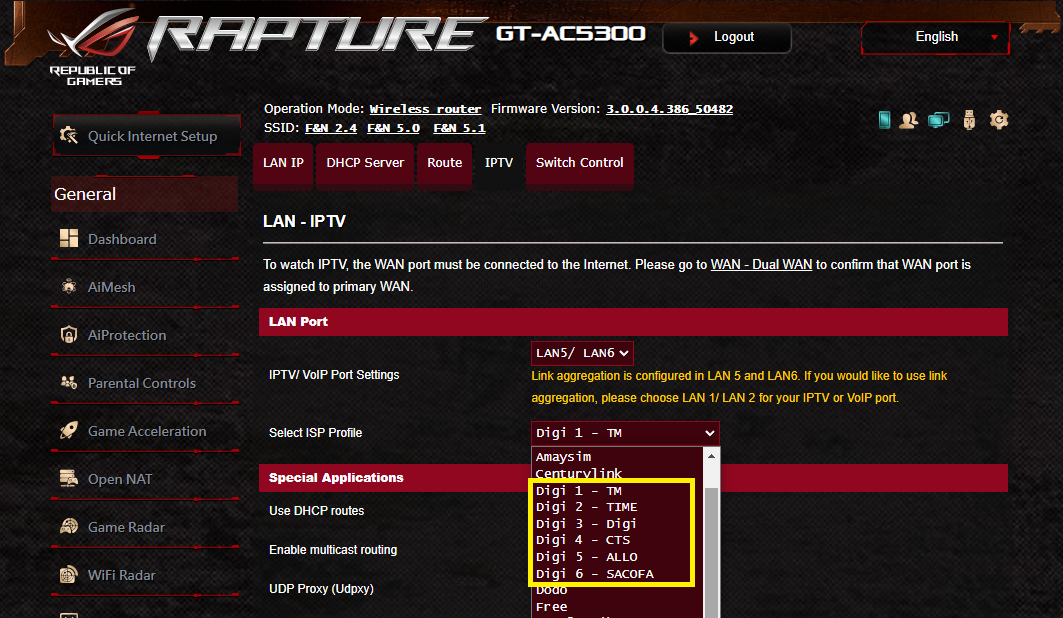 Hi is your version is an unreleased version? couldn't find 50482 in any websites |
|
|
|
|



 Quote
Quote

 0.0433sec
 0.38
0.38
 7 queries
 GZIP Disabled