Outline ·
[ Standard ] ·
Linear+
Home Networking ASUS Malaysia Networking User & Technical Support, Managed by ASUS Malaysia Representative
|
satriaguy
|
 May 19 2020, 04:43 PM May 19 2020, 04:43 PM
|

|
i just purchased a new Asus RT-AC68u to replace my aging RT-AC55UHP, the reason for the upgrade due to i have close to 15 wireless devices connected and AC55uhp did not give me a good result. now i am using AC55uhp as repeater mode in 2nd floor. The wireless from AC55UHP seem not stable, i always get the error "Unable to obtain IP address" when i connect my mobile to this wifi after the router switch on for some time (around 4-5 hours), the LAN line that connected to it is OK, can still surf internet. i have the same issue when i use the previous RT-AC55 repeater, thought using router as repeater should be better but it end up having the same issue. the connection between main router to repeater pretty good via 5Ghz channel (149)  anyone have any experience ? |
|
|
|
|
|
satriaguy
|
May 19 2020, 04:46 PM
|
|
|
i just purchased a new Asus RT-AC68u to replace my aging RT-AC55UHP, the reason for the upgrade due to i have close to 15 wireless devices connected and AC55uhp did not give me a good result. now i am using AC55uhp as repeater mode in 2nd floor. The wireless from AC55UHP seem not stable, i always get the error "Unable to obtain IP address" when i connect my mobile to this wifi after the router switch on for some time (around 4-5 hours), the LAN line that connected to it is OK, can still surf internet. i have the same issue when i use the previous RT-AC55 repeater, thought using router as repeater should be better but it end up having the same issue. the connection between main router to repeater pretty good via 5Ghz channel (149) anyone have any experience ? |
|
|
|
|
|
satriaguy
|
May 21 2020, 11:18 AM
|
|
|
QUOTE(ASUSmy @ May 20 2020, 05:00 PM) Hi satriaguy, Can you try updating the firmware for the RT-AC68U and the RT-AC55UHP. You may also try changing the 5GHz WiFi channel of the router at the Wireless->General->Control Channel. Thank you Both already the lateset firmware. AC68u - 3.0.0.4.385_20490 AC55UHP - 3.0.0.4.382_51915 on the wifi channel ? what is the "right" channel ? i had tried 149, 36, encounter the same problem. i have checked the channel usage in my neighborhood , no other wifi signal uses these channel as well. i have captured the syslog while the wireless is "hang", please help to see any info. here might able to help to resolve the issue ? This post has been edited by satriaguy: May 21 2020, 11:27 AM Attached File(s) syslog.txt
 ( 176.95k )
Number of downloads: 10 |
|
|
|
|
|
satriaguy
|
May 21 2020, 02:44 PM
|
|
|
QUOTE(junclj @ May 21 2020, 12:54 PM) I am still using my old RT-AC55UHP as Access Point, the 2.4GHz got problem but 5GHz has no issue. Before that has no issue on both 2.4GHz and 5GHz but 2.4GHz got issue since I upgrade to two RT-AC86U routers as aimesh. My house got 2 units RT-AC86U, on the top floor is main router and that is the place which Unifi comes into my house. Then living room is another RT-AC86U. So both RT-AC86U were linked together as aimesh. My RT-AC55UHP was put to basement floor, not sure whether is the LAN cable issue or wifi issue. 5GHz is working fine but 2.4GHz is abnormal. So I just disable the 2.4GHz wireless, and leave 5GHz wireless running in the same SSID with my aimesh wifi. I have no issue on the 5GHz of my RT-AC55UHP. Sometimes my aimesh wifi only can reach 350mbps+ but my RT-AC55UHP can reach 450mbps+. Wifi speed as AP router is faster than aimesh router. I was replaced the two antennas of my RT-AC55UHP to RT-AC88U custom antennas. No issue at all and the coverage of 5GHz is quite good. My RT-AC55UHP was flashed to 3.0.0.4.382_51915-g4086e57 your connection from main router to AC55UHP via LAN cable but mine via 5GHz wireless channel, how do you disable 2.4G, i don't see any option allow me to turn it off. |
|
|
|
|
|
satriaguy
|
May 26 2020, 10:19 AM
|
|
|
i am using Asus RP-AC55 repeater to connect to my main router AC68u, the traffic from repeater does not show up in the main router under both Adaptive Qos and Traffic Anayser, is it normal ? and on the clients list, the speed always static as 1  |
|
|
|
|
|
satriaguy
|
Jul 1 2020, 09:34 AM
|
|
|
QUOTE(ASUSmy @ Jun 30 2020, 05:59 PM) Hi kslim21, I have tested the RT-AC55UHP as repeater mode with another router, it seen like it is working as it should be. Can you try to update both the router and the repeater to the latest firmware and try again. If still cannot then try factory reset and redo the setup. Thank you i got a feeling you need add in RP55UHP mac address into the main router, i have the similar setup (but i don't use parental control), i noticed those device connected to RP55UHP will not show up in main router device list. Just a suggestion, you can try it out. |
|
|
|
|
|
satriaguy
|
Mar 20 2021, 07:48 AM
|
|
|
can i still get the latest/last firmware for RT-AC55UHP, asus official site seem remove this router already. Thanks
|
|
|
|
|
|
satriaguy
|
Oct 10 2023, 09:49 AM
|
|
|
Hi, i just got AX86u and set it up as Primary router and another AC68u as AiMesh node, in AX86u under the AiMesh page, i always got the below screen, occasionally it is back to the normal UI (very rare), what happen ya. 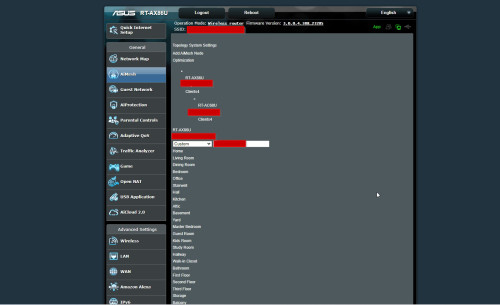 |
|
|
|
|
|
satriaguy
|
Oct 10 2023, 03:24 PM
|
|
|
Hi all, i have a question on AiMesh "roaming", the setting allow the roaming to happen when the RSSI is bad, but not the other way (is there any setting that i miss out ?
i am deploying AX86u as primary router (connect to internet) and my AC68U as Aimesh node. AX86u is Wifi6 router but AC68u is Wifi5.
when i am next to AX86u, i got connected to Wifi6 and when i go further from AX86u and near to AC68u, i got switched to AC68u and connected to Wifi5.
When i move near back to AX86u, my connection still stayed as Wifi5 (believe it still connected to AC68u), i won't auto switch back to AX86u and Wifi6. Is there any setting to control this ?
|
|
|
|
|
|
satriaguy
|
Oct 10 2023, 05:25 PM
|
|
|
QUOTE(ASUSmy @ Oct 10 2023, 04:30 PM) Hi satriaguy, Are you still getting strong WiFi connection between the RT-AC68U when you near RT-AX86U? Satriaguy : Yes, signal still strong, but obviously Wifi5 and Wifi6 speed will be different. Can you try disable smart connect if you have enabled it? Satriaguy : I am not using Smart Connect, i setup 2.4Hz and 5GHz in Primary router and Aimesh node connected using 5G Hz Thank you can i confirm there is no such function/feature to re-connect to better RSSI Aimesh node even the existing node signal still strong ? This post has been edited by satriaguy: Oct 10 2023, 05:27 PM |
|
|
|
|
|
satriaguy
|
Nov 20 2023, 09:40 AM
|
|
|
Hi all, would like to seek some advise from all the sifus here, i have a Aimesh setup (Primary - AX86U , aimesh node AC68U) , connection speed i get when connect to aimesh node around 100Mbps, but after few days, it will drop to 10 Mbps to 12 Mbps. It happen constantly. after reboot aimesh node , it will back to 100Mbps but speed will drop again after few days. What could be the problem here ? normal speed on aimesh node (after reboot) [url=https://pictr.com/image/EvOJMl 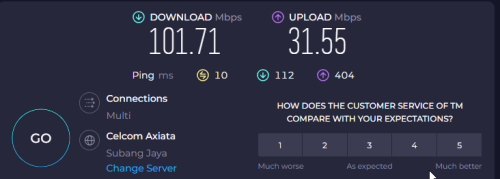 [/url] [url=https://pictr.com/image/EvOKF2 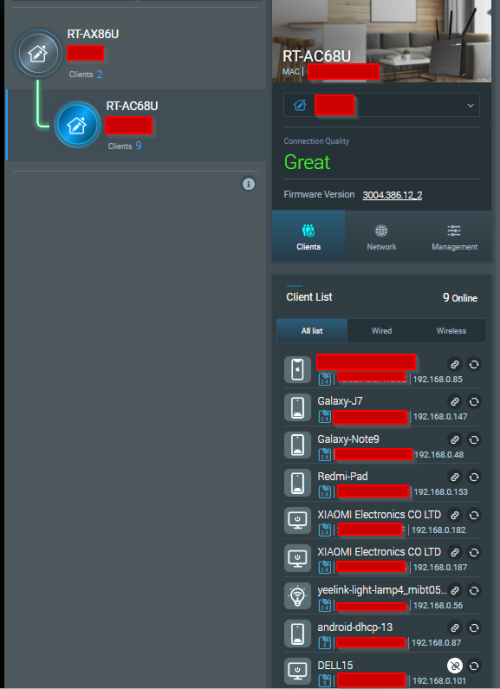 [/url] 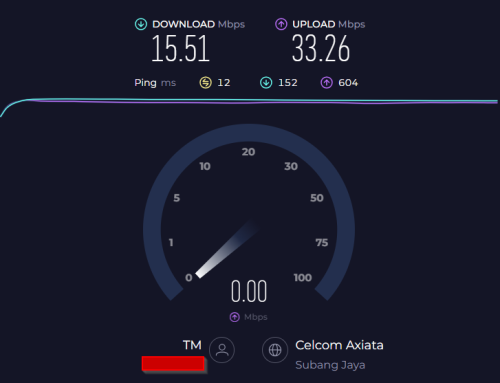 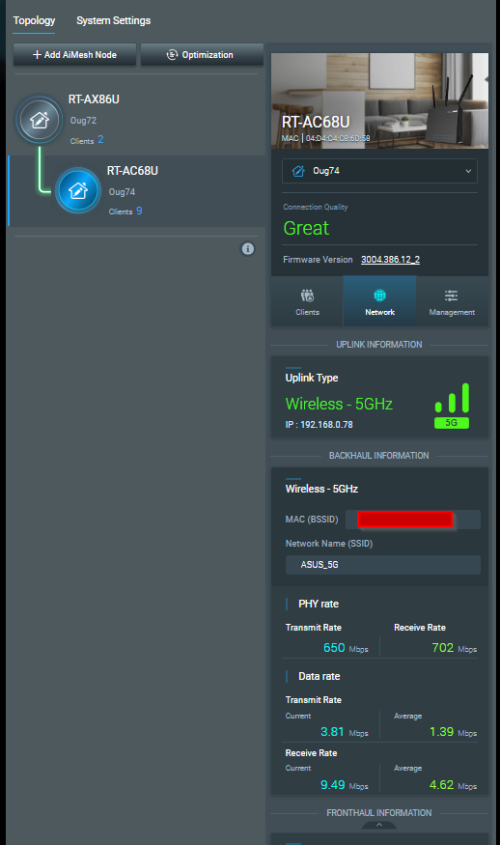 This post has been edited by satriaguy: Nov 20 2023, 09:59 AM This post has been edited by satriaguy: Nov 20 2023, 09:59 AM |
|
|
|
|
|
satriaguy
|
Nov 20 2023, 01:37 PM
|
|
|
QUOTE(sHawTY @ Nov 20 2023, 10:17 AM) How far is the distance between the primary node and the mesh node and how many walls are there in between the 2 nodes? This one wall in between, i am getting RSSI around 53 dBm |
|
|
|
|
|
satriaguy
|
Nov 20 2023, 01:38 PM
|
|
|
QUOTE(blacktubi @ Nov 20 2023, 10:27 AM) satriaguyThe most likely scenario is 5GHz wireless backhaul dropped to 2.4GHz That's probably due to roaming assistant erronously dropped your RT-AC68U from 5GHz due to signal fluctuation RT-AC68U is the older AiMesh architecture so it won't reattempt 5GHz Solution: Try disabling roaming assistant in wireless professional settings for both 5GHz and 2.4Ghz This is not the case, when i check the connection, still connected to 5GHz network. |
|
|
|
|



 Quote
Quote

 0.0423sec
 0.54
0.54
 7 queries
 GZIP Disabled