Welcome Guest ( Log In | Register )

Outline · [ Standard ] · Linear+

Home Networking ASUS Malaysia Networking User & Technical Support, Managed by ASUS Malaysia Representative

views
     
msafiedin
post May 3 2014, 12:24 PM

Getting Started
**
Junior Member
118 posts

Joined: Oct 2004


Hi Asus n friends,

need your advice

Recently bought Rt-n56u, there are some issues:

1- noticed quickly that the router can get quite hot, almost like Tm 615 router. Is it a bug? Or is it normal? Hot = not comfortable to put my hand

2- i have few phones connected either 2ghz/5ghz and speed test is great on both frequencies! But on my personal laptop, which using broadcom N built in adapter, when connect to 2ghz(not dual band), speedtest is max 2mbps, instead of 5 mbps of my package. but phone is doing ok on 2ghz. Even my ipad also working normal.

I know 56u is ralink, but all laptop should be compatible to use 2.4ghz freq right?

or i am missing something?

thank you
msafiedin
post May 3 2014, 12:27 PM

Getting Started
**
Junior Member
118 posts

Joined: Oct 2004


QUOTE(FlamingR @ May 1 2014, 10:19 AM)
Hi ASUSMy, I have setup and able to connect to the internet for the ASUS RT-n56u router but there is one issue which is my phone(Lumia 920) is unable to detect the 5Ghz band. I have set it up as below:
user posted image
Is there any setting I should have done to connect to it?
*
set channel bandwith to 20mhz
or
set wireless mode to auto/legacy only

your nokia should work now
msafiedin
post May 3 2014, 02:44 PM

Getting Started
**
Junior Member
118 posts

Joined: Oct 2004


QUOTE(tomastan4134 @ May 3 2014, 12:53 PM)
is your laptop eating bandwidth in background?
*
I connect tplink N router using cable to N56U, and connect wirelessly using tplink(as AP). my speedtest came back normal. but when connect back to N56U wirelessly, all seems slow and sluggish.

Went and update using latest broadcom N driver for the laptop. But still persist.

Im using Inspiron N4010 DELL if thats useful.
msafiedin
post May 8 2014, 01:20 PM

Getting Started
**
Junior Member
118 posts

Joined: Oct 2004


QUOTE(xperiaVuser @ May 7 2014, 10:53 PM)
Anyone knows what is the amount of flash memory and RAM on the RT-N14UHP?
*
8mb and 32mb respectively
msafiedin
post May 8 2014, 04:30 PM

Getting Started
**
Junior Member
118 posts

Joined: Oct 2004


i purchased rt-n56u recently and managed to set it up with unifi AT home (dynamic ip)

interested to use/learn the function of ddns and vpn

1- ddns i registerd with myname.asuscomm.com

- i can ping that adress with the dynamic IP, or the adress asuscomm (so registered ok)
- when i was at home testing, i can go to the router using ddns
- but when i try to go in the router from office, while still manged to ping the ddns, but cant connect to it.

2- vpn

- i set it up using asus tutorial
- everything is okay
- try to connect from office to my home vpn also cant.

please advice whats the solution.
msafiedin
post May 8 2014, 06:46 PM

Getting Started
**
Junior Member
118 posts

Joined: Oct 2004


QUOTE(kmrdeva @ May 8 2014, 04:55 PM)
I remember having the same issues like you, previously, on my RT-N56U. Someone, I forget who, asked me to try disabling DMZ on my router. And after that my issues were fixed. You may want to try it.
*
On the 56u router dmz is at default, disabled.
msafiedin
post May 17 2020, 04:49 PM

Getting Started
**
Junior Member
118 posts

Joined: Oct 2004


QUOTE(keaizer @ May 17 2020, 01:58 PM)
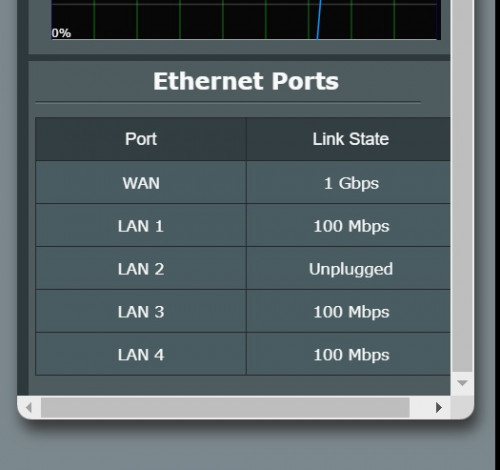
change to new router Asus RT-AC58U but my LAN speed cap at 100mbps

wifi 5ghz can get 300mbps no issue

then i check link state only show 100mbps

previously use TP link C1200(from TM) can get 300mbps using LAN

can someone assist me?

- my cable all is CAT5e
-Firmware Version:3.0.0.4.382_52134
-unifi plan 300mbps
user posted image
*
you did not explain, those LAN connected to what network card/ device.
msafiedin
post Oct 27 2020, 02:47 PM

Getting Started
**
Junior Member
118 posts

Joined: Oct 2004


I am using rt-ax3000. Currently running Version 3.0.0.4.384.9505

Just found out today that there is an update firmware Version 3.0.0.4.384.9890.

Download and update manually.

Straight away auto restart every 5 minutes. I remembered that we had this problem with last 2 firmware and were asked to use the ax56u firmware.

Maybe its not compatible with unifi vlan like last time.

Luckily able to revert back to 9505 version and it work perfectly splendid
msafiedin
post Oct 27 2020, 07:16 PM

Getting Started
**
Junior Member
118 posts

Joined: Oct 2004


QUOTE(ASUSmy @ Oct 27 2020, 05:24 PM)
Hi msafiedin,

Can you help to send a feedback using the new firmware version 3.0.0.4.384.9890 on the router? We would like to check what caused the disconnection.

After the problem happened, you can go to Administration->Feedback to send a feedback and provide me your email address used for checking.

You can use back the version 3.0.0.4.384.9505 or you can try our beta firmware at the link below after you have send the feedback.

https://drive.google.com/file/d/18enXU-87oi...iew?usp=sharing

Thank you
*
Hi sir,

It is not possible for me to send feedback, as after the router got internet connection it will try and reboot itself as soon. I revert back to old driver before i got internet connection.

but i suspect it got something todo with vlan malaysia.

what has been improved in beta?

otherwise i will stick to 9505 at this moment.
msafiedin
post Oct 28 2020, 11:27 AM

Getting Started
**
Junior Member
118 posts

Joined: Oct 2004


QUOTE(msafiedin @ Oct 27 2020, 07:16 PM)
Hi sir,

It is not possible for me to send feedback, as after the router got internet connection it will try and reboot itself as soon. I revert back to old driver before i got internet connection.

but i suspect it got something todo with vlan malaysia.

what has been improved in beta?

otherwise i will stick to 9505 at this moment.
*
Another update, I have thought that it might help others so I am putting a note here

For those upgrading RT-AX3000 from 9505 to 9890 firmware

You might have issue if doing normal upgrading from the router page (even updating manually)

I had success, by resetting the router and then updating to the new firmware using the Restoration firmware method

So far the router has been stable for the last half hour

cc: Asus support
msafiedin
post Oct 29 2020, 11:02 AM

Getting Started
**
Junior Member
118 posts

Joined: Oct 2004


OKay good to know others RT-ax3000 have problem with their new firmware too. Come on Asus!
msafiedin
post Oct 29 2020, 12:14 PM

Getting Started
**
Junior Member
118 posts

Joined: Oct 2004


AX3000.
Earlier I had success on using the new firmware, but after reboot this morning, it disconnect and reconnect - never ending.
I am using at ax56u beta firmware now.
So far so good.
msafiedin
post Oct 29 2020, 11:40 PM

Getting Started
**
Junior Member
118 posts

Joined: Oct 2004


QUOTE(Angel of Deth @ Oct 29 2020, 06:37 PM)
at the moment i'm using Merlin firmware for my AX-3000 until ASUS release a new firmware to fix the VLAN. I don't want to factory reset everything anymore, got AI Mesh to configure too.
*
which version are you using, vlan unifi is ok?
msafiedin
post Oct 30 2020, 07:28 PM

Getting Started
**
Junior Member
118 posts

Joined: Oct 2004


QUOTE(Angel of Deth @ Oct 29 2020, 11:43 PM)
The latest one available on Merlin website; version 384.19. No problem with it, in fact it does seems more stable than the latest official ASUS firmware from 20/10/2020.
*
i updated it to that firmware for now. looks the same. but faster loading

msafiedin
post Nov 2 2020, 02:50 PM

Getting Started
**
Junior Member
118 posts

Joined: Oct 2004


AX3000 Is not buggy at all. it is only when you update to new firmware and then it become buggy haha. but the driver will be updated quite frequent so just use the last firmware. and its fast too

msafiedin
post Nov 17 2020, 11:38 AM

Getting Started
**
Junior Member
118 posts

Joined: Oct 2004


for those using ax3000, the latest beta firmware is really stable
iptv compatible

Current Beta Version : 9.0.0.4.384_10096-gda53610

you can scroll previous post to find it
msafiedin
post Nov 29 2020, 10:56 PM

Getting Started
**
Junior Member
118 posts

Joined: Oct 2004


Version 3.0.0.4.384.10177
2020/11/2668.15 MBytes
ASUS RT-AX3000 Firmware version 3.0.0.4.384.10177
- Fix IPTV issues for specific regions.
- Update language support list for specific regions.
- Improve system stability.
- Minor GUI bug fixes.

Go get them boys and try them
msafiedin
post Dec 18 2020, 10:37 PM

Getting Started
**
Junior Member
118 posts

Joined: Oct 2004


my old router ac86U cant renew Lets Ecrypt anymore

status is just updating.
i Just realized this today when try to login using ddns asus

Does anybody know how to fix?
msafiedin
post Feb 15 2021, 01:31 PM

Getting Started
**
Junior Member
118 posts

Joined: Oct 2004


just bought the new tuf ax3000 for main router to pair with my ax3000.

I set the TUf to reboot every 2 days
WHenever the TUF reboot, i will have some issue with the 2.4ghz on the TUF router. The normal ax3000 works 100% all time.


Also as most of my device at home works with Wifi6. I enabled both 2.4 and 5 channel to use Wifi ax 6 mode.

But again, the 2.4 ax mode always giving issue not able to connect.

UNlike my ax3000, wifi 6 on both band does not have any issue at all.

Why is TUF is worse then AX3000 model?

This post has been edited by msafiedin: Feb 15 2021, 01:32 PM
msafiedin
post Feb 16 2021, 03:28 AM

Getting Started
**
Junior Member
118 posts

Joined: Oct 2004


QUOTE(Berserker @ Feb 15 2021, 06:34 PM)
Hi guys, I just bought the AC86U and updated with latest firmware.
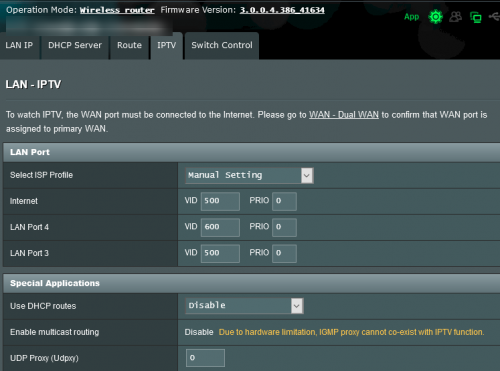
The problem started with the IPTV Unifi-Home preset is not working for LAN 4 if I choose to "Manually Assigned IP around the DHCP list". 

The unifi-Home setting will work with my unifi STB if Enable Manual Assignment is set to No during initial setup.  After I set to Yes for Manual Assignment, then my Unif STB cannot detect wired connection even though Unifi-Home is already selected in IPTV setting.
Therefore, I have to set the IPTV config manually for LAN4 as attached. Wired detection is not as fast as Unifi-Home preset though.

user posted image

Is there any sifu here that can advise if this a bug with the latest firmware or solution how to fix this minor annoyance.
Any other setting to tweak to improve the IPTV wired connection etc?

I've configured my previous TP-Link router with preset Unifi-STB and manual IP assignment for all devices without any issue.

Thanks
*
No need to do manual assignment
just select the profile unifi home
thats it you can start to use lan 4 for unifi tv

2 Pages  1 2 >Top
 

Change to:
| Lo-Fi Version
0.0554sec    0.64    7 queries    GZIP Disabled
Time is now: 12th December 2025 - 05:01 PM