QUOTE(SilentVampire @ Jul 4 2018, 12:25 PM)
The Asus seems to have a wider coverage, so it has more interference/congestion from other wireless signals. 5Ghz is fine, as there are less congestion and interference on it. See here:
https://www.howtogeek.com/222249/whats-the-...should-you-use/Wider coverage, hmm make sense maybe this is the cause of slow wifi speed, I forget about the coverage thing just keep thinking there's not conflict in channel but speed still slow

.
QUOTE(JohnLai @ Jul 4 2018, 12:43 PM)
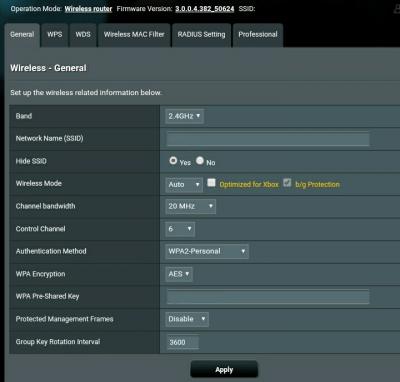
Because you are setting the channel bandwidth as 20Mhz instead of 40Mhz or 20/40Mhz (co-existence)?
Isn't 20Mhz much more better when there's interference or in high congestion place?
QUOTE(wind01 @ Jul 4 2018, 02:29 PM)
For AC1200G+, for a start: -
1. Untick b/g protection (unless you have some legacy devices that need to be on WiFi)
2. Disable "Airtime Fairness"
Save & reboot router. On device, forget Network & re-enter Network credential to connect. See if the problem persist.
After disable "Airtime Fairness" the speed is slightly better than before can go up to around 25Mbps, but I didn't untick b/g protection because it's only available for untick when using "Legacy" 2.4Ghz wifi mode means max throughput 20Mhz/54Mbps, and the result is .... much more worse than before ....

Thank you everyone for you advise.



 Apr 5 2017, 09:57 PM



 Quote
Quote


 your router more issues than mine, have you ever though about bring it to RMA?




 0.0372sec
 0.38
0.38
 7 queries
 GZIP Disabled