Outline ·
[ Standard ] ·
Linear+
Home Networking ASUS Malaysia Networking User & Technical Support, Managed by ASUS Malaysia Representative
|
heauew
|
 Feb 26 2018, 09:25 AM Feb 26 2018, 09:25 AM
|
New Member


|
Hi @ASUSmy, Just bought RT-AC1200G+ and follow the QIS to setup for UNIFI. Router say internet connected (with WAN IP), PC & Android phone also connected to WIFI successfully, but there is no internet access for both PC & Android. I'm using unifi modem HUAWEI HG655a & Innatech Router RG4332, everything is working fine, just wish to replace with Asus router. When I switch back to previous router, internet can use again. I had updated AC1200G+ firmware to 3.0.0.4.382_18991. I even initialize the router and redo the setup few time but the result is same. Please advice how should I do next? I attached the screenshot and syslog file. Please let me know if you need more information. Attached thumbnail(s)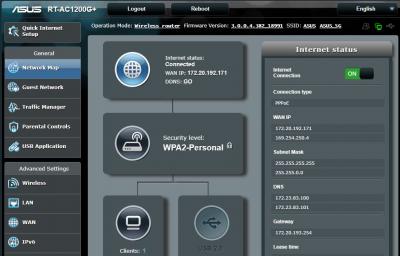 Attached File(s)
 syslog__1_.txt
 ( 42.21k )
Number of downloads: 7 |
|
|
|
|
|
heauew
|
Feb 26 2018, 11:24 AM
|
New Member
|
QUOTE(ASUSmy @ Feb 26 2018, 10:33 AM) Hi heauew, Beside double check the UNIFI account username and password as mention by voncrane, try go to WAN->Internet Connection->MAC Address, click on the MAC Clone button and click Apply. Thank you Thanks for the advise. One more information. When I setup for first time, there is strange condition that I actually can get a ping 26ms latency, very very low download speed (few hundred k) and about 20Mbps upload speed (using mobile apps for speed test). But I can't get this condition anymore. Not sure is due to firmware update or not. Any insight? If switch back to old router still can use, can I eliminate the possibility of modem having problem? Any other setting should I confirm? DNS I'm using auto. OK? |
|
|
|
|
|
heauew
|
Feb 27 2018, 09:00 AM
|
New Member
|
Thanks for all your advise.
Finally manage to get mt unifi pppoe password through unifi livechat support. This password is unchangeable, but not sure why my own note written with new password. Unifi livechat is quite effective and fast respond in this case. I can manage to get internet access without any problem now.
|
|
|
|
|



 Quote
Quote

 0.0332sec
 0.29
0.29
 7 queries
 GZIP Disabled