Welcome Guest ( Log In | Register )

Outline · [ Standard ] · Linear+

Home Networking ASUS Malaysia Networking User & Technical Support, Managed by ASUS Malaysia Representative

views
     
edward88
post Apr 12 2015, 09:18 AM

Casual
***
Junior Member
351 posts

Joined: Jul 2007


Hi,

Just bought Asus RT-N18U, i using it with my YES 4G Dongle.
When YES Dongle connect to Asus router, i can get speed around 1-2mbps only and even worst when i vpn back to my office, get below 1mbps. But when i try direct plug YES 4G dongle to my PC, i can get around 8Mbps even with VPN.. my speed not much drop.

Anyone got this issue before? Need @ASUSmy advise

edward88
post Apr 13 2015, 10:35 PM

Casual
***
Junior Member
351 posts

Joined: Jul 2007


QUOTE(ASUSmy @ Apr 13 2015, 04:33 PM)
Hi edward88,

This might due to the signal interference between the router antenna and the YES 4G Dongle. You can reduce the by getting the USB extension cable. The longer the better. 1 or 2 feet.

You can test it buy disabling the radio on the router.

Wireless->Professional->Enable Radio(Select No)

Thank you
*
Hi,

Wimax signal should be wont interference by wifi signal a.. Cos different frequency a..
Anyway I will try it..


Thanks
edward88
post Apr 16 2015, 07:04 PM

Casual
***
Junior Member
351 posts

Joined: Jul 2007


QUOTE(ASUSmy @ Apr 13 2015, 04:33 PM)
Hi edward88,

This might due to the signal interference between the router antenna and the YES 4G Dongle. You can reduce the by getting the USB extension cable. The longer the better. 1 or 2 feet.

You can test it buy disabling the radio on the router.

Wireless->Professional->Enable Radio(Select No)

Thank you
*
Hi ASUSmy,

I tried off WiFi and retry the bandwidth test, result are same.
Now even worst, got new problem... need restart few times to get Yes 4G connected.

Need Assist as above issue

Thanks
edward88
post Apr 17 2015, 08:50 PM

Casual
***
Junior Member
351 posts

Joined: Jul 2007


QUOTE(ASUSmy @ Apr 17 2015, 01:05 PM)
Hi edward88,

May I know place you put the router able to get good signal for YES 4G GO?

You said you tested the speed at the PC or notebook, you will have a good bandwidth. If you test the router at the same place, will it get better speed?

Thank you
*
the signal are good.. almost full all the time.. tested with pc at same place.. direct pc good bandwidth... plug in router loss around 70% bandwidth
edward88
post Apr 21 2015, 09:06 PM

Casual
***
Junior Member
351 posts

Joined: Jul 2007


QUOTE(ASUSmy @ Apr 20 2015, 12:27 PM)
Hi edward88,

Can try update the firmware to the latest and try again?

Update the Beta Version 3.0.0.4.378.4850. Please do a factory reset after the update.

http://www.asus.com/Networking/RTN18U/HelpDesk_Download/

Thank you
*
Hi ASUSmy,

i already updated to latest firmware.. now i found another problem..
when my YES GO and VPN connected at the 1st time, i cant surf till i restart my VPN.

Is this model firmware bugs?

edward88
post Apr 22 2015, 03:08 PM

Casual
***
Junior Member
351 posts

Joined: Jul 2007


QUOTE(ASUSmy @ Apr 22 2015, 03:03 PM)
Hi edward88,

May I ask, is router already do a factory reset after the firmware update?

I will on my unit also and get back to you ASAP.

Thank you
*
Hi ASUSmy,

i factory reset few times d lo..

thanks
edward88
post Apr 23 2015, 07:52 PM

Casual
***
Junior Member
351 posts

Joined: Jul 2007


QUOTE(ASUSmy @ Apr 22 2015, 03:03 PM)
Hi edward88,

May I ask, is router already do a factory reset after the firmware update?

I will on my unit also and get back to you ASAP.

Thank you
*
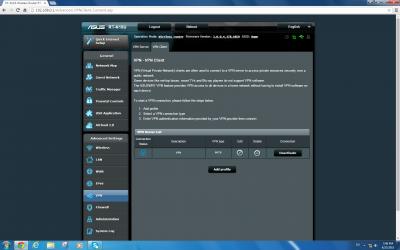
As in the photo.. VPN connected but cant online.. need restart VPN only can use.


Attached thumbnail(s)
Attached Image
edward88
post May 6 2015, 07:58 AM

Casual
***
Junior Member
351 posts

Joined: Jul 2007


Hi ASUSmy,

any update for my vpn case?
edward88
post May 7 2015, 04:09 PM

Casual
***
Junior Member
351 posts

Joined: Jul 2007


QUOTE(ASUSmy @ May 7 2015, 12:09 PM)
Hi edward88,

We are still testing the problem mention by you and try to duplicate the problem. I have tried my RT-N18U with USB YES GO 4G and connect to our RT-AC87U VPN Server it seen like no problem.

May I know what router are you using to create the VPN Server?

And when you mean restarting the VPN, do you mean the VPN server or the VPN client.

Thank you
*
Hi ASUSmy,

PPTP Server is use Mikrotik Router. PPTP normally will show connected but traffic cant go out. Need restart then only can use.
Openvpn Server is i buy service from vpn provider
My VPN usage around 10-12hrs for daily.

Thanks
edward88
post May 7 2015, 09:03 PM

Casual
***
Junior Member
351 posts

Joined: Jul 2007


QUOTE(ASUSmy @ May 7 2015, 05:19 PM)
Hi edward88,

Is your Mikrotik Router able to set a Static Router for the given account? The subnet must be same with RT-N18U LAN subnet.

Thank you
*
Hi ASUSmy,

The VPN are show connected at the 1st time but no traffic, need restart again for 2nd only can use.
I have try other router vpn client so far no this issue... is asus router vpn client not compatible with mikrotik?
Asus Openvpn client no this issue but after use few hour it will suddenly traffic all drop.. need restart router only can use.. very weird lo..

thanks
edward88
post May 8 2015, 02:03 PM

Casual
***
Junior Member
351 posts

Joined: Jul 2007


QUOTE(ASUSmy @ May 8 2015, 09:15 AM)
Hi edward88,

May I know what Mikrotik model that you are using?

Thank you
*
751U-2HnD
edward88
post May 20 2015, 01:50 PM

Casual
***
Junior Member
351 posts

Joined: Jul 2007


Hi ASUSmy,

Currently i use my 4g dongle with asus rt-n18u, the dongle always disconnect when i no use for while... got any setting can keep my usb dongle keep alive?

Thanks
edward88
post May 21 2015, 03:36 PM

Casual
***
Junior Member
351 posts

Joined: Jul 2007


QUOTE(ASUSmy @ May 21 2015, 03:28 PM)
Hi edward88,

May I ask, when it is disconnected, you will need redo the connection or restart the router to connect back to Internet?

Normally what is the time frame when this happen? No use after 12 hours, 24hours?

Thank you
*
Hi ASUSmy,

When dc, i need to go wan and click apply and wait it connect back to internet.
It happen around after 10-20min when i not using it.

Thanks
edward88
post May 21 2015, 05:10 PM

Casual
***
Junior Member
351 posts

Joined: Jul 2007


QUOTE(ASUSmy @ May 21 2015, 04:12 PM)
Hi edward88,

Do you mind send me your setting file and your log file when the disconnection happen? I got tested my RT-N18U with my YES dongle before, overnight also no disconnect.

I will PM you my e-mail address.

Thank you
*
actually i already switch to 4G dongle is need to use sim card. no longer use YES 4G dongle causing startup dc cant connect issue.
edward88
post Jun 6 2015, 11:55 AM

Casual
***
Junior Member
351 posts

Joined: Jul 2007


Hi ASUSmy.

why always getting ntp update?


Attached thumbnail(s)
Attached Image
edward88
post Jun 25 2015, 03:16 PM

Casual
***
Junior Member
351 posts

Joined: Jul 2007


hi ASUSmy,

RT-N18U support l2tp/ipsec psk?
edward88
post Jul 7 2015, 01:27 PM

Casual
***
Junior Member
351 posts

Joined: Jul 2007


Hi,

Can we manual change the router system time?
edward88
post Dec 27 2015, 12:46 PM

Casual
***
Junior Member
351 posts

Joined: Jul 2007


hi,

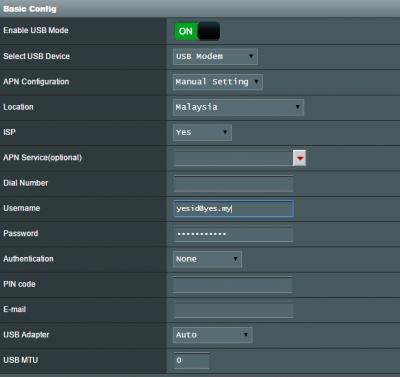
After i upgrade my rt-n18u firmware to Firmware Version:3.0.0.4.378_9459, my yes dongle cant up d..
below are the config,


Attached thumbnail(s)
Attached Image
edward88
post Dec 28 2015, 10:44 AM

Casual
***
Junior Member
351 posts

Joined: Jul 2007


QUOTE(ASUSmy @ Dec 28 2015, 10:30 AM)
Hi edward88,

Can you try do a factory reset on the device and try again? And if still cannot, can you provide me the log from the router?

Thank you
*
i already factory default few time.. still same.. i will provide you the log..

thank you very much
edward88
post Dec 28 2015, 09:20 PM

Casual
***
Junior Member
351 posts

Joined: Jul 2007


QUOTE(ASUSmy @ Dec 28 2015, 10:30 AM)
Hi edward88,

Can you try do a factory reset on the device and try again? And if still cannot, can you provide me the log from the router?

Thank you
*
Below is the log

Aug 1 08:00:11 syslogd started: BusyBox v1.17.4
Aug 1 08:00:11 kernel: Built 1 zonelists in Zone order, mobility grouping on. Total pages: 60416
Aug 1 08:00:11 kernel: Kernel command line: root=/dev/mtdblock2 console=ttyS0,115200 init=/sbin/preinit earlyprintk debug
Aug 1 08:00:11 kernel: Memory: 255708k/255708k available, 6436k reserved, 0K highmem
Aug 1 08:00:11 kernel: Virtual kernel memory layout:
Aug 1 08:00:11 kernel: vector : 0xffff0000 - 0xffff1000 ( 4 kB)
Aug 1 08:00:11 kernel: fixmap : 0xfff00000 - 0xfffe0000 ( 896 kB)
Aug 1 08:00:11 kernel: DMA : 0xf7e00000 - 0xffe00000 ( 128 MB)
Aug 1 08:00:11 kernel: vmalloc : 0xd0800000 - 0xf0000000 ( 504 MB)
Aug 1 08:00:11 kernel: lowmem : 0xc0000000 - 0xd0000000 ( 256 MB)
Aug 1 08:00:11 kernel: modules : 0xbf000000 - 0xc0000000 ( 16 MB)
Aug 1 08:00:11 kernel: .init : 0xc0008000 - 0xc0037000 ( 188 kB)
Aug 1 08:00:11 kernel: .text : 0xc0037000 - 0xc0390000 (3428 kB)
Aug 1 08:00:11 kernel: .data : 0xc03a8000 - 0xc03c7ec0 ( 128 kB)
Aug 1 08:00:11 kernel: External imprecise Data abort at addr=0x0, fsr=0x1c06 ignored.
Aug 1 08:00:11 kernel: Mount-cache hash table entries: 512
Aug 1 08:00:11 kernel: Found a AMD NAND flash:
Aug 1 08:00:11 kernel: Total size: 128MB
Aug 1 08:00:11 kernel: Block size: 128KB
Aug 1 08:00:11 kernel: Page Size: 2048B
Aug 1 08:00:11 kernel: OOB Size: 64B
Aug 1 08:00:11 kernel: Sector size: 512B
Aug 1 08:00:11 kernel: Spare size: 16B
Aug 1 08:00:11 kernel: ECC level: 8 (8-bit)
Aug 1 08:00:11 kernel: Device ID: 0x 1 0xf1 0x 0 0x1d 0x 1 0xf1
Aug 1 08:00:11 kernel: bio: create slab <bio-0> at 0
Aug 1 08:00:11 kernel: PCI: no core
Aug 1 08:00:12 kernel: PCI: Fixing up bus 0
Aug 1 08:00:12 kernel: PCI: Fixing up bus 1
Aug 1 08:00:12 kernel: VFS: Disk quotas dquot_6.5.2
Aug 1 08:00:12 kernel: Dquot-cache hash table entries: 1024 (order 0, 4096 bytes)
Aug 1 08:00:12 kernel: pflash: found no supported devices
Aug 1 08:00:12 kernel: bcmsflash: found no supported devices
Aug 1 08:00:12 kernel: Boot partition size = 524288(0x80000)
Aug 1 08:00:12 kernel: lookup_nflash_rootfs_offset: offset = 0x200000
Aug 1 08:00:12 kernel: nflash: squash filesystem with lzma found at block 28
Aug 1 08:00:12 kernel: Creating 4 MTD partitions on "nflash":
Aug 1 08:00:12 kernel: 0x000000000000-0x000000080000 : "boot"
Aug 1 08:00:12 kernel: 0x000000080000-0x000000200000 : "nvram"
Aug 1 08:00:12 kernel: 0x000000200000-0x000004000000 : "linux"
Aug 1 08:00:12 kernel: 0x00000038d358-0x000004000000 : "rootfs"
Aug 1 08:00:12 stop_nat_rules: apply the redirect_rules!
Aug 1 08:00:12 kernel: Registering the dns_resolver key type
Aug 1 08:00:12 kernel: Spare area=64 eccbytes 56, ecc bytes located at:
Aug 1 08:00:12 kernel: 2 3 4 5 6 7 8 9 10 11 12 13 14 15 18 19 20 21 22 23 24 25 26 27 28 29 30 31 34 35 36 37 38 39 40 41 42 43 44 45 46 47 50 51 52 53 54 55 56 57 58 59 60 61 62 63
Aug 1 08:00:12 kernel: Available 7 bytes at (off,len):
Aug 1 08:00:12 kernel: (1,1) (16,2) (32,2) (48,2) (0,0) (0,0) (0,0) (0,0)
Aug 1 08:00:12 kernel: Options: NO_AUTOINCR,NO_READRDY,BBT_SCAN2NDPAGE,
Aug 1 08:00:12 kernel: Creating 2 MTD partitions on "brcmnand":
Aug 1 08:00:12 kernel: 0x000004000000-0x000007ec0000 : "brcmnand"
Aug 1 08:00:12 kernel: 0x000007ec0000-0x000008000000 : "asus"
Aug 1 08:00:12 kernel: VFS: Mounted root (squashfs filesystem) readonly on device 31:3.
Aug 1 08:00:12 WAN(0) Connection: Ethernet link down.
Aug 1 08:00:12 WAN(1) Connection: Ethernet link down.
Aug 1 08:00:12 kernel: ctf: module license 'Proprietary' taints kernel.
Aug 1 08:00:12 kernel: Disabling lock debugging due to kernel taint
Aug 1 08:00:12 kernel: et_module_init: passivemode set to 0x0
Aug 1 08:00:12 kernel: et_module_init: txworkq set to 0x1
Aug 1 08:00:12 kernel: et_module_init: et_txq_thresh set to 0xce4
Aug 1 08:00:12 kernel: eth0: Broadcom BCM47XX 10/100/1000 Mbps Ethernet Controller 6.37.14.105 (r485445)
Aug 1 08:00:12 kernel: wl_module_init: passivemode set to 0x0
Aug 1 08:00:12 kernel: wl_module_init: igs set to 0x0
Aug 1 08:00:12 kernel: wl_module_init: txworkq set to 0x1
Aug 1 08:00:12 kernel: eth1: Broadcom BCM4360 802.11 Wireless Controller 6.37.14.105 (r485445)
Aug 1 08:00:12 kernel: jffs2_scan_inode_node(): CRC failed on node at 0x034547cc: Read 0xffffffff, calculated 0xccb2bc60
Aug 1 08:00:12 kernel: Empty flash at 0x03454c6c ends at 0x03455000
Aug 1 08:00:16 dnsmasq[384]: warning: interface ppp1* does not currently exist
Aug 1 08:00:16 RT-N18U: start httpd
Aug 1 08:00:17 miniupnpd[427]: version 1.9 started
Aug 1 08:00:17 miniupnpd[427]: HTTP listening on port 41503
Aug 1 08:00:17 miniupnpd[427]: Listening for NAT-PMP/PCP traffic on port 5351
Aug 1 08:00:17 disk monitor: be idle
Aug 1 08:00:17 syslog: Generating SSL certificate...
Aug 1 08:00:17 hour monitor: daemon is starting
Aug 1 08:00:17 hour monitor: ntp is not syn
Aug 1 08:00:17 wan: finish adding multi routes
Aug 1 08:00:17 syslog: module ledtrig-usbdev not found in modules.dep
Aug 1 08:00:17 syslog: module leds-usb not found in modules.dep
Aug 1 08:00:18 kernel: SCSI subsystem initialized
Aug 1 08:00:20 kernel: jnl: driver (lke_9.2.0, Dec 6 2015 15:53:07, LBD=ON) loaded at bf5ac000
Aug 1 08:00:21 kernel: ufsd:: trace mask set to 0000000f
Aug 1 08:00:21 kernel: ufsd: driver (lke_9.2.0 lke_9.2.0_r248656_b5, build_host("yau.chang"), acl, ioctl, bdi, sd2(0), wb, bz, tr, rsrc) loaded at bf5b9000
Aug 1 08:00:21 kernel: NTFS support included
Aug 1 08:00:21 kernel: Hfs+/HfsJ support included
Aug 1 08:00:21 kernel: optimized: speed
Aug 1 08:00:21 kernel: Build_for__ASUS_PRODUCTS_003_k2.6.36_2013-11-07_lke_9.2.0_r248656_b5
Aug 1 08:00:21 kernel: xhci_hcd 0000:00:0c.0: Failed to enable MSI-X
Aug 1 08:00:21 kernel: xhci_hcd 0000:00:0c.0: failed to allocate MSI entry
Aug 1 08:00:21 kernel: usb usb1: No SuperSpeed endpoint companion for config 1 interface 0 altsetting 0 ep 129: using minimum values
Aug 1 08:00:28 rc_service: wanduck 372:notify_rc start_wan_if 0
Aug 1 08:00:36 wan: finish adding multi routes
Aug 1 08:00:42 rc_service: wanduck 372:notify_rc restart_wan_if 1
Aug 1 08:00:42 kernel: Attempt to kill tasklet from interrupt
Aug 1 08:00:44 wan: finish adding multi routes
Aug 1 08:00:46 hour monitor: daemon is starting
Aug 1 08:00:46 hour monitor: ntp is not syn
Aug 1 08:01:16 hour monitor: daemon is starting
Aug 1 08:01:16 hour monitor: ntp is not syn
Aug 1 08:01:18 rc_service: wanduck 372:notify_rc restart_wan_if 0
Aug 1 08:01:30 wan: finish adding multi routes



2 Pages  1 2 >Top
 

Change to:
| Lo-Fi Version
0.1458sec    0.81    7 queries    GZIP Disabled
Time is now: 13th December 2025 - 10:55 AM