Welcome Guest ( Log In | Register )

Outline · [ Standard ] · Linear+

Home Networking ASUS Malaysia Networking User & Technical Support, Managed by ASUS Malaysia Representative

views
     
aidilaidilaidil
post Aug 22 2014, 06:19 PM

Getting Started
**
Junior Member
100 posts

Joined: Jan 2010
Hi....I've a few questions regarding warranty claim for Asus Networking products:

1) If I buy a used Asus Router which is still under warranty but without the original receipt, can I claim the warranty from Asus service centre in case if something happen to the router?

2) Is it a "must" to have the original receipt to claim the warranty? Or would the warranty card / serial number would be enough to do the claim?

3) Can claim from Asus Msia if the product is an import from Asus Singapore or Taiwan?

For example, Western Digital can claim for a faulty hardisk without needing the original receipt. Can just check the warranty validity by using the hardisk serial number. Easy and excellent service customer service rclxms.gif .

Not sure how good is Asus aftersale service especially when it comes to warranty claim coz all that I found/read was that Asus will ask you send it back to the original shop to claim the warranty doh.gif . No problem if got receipt, but if buy 2nd hand and seller already loss the original receipt how? rclxub.gif doh.gif . Besides it would be time consuming if the customers have to ask the shop to claim warranty for you unless customers can get a new replacement on the spot. Whats the point of having a service centre if the customers can't straight away walk in and claim the warranty?

Hope someone can give some clarification.

Tq.

aidilaidilaidil
post Aug 28 2014, 11:30 AM

Getting Started
**
Junior Member
100 posts

Joined: Jan 2010
QUOTE(kenhirai83 @ Aug 26 2014, 05:10 PM)
Hi all sifu-sifu,

I just bought one AC68U for home use.
But yesterday test, wifi transfer speed kind of slow.

Transfer a file to router:
usb 3.0 --> pc --> wife --> router --> usb 3.0

The transfer rate just 1.11MB/s
Saw from the internet, some manage to get 12MB/s. Is there any setting need to be done ?
*
I assumed "wife" ---> wifi tongue.gif.

Your wifi adapter support wireless AC? PCI adapter or USB adapter?

aidilaidilaidil
post Sep 23 2014, 01:28 PM

Getting Started
**
Junior Member
100 posts

Joined: Jan 2010
When RT-AC87U will be available in the store?
aidilaidilaidil
post Sep 23 2014, 08:39 PM

Getting Started
**
Junior Member
100 posts

Joined: Jan 2010
Hi,

I cannot establish the Internet connection in my RT-AC66U (latest firmware) if I do not select ISP profile for the IPTV setting. Had tried restart both the router and unifi modem and even wait for half an hour for the connection to be establish...still can't connect to the WAN. No problem if I select Unifi-Home for the IPTV setting..

Is it my router that has a problem or the firmware was designed like that in order to establish WAN connection for unifi? I don't use hypptv and want LAN port 4 to be free for other devices..
aidilaidilaidil
post Sep 24 2014, 02:47 AM

Getting Started
**
Junior Member
100 posts

Joined: Jan 2010
QUOTE(jolmy @ Sep 23 2014, 09:00 PM)
You need to set the ISP profile because it also sets the PPPoE interface to VLAN500 which is required for UniFi Internet connection.
*
QUOTE(sHawTY @ Sep 23 2014, 10:41 PM)
Just buy a switch, then you can connect as much devices / computers as you want.
5 port 100Mb ethernet switch is around RM21.
5 port Gigabit ethernet switch is around RM47.
*
QUOTE(jolmy @ Sep 24 2014, 12:30 AM)
Meanwhile an 8-port FastEthernet (100Mbps) Switch is less than RM30.
*
Thanks for the answer icon_rolleyes.gif . And i'm sure in the firmware, the ISP profile setting (Unifi-Home) can be design to set the PPPoE to interface only to VLAN500 (Internet) and has the option to disable VLAN600 (IPTV) and free up port 4 as a normal LAN port hmm.gif

You guys are right that switches are cheap and the simplest solution. But I (or maybe some other users) only need 4 LAN port (3 for use, 1 for spare) and don't want to waste my extension power point for a switch which indirectly can save electricity bill tongue.gif

I'm expecting to maximize the my money that I spent on a RM6++ device which IMO should has at least the option to use all 4 ports rather than only 3 ports were made available to other LAN devices that we want. Its like the customers were forced to allocate port 4 for IPTV eventhough in reality majority of them didn't even bother to watch hypptv cool2.gif

Nevermind...as i write these, i've found the solution to establish WAN connection while enabling port 4 for normal LAN usage.

This post has been edited by aidilaidilaidil: Sep 24 2014, 03:57 AM
aidilaidilaidil
post Oct 9 2014, 08:20 AM

Getting Started
**
Junior Member
100 posts

Joined: Jan 2010
QUOTE(sHawTY @ Oct 8 2014, 09:43 PM)
Just seen the price of RT-AC87U in lelong.com.my - RM1059! shocking.gif
While Newegg is selling it at US$277.67 (RM908.60).

ASUSmy, why the huge price differences? sweat.gif
*
Viewnet Loywat selling RT-AC87U for RM1199 shocking.gif . I assumed that will be the RRP for most of the shops?

aidilaidilaidil
post Oct 10 2014, 07:37 PM

Getting Started
**
Junior Member
100 posts

Joined: Jan 2010
Would have buy the RT-AC87U regardless of its price only if it was designed standing up like the RT-AC68U/66U. All of its ventilation holes are at the bottom and thats the dealbreaker for me..
aidilaidilaidil
post Oct 10 2014, 09:10 PM

Getting Started
**
Junior Member
100 posts

Joined: Jan 2010
QUOTE(arslow @ Oct 10 2014, 08:45 PM)
If you don't want to get the ac68u now, then wait for this model

http://forums.smallnetbuilder.com/showthread.php?t=18697
*
AC3200 doesn't stand up as well tongue.gif and only 3x3 streams. I want a 4x4 streams RT-AC87U that can stand up..haha.

http://pcdiy.asus.com/2014/01/rt-ac87u-the...-mimo-ces-2014/
aidilaidilaidil
post Oct 23 2014, 04:25 PM

Getting Started
**
Junior Member
100 posts

Joined: Jan 2010
QUOTE(mwtang @ Oct 22 2014, 01:30 PM)
Hi . Anyone aetup IPv6 on their asus router for unifi?
Would appreciate some guide lines

Thanks in advance

Am using the ac87u
*
1) Go to IPv6
2) Connection type : Native
3) Interface : PPP

That's all. BTW u using stock Asus firmware or merlin firmware?
aidilaidilaidil
post Oct 23 2014, 07:06 PM

Getting Started
**
Junior Member
100 posts

Joined: Jan 2010
QUOTE(mwtang @ Oct 23 2014, 05:04 PM)
am using stock Asus firmware
*
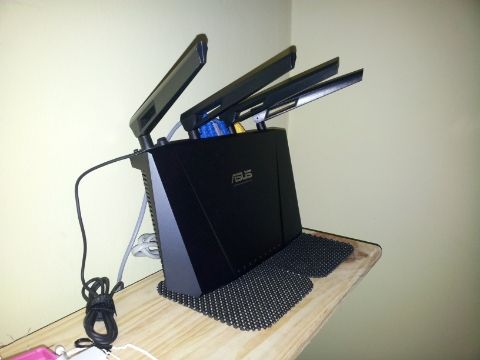
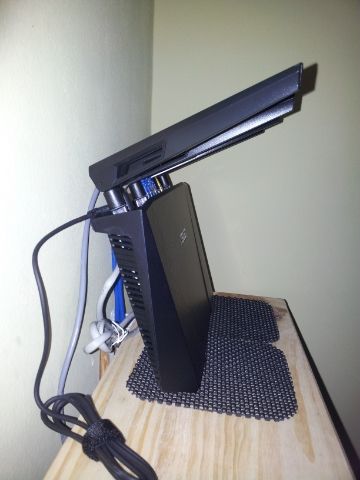
Your RT-AC87U will run cooler if it stands vertical like RT-AC68U.
aidilaidilaidil
post Oct 23 2014, 11:13 PM

Getting Started
**
Junior Member
100 posts

Joined: Jan 2010
QUOTE(mwtang @ Oct 23 2014, 08:55 PM)
If only it can stand . Using my ac68 as repeater mode
*
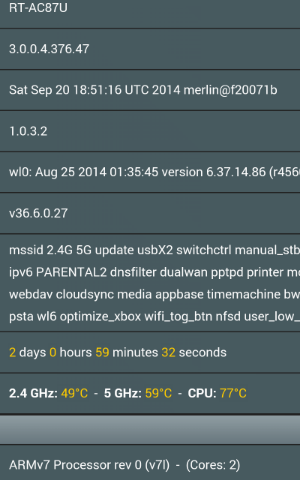
DIY tongue.gif . Put it on a frame / souvenir stand or lean it againts the wall like I do.

Horizontal position:
2Ghz : > 52°c
5Ghz : > 65°c
CPU : > 80°c

Vertical position:
2Ghz : < 50°c
5Ghz : < 62°c
CPU : < 75°c

This post has been edited by aidilaidilaidil: Oct 23 2014, 11:15 PM
aidilaidilaidil
post Oct 24 2014, 12:23 AM

Getting Started
**
Junior Member
100 posts

Joined: Jan 2010
QUOTE(mwtang @ Oct 23 2014, 11:24 PM)
PICS !!!
*
user posted image

user posted image

user posted image

This post has been edited by aidilaidilaidil: Oct 24 2014, 01:38 AM


Change to:
| Lo-Fi Version
0.0420sec    0.99    7 queries    GZIP Disabled
Time is now: 11th December 2025 - 09:45 PM