Outline ·
[ Standard ] ·
Linear+
Home Networking ASUS Malaysia Networking User & Technical Support, Managed by ASUS Malaysia Representative
|
TomCruise
|
 Feb 5 2016, 08:45 PM Feb 5 2016, 08:45 PM
|
New Member


|
Hi ASUSmy, I just bought RT-N14UHP, I follow below youtube guides on quick setup for unifi, but when I try access to internet, below page appear and cannot connect to internet, but in the Asus router page (192.168.1.1) network map the internet status show connected, any ideas how to fix this? https://www.youtube.com/watch?v=ESAPAJqWxH4https://www.youtube.com/watch?v=Y7VUBSFy_es This post has been edited by TomCruise: Feb 5 2016, 08:51 PM This post has been edited by TomCruise: Feb 5 2016, 08:51 PM |
|
|
|
|
|
TomCruise
|
Feb 6 2016, 10:04 AM
|
New Member
|
QUOTE(jusbella @ Feb 5 2016, 08:54 PM) Put auto dns. Thanks for your suggestion, I checked the router settings, but the DNS already set to automatic 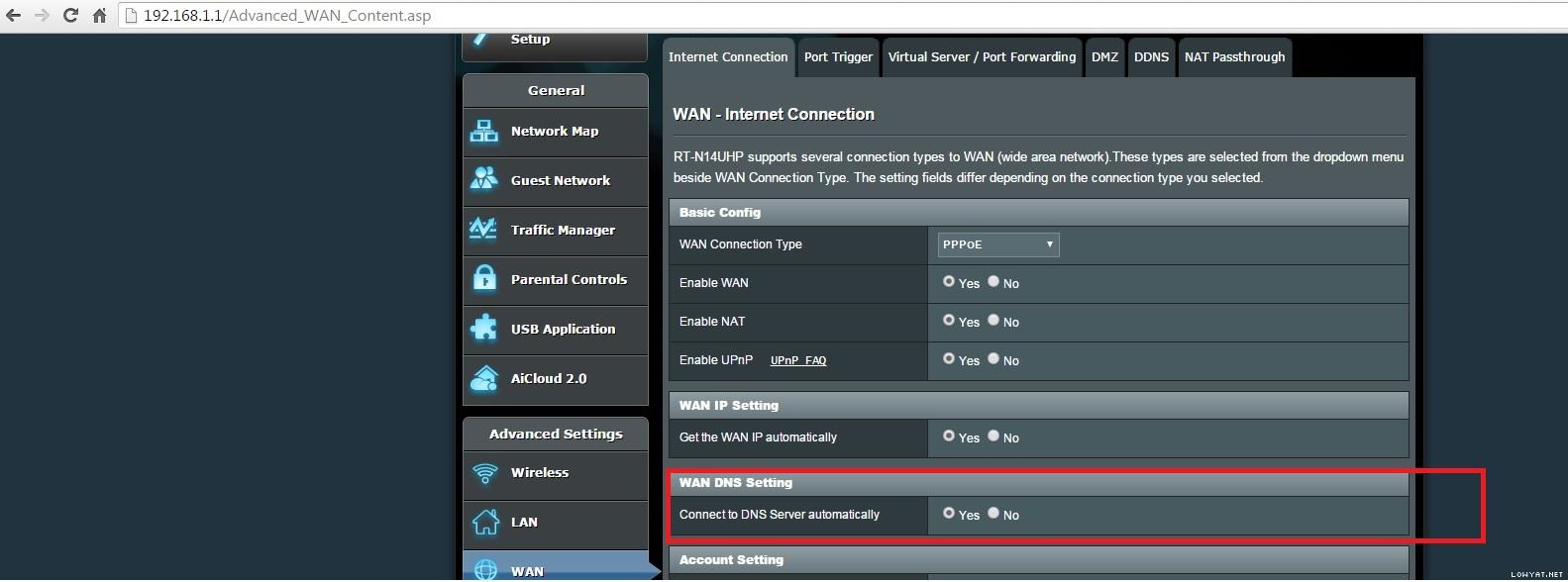  Any experts can help me to solve this problem? |
|
|
|
|
|
TomCruise
|
Feb 6 2016, 10:36 AM
|
New Member
|
QUOTE(jusbella @ Feb 6 2016, 10:09 AM) Here are the Windows DNS, anything wrong?  |
|
|
|
|
|
TomCruise
|
Feb 6 2016, 10:43 AM
|
New Member
|
IPv4 basically the same, also auto DNS
This post has been edited by TomCruise: Feb 6 2016, 10:43 AM
|
|
|
|
|
|
TomCruise
|
Feb 10 2016, 05:30 PM
|
New Member
|
QUOTE(jusbella @ Feb 6 2016, 11:20 AM) Not me, it's Tom cruise. Ok check Unifi password. Today finally able to setup the router, here is my download speed, seems like not meet 50Mbps? (I'm using Unifi VIP50 package)  Is it setting problem or I need better router? |
|
|
|
|
|
TomCruise
|
Feb 10 2016, 05:50 PM
|
New Member
|
QUOTE(jusbella @ Feb 10 2016, 05:35 PM) So what the issue? Try use speed test. Here are the speed test with different servers (from local to Beijing, Paris & USA servers)   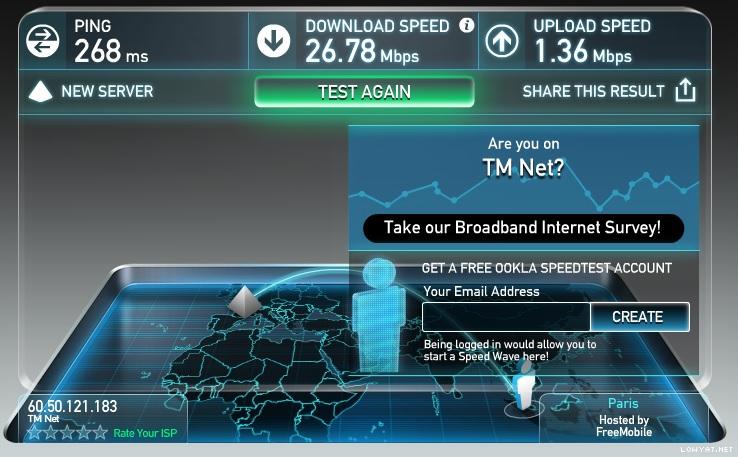  This post has been edited by TomCruise: Feb 10 2016, 05:51 PM This post has been edited by TomCruise: Feb 10 2016, 05:51 PM |
|
|
|
|
|
TomCruise
|
Feb 11 2016, 01:25 PM
|
New Member
|
QUOTE(Xnet @ Feb 10 2016, 07:46 PM) Thanks, but how much improvements I can get by changing to a better router such as AC66U or AC68U? This post has been edited by TomCruise: Feb 11 2016, 01:25 PM |
|
|
|
|
|
TomCruise
|
Feb 11 2016, 02:58 PM
|
New Member
|
QUOTE(Xnet @ Feb 11 2016, 02:34 PM) May I know which router are you using now? what download speed you get? which router were you upgraded from? This post has been edited by TomCruise: Feb 11 2016, 02:58 PM |
|
|
|
|



 Quote
Quote

 0.0298sec
 0.96
0.96
 7 queries
 GZIP Disabled