Welcome Guest ( Log In | Register )

Outline · [ Standard ] · Linear+

Home Networking ASUS Malaysia Networking User & Technical Support, Managed by ASUS Malaysia Representative

views
     
G K Lai
post Feb 22 2016, 02:08 PM

Enthusiast
*****
Senior Member
839 posts

Joined: Aug 2009


Hi good day ASUSmy and all,

I plan to upgrade the stock router to Asus HP series (the one that have long antenna) and hopefully, with wireless AC capability, my budget around RM500±, which model do you recommend?

Can I setup Asus router to watch HyppTV wirelessly?

Thank you in advance! notworthy.gif
G K Lai
post Feb 22 2016, 03:56 PM

Enthusiast
*****
Senior Member
839 posts

Joined: Aug 2009


QUOTE(zhou86 @ Feb 22 2016, 02:37 PM)
Try the AC55UHP, can get RM490.
*
Many thanks zhou86 notworthy.gif
This model looks promising. Although I don't use USB connectivity (unless I know how to setup a printer on it), but it is a bonus.
By the way, do you have any info where to get it at this price?
You can PM me if you like. nod.gif
G K Lai
post Feb 22 2016, 11:56 PM

Enthusiast
*****
Senior Member
839 posts

Joined: Aug 2009


QUOTE(amysthe @ Feb 22 2016, 07:59 PM)
I just got this router from Lazada with RM492 after 12% discount in-app

Great router for its price...definitely worth it thumbup.gif
*
Was the discount only for MasterCard holder? I only have Visa... sad.gif
Don't know if my wife's MasterCard debit card eligible for the discount?

I found two RT-AC55UHP here:
RM515
RM523
But both their pictures showing isn't the high-gain antenna? hmm.gif

G K Lai
post Mar 3 2016, 03:24 PM

Enthusiast
*****
Senior Member
839 posts

Joined: Aug 2009


Hi ASUSmy

I'm using RT-AC55UHP, I realized whenever the router boot up, my default browser will pops up and open this page (http://www.msn.com/en-my/?ocid=wispr), is there any way to disable this?

Thanks in advanced! thumbsup.gif
G K Lai
post Mar 3 2016, 03:55 PM

Enthusiast
*****
Senior Member
839 posts

Joined: Aug 2009


QUOTE(voncrane @ Mar 3 2016, 03:36 PM)
Check your system for malware, etc.. Also check the browser's default startup page settings, change it.. I.e to say "blank page". Very unlikely it's the fault of the router.
*
Thanks for help, voncrane, and indeed my browser was set to show "Blank page" on startup (how did you know? tongue.gif ).

I ask here because the very first time I install the router for setup, my browser automatically open Asus' router setup page, I also don't know why, that's the reason I suspect this is a "call" from the router. Anyway, I'll scan my PC for any malware later... (finger crossed).

Thanks again and have a great day, voncrane. icon_rolleyes.gif
G K Lai
post Mar 3 2016, 11:46 PM

Enthusiast
*****
Senior Member
839 posts

Joined: Aug 2009


QUOTE(voncrane @ Mar 3 2016, 06:26 PM)
You r welcome.. Did a bit of reading around and it appears that there's a bug that mimics such browser launching behavior.. tongue.gif.  From what I've gathered, it's a firmware bug. Perhaps check for an updated firmware & if you've recently upgraded (+ the required reset), try rolling back a version or 2..  biggrin.gif

Edit: Start here.
*
Hey! How did you do that? Before I post here, I tried searching high and low but just can't find anything close to this kind of "feature", and you just show the page to me!!! thumbup.gif

Due to the very informative link you provided, I think I have a clue which direction to dig into... laugh.gif
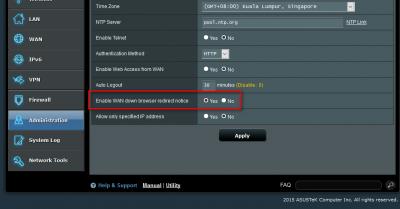
Since the discussion mentioned "whenever there's a connectivity issue", I think this particular "feature" below are doing the trick:

» Click to show Spoiler - click again to hide... «


The only different is, instead of "detailing the problem", mine was showing me a Microsoft page. doh.gif

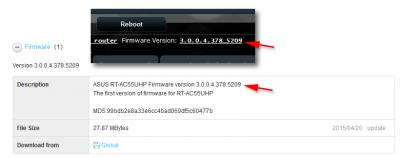
And, for your information, the router already pre-installed with the latest firmware, in fact, Asus only have 1 version of firmware at their support page:

» Click to show Spoiler - click again to hide... «


Thank you very much again because I've finally found out why is this happened to me. Please accept my worship. notworthy.gif

**************************************************************************************************
EDIT:
Another thing: One of the reason why I choose Asus router was because I saw this thread and is maintain by Asus people,
hoping that I can get support easier, but I only realized this is not the case... sweat.gif Luckily voncrane is so helpful and keep
helping around. thumbsup.gif


**************************************************************************************************

This post has been edited by G K Lai: Mar 3 2016, 11:56 PM

G K Lai
post Mar 4 2016, 12:35 AM

Enthusiast
*****
Senior Member
839 posts

Joined: Aug 2009


QUOTE(voncrane @ Mar 4 2016, 12:33 AM)
It's all good.. We learn everyday..  biggrin.gif  notworthy.gif
*
Haha... finally got a proper helpful info after a test reboot just now. icon_idea.gif

Attached Image
G K Lai
post May 5 2016, 09:48 PM

Enthusiast
*****
Senior Member
839 posts

Joined: Aug 2009


QUOTE(pitywoman @ May 5 2016, 07:35 PM)
DSL-N12U_C1

can u suggest to ur team, sometimes we wish to reconnect to new ip. we need to press reboot, we need to wait for a time, can it just disconnect the net and press connect. no need to reboot the device. it's much more convenient and faster.
*
I thought you can toggle this "switch" to ON/OFF and it will act like CONNECT/DISCONNECT? smile.gif

Attached Image


G K Lai
post Nov 13 2017, 12:19 AM

Enthusiast
*****
Senior Member
839 posts

Joined: Aug 2009


Hi all,

I am currently using RT-AC55UHP on Unifi, and my brother give me his 3 month old DSL-AC52U.
I can't seems to find any major difference in the functionality besides DSL-AC52U has 4 antennas.

Is it recommend to swap out my RT-AC55UHP to this 4 antennas DSL-AC52U?
Will I be losing any good functions, or gain something?

Thanks in advanced.
G K Lai
post Nov 13 2017, 12:50 PM

Enthusiast
*****
Senior Member
839 posts

Joined: Aug 2009


QUOTE(voncrane @ Nov 13 2017, 06:47 AM)
The major difference is that one is a router (Yours, meant for a Unifi config) and the other is a modem-router (his, ideally for a config like Streamyx). So while you could swap and use either one with Unifi, as standalone devices, the AC55UHP is better than the DSL-AC52U. Plus, It's a faster router, you also get SmartQoS, 2 USB ports (one of which is 3.0) and according to the Asus website, the RT-AC55UHP should serve a larger home better. Alternatively, if you've got a large home with dead/extremely weak wifi spots, then you could use both together for strong signals all over the house.

DSL-AC52U
RT-AC55UHP
*
Thank you voncrane, for the detailed explanation. This really helped me better understanding on both of these models.

Looks like I have no reason to swap the router at this time, but start to do my research on setting up the other one as "repeater", I don't have a large house, but do have blind spot in some bedroom.

Thank you again, voncrane for your reply. smile.gif
G K Lai
post Mar 17 2018, 03:28 AM

Enthusiast
*****
Senior Member
839 posts

Joined: Aug 2009


I don't know what was happened?
But today I only realized that I suddenly cannot login to my router setup page?!?! rclxub.gif
All the Wi-Fi and Internet settings are fine and still working properly.

I am 1000% sure my login credential are correct.

My router is RT-AC55UHP.

I know I can simply reset the router and do the setup again from scratch.
But before I am sure of why this happen, I don't dare to do it.
Just in case I still cannot login even after reset the router, then I will left with no Internet at all.

Can someone please help?

EDIT:
Previously, I've downloaded the official ASUS Router app to my phone and was working properly, and now it can't login to my router as well.
bangwall.gif


EDIT #2:
I decided to reset the router finally.
Re-configure everything from scratch and it's working normally again.
Still don't know why all these happened to my router?
bangwall.gif

This post has been edited by G K Lai: Mar 17 2018, 04:23 AM
G K Lai
post Mar 19 2018, 11:31 PM

Enthusiast
*****
Senior Member
839 posts

Joined: Aug 2009


QUOTE(ASUSmy @ Mar 19 2018, 04:42 PM)
Hi G K Lai,

You can also download the setting file from the router. You can easily upload back the setting in case anything happen on the router.

Try using changing the default user name and password for better security.

Thank you
*
Hi,

First of all, thank you for replying. thumbsup.gif

Yes, I always use custom user name and password, since the first screen of router interface always asks user to change password. rolleyes.gif

I don't know how to upload setting file (.CFG file) while I was unable to login to the router. laugh.gif
Maybe you mean always have the saved setting file handy and after reset the router, restore with the setting file? Yup! Good idea. thumbup.gif

Thank you again! icon_rolleyes.gif
G K Lai
post Dec 8 2018, 04:06 AM

Enthusiast
*****
Senior Member
839 posts

Joined: Aug 2009


Hi all.

My router is RT-AC55UHP with the latest firmware, recently switched from Unifi to Maxis.

I noticed I got disconnection problem everyday, although sometimes not in the middle of using.
Really wish to figure out what was going on?
If the router's problem or the ISP was causing this?

Here's a portion of router log file:

» Click to show Spoiler - click again to hide... «


Thank you in advanced. thumbsup.gif


G K Lai
post Dec 10 2018, 09:53 PM

Enthusiast
*****
Senior Member
839 posts

Joined: Aug 2009


QUOTE(ASUSmy @ Dec 10 2018, 10:24 AM)
Hi G K Lai,

From the log given, it seen like the router detected disconnection from the modem, is the DSL signal from the modem are okay when the problem happen?

Dec  8 02:54:16 pppd[445]: Serial link appears to be disconnected.

Thank you
*
Oh I see, thanks!

I did not aware and was not using the computer when the disconnect and re-connection happens, so I don't know how was the DSL signal at that time.

However, I just try to set PPP Echo Interval from the original 6, to 30, as Maxis provided router's default value, and no more disconnection for for the past 24 hours already. Don't know if it is by coincidence or this value actually have the effect. sweat.gif

Thank you again for your reply. notworthy.gif


Change to:
| Lo-Fi Version
0.0514sec    0.60    7 queries    GZIP Disabled
Time is now: 10th December 2025 - 11:07 PM