Welcome Guest ( Log In | Register )

Outline · [ Standard ] · Linear+

Home Networking ASUS Malaysia Networking User & Technical Support, Managed by ASUS Malaysia Representative

views
     
EdwinCodec
post Mar 16 2013, 07:11 PM

Anonymous
******
Senior Member
1,430 posts

Joined: Apr 2012
From: Malaysia


Hi AsusMy, I really can't stand the Asus N12u-B1 modem router ady. There's one thing that I don't understand. It's so sucky that whenever me and bro playing the same online game, one of us will lag off for sure and disconnect. Sometimes, the wifi can't be detectable. Any idea on what's happening? This is my warranty unit. The one before also got the same exact problem. Also, I'm not the only one who's facing the problem, my friend facing it as well. Thank you
EdwinCodec
post Mar 18 2013, 08:21 PM

Anonymous
******
Senior Member
1,430 posts

Joined: Apr 2012
From: Malaysia


QUOTE(ASUSmy @ Mar 18 2013, 10:03 AM)
Hi EdwinCodec,

May I know what is your current firmware version?

Thank you
*
Hey thanks for the reply. Using the latest one. 1.0.4.1
EdwinCodec
post Mar 19 2013, 11:52 AM

Anonymous
******
Senior Member
1,430 posts

Joined: Apr 2012
From: Malaysia


QUOTE(ASUSmy @ Mar 19 2013, 10:20 AM)
Hi EdwinCodec,

Need your help to update the firmware to latest with the following firmware. The version is 2.1.1.1.78.

http://support.asus.com/Download.aspx?SLan...1_VER211178.zip

See the problem still persist or not.

Thank you
*
I'm using this model. https://www.asus.com/Networking/DSLN12U_B1/

Not the one that u've posted sad.gif
EdwinCodec
post Mar 19 2013, 01:02 PM

Anonymous
******
Senior Member
1,430 posts

Joined: Apr 2012
From: Malaysia


QUOTE(ASUSmy @ Mar 19 2013, 12:34 PM)
Hi EdwinCodec,

Sorry for the wrong model provided  tongue.gif . It seen like the version that you have is the latest already.

Have you try do a factory reset to have a try? Because the latest version require you to do so after you updated the firmware.

Thank you
*
It's okay =). Yeah I did. I even got a RMA unit that comes with the latest firmware but the problem still occurs most of the time.
EdwinCodec
post Mar 19 2013, 01:09 PM

Anonymous
******
Senior Member
1,430 posts

Joined: Apr 2012
From: Malaysia


QUOTE(aneip @ Mar 19 2013, 01:08 PM)
Try with LAN connection. To pinpoint whether it's internet/routing/natting issue or wireless issue.
*
As mentioned. My pc is on LAN whereby my bro's is on Wireless. LAN seems to be fine. Only the Wireless causing the issue.
EdwinCodec
post Mar 24 2021, 01:16 AM

Anonymous
******
Senior Member
1,430 posts

Joined: Apr 2012
From: Malaysia


Hi guys, I've gotten a really weird issue. I have 2 AIMESH node tie to a main router. They are all AX55 and running on the same subnet and gateway, but I just could not ping some of the wireless devices (especially printers) from devices that are connected via Ethernet.

Update: Switching off smart-connect and splitting the Wireless SSID for 2.4/5ghz still doesn't work. My local machine can ping other wireless machines, but not wireless printers.

This post has been edited by EdwinCodec: Mar 24 2021, 11:31 AM
EdwinCodec
post Mar 24 2021, 05:11 PM

Anonymous
******
Senior Member
1,430 posts

Joined: Apr 2012
From: Malaysia


QUOTE(ASUSmy @ Mar 24 2021, 04:22 PM)
Hi ian90,

Is this happen to all the WiFi devices?

What is the connection strength between the Maxis router and the RT-AC59U V2?

Is the roaming assistance has been turn on on the RT-AC59U V2? If yes, try increase the value or disable it.

Thank you
*
Hi Asus MY,

Are you able to support my case on the earlier reply? Thank you so much
EdwinCodec
post Mar 25 2021, 09:52 AM

Anonymous
******
Senior Member
1,430 posts

Joined: Apr 2012
From: Malaysia


QUOTE(ASUSmy @ Mar 25 2021, 09:39 AM)
Hi EdwinCodec,

1) Can you update the firmware to the latest for all the RT-AX55.
2) Is your PC able to use the printer?
3) Is the printer connected to the node or the main router? If connected to node, can you try move the printer or off the node so that it is connected main router. Once done, try ping again.
4) If the printer are connected to the node, the PC from the same node able to ping the printer?
5) The router able to ping the printer?

Thank you
*
1) The firmaware is running on latest Version 3.0.0.4.386.41700 (Have not tried the one that released just yesterday)
2) All PC / Devices that are wireless connected are able to use the printer. My only LAN connected PC unable to ping nor use the printer.
3) The printer is connected to the main router.
5) Router able to ping printer with good latency. The main router is basically sitting in the same room with the printer.

Note: I have two wireless printers in different rooms. Oddly, My LAN connected PC could not ping neither. It's happening only on wireless printers as I have scaled down that it can pings to every wireless connected PCs.

Test 2: Lan to Lan devices that are connected to the main router is not ping-able as well.

Test 3: Router itself could not ping to LAN connected devices

This post has been edited by EdwinCodec: Mar 25 2021, 10:10 AM

EdwinCodec
post Mar 25 2021, 10:54 AM

Anonymous
******
Senior Member
1,430 posts

Joined: Apr 2012
From: Malaysia


QUOTE(ASUSmy @ Mar 25 2021, 10:22 AM)
Hi EdwinCodec.

Can you try the latest release firmware and test again?

Can I know PC that unable to ping are connected to which LAN port and what ISP you are using?

Thank you
*
I can conclude that this is a firmware issue. I have reset the router to factory setting after upgraded the latest firmware without any node attached. Yet, the ping from LAN connected PC to wireless printers just doesn't work even without AIMESH configured.

Appreciate that ASUS Malaysia can fix this ASAP. I'm running on Maxis Fibre. I have tried connecting to both LAN port 1 & 4 with two different devices. Both unable to ping each other as well, nor the router can ping both of them.

This post has been edited by EdwinCodec: Mar 25 2021, 10:59 AM
EdwinCodec
post Mar 25 2021, 12:58 PM

Anonymous
******
Senior Member
1,430 posts

Joined: Apr 2012
From: Malaysia


QUOTE(kkm @ Mar 25 2021, 11:26 AM)
Time to take it in for warranty claim...
*
Unfortunately, it has nothing to do with the hardware itself but software. I purchased 3 units of AX-55. All 3 are having the same issue after spending sometime resetting and swapping.

Funny thing is that they are all sitting under the same subnet and a simple network topology without any switches involved, it just couldn't get ping to any of the wireless printers nor pinging between Lan-to-Lan devices. Wireless-to-wireless are working perfectly.
EdwinCodec
post Mar 25 2021, 01:31 PM

Anonymous
******
Senior Member
1,430 posts

Joined: Apr 2012
From: Malaysia


QUOTE(ASUSmy @ Mar 25 2021, 01:17 PM)
Hi EdwinCodec,

Based on the Test 2 and 3, I tested on my RT-AX55 with the latest firmware there is no problem.

Test 2: Lan to Lan devices that are connected to the main router is not ping-able as well.
- I able to ping between my laptop and my PC which is connected by LAN.

Test 3: Router itself could not ping to LAN connected devices
- I able to ping the PC through the router GUI.

May I know is the ISP profile you selected is Maxis-Fibre?

Is there any devices or router connected to LAN port 3?

Thank you
*
Hi Asus team,

Thanks for the simulating the test.

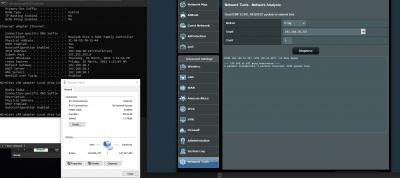
Are you on Maxis as well? If not, I'm suspecting that it has something to do with the ISP profiling that has messed up things up. Yes, I'm using Maxis-Fibre profile without "Special" as the modem provided is from TM.

I do not have IPTV. Thus, LAN port 3 is free. The test 2 & 3 were simulated with port 1 & 4.

This post has been edited by EdwinCodec: Mar 25 2021, 01:33 PM


Attached thumbnail(s)
Attached Image
EdwinCodec
post Mar 25 2021, 09:13 PM

Anonymous
******
Senior Member
1,430 posts

Joined: Apr 2012
From: Malaysia


QUOTE(ASUSmy @ Mar 25 2021, 01:53 PM)
Hi EdwinCodec,

My laptop and PC are connected LAN port 1 and 4, and I am able to ping from both the devices.

I have selected the Maxis Fibre profile also and it is okay.

From the image given by you I saw that you are using 2.5Gbps LAN port, have you try the normal 1Gbps LAN port?

Just to check, is there any VPN connection on your PC?

Thank you
*
Huh? It can't be. I have tested not on 1 unit, but 3 units. 3 units are facing the same issue.

My Mac is running on GBe LAN port and it's still the same. There's no VPN connection involved. Swapping it back to my AC1300UHP for the time being.

Solution:
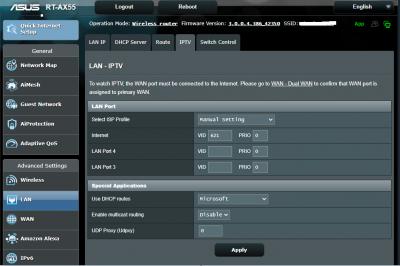
After hours of testing, finally found the solution. It was the maxis ISP profile that messed things up!

Using the manual setting as per below has resolved the problem.

This post has been edited by EdwinCodec: Mar 26 2021, 08:54 AM


Attached thumbnail(s)
Attached Image


Change to:
| Lo-Fi Version
0.1855sec    0.68    7 queries    GZIP Disabled
Time is now: 4th December 2025 - 04:16 AM