Outline ·
[ Standard ] ·
Linear+
Home Networking ASUS Malaysia Networking User & Technical Support, Managed by ASUS Malaysia Representative
|
Aoshi_88
|
 Apr 21 2014, 06:40 PM Apr 21 2014, 06:40 PM
|

|
I am attempting to find out if upgrading from the 3.0.0.4.246 firmware to the latest available on the Asus website 3.0.0.4.374 will cause me to lose the Unifi VPN settings.
Model: RT-N16
Can anyone advice?
Are you on the latest Asus firmware?
I intend to upgrade for security and stability purposes.
This post has been edited by Aoshi_88: Apr 21 2014, 06:41 PM
|
|
|
|
|
|
Aoshi_88
|
Apr 23 2014, 04:23 PM
|
|
|
QUOTE(ASUSmy @ Apr 22 2014, 11:14 AM) Hi Aoshi_88, The current newest firmware version for RT-N16 is 3.0.0.4.374.5517. And due to this and previous version add many new features, please press the reset button more than 5 seconds to reset the RT-N16 after firmware upgraded to prevent unexpected problem. You will need to manually redo all the setting even for the VPN. http://www.asus.com/my/Networking/RTN16/HelpDesk_Download/Thank you Okay... so I bricked the router but managed to recover it and it's now running the latest firmware. I quick-googled and seems like OKRLY is having some IPv6 issues. I too, am having this issue. See below for screencap of IPv6 config. Jan 1 08:00:25 syslog: module nf_conntrack_ipv6 not found in modules.dep Jan 1 08:00:35 rc_service: ipv6-up 325:notify_rc start_rdnssd Jan 1 08:00:35 syslog: module nf_conntrack_ipv6 not found in modules.dep 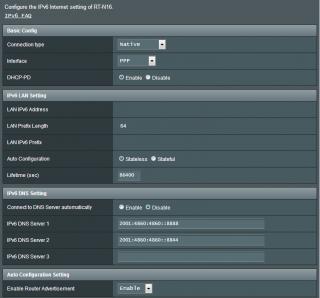
EDIT: Scratch that... seems like IPv6 is now working again.This post has been edited by Aoshi_88: Apr 23 2014, 04:25 PM |
|
|
|
|



 Quote
Quote

 0.0341sec
 0.69
0.69
 7 queries
 GZIP Disabled