

» Click to show Spoiler - click again to hide... «
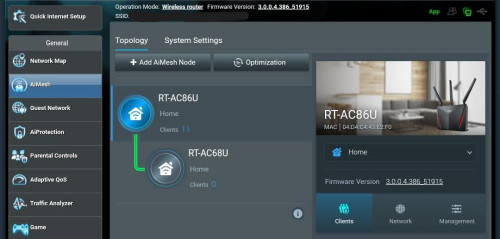
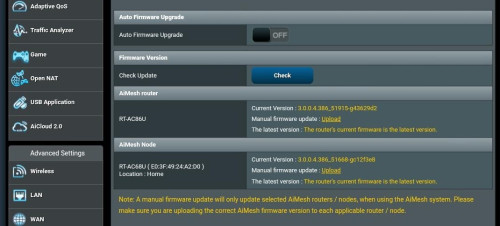
Got this issue when still using AC & also constantly disconnect from main node via ethernet backhaul
So i upgraded to AX & not having any issue since.
Home Networking ASUS Malaysia Networking User & Technical Support, Managed by ASUS Malaysia Representative
|
|
 Feb 6 2024, 02:44 AM Feb 6 2024, 02:44 AM
Return to original view | IPv6 | Post
#121
|
 
Senior Member
2,281 posts Joined: Feb 2012  
|
» Click to show Spoiler - click again to hide... « Got this issue when still using AC & also constantly disconnect from main node via ethernet backhaul So i upgraded to AX & not having any issue since. |
|
|
|
|
|
Feb 17 2024, 03:45 PM
Return to original view | IPv6 | Post
#122
|
|
Senior Member
2,281 posts Joined: Feb 2012
|
QUOTE(eclectice @ Feb 7 2024, 10:13 PM) Some too many ambiguities and considerations need to be addressed here concerning the broken antenna case: im pretty sure its human error. even so if the antenna has flaw, the warranty period was over. either way, the person wont be able to make a case.Cleaning: "Going to clean it" could imply anything from dusting to vigorous scrubbing, each potentially impacting the antenna differently. Broken: "Broken" doesn't clarify the extent of damage. Did it snap due to external pressure or crumble through simple handling? The force applied: Did the owner accidentally bump the antenna while cleaning, causing it to break? Or did the plastic simply degrade over time and give way during gentle handling? Intentionality: Did the owner knowingly subject the antenna to stress beyond its intended use? Or was the breakage an unforeseen consequence of normal cleaning activity? Product quality: Did the antenna's design or material contribute to its fragility, even under light pressure? Plastic part: While the ASUS rep mentioned "accident" and "misuse," focusing solely on cosmetic plastic might not reveal the full picture. I encourage the owner to provide pictures, clarify cleaning methods, and describe the break itself. Then, the ASUS rep on the forum, with knowledge of warranty policies and product details, can make an informed judgment of the case.  This post has been edited by firdausbhari: Feb 17 2024, 03:45 PM |
|
|
Mar 9 2024, 12:18 PM
Return to original view | IPv6 | Post
#123
|
|
Senior Member
2,281 posts Joined: Feb 2012
|
QUOTE(laihuhng @ Mar 8 2024, 07:47 PM) Tried 2nd guest network for both, problem goes away. Thanks, but why? i've been facing this issue since the day i bought AX4200 but the problem goes away with 2nd guest network. no idea why but as long as it works its all good.This post has been edited by firdausbhari: Mar 9 2024, 12:19 PM laihuhng liked this post
|
|
|
Mar 30 2024, 03:06 PM
Return to original view | IPv6 | Post
#124
|
|
Senior Member
2,281 posts Joined: Feb 2012
|
QUOTE(nickeleonidas @ Mar 30 2024, 08:19 AM) Hi Guys, Non wired LAN backhaul works best with tri band.I would like to have a recommendation to improve on wifi connectivity in 1st floor house. Currently my setup AX3000 as main router + RT-AC68U (mesh) , both router is on ground floor. Connecting to Unifi 1Gbps. Should i get a new AX4200 as main router , AX3000 as mesh or I should get a mesh Zenwifi to install at 1st floor ? Thank you Thus, XT8 or XT12 would be great choice for your scenario. |
|
|
Mar 31 2024, 05:20 PM
Return to original view | IPv6 | Post
#125
|
|
Senior Member
2,281 posts Joined: Feb 2012
|
QUOTE(nickeleonidas @ Mar 30 2024, 10:36 PM) I have decided with XD6, but its does improve the connectivity ( manage to get 300mbps for smart tv in 1st floor). However, I have a problem to connect on wireless backhaul, XD6 only works with ethernet backhaul? Had multiple times reset & update to latest firmware already. Any guide to solve for wireless backhaul ? I plan to install 1 unit of XD6 in the 1st floor. it should work with wireless backhaul. maybe others can guide u on the matter.my recommendation, pull ethernet cable. cover with pvc trunking. u will get full speed on each floor & zero issues for long run. |
|
|
Apr 20 2024, 02:30 PM
Return to original view | IPv6 | Post
#126
|
|
Senior Member
2,281 posts Joined: Feb 2012
|
QUOTE(ASUSmy @ Apr 15 2024, 05:50 PM) Hi fruitie, Hi ASUSmy . I've sent PM regarding DDNS reset.I believe the router already locked, no people are able to log in anymore. If you want to try, you can use the DDNS you have created or by ASUS Router APP. In the ASUS router APP, you can go to Router Information->About My Router->Look for DDNS. Thank you |
|
|
|
|
|
May 3 2024, 09:15 PM
Return to original view | IPv6 | Post
#127
|
|
Senior Member
2,281 posts Joined: Feb 2012
|
Dear ASUSmy, previously I had issue with Guest Network 1 which makes the main wifi connection unable to connect to internet eventho it is connected full bar. So i switch to Guest Network 2 & everything works fine.
However with the recent firmware upgrade, I am curious if this issue has been fix. Unfortunately, it hasn’t. The issue remains whenever Guest Network 1 is on. I even clean restore and issue still persist. Will this be fixed? cuz it seems like the problem still exist in every firmware even with the latest version. TUF Gaming AX4200 with latest firmware. This post has been edited by firdausbhari: May 3 2024, 09:18 PM |
|
|
May 3 2024, 10:09 PM
Return to original view | IPv6 | Post
#128
|
|
Senior Member
2,281 posts Joined: Feb 2012
|
QUOTE(blacktubi @ May 3 2024, 09:57 PM) Do you happen to use VLAN ISP like Maxis or Unifi? Im using Unifi |
|
|
May 6 2024, 12:58 PM
Return to original view | IPv6 | Post
#129
|
|
Senior Member
2,281 posts Joined: Feb 2012
|
QUOTE(ASUSmy @ May 6 2024, 10:42 AM) Hi firdausbhari, Will do. It's just that the option to use mesh node for guest network were not found in Guest 2 or 3.As per check with RD, they are still finding a solution for the Guest Network 1. I would suggest to use the Guest Network 2 or 3 at the meantime. Thank you |
|
|
May 8 2024, 10:23 AM
Return to original view | Post
#130
|
|
Senior Member
2,281 posts Joined: Feb 2012
|
QUOTE(zeronehza @ May 6 2024, 09:32 PM) im on asus tuf ax6000, IMO mediatek series router from Asus not on par compared to broadcomm chip. i personally use AX4200 and plan to sell it off....... im having hiccup or small issue always with this series.recently traffic analyzer didnt show accurate data. just updated to the latest firmware last night, also i did the factory reset. any idea ? zeronehza liked this post
|
|
|
May 8 2024, 02:59 PM
Return to original view | Post
#131
|
|
Senior Member
2,281 posts Joined: Feb 2012
|
QUOTE(blacktubi @ May 8 2024, 12:06 PM) If you use Apple devices, stick to Broadcom based devices. Thanks for the clarification. will take note on this.All Apple devices are using Broadcom WiFi chip and they tend to work the best with Broadcom routers. They work decently with other chip (Qualcomm, Mediatek, Realtek) but performance and stability is the best when combined with a Broadcom router. |
|
|
Oct 6 2024, 04:41 PM
Return to original view | Post
#132
|
|
Senior Member
2,281 posts Joined: Feb 2012
|
QUOTE(chinkw1 @ Oct 5 2024, 11:17 PM) Considering between RT-AX3000 vs. RT-AX86U. AX86U - 1.8ghz Quad-Core, 2.5g WAN/LAN port, 5ghz 4x4 upstream, 1GB RAMWhats the key difference between them? Bcoz RT-AC86U is much more expensive. AX3000 - 1.5ghz Tri-Core, 1g WAN/LAN port, 5ghz 2x2 upstream, 512MB RAM If using more than 800mbps plan, consider AX86U as it uses multigig 2.5G WAN port other than that, depends on your needs. note that AX86U has wider WiFi coverage chinkw1 liked this post
|
|
|
Oct 6 2024, 04:49 PM
Return to original view | Post
#133
|
|
Senior Member
2,281 posts Joined: Feb 2012
|
QUOTE(krofal @ Oct 2 2024, 05:20 PM) Hmm i have double checked for loose cable, so maybe optic cable like you say. I use to run wireless backhaul but changed to wired because I thought it would be more stable that way (one of the XT8 would randomly slow down to snail pace for strange reason). Now everything also problem, XT8 would randomly blink blue lights, and WAN would randomly drop and needs to power off to reconnect. Thanks for sharing anyway! IMHO ZenWifi series works best with its own. Mix & match sometimes is a hit or miss. |
|
|
|
|
|
Oct 18 2024, 12:31 PM
Return to original view | Post
#134
|
|
Senior Member
2,281 posts Joined: Feb 2012
|
QUOTE(kwai_83 @ Oct 8 2024, 09:26 PM) Dear Asus happened to me quite few times. browser refresh would solve the issue.I Jst log in my router do some setting found out the Interface at the mesh become like tht,try Edge and Chorme log in out also the same problem- Kindly advice .thank you |
|
|
Mar 10 2025, 11:19 AM
Return to original view | Post
#135
|
|
Senior Member
2,281 posts Joined: Feb 2012
|
it would be nice feature if USB3.0 ports on ASUS routers can be used for USB Ethernet 2.5gb adapter for WAN/LAN
This post has been edited by firdausbhari: Mar 10 2025, 11:20 AM |
|
|
Apr 7 2025, 06:49 PM
Return to original view | Post
#136
|
|
Senior Member
2,281 posts Joined: Feb 2012
|
QUOTE(sgpdsmss @ Apr 7 2025, 12:50 PM) ops....i just did upgrade yesterday morning to 3.0.0.4.388_33903.... from my previous experience, Broadcomm chipset provides more stability IMO. I've encountered several disconnection issue when using AX4200 back then.how to noticed internet connectivity issue ? router auto disconnected then reconnect ? how to read from router log ? thanks .... This post has been edited by firdausbhari: Apr 7 2025, 06:50 PM |
|
|
Apr 21 2025, 10:45 AM
Return to original view | Post
#137
|
|
Senior Member
2,281 posts Joined: Feb 2012
|
QUOTE(sgpdsmss @ Apr 20 2025, 09:19 PM) arr...regret to get ax4200 now ..not stable ,n problematic.... 2 options;a) you can resell and get another Broadcom models. will save you time and troubles in future. b) get another Broadcom models for main router. use AX4200 as mesh node. |
|
|
May 19 2025, 03:01 PM
Return to original view | Post
#138
|
|
Senior Member
2,281 posts Joined: Feb 2012
|
Hi all. Recently i bought a used AX55 for aimesh purpose. However, 5Ghz indicator were not on but still getting full signal. Tried restore and everything. same result. no 5Ghz lights on.
Is it safe to say that only the indicator broken without affecting performance? |
|
|
Nov 18 2025, 11:44 AM
Return to original view | Post
#139
|
|
Senior Member
2,281 posts Joined: Feb 2012
|
QUOTE(wma4790 @ Nov 16 2025, 10:13 PM) 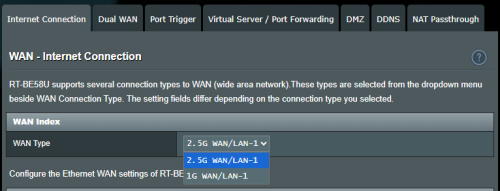 Saya ingat dulu nak guna port wan/lan 2.5gbps tu untuk Synology DS225+ sebab dia ada port 2.5gbps...  wma4790 liked this post
|
| Change to: |  0.0398sec 0.0398sec
 0.35 0.35
 7 queries 7 queries
 GZIP Disabled GZIP Disabled
Time is now: 6th December 2025 - 11:06 AM |
 Quote
Quote