

if i remember correctly, all component used in this Acer are reqular desktop type- HDD, dvd......, only thing is the mini ITX mobo.
PC Audio HTPC, anyone doing this?
PC Audio HTPC, anyone doing this?
|
|
 Mar 24 2007, 10:37 PM Mar 24 2007, 10:37 PM
Return to original view | Post
#81
|
 
Junior Member
316 posts Joined: Apr 2005 
|
if i remember correctly, all component used in this Acer are reqular desktop type- HDD, dvd......, only thing is the mini ITX mobo.
|
|
|
|
|
|
Apr 9 2007, 04:40 PM
Return to original view | Post
#82
|
|
Junior Member
316 posts Joined: Apr 2005
|
in any case that you guys wanna connect your HTPC (DVI) to your TV (HDMI), i have 5 pcs of generic [HDMI to DVI adaptors] to let go (to be used with dvi cable). Price is RM 50 each. add RM 10 (WM) for post laju.
1 good quality [HDMI to DVI] cable, 2m length, to let go as well at RM 120. add RM 10 (WM) for post laju. PM me if interested. This post has been edited by ryansia: Apr 14 2007, 02:49 PM |
|
|
Apr 20 2007, 04:49 PM
Return to original view | Post
#83
|
|
Junior Member
316 posts Joined: Apr 2005
|
QUOTE(ccschua @ Apr 16 2007, 08:49 PM) Well i put below the comments as mentioned by Ryan i have with HDMI DVI cable. Chua, mind to ask what decoder you used to play back DVD, since you are like me using fx 6200, i'm pretty happy with nvidia's purevideo.I am using htpc to connect to my LG 37" lcdtv by means of RGB cable. Recently i bought the DVI hdmi cable to try and play DVD 9 movies. Overall the difference as compared to RGB is not that great, and I am very disappointed with the output. The color is still not brilliant as compared to my SONY NS76H HDMI output. so i stick back to my RGB (since LG has 1 hdmi port) and quite happy with that, what to do! i suspect my graphics card may not be that good, i am using MSI 6200 AGP.  i do agree with you that the improvement with DVI compare with RGB is quite marginal in DVD playback. it definitely carries more water when you playback 1080 HD due to the higher bandwidth in DVI |
|
|
May 2 2007, 02:29 PM
Return to original view | Post
#84
|
|
Junior Member
316 posts Joined: Apr 2005
|
Hi All, help needed!!
i've Klite codec pack installed and it was flawless until i try .MP4 files. File type: .MP4, resolution : 640x480 captured by my Digicam it plays fine on Media Player Classic. if i play it by WMP11, it crops the video to 320x240!!! meaning large portion of the video is not shown but the center 320x240. check through the file properties in wmp11, saying its 320x240. I'm running Window Media Center and it has the same effect which is very annoying. please help! Added on May 9, 2007, 6:04 pmquite tempting to set up another HTPC with this board.... Built in HDMI Asus M2A-VM HDMI Review 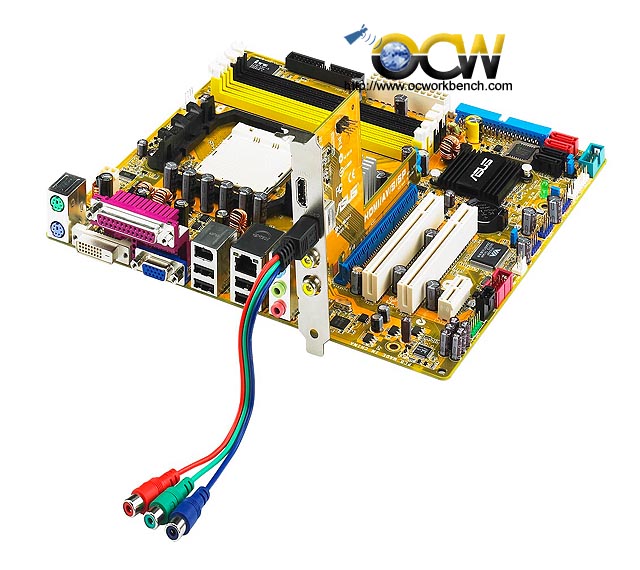 This post has been edited by ryansia: May 9 2007, 06:04 PM |
|
|
May 22 2007, 02:49 PM
Return to original view | Post
#85
|
|
Junior Member
316 posts Joined: Apr 2005
|
QUOTE(ccschua @ May 13 2007, 12:18 PM) I like the board too. that's perfect for hometheater. I ended up with intel 965OT, not bad though. I get good sound and graphics so so. isn't that if you assign album art to your collection then you will have thumbnail view? i used to use SageTV, it has quite nice interface on music cataloging. anyway, MCE really screw up on album/artist with ID3 tag..... either album not listed or album with unknown artist.... sighi have a question. I like to create media center especially on music album. currently i am using media portal. i notice some cyber cafe can do this : create music album arranged in photo album. u just clik on the album and it will play the music. e.g. if u click on jacky cheung (with photo/thumnnail , all past album) and it is arranged very nicely. can i know how they create it. my mediaportal can not allowed album style music . QUOTE(ccschua @ May 14 2007, 09:08 PM) why dont u consider antec fusion / antec nsk 2400. nice casing, i am using it. very solid feeling (put my heavy lcd monitor on op of it) and very quiet. how much did you pay for it and where? is the fusion come with VFD and remote or only the plain version?no regret. |
|
|
Jul 11 2007, 09:19 PM
Return to original view | Post
#86
|
|
Junior Member
316 posts Joined: Apr 2005
|
QUOTE(intothefantasy @ Jul 11 2007, 08:58 PM) sifu sifu sekalian....can winxp use for htcp built or do i need another type of winxp? currently using winxp pro....btw...can i know how u guys connect ur htcp to the lcd monitor? i wanted to buy the new samsung 40inc R8....how should i connect the htpc to the lcd? you need the windows xp media center edition. it's OS. alternative way is to install 3rd party PVR / media center software ie SageTv, Beyond TV, media portal etc.and can i still watch astro with htcp and record? can someone explain for me wat is windows xp media center edition? is it a OS or a program to install???it seems i saw got remote control.... to connect your HTPC to R8, either VGA cable (analog) or DVI to HDMI cable (digital). you need TV card to record astro ie hauppauge PVR 150 MCE. it come's with MCE remote and receiver. |
|
|
|
|
|
Jul 12 2007, 10:13 AM
Return to original view | Post
#87
|
|
Junior Member
316 posts Joined: Apr 2005
|
clear like monitor, depend on your definationand quality of the source media. as for Windows XP MCE, i'm not sure if it is being sold on retail. i'm sure ahem is there or look for it via BT
|
|
|
Jul 17 2007, 09:13 AM
Return to original view | Post
#88
|
|
Junior Member
316 posts Joined: Apr 2005
|
sure, but you won't benefit certain features specifically only work within nVidia ships.
what 690G mobo did u buy? with HDMI? pls report in with the review with onboard HDMI mobo..... |
|
|
Jul 18 2007, 03:49 PM
Return to original view | Post
#89
|
|
Junior Member
316 posts Joined: Apr 2005
|
as for HD playback, my p4 northwood 3.0 with the cheapo nVidia 6200 are able to run fine..... kekeekek
i'm still on XP MCE, lazy to explore to vista ultimate. if more vista users report in and it is running without major issues then i might consider to move on..... someone is asking spdif optical out..... why dun use the coaxial instead? my mobo comes with only the spdif header w/o bracket. i diy to have the coaxial out and it's working perfectly. what you need to do is to get the pinout of the spdif, then connect the data pin to the center of the female RCA, and the ground to the outer of the female RCA....voila u got the coaxial out!! anyone wanna swap HD titles???? i've few titles in wmv, ts, mkv....... thos files are too huge and takes hell lot of time to download.... exchanging seems to be a better idea...... hope the mods don't read this...kekekeke |
|
|
Aug 20 2007, 11:17 AM
Return to original view | Post
#90
|
|
Junior Member
316 posts Joined: Apr 2005
|
accs,
Bro, where did you get Logitech Harmony 525 Universal remote for RM207??? TIA |
|
|
Jul 14 2008, 02:56 PM
Return to original view | Post
#91
|
|
Junior Member
316 posts Joined: Apr 2005
|
QUOTE(Pucca @ Jul 12 2008, 11:30 AM) anyone having issue to load Astro's movie guide into Vista ? not sure about Vista as i'm still running XP MCE.lately the xmltv epg seems not to be able to download from Astro webby.... as usual, the setup is TVxb + Blade runner..... seems like the astro link in the TVxB.ini file is dead. anyone here have the updated ini file? |
|
|
Jul 17 2008, 01:39 PM
Return to original view | Post
#92
|
|
Junior Member
316 posts Joined: Apr 2005
|
QUOTE(mADmAN @ Jul 17 2008, 12:33 PM)  the mediaportal looks very interesting. will have to read up on that... the mediaportal looks very interesting. will have to read up on that...coz currently my htpc is just running on XP. http://sagetv.com/ http://forums.sagetv.com/forums/ |
|
|
Aug 8 2008, 10:18 AM
Return to original view | Post
#93
|
|
Junior Member
316 posts Joined: Apr 2005
|
QUOTE(Moonguy @ Jul 30 2008, 11:18 PM) I'm having the same problem too, looking for the updated ini file. Tried dropping a line to terrencey, hopefully he can help out. Anyone else have any idea on getting epg running? Too spolied without it! updated TVxb ini for astro EPGhttp://www.chengchuan.org/tmp/TVxb.ini thanks for cckhaw FYI, program description ain't working |
|
|
|
|
|
Aug 8 2008, 10:21 AM
Return to original view | Post
#94
|
|
Junior Member
316 posts Joined: Apr 2005
|
not sure if it has been posted...
updated TVxb ini for astro EPG http://www.chengchuan.org/tmp/TVxb.ini thanks cckhaw FYI, program description ain't working |
|
|
Jan 5 2009, 04:05 PM
Return to original view | Post
#95
|
|
Junior Member
316 posts Joined: Apr 2005
|
QUOTE(vey99 @ Jan 5 2009, 01:06 PM) I tested my rig using Vista but the MCE remote doesnt work i am. it works without any tweaks. p/s, it's not connected to astro, only antena. Installed latest drivers also not work. Anyone using Vista and a MCE remote (hauppage)? |
|
|
Jan 7 2009, 09:38 AM
Return to original view | Post
#96
|
|
Junior Member
316 posts Joined: Apr 2005
|
QUOTE(vey99 @ Jan 6 2009, 04:35 PM) I think I'd try to reinstall vista (diff version). Getting a bit bored with XP MCE (but still love it) my XP MCE is still running faithfully and same as you, getting bored and i built new rig for Vista ultimate (ahem....) 2 weeks ago everything fine but i have issues with EPG. let me know which version of ultimate works perfectly. |
|
|
Mar 17 2009, 11:19 AM
Return to original view | Post
#97
|
|
Junior Member
316 posts Joined: Apr 2005
|
i think your tv overscan in HDMI and hence can't get pixel to pixel.
i'm assuming your pc is running 1920x1080. go to the tv menu to find if there is PC mode (DVI mode) in HDMI in order to disable overscan in HDMI. i have a old HDready LG LCD, such setting exist. |
|
Topic ClosedOptions
|
| Change to: |  0.0504sec 0.0504sec
 0.54 0.54
 7 queries 7 queries
 GZIP Disabled GZIP Disabled
Time is now: 3rd December 2025 - 09:14 PM |
 Quote
Quote