

QUOTE(kuroneko0509 @ Dec 30 2012, 04:18 PM)
got la.... i even listed it on 1st page 

ouh... silly me... haha 
Lenovo IdeaPad Y Series Thread v2, When Y480/580 meet Y400/500
|
|
 Dec 31 2012, 02:01 AM Dec 31 2012, 02:01 AM
Return to original view | Post
#41
|
 
Senior Member
977 posts Joined: Jan 2009 From: In the middle...  
|
QUOTE(kuroneko0509 @ Dec 30 2012, 04:18 PM) got la.... i even listed it on 1st page ouh... silly me... haha |
|
|
|
|
|
Jan 1 2013, 04:00 AM
Return to original view | Post
#42
|
|
Senior Member
977 posts Joined: Jan 2009 From: In the middle...
|
QUOTE(chopin @ Dec 31 2012, 02:27 PM) hi, just curious, is win8 made for touch screen devices? if using mouse on y480/580, would the user experience be good? Some people dont like it... some people like it just fine... most people that I know in the end get used to the change and like it more than Win7... but some don't like it and revert back to Win7 after 30mins trying it...So, I would say try it yourself to see if you like it or not... maybe can get release preview to try for free... the ISO still available to use... not sure if it's still legal? so I'm not going to paste the link here, but google around you'll find it... |
|
|
Jan 1 2013, 12:39 PM
Return to original view | Post
#43
|
|
Senior Member
977 posts Joined: Jan 2009 From: In the middle...
|
QUOTE(guilt79 @ Jan 1 2013, 10:46 AM) In my opinion, some people don't like it because it is completely different than previous windows 7 Yup, it's completely different... while it's intuitive with touch screen, traditional input will have some learning curve... I've tested Win8 since consumer preview so it's not that alien for me (to be frank, I still stutter and struggle for certain functions) but for those who just getting to know it, I can understand the frustration.Well... Maybe you can still use the desktop function but difference is quite huge. I found myself trying to understand the functions because in laptop is not as easy to use compared to tablet. Also, some of the features, need time to adjust. I'm currently logged into UK store, dunno why.  IE took me some time understand the usage like type the address because its hidden, extra tab, in private, etc. only problem now is how to get to gutteruncensored. Desktop function is only to:- 1. maintain compatibility with older Windows apps 2. File Explorer And the worst thing is, the search function is actually degraded from previous iteration Windows  (and the previous is already bad). Good thing it boots up fast, and I actually like the Start screen better now because it leave my desktop clean of icons and I dont have to struggle looking for my games in cluttered Start Menu (and the previous is already bad). Good thing it boots up fast, and I actually like the Start screen better now because it leave my desktop clean of icons and I dont have to struggle looking for my games in cluttered Start Menu  QUOTE(kujiro @ Jan 1 2013, 11:34 AM) Max CPU temp 80ish - 90. When the CPU drop to 2.4ghz, temp around 70ish. GPU temp ard 50ish. Is this consider as throttling issue? Anyway to turn on thee turbo boost function? I'm not 100% sure but I believe if there's an option for that, it will be in the BIOS menu... |
|
|
Jan 1 2013, 01:51 PM
Return to original view | Post
#44
|
|
Senior Member
977 posts Joined: Jan 2009 From: In the middle...
|
QUOTE(izaydi @ Jan 1 2013, 01:36 PM) can u guys recommend best cooling pad for y400? Few posts above probably answered your question...Those who has moved the HDD to ODD location, what's the clearance we have for that area? I'm trying to see over on amazon or ebay if I can get cheaper, but I notice there's two size (12.7mm and 9.5mm) which one will fit Y580 ODD space? |
|
|
Jan 2 2013, 01:29 AM
Return to original view | Post
#45
|
|
Senior Member
977 posts Joined: Jan 2009 From: In the middle...
|
QUOTE(guilt79 @ Jan 1 2013, 07:31 PM)  The One Key Theater is no more when installed Win 8? QUOTE(tennytyy @ Jan 1 2013, 08:05 PM) Have you installed the driver? I've checked Lenovo website, no one touch support yet... IINM they mentioned you will lost the support the keys once you upgrade to Win8 for Y500...You can still use it in Win8 but there will no on screen notification when you switch between modes each time. but, it should be supported now since it's already included in official spec right?... anybody knows?? |
|
|
Jan 2 2013, 11:27 PM
Return to original view | Post
#46
|
|
Senior Member
977 posts Joined: Jan 2009 From: In the middle...
|
QUOTE(kujiro @ Jan 2 2013, 02:27 PM) It seems like the lenovo had set to throttle down the CPU speed to 2.4ghz after reaching 90C, attached is the testing using throttlestop to maintain the speed after 90C and max the CPU temp reach 98C without cooler. I believe the throttle temp comes from the CPU itself... not Lenovo...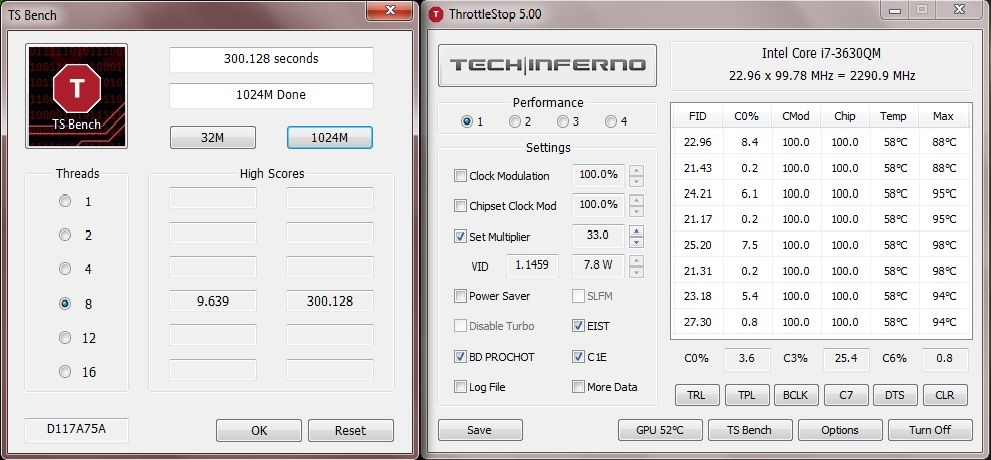 QUOTE(Stefan How @ Jan 2 2013, 02:55 PM)  Anyone have problem installing the latest Nvidia driver 310.70? It seems im having trouble updating it,i tried clean install and typical too..still no luck..=( any idea? Anyone have problem installing the latest Nvidia driver 310.70? It seems im having trouble updating it,i tried clean install and typical too..still no luck..=( any idea? |
|
|
|
|
|
Jan 3 2013, 06:30 AM
Return to original view | Post
#47
|
|
Senior Member
977 posts Joined: Jan 2009 From: In the middle...
|
QUOTE(unclewebb @ Jan 3 2013, 05:53 AM) http://ark.intel.com/products/71459/Intel-...3_40-GHz?q=3630 yeah, you're right... it's from Lenovo... The Intel specified thermal throttling temperature for a Core i7-3630QM is 105C. Any throttling before the CPU reaches this temperature has nothing to do with Intel. 98C is a high temperature but it is still within the Intel spec. Make sure the ThrottleStop Set Multiplier is set to Turbo to get maximum performance out of your CPU.  after reading here and there, the limit looks like can be adjusted from BIOS... probably already hardcoded by Lenovo? after reading here and there, the limit looks like can be adjusted from BIOS... probably already hardcoded by Lenovo?and this suddenly reminds me why my BF3 crashed, I remembers the temp is more than 100'C (104'C iinm) and now I wonder how come BF3 used a lot of CPU resources... |
|
|
Jan 4 2013, 11:43 PM
Return to original view | Post
#48
|
|
Senior Member
977 posts Joined: Jan 2009 From: In the middle...
|
QUOTE(sharp903sh finder @ Jan 4 2013, 05:38 PM) what is this function called wen i slide de touchpad wit four fingers to left or right and a giant notes show up?  is der any way to disable it? QUOTE(sharp903sh finder @ Jan 4 2013, 08:04 PM) ok 3 fingers swipe and 4 fingers swipe. You can disable them in touchpad settings. so what is this useless function name is??so i can uninstall it also  QUOTE(guilt79 @ Jan 4 2013, 10:19 PM) I need help. one touch recovery > reset to factory settings I think I did not do a clean installation. Recently, it freeze when I shut it down. How to do clean installation? OR insert windows installation disc > reformat hdd > install windows I'm dead worried about the temperature now... idling 52'C, playing 720p vid can reach 70'C... I think something is wrong with the CPU heat transfer This post has been edited by mrl: Jan 5 2013, 12:11 AM |
|
|
Jan 5 2013, 12:06 PM
Return to original view | Post
#49
|
|
Senior Member
977 posts Joined: Jan 2009 From: In the middle...
|
QUOTE(guilt79 @ Jan 5 2013, 10:41 AM) No installation disc wor. Use one key recovery then, and reset to factory settings... Refer to your manual, coz I dont have detail steps on that...Preloaded with Win 7HB. Reset? But if you want real clean install as in reformat everything and install without even lenovo apps, you can download ISO from Microsoft using your serial key on the COA attached at the bottom of your laptop... |
|
|
Jan 6 2013, 03:21 PM
Return to original view | Post
#50
|
|
Senior Member
977 posts Joined: Jan 2009 From: In the middle...
|
QUOTE(kuroneko0509 @ Jan 6 2013, 01:23 PM) well... Y580 is multimedia laptop, not gaming laptop well, I'm willling to call this as gaming laptop unofficially since Razer Blade has the similar spec (same CPU + GPU....) however, Lenovo US coined Y580 as Powerful Gaming Laptop PC... and I'm not kidding... http://www.lenovo.com/products/us/laptop/i.../y-series/y580/ |
|
|
Jan 6 2013, 03:42 PM
Return to original view | Post
#51
|
|
Senior Member
977 posts Joined: Jan 2009 From: In the middle...
|
QUOTE(kuroneko0509 @ Jan 6 2013, 03:31 PM) oooo.... errrrr.... I just checked Lenovo Malaysia, they use the same page as the US, same page title as well... Powerful Gaming Laptop PC...wonder why Lenovo Malaysia stick with multimedia laptop isit bcos we more spec hunter is because my location? or they really changed it recently? I think I do remember they use different page before... |
|
|
Jan 6 2013, 07:29 PM
Return to original view | Post
#52
|
|
Senior Member
977 posts Joined: Jan 2009 From: In the middle...
|
QUOTE(izaydi @ Jan 6 2013, 07:08 PM) u sure got sli problem?never heard that problem for y400 and y500 I do not think he meant exactly y400/y500 specific, but SLI in general... not all game came out with SLI ready upon release and sometimes perform worse than single card... some people find this as turn off factor coz they're lazy to update the driver... of course if you are willing to tolerate that (which for me it's tolerable), there's nothing wrong with SLI... unless he meant something else.... |
|
|
Jan 8 2013, 11:21 AM
Return to original view | Post
#53
|
|
Senior Member
977 posts Joined: Jan 2009 From: In the middle...
|
QUOTE(tidus88 @ Jan 8 2013, 10:05 AM) I updated to the latest Nvidia driver. what kind of bug?Dota 2: The V-sync flicking bug had been solved. Still got some bug when typing in game. Anyone has same problem like me? is it exclusive to DOTA 2? |
|
|
|
|
|
Jan 9 2013, 01:06 PM
Return to original view | Post
#54
|
|
Senior Member
977 posts Joined: Jan 2009 From: In the middle...
|
QUOTE(SELRYC @ Jan 8 2013, 11:42 AM) Just tested my Y580 with the bottom cover removed and put on the cooler. What's your ambient temperature?HDD idle 39c. GPU idle 42c. CPU idle 42-50c. When playing games (tested with World of Tanks on High settings) HDD load 44c. GPU load 61c. CPU load 58-61c. Well....not bad,hmmm... CPU under load 61'C max is very very very very very very attractive... I still have 90'C++ in 20'C room... if it can reduce that much, I'm willing to try... |
|
|
Jan 9 2013, 04:50 PM
Return to original view | Post
#55
|
|
Senior Member
977 posts Joined: Jan 2009 From: In the middle...
|
QUOTE(JohnnyBoy92 @ Jan 9 2013, 04:13 PM) look at the catalogue here I dont know if this is true or not, but the difference is one is intended for different region?http://forum.lowyat.net/topic/1384202 i pm the seller but he said both same spec. Lenovo Malaysia listed 5934-9366 as their unit. Lenovo US listed 5936-0242 and 5936-0241 Spec wise, totally similar except for the HDD... |
|
|
Jan 10 2013, 02:56 AM
Return to original view | Post
#56
|
|
Senior Member
977 posts Joined: Jan 2009 From: In the middle...
|
QUOTE(SELRYC @ Jan 9 2013, 09:00 PM) In a 20c room? wow mine was hotter around 28c when I tested this. The way I position the fans is vital for the efficient cooling (2 big fans in diagonal,2 small fans opposite, didn't cover the the laptop's own fan) I put the big fan directly on the HDD, 2nd big fan directly near the laptop fan and covered the upper HDD whereas the 2 small fans cover the GPU and CPU directly. Even when I switch off the cooler the whole temperature just rose around 2-5c. maybe I should try... if the temp still not dropping then can confirm my thermal paste needs replacement then... nowadays I'm freezing in my own apartment, room temp 25'C can make the laptop goes close to 100'C... if everyday BF3, probably it'll be dead before it's time... |
|
|
Jan 10 2013, 02:13 PM
Return to original view | Post
#57
|
|
Senior Member
977 posts Joined: Jan 2009 From: In the middle...
|
QUOTE(bboycc @ Jan 10 2013, 12:27 PM) i never heard before windows xp windows 7 windows vista need to "clean install" I used to do upgrade from XP to Vista, Vista to 7...Only windows 8 start to become "dirty" and need "clean install". and every single time I do that, it's really really really dirty... a lot of incompatible software that it's easier to clean it up by formatting rather than fixing one by one... and as far as I can remember, win7 to win8 upgrade is the dirtiest of all... |
|
|
Jan 10 2013, 02:55 PM
Return to original view | Post
#58
|
|
Senior Member
977 posts Joined: Jan 2009 From: In the middle...
|
QUOTE(Stefan How @ Jan 10 2013, 02:19 PM) Y480 user's,well i kinda confuse which part is those component..In this pic is my y480 been partially take apart cover. The bottom right corner is ram,wireless card at the bottom left as i know. The upper left,middle (is it HDD?) and right side..i cant be sure what component is it. Any idea? middle left is optical disk drive, middle is HDD, right side is vent, CPU is under it... GPU is on the top left... IINM...https://www.dropbox.com/s/5y3aknb50gttqnb/IMAG0679.jpg |
|
|
Jan 11 2013, 01:53 AM
Return to original view | Post
#59
|
|
Senior Member
977 posts Joined: Jan 2009 From: In the middle...
|
QUOTE(soundworks @ Jan 10 2013, 06:05 PM) Will the windows 8 be able to support games like gta Iv, bf3, cod and sims ? I dont see any problem at all, unless we're talking about jack-sparrow edition, then there's no guarantee...original legitimate copies, I've been able to run as old as SimCity 4 without problems... |
|
|
Jan 11 2013, 02:00 PM
Return to original view | Post
#60
|
|
Senior Member
977 posts Joined: Jan 2009 From: In the middle...
|
QUOTE(arielpp @ Jan 11 2013, 01:47 PM) Lenovo y580 what's the version of the driver you installed?i7,8gb ram Nvidia GTX660 juz bought the machine 3 days ago,experiencing this kindda probs really irritating. install far cry 3 only for now, sometime the game freeze...have to end task all the time... and the graphic also like there are flashing pixel randomly?artifacts problem? how to solve this? already update my nvidia FarCry3 jack sparrow or original? Only FarCry3? try another games as well... |
|
Topic ClosedOptions
|
| Change to: |  0.0202sec 0.0202sec
 0.28 0.28
 7 queries 7 queries
 GZIP Disabled GZIP Disabled
Time is now: 3rd December 2025 - 01:36 AM |
 Quote
Quote