Welcome Guest ( Log In | Register )

Bump Topic Topic Closed RSS Feed
9 Pages < 1 2 3 4 > » Bottom

Outline · [ Standard ] · Linear+

 Lenovo IdeaPad Y Series Thread v2, When Y480/580 meet Y400/500

views
     
sss2sssss
post Dec 10 2012, 01:03 AM

I'm Abra
******
Senior Member
1,329 posts

Joined: May 2008
QUOTE(Jet23sky @ Dec 10 2012, 01:01 AM)
ahh... my bad.... one thing i wanna ask since you already mentioned. Does the quality of 1366x768 same as 1080p? Since the screen size is just 15 inches. I don't think it will make any diff, except for watching HD movie of course.
I have to agree on this. Actually most of the games do have problem with SLI, and requires times for Nvidia to release the patches. I maybe just get y580m and get 670 card for my desktop. Much efficiency i think....
*
1080p is 1920x1080.....
well in gaming it just screen getting bigger since got more pixel....
sss2sssss
post Dec 10 2012, 01:16 AM

I'm Abra
******
Senior Member
1,329 posts

Joined: May 2008
QUOTE(kuroneko0509 @ Dec 10 2012, 01:15 AM)
well, for me, it is a bit warm when playing games, but i don't think it that severe in my opinion
*
My Y480 got a bit warm when I'm gaming those heavy game
Coz I'm setting to unless it's full power... laugh.gif
sss2sssss
post Dec 10 2012, 01:19 AM

I'm Abra
******
Senior Member
1,329 posts

Joined: May 2008
QUOTE(Jet23sky @ Dec 10 2012, 01:18 AM)
Hmm.. Okk.. I will go have a look at these 2 models, y580 and y500. I might just getting a decent graphic card as I'm working, and won't spend so much time on gaming laptop, but at least it can be played at a playable level.
*
Well GT650M can push all game to highest possible setting(except Far Cry 3 which only can all high but not extra or ultra) in 1366x768 resolution
sss2sssss
post Dec 10 2012, 03:49 PM

I'm Abra
******
Senior Member
1,329 posts

Joined: May 2008
QUOTE(FauxHawk @ Dec 10 2012, 03:46 PM)
Sent my laptop to the service center. Need wait 2 weeks >.<

2 days old laptop already so mafan >.<
*
U are unlucky ppl well.... laugh.gif


Added on December 10, 2012, 3:51 pmU go which company in PC fair to buy ur Y580?

This post has been edited by sss2sssss: Dec 10 2012, 03:51 PM
sss2sssss
post Dec 10 2012, 04:11 PM

I'm Abra
******
Senior Member
1,329 posts

Joined: May 2008
BTW anyone can intro me for video converter which support NVIDIA CUDA-accelerated?


Added on December 10, 2012, 4:13 pmI dun mine free or paid version, as I will find for crxxk one... laugh.gif

This post has been edited by sss2sssss: Dec 10 2012, 04:13 PM
sss2sssss
post Dec 10 2012, 04:22 PM

I'm Abra
******
Senior Member
1,329 posts

Joined: May 2008
QUOTE(xyz_cityhunter @ Dec 10 2012, 04:19 PM)
I'll try it...
Coz the Freemake Video Converter seems like not so powerful.... laugh.gif


Added on December 10, 2012, 4:39 pmCrashing....
Revert back to use Freemake video converter...

This post has been edited by sss2sssss: Dec 10 2012, 04:39 PM
sss2sssss
post Dec 10 2012, 05:01 PM

I'm Abra
******
Senior Member
1,329 posts

Joined: May 2008
QUOTE(FauxHawk @ Dec 10 2012, 04:50 PM)
The Lenovo exclusive store, based in Mid Valley
*
Well I got ask them some question when I'm still staying pj and frequently go mid valley that period, they seems like not so smart..... laugh.gif

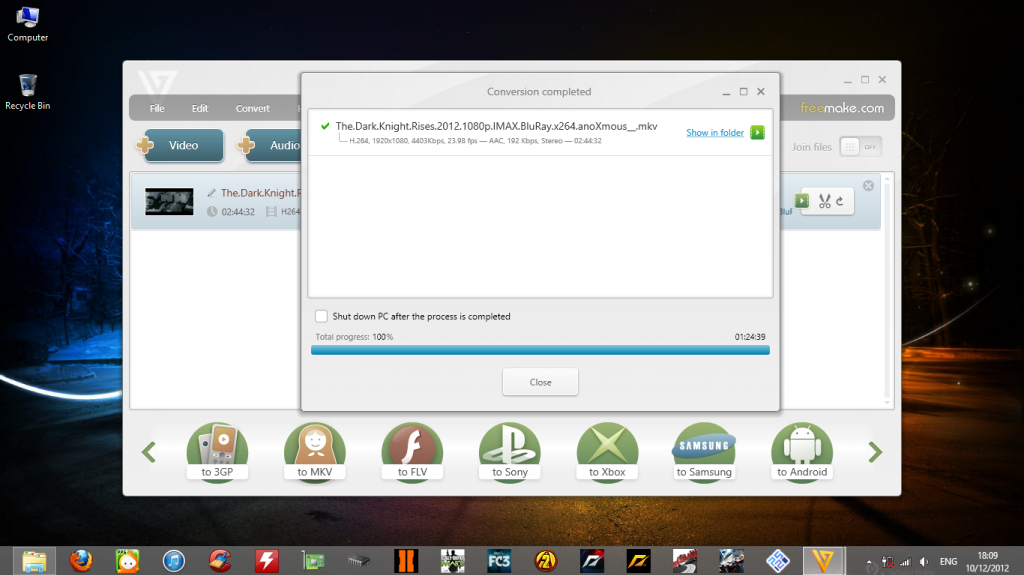
Anyway just now regarding for slow convert speed for freemake video converter, I found that I let it choose for auto, now I set to only cuda acceleration and now freaking fast, 2 and half hours 1080p .mp4 video to same source setting mkv file only use approx 100 min(but i think will faster than that time) to complete
sss2sssss
post Dec 10 2012, 05:45 PM

I'm Abra
******
Senior Member
1,329 posts

Joined: May 2008
QUOTE(XionCity @ Dec 10 2012, 05:40 PM)
I always prefer a single card GPU over a dual card GPU (CFX/SLI)...cause Dual card GPU tend to hv incompatible issue for lots of games...
and rating between GT with GTX is alot different...cannot compare with GT650M and GTX660M, even GT650M SLI, some performance for certain game won't be there...
Glad that I got my Y580, happy user till now...not to say, the 1st user here with SSD upgrade biggrin.gif
*
Well single GT650M GDDR5 and single GTX660M not so much different
Only 100MHz different well..... lol
sss2sssss
post Dec 10 2012, 06:11 PM

I'm Abra
******
Senior Member
1,329 posts

Joined: May 2008
Not bad while convert video by using CUDA-acceleration... thumbup.gif
user posted image
sss2sssss
post Dec 10 2012, 07:51 PM

I'm Abra
******
Senior Member
1,329 posts

Joined: May 2008
QUOTE(XionCity @ Dec 10 2012, 07:49 PM)
well, this might do it...comparison of GT650M and GTX660M....
http://www.notebookcheck.net/NVIDIA-GeForc...0M.71887.0.html
http://www.notebookcheck.net/NVIDIA-GeForc...0M.71859.0.html

I won't compare them with GT650M SLI because not fair for single vs dual GPU
http://www.notebookcheck.net/NVIDIA-GeForc...LI.84953.0.html
*
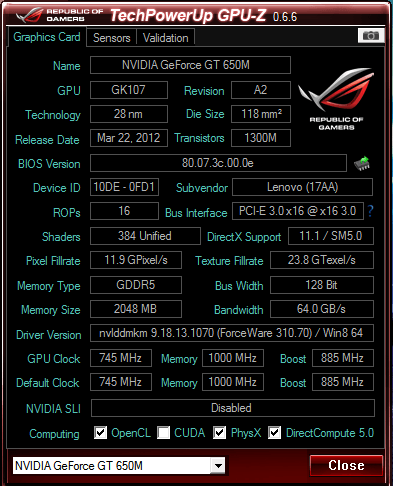
Well the infomation in the GT650M not so true, they show only the DDR3 variants only...


Added on December 10, 2012, 7:53 pmWell I post my GT650M GPU-Z screenshot...
user posted image

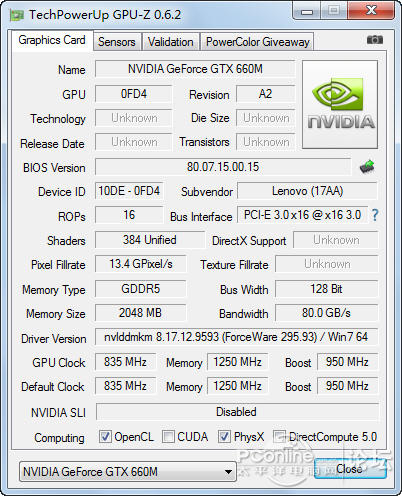
And the GTX660M
user posted image
These two card performance is very close, what GTX660M can do GT650M also can do, just approx 5fps drop if it's in real life

This post has been edited by sss2sssss: Dec 10 2012, 07:55 PM
sss2sssss
post Dec 10 2012, 08:21 PM

I'm Abra
******
Senior Member
1,329 posts

Joined: May 2008
QUOTE(tennytyy @ Dec 10 2012, 08:16 PM)
Actually has a difference, 660M as a GTX grade Graphic Card can support TXAA aliasing techs which a GT650M don't support it at all
*
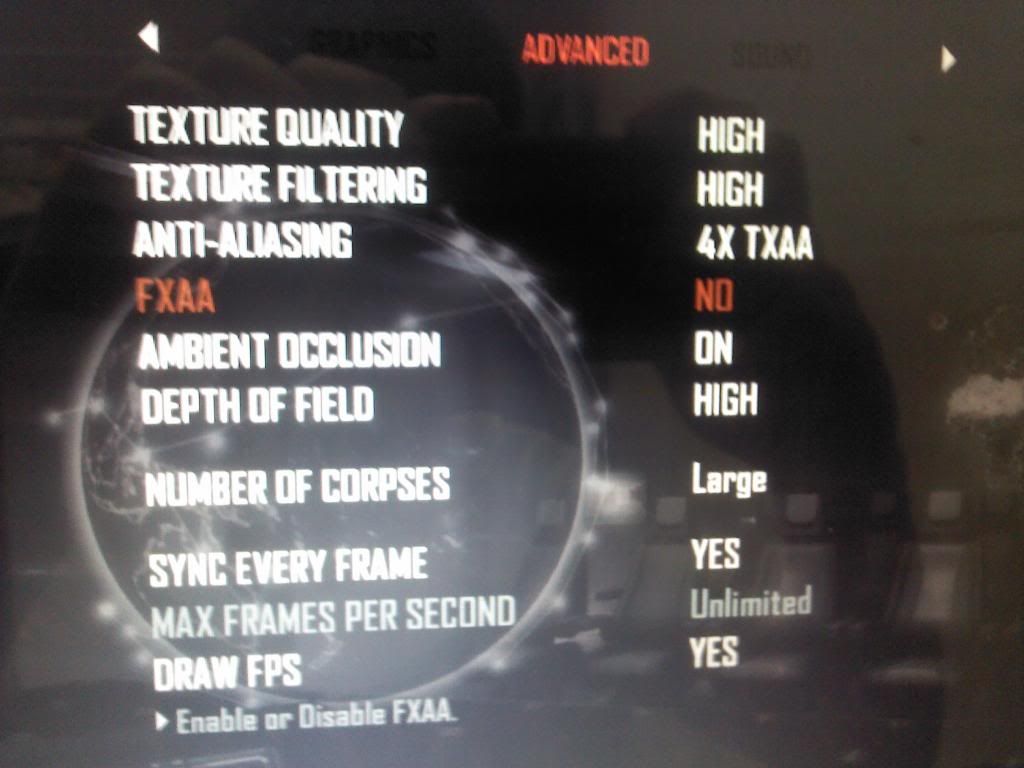
Well GT650M can also support TXAA.... laugh.gif
My Black Ops II currently using 4xTXAA
sss2sssss
post Dec 10 2012, 08:30 PM

I'm Abra
******
Senior Member
1,329 posts

Joined: May 2008
QUOTE(tennytyy @ Dec 10 2012, 08:26 PM)
Here's the proof... laugh.gif
user posted image

sss2sssss
post Dec 10 2012, 09:18 PM

I'm Abra
******
Senior Member
1,329 posts

Joined: May 2008
QUOTE(chopin @ Dec 10 2012, 09:11 PM)
hi folks, have a question about our Y480 power adapter:

I have an old HP lappy with a power adapter of 75W, i have tried it on my y480 and it works, only thing is that it is a bit lower than the original one. Since i normally use my lappy in 2 places: home, and my lab, so i plan to leave the orig adapter in one place and use the HP 75watter in another.

I'd like to know: is using an adapter with lower power harm the battery and the lappy? FYI, i'm not gaming and usually my lappy is not run at half the capacity.

Really wish to hear from u guys soon.
*
Ur 75W power adapter power rate?(V X A)
sss2sssss
post Dec 10 2012, 09:40 PM

I'm Abra
******
Senior Member
1,329 posts

Joined: May 2008
QUOTE(chopin @ Dec 10 2012, 09:24 PM)
ok it states:

input:
100-240V  2.25A(2.25A)
50 - 60Hz

output:
19V -- 3.95A(3.95A)


Added on December 10, 2012, 9:30 pm
the s/n should also be printed at the bottom of your lappy, just turn it over and see.
*
I think it may take risk as this requirement:
1) Output Voltage is within +/- 5% of your old charger's output.
This requirement is pass coz 19V vs 19.5V
2) Output Current is the same or higher than that of your old charger.
This is not reach requirement

And the result of using ur 75W power cord:
-Melted power supply or cord, as the laptop starts drawing too much current
-Working laptop, with little to no charging of the battery (or charging the battery, but no working laptop) as 3.95 A is enough for one, but not the other
-Perfectly working laptop, as even though the brick is rated at 6.15 A, your laptop only draws 3.95 A (or the 3.95 A is perfectly capable of pumping 6.15 A)

sss2sssss
post Dec 10 2012, 09:53 PM

I'm Abra
******
Senior Member
1,329 posts

Joined: May 2008
QUOTE(chopin @ Dec 10 2012, 09:51 PM)
what you mean is there could be 3 possible outcomes right? and, 3.95A is just enuf to either

a) charge the battery (but not operating it), or
b) operate the lappy (but not charging it)

please correct me if i'm wrong.

actually i have been using the 75watter for quite abt 2 weeks, and sometimes charging it sometimes not (i set the charging to stop at 60%), didn't know that it has such a risk.  sweat.gif
*
yeap...
And I think u r drop to 2nd possible....
sss2sssss
post Dec 10 2012, 10:00 PM

I'm Abra
******
Senior Member
1,329 posts

Joined: May 2008
QUOTE(chopin @ Dec 10 2012, 09:57 PM)
ok, would you advice me to not use this old adapter?
*
I think u might be not attach ur battery when u r using this adapter, or just use back ur stock power adapter
BTW u got set ur battery plan to Optimized battery health mode(set at Lenovo Energy Management)? coz that mode will only allow charge to 60%... laugh.gif

This post has been edited by sss2sssss: Dec 10 2012, 10:03 PM
sss2sssss
post Dec 11 2012, 12:35 AM

I'm Abra
******
Senior Member
1,329 posts

Joined: May 2008
QUOTE(pbc06 @ Dec 11 2012, 12:23 AM)
Hi all,
New y580 user reporting in. Got my base FHD Y580 from devour.
Upgrade it of course… Now running with 8GB RAM, SSD with secondary HD on the DVD Bay and running Win8. Loving it!

Any Win8 users manage to get the onetouch theatre button to work?
*
Yeah me work, but without On Screen Display
sss2sssss
post Dec 11 2012, 03:30 AM

I'm Abra
******
Senior Member
1,329 posts

Joined: May 2008
QUOTE(blackbird964 @ Dec 11 2012, 02:51 AM)
hi! my Y580 WEI score in windows 8 for graphics 4.9 only is it because i didnt turn off hd4000? the score should be around 7.2 in windows 7 right? thanks!


Added on December 11, 2012, 3:05 amcan add me in the owner list as well?
*
Update both graphic card driver By using the official one(not lenovo one)and upgrade ur ram to 8gb and above
the hd 4000 won't turn off one, It's the nvidia gpu deactive when no use Only due to nvidia optimus technology
sss2sssss
post Dec 11 2012, 04:05 PM

I'm Abra
******
Senior Member
1,329 posts

Joined: May 2008
QUOTE(mozane @ Dec 11 2012, 04:03 PM)
I'm thinking to buy one between Y400 & Y480.
1. Y400 is going out soon before 2013?
2. Should I choose Y400 over Y480 for its better cooling system? (it's better right? lol)

Basically I'm concerning on the "heat" it gives on long period of using it.

Any advice? thx
*
Heard devour said is ady out....
Y400 should be in better cooling system, but Y480 with better cooler pad is also fine too..... thumbup.gif
sss2sssss
post Dec 11 2012, 05:47 PM

I'm Abra
******
Senior Member
1,329 posts

Joined: May 2008
QUOTE(csv @ Dec 11 2012, 05:19 PM)
anyone knows whether we can still claim warranty for a faulty gtx660m in the y580 even if we have upgraded the ram and installed an ssd?
*
U switch back the SSD to HDD first, RAM nvm one....
Or I think u even can be claim warranty in this status...
U spoil ur GPU ady? shocking.gif
Well they need to change the whole mobo


Added on December 11, 2012, 5:58 pm
QUOTE(liptonpc @ Dec 11 2012, 05:46 PM)
Dear all users of y480/y580,

i need some your information about both of y480 and 580. until now is it got any problem with your lappy? i heard some issue from wifi or signal, some from lcd, some from temperature so high...is it normally with y480/580? how high temperature in your lappy? how heavy 480 and 580 compare with asus G50? the screen of 480 is it good ? and any issue of both 480 and 580?

last ^^, any seller are you recommend?

Thanks all ^^!!
*
So far my Y480 not problem at all.... thumbup.gif
My laptop normal temp would be 38-40+ something in CPU, 35+ in HDD;
Gaming temp would be 60+ - 70+ in CPU, 70+ in GPU, 40-42 in HDD;
After gaming would be 40+ - 50 in CPU, 40 in HDD

This post has been edited by sss2sssss: Dec 11 2012, 05:58 PM

9 Pages < 1 2 3 4 > » Top
Topic ClosedOptions
 

Change to:
| Lo-Fi Version
0.0169sec    0.68    7 queries    GZIP Disabled
Time is now: 6th December 2025 - 01:59 AM