

anyone using the bumper already? mind to tell how is it?solid?=D
incase u're wondering...its this one..
http://www.nokia.com/global/products/acces...product=2019524
Nokia Lumia 620, low entry windows phone 8
Nokia Lumia 620, low entry windows phone 8
|
|
 May 4 2013, 09:09 PM May 4 2013, 09:09 PM
|
 
Junior Member
284 posts Joined: Jan 2010 
|
anyone using the bumper already? mind to tell how is it?solid?=D
incase u're wondering...its this one.. http://www.nokia.com/global/products/acces...product=2019524 |
|
|
|
|
|
May 5 2013, 02:12 AM
|

Junior Member
332 posts Joined: Jan 2007 From: taman samudera,batu caves 
|
my l620 after update to latest firmware 1030.6407.1308.0008 i realize got some problem with the camera quality.
the problem is the picture i take will have purple tint if use flash to take picture. like this one.  [attachmentid=3424683] this picture take without flash.  [attachmentid=3424684] other problem is got random reboot and hang very often.this occur after screen lock.cannot unlock back the screen just blank need to remove batery and reboot after 3s i lock screen.every day sure got this problem.    so anyone have same problem like this also?or just me my set got problem need to send to ncc? |
|
|
May 5 2013, 07:24 AM
|

Senior Member
1,742 posts Joined: Aug 2006 From: Selangor
|
QUOTE(muhiann @ May 5 2013, 02:12 AM) my l620 after update to latest firmware 1030.6407.1308.0008 i realize got some problem with the camera quality. Never test that with camera, normal photo taking seems ok.the problem is the picture i take will have purple tint if use flash to take picture. like this one. [attachmentid=3424683] this picture take without flash. [attachmentid=3424684] other problem is got random reboot and hang very often.this occur after screen lock.cannot unlock back the screen just blank need to remove batery and reboot after 3s i lock screen.every day sure got this problem. so anyone have same problem like this also?or just me my set got problem need to send to ncc?  After lock screen cannot in back? Certainly not have such case before. Did you install any apps after the upgrade? Seems like during upgrade your system encounter problem |
|
|
May 5 2013, 04:05 PM
|

Junior Member
475 posts Joined: Jun 2012 From: 부산
|
Err, I got a problem. Idk why when I pause music, then after that go to Music app and press the "paused" thing, it redirects me to WhatsApp :/
|
|
|
May 5 2013, 09:07 PM
|

Senior Member
2,234 posts Joined: Feb 2012
|
QUOTE(HwangTommy @ May 5 2013, 04:05 PM) Err, I got a problem. Idk why when I pause music, then after that go to Music app and press the "paused" thing, it redirects me to WhatsApp :/ no problemsince wp7.8 got this 'prob' maybe after u paus music then u open whatsapp thats why its redirect to whatsapp idunno y dis happen lol |
|
|
May 5 2013, 11:32 PM
|
|
Junior Member
332 posts Joined: Jan 2007 From: taman samudera,batu caves
|
QUOTE(mashimarow @ May 5 2013, 07:24 AM) Never test that with camera, normal photo taking seems ok. yes cannot in back the phone just hang this just only happen sometime in one day but sure everyday will happen.After lock screen cannot in back? Certainly not have such case before. Did you install any apps after the upgrade? Seems like during upgrade your system encounter problem after upgrade yes i install some app. what the system problem during upgrade any example?..i update mine using nokia software updater and during update i don't face any problem. |
|
|
|
|
|
May 6 2013, 10:10 AM
|
|
Senior Member
1,742 posts Joined: Aug 2006 From: Selangor
|
QUOTE(muhiann @ May 5 2013, 11:32 PM) yes cannot in back the phone just hang this just only happen sometime in one day but sure everyday will happen. You not using Ota to upgrade? I heard using updater might cause problem like missing files or corrupted files.after upgrade yes i install some app. what the system problem during upgrade any example?..i update mine using nokia software updater and during update i don't face any problem. You can first try uninstall those apps that you install after upgrade see any improvement. If not think you need to send the phone for them to reformat again. |
|
|
May 6 2013, 07:20 PM
|
|
Junior Member
332 posts Joined: Jan 2007 From: taman samudera,batu caves
|
QUOTE(mashimarow @ May 6 2013, 10:10 AM) You not using Ota to upgrade? I heard using updater might cause problem like missing files or corrupted files. the ota update don't have latest update yet last time during i update using that nokia updater.You can first try uninstall those apps that you install after upgrade see any improvement. If not think you need to send the phone for them to reformat again. just now i try reflash reformat back fresh firmware using nokia updater and install update all nokia official software and setting. camera problem purple tint picture still there.Self reboot also not solve. maybe i need to send back to nokia.tq. |
|
|
May 6 2013, 11:25 PM
|

Senior Member
1,619 posts Joined: Sep 2005
|
QUOTE(Ah hao @ May 3 2013, 07:30 PM) Btw,at first, i very like the contact syncing thing, it sync all contact into one (facebook,local hp, oversea hp), but now it start troubling me when u want to sms. u cant choose which number to sms, or i dont know how? Im from JB, so most of my friend working in SG, and one day they asking me why i sms to their sg number ? i was like OMFG  so is there any way to settle this? except to Unsync their contact 1 by 1 again  Btw,at first, i very like the contact syncing thing, it sync all contact into one (facebook,local hp, oversea hp), but now it start troubling me when u want to sms. u cant choose which number to sms, or i dont know how? Im from JB, so most of my friend working in SG, and one day they asking me why i sms to their sg number ? i was like OMFG so is there any way to settle this? except to Unsync their contact 1 by 1 again |
|
|
May 6 2013, 11:36 PM
|

Senior Member
1,068 posts Joined: Aug 2011 From: Malaysia
|
QUOTE(Ah hao @ May 6 2013, 11:25 PM) repost: You can click the "switch" button in the messaging thread? or not, go into people hub, search for the person you would like to text and choose which number to text.Btw,at first, i very like the contact syncing thing, it sync all contact into one (facebook,local hp, oversea hp), but now it start troubling me when u want to sms. u cant choose which number to sms, or i dont know how? Im from JB, so most of my friend working in SG, and one day they asking me why i sms to their sg number ? i was like OMFG so is there any way to settle this? except to Unsync their contact 1 by 1 again |
|
|
May 7 2013, 12:56 AM
|
|
Senior Member
1,619 posts Joined: Sep 2005
|
QUOTE(JasonWilton @ May 6 2013, 11:36 PM) You can click the "switch" button in the messaging thread? or not, go into people hub, search for the person you would like to text and choose which number to text. thanks, i didnt notice the “switch" button exist  |
|
|
May 7 2013, 01:25 PM
|
|
Senior Member
2,234 posts Joined: Feb 2012
|
QUOTE(JasonWilton @ May 6 2013, 11:36 PM) You can click the "switch" button in the messaging thread? or not, go into people hub, search for the person you would like to text and choose which number to text. QUOTE(Ah hao @ May 7 2013, 12:56 AM) thanks, i didnt notice the “switch" button exist where is the 'switch' button?  |
|
|
May 7 2013, 01:47 PM
|
|
Senior Member
1,068 posts Joined: Aug 2011 From: Malaysia
|
Okay lah, make a simple guide for you guys.
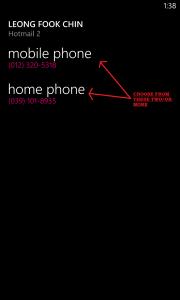
1. If you have an existing messaging thread for the person you want to message to, click on that, and you can see the switch button below (2 arrows button). 2. If you do not have an existing messaging thread, you WILL NOT see a "switch" button at the below. 3. If you wanna text a person without an existing messaging thread before, and you do not find a switch button below, follow the guide(the pictures) below  - Go into your messaging hub, press the "+" button to create a new message, at the top you will see a tiny "+" button at the right side, click on that, choose the person you wanna text and it will prompt you which number you wanna text. Simple, just that quite a number of people do not see the mini "+" symbol there. QUOTE(ashdwoers @ May 7 2013, 01:25 PM) where is the 'switch' button? see the guide i made for youThis post has been edited by JasonWilton: May 7 2013, 01:48 PM Attached thumbnail(s) 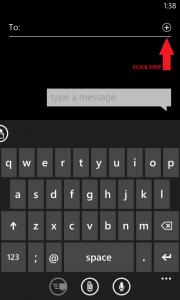
|
|
|
|
|
|
May 7 2013, 01:49 PM
|
|
Senior Member
2,234 posts Joined: Feb 2012
|
QUOTE(JasonWilton @ May 7 2013, 01:47 PM) Okay lah, make a simple guide for you guys. thnks 1. If you have an existing messaging thread for the person you want to message to, click on that, and you can see the switch button below (2 arrows button). 2. If you do not have an existing messaging thread, you WILL NOT see a "switch" button at the below. 3. If you wanna text a person without an existing messaging thread before, and you do not find a switch button below, follow the guide(the pictures) below - Go into your messaging hub, press the "+" button to create a new message, at the top you will see a tiny "+" button at the right side, click on that, choose the person you wanna text and it will prompt you which number you wanna text. Simple, just that quite a number of people do not see the mini "+" symbol there. see the guide i made for you  didnt realize that button before this thnks again  |
|
|
May 7 2013, 01:52 PM
|
|
Senior Member
1,068 posts Joined: Aug 2011 From: Malaysia
|
QUOTE(ashdwoers @ May 7 2013, 01:49 PM) thnks haha welcome man, if your screen is small quite difficult to click the tiny button ahha didnt realize that button before this thnks again  |
|
|
May 7 2013, 02:00 PM
|
|
Senior Member
2,234 posts Joined: Feb 2012
|
QUOTE(JasonWilton @ May 7 2013, 01:52 PM) haha welcome man, if your screen is small quite difficult to click the tiny button ahha no problem with that tiny button imma pro   |
|
|
May 8 2013, 04:37 PM
|

Senior Member
4,893 posts Joined: May 2008
|
I hope Nokia or some 3rd party release a wireless charging shell for our Lumia 620
so many devices but so little USB ports   This post has been edited by JonSpark: May 8 2013, 04:42 PM |
|
|
May 8 2013, 05:56 PM
|

Junior Member
51 posts Joined: Nov 2006
|
i facing auto restart problem, and it hang on nokia logo, never go into windows. have to reinsert the battery only ok. any solution for this?
|
|
|
May 8 2013, 06:05 PM
|
|
Senior Member
4,893 posts Joined: May 2008
|
QUOTE(gfish213 @ May 8 2013, 05:56 PM) i facing auto restart problem, and it hang on nokia logo, never go into windows. have to reinsert the battery only ok. any solution for this? Happened to me once, stuck on Nokia logo and cant force shutdown so had to take out the battery.Format my sdcard kind of solved my problem. |
|
|
May 9 2013, 11:38 AM
|

Senior Member
2,308 posts Joined: Jul 2007
|
QUOTE(gfish213 @ May 8 2013, 05:56 PM) i facing auto restart problem, and it hang on nokia logo, never go into windows. have to reinsert the battery only ok. any solution for this? format sdcardput it back in to the phone. the phone might not format the card into the "phone format" immediately, so i reckon, you use the camera to take some pics, save some pics from the web, or via whatsapp. **refrain from using your computer to directly edit the files name / folders name on the sd card. update your OS to the latest update via wifi by default, the OS pre-installed in the fone might still have some bugs which is updated in later versions of updates. so updating the OS will fix the problem. i was having a lot of auto-restarts as well, due to network / data connectivity. when your phone have trouble detecting network in weak reception areas, or weak data network, it will auto-restart. updating fix the problem for me. |
| Change to: |  0.0353sec 0.0353sec
 0.55 0.55
 6 queries 6 queries
 GZIP Disabled GZIP Disabled
Time is now: 4th December 2025 - 11:41 AM |
 Quote
Quote