QUOTE(blacktubi @ Apr 6 2013, 03:24 PM)
Hi bro, looks like in order to connect to LTE you need to get this kind of SIM

-Image posted by
OlgaC4 hereA
member able to get LTE activated with his Talkmore 75 plan at Maxis TTDI centre, his current SIM card is exchanged to this new one with 2 gold strips. You need to discuss a bit with the CS there as he face many problem when request to get LTE.
Read more about his story
hereHmm... Facing problem to connect to LTE too. Using Huawei E392 (Viva) that i bought from here 2 months ago. I just took up SIM only Maxis Wireless broadband plan yesterday. Then this morning changed the mini SIM to the Nano SIM which is exactly same as the Nano SIM on my ip5. FYI, i do get LTE on my ip5, that's why i terminated UMobile and get Maxis instead. Do i really need to get the special Nano SIM with 2 gold stripes on it? Had to pay RM25 plus buy a nano SIM adapter...
Inside the Mobile Partner (latest version from the 1st page), if i choose Maxis (2G)(3G)(LTE), then no problem to register; but if i choose only LTE, registration failed.

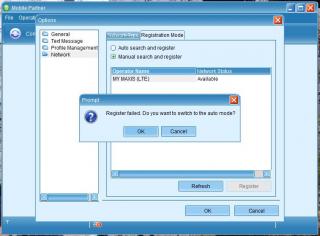
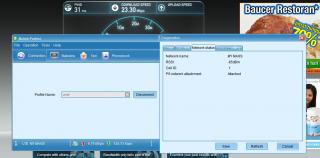
Below is proof that the modem is picking up LTE signals using MDMA.

Can see the RSSI but cannot see the cell ID. Definitely not registered too.
Btw, i use the E392 with TL-MR3420 3G/4G router. But it only connects when i set it to WCDMA only. If i set it for Auto, it will not connect at all once plug into the MR3420

Finally, what i did was taking the Nano SIM out from my ip5 and put into the E392. Same thing happen, cannot connect to LTE

Anyone using E392 also facing this problem? TQ



 Jun 30 2013, 12:03 AM


 Quote
Quote







 0.0289sec
 0.65
0.65
 6 queries
 GZIP Disabled