

Do you hv apple laptop power cable? PM me pls
Hardware Your Mac Desktop / Apple Hardware
Hardware Your Mac Desktop / Apple Hardware
|
|
 Dec 8 2009, 01:06 PM Dec 8 2009, 01:06 PM
|
 
Junior Member
31 posts Joined: Oct 2009 
|
Do you hv apple laptop power cable? PM me pls
|
|
|
|
|
|
Dec 8 2009, 02:35 PM
|

Senior Member
7,916 posts Joined: Jul 2005 From: Kuala Lumpur 
|
QUOTE(konnf @ Dec 8 2009, 01:06 PM) Do you hv apple laptop power cable? PM me pls of course we do   This post has been edited by dvlzplayground: Dec 8 2009, 02:36 PM |
|
|
Dec 8 2009, 03:22 PM
|

Senior Member
1,484 posts Joined: Jan 2007
|
just to share with everyone, why mac cannot boot into chrome os?
i tried botting chrome os with my school's windows. and hell!!!!!!!!! its soooooooooooooooooo FREAKING FAST!!! |
|
|
Dec 8 2009, 03:26 PM
|
|
Senior Member
7,916 posts Joined: Jul 2005 From: Kuala Lumpur
|
why would u want to use chrome os?
|
|
|
Dec 8 2009, 03:32 PM
|
|
Senior Member
1,484 posts Joined: Jan 2007
|
QUOTE(dvlzplayground @ Dec 8 2009, 03:26 PM) why would u want to use chrome os? just for fun. anyways, will still go back to mac. |
|
|
Dec 8 2009, 06:49 PM
|

Senior Member
2,197 posts Joined: Nov 2008 
|
QUOTE(konnf @ Dec 8 2009, 01:06 PM) Do you hv apple laptop power cable? PM me pls laptop power cable? what do you mean dude?QUOTE(diners @ Dec 8 2009, 03:22 PM) just to share with everyone, why mac cannot boot into chrome os? and crome OS? howd you get chrome OS? ive heard abt it but yet to check it out. i tried botting chrome os with my school's windows. and hell!!!!!!!!! its soooooooooooooooooo FREAKING FAST!!!  |
|
|
|
|
|
Dec 8 2009, 06:52 PM
|
|
Senior Member
1,484 posts Joined: Jan 2007
|
QUOTE(llsphinxll @ Dec 8 2009, 06:49 PM) laptop power cable? what do you mean dude? u cna just go google "chrome os usb"and crome OS? howd you get chrome OS? ive heard abt it but yet to check it out. |
|
|
Dec 9 2009, 08:31 AM
|

Senior Member
2,642 posts Joined: Jan 2005 From: Penang
|
QUOTE(diners @ Dec 8 2009, 03:22 PM) just to share with everyone, why mac cannot boot into chrome os? because previously was 32biti tried botting chrome os with my school's windows. and hell!!!!!!!!! its soooooooooooooooooo FREAKING FAST!!! 64 bit beta is out source it |
|
|
Dec 9 2009, 08:58 AM
|
|
Senior Member
1,484 posts Joined: Jan 2007
|
QUOTE(cRazYee @ Dec 9 2009, 08:31 AM) because previously was 32bit yeah, cuz when i writing the image to my usb, its using the "window32 xxxxx" image thinggie64 bit beta is out source it anyway, just deleted it.... nothing much in it anyway  |
|
|
Dec 9 2009, 09:25 AM
|
|
Junior Member
81 posts Joined: Apr 2009
|
Is there any compatible External Hard Drive [Third Party Non-Apple] that works with the New Macbook White? If you know any good ones please recommend me thanks
 Edit : How about External DVD Burners? Oh yeah does the External Hard Drive Support Time Machine? This post has been edited by Vistaril: Dec 9 2009, 09:45 AM |
|
|
Dec 9 2009, 09:27 AM
|
|
Senior Member
2,642 posts Joined: Jan 2005 From: Penang
|
WD My passport Essential/Seagate Agent/Omega ......
those are good stuff Added on December 9, 2009, 9:28 amthe 64 bit OS Chrome OS is lead of a Singaporean mr.teo This post has been edited by cRazYee: Dec 9 2009, 09:28 AM |
|
|
Dec 9 2009, 09:50 AM
|
|
Junior Member
81 posts Joined: Apr 2009
|
How about External DVD Burners? Oh yeah does the External Hard Drive Support Time Machine?
|
|
|
Dec 9 2009, 11:54 AM
|
|
Senior Member
7,916 posts Joined: Jul 2005 From: Kuala Lumpur
|
QUOTE(Vistaril @ Dec 9 2009, 09:50 AM) How about External DVD Burners? Oh yeah does the External Hard Drive Support Time Machine? any external hard drives works. just remember to format as FAT32 before u transfer ur files. normally ext hdd are formatted as NTFS, which OSX can read but not write. there are workarounds though, but i reckon formatting to FAT32 is the best choice. u can also format to HFS Journaled but windows wont be able to detect it (which is also a good thing sometimes ;p)time machine can work with any hdd. but for this u can only use HFS journaled. juz plug in the hdd n tell TM to use that hdd sorry no comment on external dvd burners, never used one . but its a good idea though since the superdrive is damn sensitive. sometimes if got small scratch on a dvd it wont detect at all n just eject the dvd. the same dvd can play smoothly on a dedicated dvd playerThis post has been edited by dvlzplayground: Dec 9 2009, 11:55 AM |
|
|
|
|
|
Dec 9 2009, 12:01 PM
|

Senior Member
6,496 posts Joined: Jan 2003 From: Kota Damansara 
|
For DVD burner it works the same as HDD.
|
|
|
Dec 9 2009, 12:04 PM
|
|
Senior Member
7,916 posts Joined: Jul 2005 From: Kuala Lumpur
|
QUOTE(wei @ Dec 9 2009, 12:01 PM) For DVD burner it works the same as HDD. do we need any extra drivers or anything? or just plug in n OSX automatically recognize? |
|
|
Dec 10 2009, 06:35 AM
|

Senior Member
1,357 posts Joined: Jan 2003 From: Londinium, Albion
|
my mac hdd died on me
 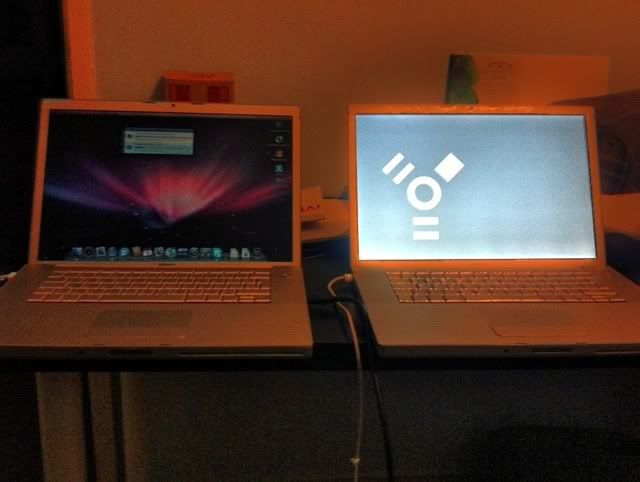 backing up data using target disk mode then will restore using Time Machine |
|
|
Dec 10 2009, 09:36 AM
|
|
Senior Member
6,496 posts Joined: Jan 2003 From: Kota Damansara
|
QUOTE(dvlzplayground @ Dec 9 2009, 12:04 PM) do we need any extra drivers or anything? or just plug in n OSX automatically recognize? Nope. Unless the burner you using come with extra function like BluRay burning or lightscribe.Most of them should work but this doesn't mean 100%. |
|
|
Dec 10 2009, 01:18 PM
|
|
Senior Member
7,916 posts Joined: Jul 2005 From: Kuala Lumpur
|
QUOTE(chizzu @ Dec 10 2009, 06:35 AM) my mac hdd died on me the HDD die also still can backup?backing up data using target disk mode then will restore using Time Machine |
|
|
Dec 10 2009, 07:28 PM
|

Senior Member
1,023 posts Joined: Aug 2008
|
About upgrading memory, mine is currently 512MB 667 MHz DDR2 SDRAM.
I wish to upgrade it. Where should I look for iMac compatible ones? Online store preferably. |
|
|
Dec 10 2009, 09:07 PM
|
|
Senior Member
1,357 posts Joined: Jan 2003 From: Londinium, Albion
|
QUOTE(dvlzplayground @ Dec 10 2009, 01:18 PM) the HDD die also still can backup? The HDD could not be verified and it gives me error. Aftyer abit of google it is quite a catastrophic issue and the only solution is to back up the data and reformat Lucky i have a Time Machine backup but there are some folders that i exclude to back up so i will need to get them back. The drive is mountable but could not be verified so i can still access my data after mounting it on another machine on TDM. |
|
Topic ClosedOptions
|
| Change to: |  0.0171sec 0.0171sec
 0.50 0.50
 6 queries 6 queries
 GZIP Disabled GZIP Disabled
Time is now: 4th December 2025 - 08:36 PM |
 Quote
Quote