Outline ·
[ Standard ] ·
Linear+
Tp LInk TL-MR3420 Owner CLub V2
|
LcBoy135z
|
 Dec 13 2012, 11:48 PM Dec 13 2012, 11:48 PM
|
Getting Started


|
QUOTE(redyakuza87 @ Dec 13 2012, 01:28 PM) alright so far so good.. thanks chuah n blacktubi! hopefully it will never DC till the end of time.. or maxis prob 
Added on December 13, 2012, 4:32 pmjadi balik.. after 3 hours.. then kena restart 3-4 times.. weird thing is, mula2 dah successfully identified but cannot connect to internet.. the modem blinking.. then tiba2 identifying modem.. at first using the cable that came with the modem, now direct connect to the router terus.. stresssss! with the latest V2 firmware can see signal strength right? QUOTE(iddbbi @ Dec 13 2012, 06:48 PM) I have the same problem, E398 + TL-MR3420 v2 cannot connect at all, keep on identifying and connecting yet not connected.  I have done all the steps advised by our sifus blacktubi and chuachs79. 
http://www.tp-link.com/Resources/software/...0_v2_120703.zip
the latest one not totally working at all for e398.
after download,please extract to one folder,then upgrade your firmware.
after finish, it will reboot and try to disconnect your e398 and turn off a while...after that turn on, wait the all LED stable..after that try connect again your e398.
try to monitor your status at page 192.168.0.1
hope this can help u.
***it will take about 3 minutes to connect the net
thank you  This post has been edited by LcBoy135z: Dec 13 2012, 11:53 PM This post has been edited by LcBoy135z: Dec 13 2012, 11:53 PM |
|
|
|
|
|
LcBoy135z
|
Dec 14 2012, 01:56 AM
|
Getting Started
|
QUOTE(chuahcs79 @ Dec 14 2012, 01:29 AM) i will Pin this to first post, thanks for your contribution most welcome..sharing is caring  wait for others first...for me working well.. only signal status not show up..only display 0% need comfirmation from others... |
|
|
|
|
|
LcBoy135z
|
Dec 14 2012, 09:10 AM
|
Getting Started
|
QUOTE(chuahcs79 @ Dec 14 2012, 02:21 AM) if that bin file works for you, it should works for the rest of the user who is using E398,.. well i can test it myself next weeks,  okay now i understood what u modem u want upgrade okay then..still waiting the rest to comfirm this work for them too   |
|
|
|
|
|
LcBoy135z
|
Dec 14 2012, 10:44 AM
|
Getting Started
|
QUOTE(digilife @ Dec 14 2012, 09:26 AM) If we dun upgrade any FW on V2 and use only stock FW that came with the V2, will the signal percentage shows 0% on E398? on stock it will show the 38%, after i update the firmware it become 0% until now so my advice who want buy new mr3420 v2, please stay with current stock and dont upgrade yet..becoz what i can says, the default stock very easy to connect with e398...and the signal shows 38%..only after do upgrading the firmware it not show the actual signal and take too long to connect with net  my speed with e398 + panel + mr3420 v2  This post has been edited by LcBoy135z: Dec 14 2012, 10:45 AM This post has been edited by LcBoy135z: Dec 14 2012, 10:45 AM |
|
|
|
|
|
LcBoy135z
|
Dec 14 2012, 01:44 PM
|
Getting Started
|
» Click to show Spoiler - click again to hide... « try this one bro..using latest firmware QUOTE(iddbbi @ Dec 14 2012, 12:13 PM) thanks, get connected but signal strength is 0% but its okay as long as get connected. |
|
|
|
|
|
LcBoy135z
|
Dec 14 2012, 01:51 PM
|
Getting Started
|
QUOTE(digilife @ Dec 14 2012, 01:39 PM) Morale of the story Use the V2 on Default FW that was shipped from China, until some Guinea Khinzir tested alrite If you panai panai Upgrade to the latest ( when you hands are itchy itchy ) you will connect slower and the fooking signal will shows 0% My V2 is still virgin from the Factory, hence my MF680/E372 can connect in less than 59secs yup..that the moral..but nothing need to be worry becoz we not brick it...the problem right now is compability the firmware from tp link. dont upgrade after u buy it until the stable firmware come out..this only happen to e398 only which is LTE 3g modem..for e372 can connect easily with the latest firmware. |
|
|
|
|
|
LcBoy135z
|
Dec 14 2012, 09:08 PM
|
Getting Started
|
QUOTE(AzamAbAziz @ Dec 14 2012, 08:44 PM) I had upgraded it about 1 month ago. Is there any way to downgrade like from the factory again? Because i'm thinking to use Huawei E398.  dont worry, u can use new method at first page...yes u can use e398 without having problem after follow the solution here >> http://forum.lowyat.net/topic/2595851 |
|
|
|
|
|
LcBoy135z
|
Dec 15 2012, 01:53 PM
|
Getting Started
|
QUOTE(chuahcs79 @ Dec 15 2012, 12:29 PM) i guess that bin file should be good for all E398 user  i hope like that right now waiting tpplink team to reply about 0% signal reading. hope can get the solution from them |
|
|
|
|
|
LcBoy135z
|
Dec 15 2012, 08:32 PM
|
Getting Started
|
QUOTE(AzamAbAziz @ Dec 15 2012, 08:25 PM) TQ bro! most welcome enjoy your speed |
|
|
|
|
|
LcBoy135z
|
Dec 16 2012, 11:12 AM
|
Getting Started
|
QUOTE(AzamAbAziz @ Dec 16 2012, 07:40 AM) 1. Huawei E392 or Huawei E398. Which one would you prefer? Depend on your pocket money...both arounf 4 - 5 star modem for me2. Does TL-MR3420 v2 support E392? (E392 also seem quite wider so I wonder if it can't be plug on because mr3420 v2 has curve design around the USB port)  Yes can use without any problem. Yes can use without any problem.
Refer first post.tqAnswer in red color.. enjoy |
|
|
|
|
|
LcBoy135z
|
Dec 18 2012, 08:12 AM
|
Getting Started
|
QUOTE(redyakuza87 @ Dec 17 2012, 07:06 PM) the first post, regarding e398 n v2.. the firmware that we need to use is it the latest one? or was it suppose to be the 2nd latest one? hi please download from link given...that one is the latest one for v2 router \TL-MR3420_V2_120905 |
|
|
|
|
|
LcBoy135z
|
Dec 18 2012, 10:39 AM
|
Getting Started
|
QUOTE(redyakuza87 @ Dec 18 2012, 10:36 AM) the link in the forst post actually went to TL-MR3420_V2_120905.. thats why i asked that question before.. is that the one we need to download or there is a mistake in the link given? i think no mistake in first post. already there TL-MR3420_V2_120905 latest firmware privode from TPLINK read, choose, try |
|
|
|
|
|
LcBoy135z
|
Dec 18 2012, 12:13 PM
|
Getting Started
|
QUOTE(redyakuza87 @ Dec 18 2012, 10:49 AM) tried.. the same thing happened.. it holds on for 20-25 mins, then got disconnected.. your setting like this? 
|
|
|
|
|
|
LcBoy135z
|
Dec 18 2012, 04:47 PM
|
Getting Started
|
QUOTE(redyakuza87 @ Dec 18 2012, 03:11 PM) yep.. thats what u told me earlier in the post yeah thats how it was told by chuah hai dear Okay, if u suffer from problem with disconect, please reset with install old firmware first from link given by chuah then try to runn, see if got the same problem or not. if not carry on...if got problem...update to latest firmware from tuto i given... i dont face any problem right now..running smooth thank you. 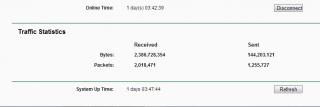
» Click to show Spoiler - click again to hide... « This post has been edited by LcBoy135z: Dec 18 2012, 04:56 PM |
|
|
|
|
|
LcBoy135z
|
Dec 19 2012, 06:34 AM
|
Getting Started
|
to @redyakuza87 last method, check via direct cable without using router...try to get the rssi..this very important to know your signal is ok or not...do speed test...then back connect using router. so far i dont face any issue with my method.. try to do new setup for your router if u still take time too long to connect. otherwise paste your system log file here as i can make comparison with mine This post has been edited by LcBoy135z: Dec 19 2012, 06:35 AM |
|
|
|
|
|
LcBoy135z
|
Dec 24 2012, 09:48 PM
|
Getting Started
|
QUOTE(greenlp_87 @ Dec 24 2012, 03:46 PM) have u upgrade the firmware to openwrt firmware?
Added on December 24, 2012, 3:47 pmmaybe the FW crash QUOTE(digilife @ Dec 24 2012, 04:09 PM) You are fr Northern Boleland near Thailand rite? If yes, Maxis was doing some upgrading at that time 
still using mr3420 v2 + e398
hermm...e398 for me same hot as e372, but for stability e398 win..
that mine opinion la |
|
|
|
|



 Quote
Quote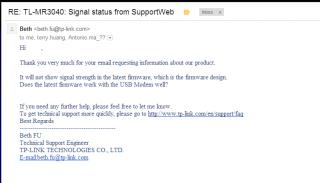


 0.0325sec
 0.51
0.51
 7 queries
 GZIP Disabled