Welcome Guest ( Log In | Register )

Bump Topic Topic Closed RSS Feed

Outline · [ Standard ] · Linear+

Maxis Maxis 3G/HS 3G Thread V7 (Not WBB), Don't Envy at Our Super Fast Speed! :D

views
     
maxcheam
post Nov 13 2012, 09:56 AM

Casual
***
Junior Member
384 posts

Joined: Jan 2006
From: Penang


QUOTE(digilife @ Nov 13 2012, 09:08 AM)
Can i use 2 modem to combine the speed, if yes how can i do it on a single connection?

I have 2#E372 and 2#MR3420 , V1 and V2

Thanks

smile.gif
*
combine two speed into one or so-called "bonding" is very hard to achieve unless you have specialize hardware and software. What average consumers like us can only do is load-balancing and failover. You can do that with just 2 x E372 and 1 x MR3420 using OpenWRT with a USB hub. I haven't try that myself.

My implementation is using zeroshell with 2 sets of 3G modem and 3G router:
Attached Image
So far, I find that zeroshell is the easiest way to load balance and failover multiple WAN connections under the same network. Other solutions in the market requires you to split your network into separate segments/subnets. The maximum I have tried on zeroshell is 3 x 3G connections. Although it can't achieve true combined speed, but it can achieve something similar if some factors are fulfilled. I'll use just one word - multi-threaded.

This post has been edited by maxcheam: Nov 13 2012, 09:58 AM
maxcheam
post Nov 13 2012, 10:04 AM

Casual
***
Junior Member
384 posts

Joined: Jan 2006
From: Penang


QUOTE(digilife @ Nov 13 2012, 10:00 AM)
notworthy.gif  notworthy.gif  notworthy.gif

I guess i have to ask SiFu Chuah for instruction to finally flash OpenWRT  on my MR3420 V1 to run 2 E372 using your way.....

Thanks maxcheam

notworthy.gif
*
just following the lead of many good people in the forum - "Sharing is caring".. icon_rolleyes.gif
maxcheam
post Nov 13 2012, 10:15 AM

Casual
***
Junior Member
384 posts

Joined: Jan 2006
From: Penang


QUOTE(stevenlee @ Nov 13 2012, 10:09 AM)
how u going to run 2x E372 if u just have 1 usb port in a router?
last time i did is i get a load balancer router..
connect 2 router to the load balancer and ur pc connect to the load balancer..
it very easy..some forumer selling the load balancer as well
*
we can use a USB hub as I mentioned earlier. and like you mentioned, using another device - load balancer router will be another option but it will cost a lot more. I'm using zeroshell (software-based load balancer router) as a VM in my PC with 2 LAN ports and a WiFi connection which is on 24x7.
maxcheam
post Nov 13 2012, 10:20 AM

Casual
***
Junior Member
384 posts

Joined: Jan 2006
From: Penang


QUOTE(digilife @ Nov 13 2012, 10:09 AM)
aiks, lagi easy this oneĀ  thumbup.gif

can it increase the speed and maintain a stable connection?

how much is a load balancer ?

notworthy.gif
*
I thought you want a more challenging method. Look for any routers with minimum 2 WAN ports. In fact, if you have a supported router using OpenWRT, you can achieve the same thing. I'm pretty sure 1043ND is supported, not sure about MR3420 though. Refer here - http://wiki.openwrt.org/doc/uci/multiwan

More things to explore.. haha.. tongue.gif

This post has been edited by maxcheam: Nov 13 2012, 10:38 AM
maxcheam
post Nov 13 2012, 10:33 AM

Casual
***
Junior Member
384 posts

Joined: Jan 2006
From: Penang


QUOTE(stevenlee @ Nov 13 2012, 10:16 AM)
so ur pc work as load balancer connecting USB internet from pc and internet from router right?
*
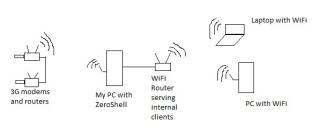
I have 2 x 3G modems and 2 x 3G routers like digilife. Both sets are connected to the same network via a LAN cable connected to respective routers' LAN port. My PC just connect to one of the 3G router via WiFi and I mapped this WiFi Adapter as a network card in the zeroshell VM.

Here's a simple graphical view of the setup for my home:
Attached Image
Pardon me for the bad drawings.. sweat.gif


Added on November 13, 2012, 10:36 am
QUOTE(digilife @ Nov 13 2012, 10:23 AM)
really 24/7? good la wei , moreover its FOC . Now there is a good purpose for  Multisims biggrin.gif
*
Yup, i'm brought up since very small to fully utilize the things I have around me with minimum costs. flex.gif

This post has been edited by maxcheam: Nov 13 2012, 10:36 AM
maxcheam
post Nov 13 2012, 11:15 AM

Casual
***
Junior Member
384 posts

Joined: Jan 2006
From: Penang


QUOTE(stevenlee @ Nov 13 2012, 11:06 AM)
oh that easy....i tot u using 1 router with 2x 3g modem -.-
*
yeah, it's the easy implementation. I haven't try the multiple 3G modem on a single router yet. doh.gif If you're interested, you can read it up here - http://wiki.openwrt.org/doc/recipes/3gdong...iple.3g.dongles

This post has been edited by maxcheam: Nov 13 2012, 11:18 AM
maxcheam
post Nov 20 2012, 03:27 PM

Casual
***
Junior Member
384 posts

Joined: Jan 2006
From: Penang


wow.. just over a weekend I have to catch up more than 10 pages. Here's my take (note: i'm not sure if it's the actual case) on how Maxis control the speed per tower with the assumption that you have the right modem and signal strength to support up to 42Mbps:
- Each tower has a pipe of 42Mbps or more bandwidth
- They will have a device that do QoS or dynamic bandwidth control on that tower depending on the number of users connected at the time
- Let's say they apply a very basic QoS rule which is divide the pipe to the number of connected users equally. If 10 users are connected, each user will get around 4.2Mbps. If 2 users are connected, each might get around 21Mbps. (The figures that I used are just sample to help us understand, it might not reflect the actual numbers Maxis allocate to each tower or each user)
- We can see that during daytime, most people get slower speed because of the congestion while during graveyard shift, you can get maximum speed because most people is already sleeping

Well, it's just how I'd look at it from a technical perspective. I'm sure experts in this cellular field can tell us more about it. tongue.gif

This post has been edited by maxcheam: Nov 20 2012, 03:30 PM
maxcheam
post Nov 22 2012, 02:28 PM

Casual
***
Junior Member
384 posts

Joined: Jan 2006
From: Penang


QUOTE(jcst83 @ Nov 22 2012, 02:21 PM)
I also just apply 5 line just now(at intel).....tongue.gif...but haven't add on the data package la.....until now, they still said the RM68 data plan is unlimited wor.... Mayb just dono when it will start quota system... sweat.gif .... Hopefully it will still remaining the unlimited speed and data for this 2 years time....XD

btw, the 1 i apply is RM0 Monthly Commitment..... brows.gif
*
care to tell us more about the RM0 monthly commitment? Thanks in advance! notworthy.gif

This post has been edited by maxcheam: Nov 22 2012, 02:29 PM
maxcheam
post Nov 22 2012, 04:03 PM

Casual
***
Junior Member
384 posts

Joined: Jan 2006
From: Penang


QUOTE(jcst83 @ Nov 22 2012, 03:54 PM)
lol...it's just offer for worker here....(i think same promotion like dell worker)... mayb sooner or later this promotion will reach ur company i think....tongue.gif
*
I don't see any RM0 commitment for Maxis' promotion in Dell. Sharing is caring mar.. rolleyes.gif
maxcheam
post Nov 22 2012, 04:43 PM

Casual
***
Junior Member
384 posts

Joined: Jan 2006
From: Penang


QUOTE(jcst83 @ Nov 22 2012, 04:34 PM)
Is it??... I think should b the same mah.... Since maxis come here to do their promotion also...
or mayb have to double confirm with stevenlee as he claim that his work place(dell) got this promo as well...
hmm.gif
Anyway, i just take 5 sim cards without paying anything...tongue.gif... But have to wait 3 - 4 weeks to activate la... sweat.gif
*
okay, thanks! Be extra careful with Maxis BillShock tm though. Especially when they ask you to sign a contract, double check everything to avoid regretting later.
maxcheam
post Nov 23 2012, 03:33 PM

Casual
***
Junior Member
384 posts

Joined: Jan 2006
From: Penang


QUOTE(ralph_lauren @ Nov 23 2012, 12:21 PM)
ya ..i know about that... i mean , if 1 of my maxis sim can get 1.6MB/s , i get another modem ..so running 2 modem in the same house... so speed also 2x ..allocate bandwidth ? 3gb / user ? LOL
*
i'm using 2 x E372 where each gets about 2-4Mbps on average. Load balancing both with multi-threaded apps like IDM or torrent, I'm getting between 4-7Mbps. How much more you can get is entirely up to the load balancing device/software that you used, of course, the congestion of the tower that you're connected is taken into consideration as well. I'm just using a software based load balancing with ZeroShell which do simple load balancing via round-robin method. Hardware load-balancer might perform better.

This post has been edited by maxcheam: Nov 23 2012, 03:40 PM
maxcheam
post Nov 23 2012, 03:42 PM

Casual
***
Junior Member
384 posts

Joined: Jan 2006
From: Penang


QUOTE(ralph_lauren @ Nov 23 2012, 03:39 PM)
that is slow.... mine alone alredi 15mbps .... Zzzzzzzz
*
yes, i'm always jealous of all the high speed you all are getting. But I don't have much choice in my area, Maxis has no plans to upgrade so far. but you can get the idea of the proportion you'll get on the speed with 2 modems.

This post has been edited by maxcheam: Nov 23 2012, 03:43 PM
maxcheam
post Nov 23 2012, 03:46 PM

Casual
***
Junior Member
384 posts

Joined: Jan 2006
From: Penang


QUOTE(ralph_lauren @ Nov 23 2012, 03:44 PM)
why pay RM68 * 2 for 7mbps ...... its simply not worth at all....
*
nope, i didn't spend that much since I'm one of the legacy unlimited plan with multi-sims. thumbup.gif
maxcheam
post Nov 23 2012, 03:49 PM

Casual
***
Junior Member
384 posts

Joined: Jan 2006
From: Penang


QUOTE(maxcheam @ Nov 23 2012, 03:46 PM)
nope, i didn't spend that much since I'm one of the legacy unlimited plan with multi-sims.  thumbup.gif
*
Another reason I load balance 2 connections are meant to have a reliable always connected internet connection. As we all know, mobile broadband is never that stable. If one connection fails, all my internet requests will be failover to the one that is still connected. It's not just about the speed. icon_rolleyes.gif


Added on November 23, 2012, 3:52 pm
QUOTE(ralph_lauren @ Nov 23 2012, 03:49 PM)
wow , u should have get 5 multi sim and get around 15mbps ...imagine i get 5 multisim , the whole 42mbps tower is hog by me..LOL
*
it doesn't work that way, you can't just multiply like that. The software that we're using in our daily life wasn't fully optimize to take full advantage of that. Unless you're hosting a datacenter at home, then, it might be useful. biggrin.gif

This post has been edited by maxcheam: Nov 23 2012, 03:52 PM
maxcheam
post Nov 23 2012, 03:53 PM

Casual
***
Junior Member
384 posts

Joined: Jan 2006
From: Penang


QUOTE(ralph_lauren @ Nov 23 2012, 03:52 PM)
if u want stable connection , should have opt for wired broadband ..LOL
*
i wish i can, the best wired broadband I can get at my area is Streamyx 1Mbps (not even 4Mbps). rclxub.gif
maxcheam
post Nov 23 2012, 03:57 PM

Casual
***
Junior Member
384 posts

Joined: Jan 2006
From: Penang


QUOTE(ralph_lauren @ Nov 23 2012, 03:53 PM)
yeah... i will getting 5modem and run my file download all the time... imagine each pc get average 10mbps for the file download...

so 5 * 10 = max 42mbps...
*
again, it's not as simple as that. As I mentioned earlier about my assumption how Maxis control the bandwidth at each tower, you will never that the max speed if there are other users using it in your area.
maxcheam
post Nov 29 2012, 03:02 PM

Casual
***
Junior Member
384 posts

Joined: Jan 2006
From: Penang


just notice someone is selling the enterprise level network bonding appliance which will allow you to combine the speed of multiple WAN connections in the Network sales sub-forum. i'm pretty sure it cost a bomb. biggrin.gif

hardcore users with deep pocket might be interested. tongue.gif


Added on November 29, 2012, 3:25 pmsoftware based bonding by Connectify coming soon. Regretted that I didn't join their Kickstarter project previously that give certain level of backers lifetime free upgrade.

More info - http://www.connectify.me/dispatch

This post has been edited by maxcheam: Nov 29 2012, 03:25 PM
maxcheam
post Nov 29 2012, 03:28 PM

Casual
***
Junior Member
384 posts

Joined: Jan 2006
From: Penang


QUOTE(stevenlee @ Nov 29 2012, 03:26 PM)
not really bro.
Dlink and TPlink just around RM250-300
it will combine 2 WAN together
but of cos it is a load balancer and u will just the speed of 1 connection...
the balancer will share and balance the load across 2 WAN instead of cramping on 1 lines. nod.gif
*
bonding is different than load balancing. it gives you the speed of the combined lines. drool.gif

This post has been edited by maxcheam: Nov 29 2012, 03:28 PM
maxcheam
post Nov 29 2012, 09:13 PM

Casual
***
Junior Member
384 posts

Joined: Jan 2006
From: Penang


QUOTE(rifle_m16 @ Nov 29 2012, 05:08 PM)
This is very very very interesting..  thumbup.gif

I'll follow any news from them.  nod.gif

Thanks max!  rclxms.gif
*
you're most welcome! I'll wait for them as well. Already signed up their newsletter. Anyway, I'm going to test bonding my Maxis connections using VPN aggregation method in the next few weeks. Will update if the results are promising.. sweat.gif
maxcheam
post Nov 30 2012, 10:45 AM

Casual
***
Junior Member
384 posts

Joined: Jan 2006
From: Penang


if any of you are interested to see the real life results of E398, check out my post at blacktubi's thread - http://forum.lowyat.net/index.php?act=ST&f...t=2605886&st=0#

2 Pages  1 2 >Top
Topic ClosedOptions
 

Change to:
| Lo-Fi Version
0.0413sec    0.27    7 queries    GZIP Disabled
Time is now: 8th December 2025 - 06:21 PM