Welcome Guest ( Log In | Register )

4 Pages < 1 2 3 4 >Bottom

Outline · [ Standard ] · Linear+

Unifi unifi & tomato firmware -- possible?

views
     
kasmankk
post Jan 26 2014, 12:26 PM

New Member
*
Junior Member
27 posts

Joined: Dec 2007


I really need help on the iptv setup.
Im using e2500 on tomato 1.28 r116
If the offset is 496, to get vid of 600, the vlan has to be more 104. But we only can enter up to 15 only.
Pls advice, tq
Attached Image


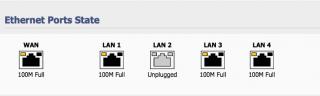
and the port the port state is not reporting the right ports being used.
I used ports 1,2 & 3.
it showed 1,3&4 (see pic)
Attached Image

This post has been edited by kasmankk: Jan 26 2014, 12:56 PM
qSKYDRIFTERp
post Apr 1 2014, 04:57 PM

New Member
*
Newbie
0 posts

Joined: Apr 2014


QUOTE(biatche @ Nov 1 2012, 06:00 PM)
i have an asus rt-n16... if i get unifi can i use tomato firmware with unifi somehow? can tomato do those what vlan tagging etc..
*
Desperately HOPE someone will post a TOTAL TUTORIAL from A-Z on how to connect unifi thru tomato. Been trying almost a month now. Subscribe to purevpn, yet I cant connect my xbox one directly to router for vpn. HELP!!!
ethaniel
post May 30 2015, 07:26 PM

Getting Started
**
Junior Member
85 posts

Joined: Dec 2004


QUOTE(tycheah_7 @ Nov 6 2013, 03:40 PM)
here you go!
user posted image

Uploaded with ImageShack.us
*
followed exactly same config. PPPoE showing connected but not able to ping the internet. The connected WAN IP always start from 172.20.100.xx. Somewhere wrong rclxub.gif


tertiary
post Jan 11 2017, 12:28 PM

On my way
****
Junior Member
664 posts

Joined: Nov 2016
QUOTE(qSKYDRIFTERp @ Apr 1 2014, 04:57 PM)
Desperately HOPE someone will post a TOTAL TUTORIAL from A-Z on how to connect unifi thru tomato. Been trying almost a month now. Subscribe to purevpn, yet I cant connect my xbox one directly to router for vpn. HELP!!!
*
Apologies for reviving an old thread but I just got my Netgear WNR3500L working with Unifi and I hope this helps others.

Klseet shows that newer routers can use Shibby builds 136 and above to set VID of 500:
https://klseet.com/index.php/15-tomato/toma...vlan500-vlan600

However, older routers like mine have a hardware limitation that requires another method, VID offset as featured in Shibby build numbers <136. I'm using build 132.

I struggled to get the right values in the VLAN table, but eventually found the answer here:
http://tomatousb.org/forum/t-430053/suppor...-console-or-gui
Thanks to Kanuki!
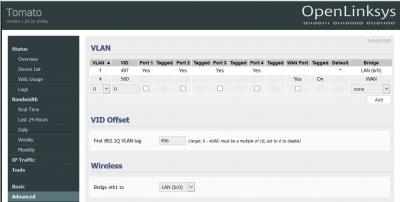
My settings are:

VLAN1 (LAN) / VID = 497
VLAN4 (WAN) / VID = 500 / 'Tagged' box checked
VID Offset = 496

Screenshot attached.

Reboot the router after saving, then enter your PPPoE login and save.

NB I had to turn off both the BTU and router, then allow the BTU to boot fully before turning on the router in order to get it to connect to TM via PPPoE.

Now I have internet from my WNR3500L rclxm9.gif But it isn't possible to get HyppTV working with these old routers, I think. No loss for all I care.


Attached thumbnail(s)

Attached Image
TSbiatche
post Jan 12 2017, 02:12 PM

Regular
******
Senior Member
1,649 posts

Joined: Jan 2003
QUOTE(tertiary @ Jan 11 2017, 12:28 PM)
Apologies for reviving an old thread but I just got my Netgear WNR3500L working with Unifi and I hope this helps others.

Klseet shows that newer routers can use Shibby builds 136 and above to set VID of 500:
https://klseet.com/index.php/15-tomato/toma...vlan500-vlan600

However, older routers like mine have a hardware limitation that requires another method, VID offset as featured in Shibby build numbers <136. I'm using build 132.

I struggled to get the right values in the VLAN table, but eventually found the answer here:
http://tomatousb.org/forum/t-430053/suppor...-console-or-gui
Thanks to Kanuki!
My settings are:

VLAN1 (LAN) / VID = 497
VLAN4 (WAN) / VID = 500 / 'Tagged' box checked
VID Offset = 496

Screenshot attached.

Reboot the router after saving, then enter your PPPoE login and save.

NB I had to turn off both the BTU and router, then allow the BTU to boot fully before turning on the router in order to get it to connect to TM via PPPoE.

Now I have internet from my WNR3500L  rclxm9.gif  But it isn't possible to get HyppTV working with these old routers, I think. No loss for all I care.
*
VID = 497? LAN? why's this in the tutorial
tertiary
post Jan 12 2017, 02:30 PM

On my way
****
Junior Member
664 posts

Joined: Nov 2016
QUOTE(biatche @ Jan 12 2017, 02:12 PM)
VID = 497? LAN? why's this in the tutorial
*
Because the offset of 496 is added to both VLAN IDs, 1 and 4. It works anyway.

You can see the same in the top pic in Kasmankk's post #41.

This post has been edited by tertiary: Jan 12 2017, 02:31 PM
jio
post Jan 12 2017, 02:40 PM

Casual
***
Junior Member
383 posts

Joined: May 2005
QUOTE(tertiary @ Jan 12 2017, 02:30 PM)
Because the offset of 496 is added to both VLAN IDs, 1 and 4. It works anyway.

You can see the same in the top pic in Kasmankk's post #41.
*
Your WNR3500L has BCM53115 switch chip which does support 4K VLAN. That offset VLAN is for switch chip with VLAN 16 limit. Broadcom gigabit switch such as BCM53XXX & some of the newer 100mbit switch chip support 4K VLAN.
tertiary
post Jan 12 2017, 03:44 PM

On my way
****
Junior Member
664 posts

Joined: Nov 2016
QUOTE(jio @ Jan 12 2017, 02:40 PM)
Your WNR3500L has BCM53115 switch chip which does support 4K VLAN. That offset VLAN is for switch chip with VLAN 16 limit. Broadcom gigabit switch such as BCM53XXX & some of the newer 100mbit switch chip support 4K VLAN.
*
I tried DualWAN Shibby builds 137 and 138 with the VLAN settings advised by Klseet and the router would not connect via PPPoE, no matter how many times I tried, double checked settings, password etc. I reverted to build 132 and the offset method and it connected.
jio
post Jan 12 2017, 04:40 PM

Casual
***
Junior Member
383 posts

Joined: May 2005
QUOTE(tertiary @ Jan 12 2017, 03:44 PM)
I tried DualWAN Shibby builds 137 and 138 with the VLAN settings advised by Klseet and the router would not connect via PPPoE, no matter how many times I tried, double checked settings, password etc. I reverted to build 132 and the offset method and it connected.
*
That is could be due to incomplete 4K vlan support in some of the codepath in shibby (but I'm sure toastman build had the support for it) or you didn't enable the experimental support for it IIRC. I used tomato toastman for Belkin F7D4301, which had the same chip as your WNR3500L. Back when 4K vlan first added to tomato, not all codepath (K24, K26, K26RT-N etc) had it implemented & I have to manually patch & compile my own. But that should be all fixed (toastman at least) since 2014 & I don't even have to custom compile it.
tertiary
post Jan 12 2017, 05:05 PM

On my way
****
Junior Member
664 posts

Joined: Nov 2016
QUOTE(jio @ Jan 12 2017, 04:40 PM)
That is could be due to incomplete 4K vlan support in some of the codepath in shibby (but I'm sure toastman build had the support for it) or you didn't enable the experimental support for it IIRC. I used tomato toastman for Belkin F7D4301, which had the same chip as your WNR3500L. Back when 4K vlan first added to tomato, not all codepath (K24, K26, K26RT-N etc) had it implemented & I have to manually patch & compile my own. But that should be all fixed (toastman at least) since 2014 & I don't even have to custom compile it.
*
I see. I tried Toastman a few years ago but Shibby seemed easier to use for some reason I can no longer remember. I think Shibby had 3G modem support and Toastman didn't and I needed it back then - something like that.

I'm not competent to patch and compile my own build and don't really have the interest.

Thanks for your input. If I get round to it I'll give Toastman a try. But as I don't need HyppTV then my present setup is fine.
dannielshazmeer
post Jan 12 2017, 05:07 PM

On my way
****
Senior Member
628 posts

Joined: Apr 2016
can openwrt for RT-N14UHP ?
tertiary
post Jan 13 2017, 12:57 PM

On my way
****
Junior Member
664 posts

Joined: Nov 2016
QUOTE(dannielshazmeer @ Jan 12 2017, 05:07 PM)
can openwrt for RT-N14UHP ?
*
Not trying to be rude, but if you're not competent to research that question for yourself by using Google, then you are going to find installing and configuring OpenWRT a challenge. Try Tomato or DD-WRT, if they have suitable builds.
PeacefulDiscord
post Jan 15 2017, 06:01 PM

Getting Started
**
Junior Member
137 posts

Joined: Dec 2008
From: Somewhere between my chair and computer


So I have been trying to get tomato or DD wrt to work on my Asus RT N18U with Unifi but no luck. I used to use it with TIME without a problem but now with this VLAN tagging stuff, I just can't get it to connect to WAN. I have created a VLAN2 with VID as 500 and set it to the WAN port and still nothing. I have double checked my Unifi login credentials and everything is correct. The stock firmware works fine but tomato doesn't. Any ideas?
tertiary
post Jan 15 2017, 07:04 PM

On my way
****
Junior Member
664 posts

Joined: Nov 2016
QUOTE(PeacefulDiscord @ Jan 15 2017, 06:01 PM)
So I have been trying to get tomato or DD wrt to work on my Asus RT N18U with Unifi but no luck. I used to use it with TIME without a problem but now with this VLAN tagging stuff, I just can't get it to connect to WAN. I have created a VLAN2 with VID as 500 and set it to the WAN port and still nothing. I have double checked my Unifi login credentials and everything is correct. The stock firmware works fine but tomato doesn't. Any ideas?
*
Which Tomato build number are you trying, and which flavour - Shibby or Toastman?
PeacefulDiscord
post Jan 15 2017, 08:05 PM

Getting Started
**
Junior Member
137 posts

Joined: Dec 2008
From: Somewhere between my chair and computer


QUOTE(tertiary @ Jan 15 2017, 07:04 PM)
Which Tomato build number are you trying, and which flavour - Shibby or Toastman?
*
I am running Shibby build 138.
tertiary
post Jan 15 2017, 08:31 PM

On my way
****
Junior Member
664 posts

Joined: Nov 2016
QUOTE(PeacefulDiscord @ Jan 15 2017, 08:05 PM)
I am running Shibby build 138.
*
I tried that build on my Netgear router and couldn't get Unifi to work. Maybe there's a VLAN problem with that build (and 137 also didn't work).

I reverted to build 132 and used the VLAN ID offset method detailed above and internet works (but not HyppTV).
PeacefulDiscord
post Jan 15 2017, 08:35 PM

Getting Started
**
Junior Member
137 posts

Joined: Dec 2008
From: Somewhere between my chair and computer


QUOTE(tertiary @ Jan 15 2017, 08:31 PM)
I tried that build on my Netgear router and couldn't get Unifi to work. Maybe there's a VLAN problem with that build (and 137 also didn't work).

I reverted to build 132 and used the VLAN ID offset method detailed above and internet works (but not HyppTV).
*
I tried the same thing. Reverted to build 132 and do VID offset but my router wouldn't boot to the admin interface anymore. The LEDs turn on but I couldn't actually access anything.

I am gonna try Toastman's build to see if it works. Will report back if all goes well.

tertiary
post Jan 15 2017, 09:50 PM

On my way
****
Junior Member
664 posts

Joined: Nov 2016
QUOTE(PeacefulDiscord @ Jan 15 2017, 08:35 PM)
I tried the same thing. Reverted to build 132 and do VID offset but my router wouldn't boot to the admin interface anymore. The LEDs turn on but I couldn't actually access anything.

I am gonna try Toastman's build to see if it works. Will report back if all goes well.
*
Did you get a 404 error when trying to get to the web interface? I had that in Chrome although it had worked fine until the latest flash. Changed to Firefox and I could log in as usual.
lamode
post Jan 18 2017, 07:58 PM

anything could happen!
*******
Senior Member
3,903 posts

Joined: Jul 2007
QUOTE(PeacefulDiscord @ Jan 15 2017, 06:01 PM)
So I have been trying to get tomato or DD wrt to work on my Asus RT N18U with Unifi but no luck. I used to use it with TIME without a problem but now with this VLAN tagging stuff, I just can't get it to connect to WAN. I have created a VLAN2 with VID as 500 and set it to the WAN port and still nothing. I have double checked my Unifi login credentials and everything is correct. The stock firmware works fine but tomato doesn't. Any ideas?
*
hmmm.... could it be some config issue with VID offset?
when the VLAN2 with VID500, did you use 496 VID offset? flex.gif

i think it's worth to try set VLAN2 with VID500, and disable the VID offset...
jio
post Jan 19 2017, 03:09 PM

Casual
***
Junior Member
383 posts

Joined: May 2005
QUOTE(tertiary @ Jan 12 2017, 05:05 PM)
I see. I tried Toastman a few years ago but Shibby seemed easier to use for some reason I can no longer remember. I think Shibby had 3G modem support and Toastman didn't and I needed it back then - something like that.

I'm not competent to patch and compile my own build and don't really have the interest.

Thanks for your input. If I get round to it I'll give Toastman a try. But as I don't need HyppTV then my present setup is fine.
*
I can confirm Shibby build don't have the 4K VLAN properly supported for BCM53115. Toastman build works till RT-VLAN 7508.2 & RT-N-VLAN 0508.2. 7509/0509 onwards had Shibby code base merged to it & 4K VLAN for BCM53115 no longer working. You can try to submit bug or contact toastman or shibby to fix it. The code file bcmrobo.c.

So probably time to say goodbye to tomato firmware. I don't recommend tomato for anything other than Broadcom MIPS platform anyway. No point supporting newer hardware (issues with hardware accelerations, wifi power amp, etc) if it is poorly supported.

4 Pages < 1 2 3 4 >Top
 

Change to:
| Lo-Fi Version
0.4180sec    0.37    6 queries    GZIP Disabled
Time is now: 8th December 2025 - 12:30 PM