QUOTE(HeartRoxas @ Aug 30 2012, 12:07 PM)
maybe i did not at all. =/ again, what's the thing to test? the what what resolution thing is it. lol.
Are you using Windows 7? You can check the ping by using Resource Monitor, start task manager and open Resource Monitor. Then go network area tick the GW2.exe and see the TCP connection... you will see the ping there unless you are using third party connection.
If you are using third party connection such as WTFast ...UltimaProxy..LaglessProxy.. or whatever, then just tick the corresponding
.exe
and see the latency there.... if the latency is 250ms, then you need to add another 30-50ms for the proxy to GW2 server.
For example:
Your House > Proxy Server (250ms) > GW2 Server (50ms) = total is roughly 300ms
Also, if your Proxy Server is the Local Malaysia Proxy (probably 30-80ms)... but not West US Proxy, then you need to add another 200-250ms
for the local proxy to reach GW2 server.
Btw, I have the server IP, but I left it at my home.
This post has been edited by chiangeg: Aug 30 2012, 11:25 AM 

 Aug 30 2012, 10:33 AM


 Quote
Quote


 .exe = putty.exe .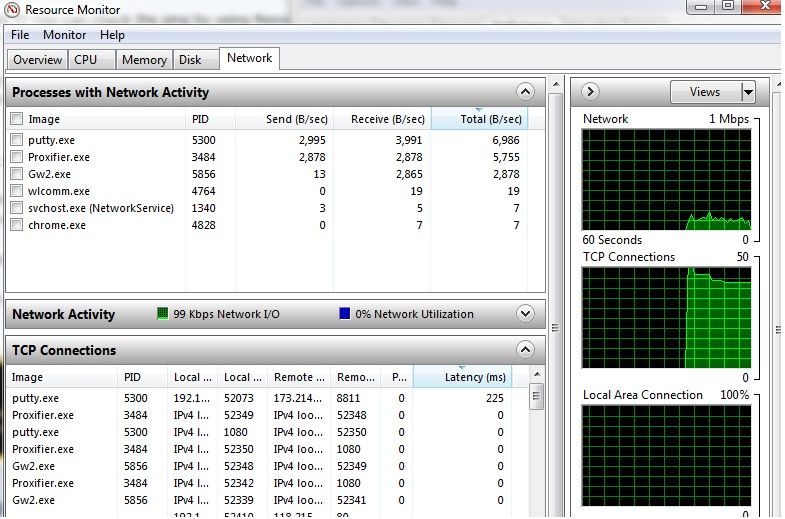
 ... using streamyx 4mb


 0.0209sec
 0.27
0.27
 5 queries
 GZIP Disabled