


Maxis Connect to Maxis using Custom Router!, Guidelines
|
|
 Jul 27 2013, 01:40 AM Jul 27 2013, 01:40 AM
Return to original view | Post
#1
|
 
Senior Member
551 posts Joined: Nov 2004 From: ポンテイアン、 ジョホル。   
|
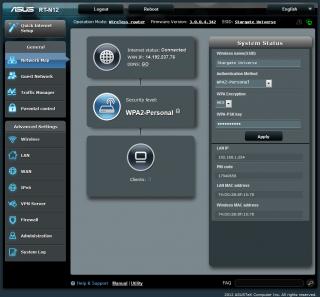
i also change the router using asus rt-n12.. cheaper than rt-n19
|
|
|
Aug 20 2013, 09:47 PM
Return to original view | Post
#2
|
|
Senior Member
551 posts Joined: Nov 2004 From: ポンテイアン、 ジョホル。
|
QUOTE(Almondbox @ Aug 13 2013, 01:06 AM) Hi there I am using the same router as u.asus rt-n12.how to u configure to make this a second router?can teach me pls.  QUOTE(fishhy @ Aug 20 2013, 04:45 PM) how do u do it with old version firmware??? that drove me crazy for setting up my rt-n12, but finally i got it just upgrade the firmware and let the machine do the work. go to quick internet setup, choose what stated below, and thn key-in ur account & password, DONE~ [attachmentid=3591209] hopefully this help u~  QUOTE(Almondbox @ Aug 13 2013, 01:06 AM) Hi there I am using the same router as u.asus rt-n12.how to u configure to make this a second router?can teach me pls. 1st, you might need same firmware as mine. i dunno where to get coz it there when im buy it.2nd, as fishhy said. need to select maxis fibre from that menu, then you have to wait until connected. |
| Change to: |  0.0411sec 0.0411sec
 0.73 0.73
 7 queries 7 queries
 GZIP Disabled GZIP Disabled
Time is now: 4th December 2025 - 12:28 AM |
 Quote
Quote