

 Apr 25 2024, 11:25 PM


QUOTE(chunte @ Apr 25 2024, 11:51 AM)
Posting my setup notes to use the Maxis supplied Huawei HG8240H5 ONT for VOIP.
Package: Maxis Fibre for Business
Environment: TM Unifi infra
Prerequisite:
- Your phone number, (e.g. 0312345678, don't have the +6 or 6 in front).
- Your SIP password. You need to call Maxis for this. For me, they asked for the serial number of my Maxis-supplied router (aminia MA131) and your Maxis account number
Login to HG8240H5
- Plug cable into Eth Port 1
- Set laptop IP manually (IP: 192.168.1.2, Subnet: 255.255.255.0, Gateway: 192.168.1.1, DNS: 8.8.8.8 / 8.8.4.4)
- Browse to 192.168.1.1
- Login with Username: telecomadmin PW: admintelecom (Your unit may be different)
Setup WAN for VOIP
- Checking if your WAN VOIP network is up. It was not running and message was obtaining IP address
- The VLAN Id was set to 400.
- Change it to 822 and Apply. For reference, it is priority 6, and VOIP mode.
- The WAN VOIP should be up with an IP address
Setup SIP
- I followed this video
- Outbound Primary & Alternate Proxy: bvgw03.maxis.com.my
- Primary & Alternate Proxy: maxis.com.my
- Domain: maxis.com.my
- Digitmax Map : Max
That's it. Good luck
Credits & Source:
- Poster leezhijiang above
- https://youtu.be/8sk-MXvBE1k?si=7_ZBk2Ao79TJ4b8w
- https://www.clnet-solution.my/knowledgebase...er-replacement/
- https://forum.lowyat.net/topic/4039388

This wont work who on Nokia OLT because OMCI ME 171Package: Maxis Fibre for Business
Environment: TM Unifi infra
Prerequisite:
- Your phone number, (e.g. 0312345678, don't have the +6 or 6 in front).
- Your SIP password. You need to call Maxis for this. For me, they asked for the serial number of my Maxis-supplied router (aminia MA131) and your Maxis account number
Login to HG8240H5
- Plug cable into Eth Port 1
- Set laptop IP manually (IP: 192.168.1.2, Subnet: 255.255.255.0, Gateway: 192.168.1.1, DNS: 8.8.8.8 / 8.8.4.4)
- Browse to 192.168.1.1
- Login with Username: telecomadmin PW: admintelecom (Your unit may be different)
Setup WAN for VOIP
- Checking if your WAN VOIP network is up. It was not running and message was obtaining IP address
- The VLAN Id was set to 400.
- Change it to 822 and Apply. For reference, it is priority 6, and VOIP mode.
- The WAN VOIP should be up with an IP address
Setup SIP
- I followed this video
- Outbound Primary & Alternate Proxy: bvgw03.maxis.com.my
- Primary & Alternate Proxy: maxis.com.my
- Domain: maxis.com.my
- Digitmax Map : Max
That's it. Good luck
Credits & Source:
- Poster leezhijiang above
- https://youtu.be/8sk-MXvBE1k?si=7_ZBk2Ao79TJ4b8w
- https://www.clnet-solution.my/knowledgebase...er-replacement/
- https://forum.lowyat.net/topic/4039388
Nokia OLT explicitly tell from tagged must be exit as tagged at LAN 2:
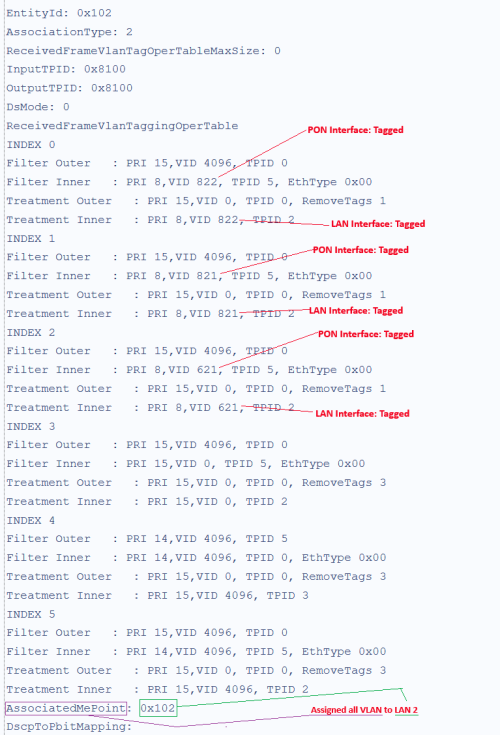
I believe same goes other OLT except ZTE & Fiberhome
 Quote
Quote
 0.0420sec
 1.35
1.35
 7 queries
 GZIP Disabled