Welcome Guest ( Log In | Register )

Bump Topic Topic Closed RSS Feed

Outline · [ Standard ] · Linear+

 Ivy Bridge Overclocking V1 | 3770K/3570K | Z77, Torture Your CPU, Post It Here!

views
     
Lokie90
post Sep 17 2013, 11:46 PM

Getting Started
**
Junior Member
213 posts

Joined: Jun 2013
From: Kota Kinabalu, Sabah.


Helloe To All Sifus smile.gif

I'm still newbies here .. Would like to learn OC ..

I Just complete all my things was ready to OC ..

Here my Spec :
I5 3570k
Z77 Extreme 4
Corsair H100i Hydro Series
Kingston HyperX Beast 2400mhz

Never done OC before.. And really don't know ..
How to OC smile.gif

But its look like.. My spec was ready for OC ..
Any 1 can teach me ?

Also .. What's software do I need to monitoring
Temperature?
Any link I can watch before I started to learn OC?

Thanks Guys smile.gif

Lokie90
post Sep 18 2013, 07:49 AM

Getting Started
**
Junior Member
213 posts

Joined: Jun 2013
From: Kota Kinabalu, Sabah.


QUOTE(owikh84 @ Sep 18 2013, 07:20 AM)
Pls check out Post #1 of this thread for OC Guides and temp monitoring app (RealTemp).
Good luck
*
OK sir .. Thanks ya smile.gif
Will update soon
Lokie90
post Sep 18 2013, 09:53 PM

Getting Started
**
Junior Member
213 posts

Joined: Jun 2013
From: Kota Kinabalu, Sabah.


Hye Alls Lyn.NET

Newbies Here..

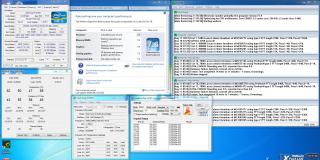
This Is my First OC with This result..

is This OK ? with my Spec?

Intel Core i5 3570k
ASRock Z77 Extreme 4
Corsair H100i Hydro Series
Kingston HyperX Beast 2400
Kingston SSD V300
GTX 560 TI

And This is my result For my First OC
With Help Guide From Lyn.NET Mamber smile.gif

Casing Fan Air Flow Position ~

Front :
140mm x1 Fan
120mm x1 Fan
Intake

Side :
120mm x1 Fan
Intake

Rear :
120mm x1 Fan ( CM Excalibur Fan )
Exhaust

Top :
120mm x2 Fan Above Radiator H100i
Noise Blocker Fan = Intake

This post has been edited by Lokie90: Sep 18 2013, 10:46 PM


Attached thumbnail(s)
Attached Image
Lokie90
post Sep 19 2013, 07:36 AM

Getting Started
**
Junior Member
213 posts

Joined: Jun 2013
From: Kota Kinabalu, Sabah.


QUOTE(owikh84 @ Sep 19 2013, 07:41 AM)
Welcome to the club mate. Somethings are not right in your OC.

1) your idle temps are way too high. What's your ambient (room) temp?
2) vCore = 1.25v for 4.0Ghz is too much. Try lower vCore ie. 1.225v, 1.2v, 1.175v, 1.15v, 1.1v, 1.05v etc...
3) your prime95 version is kinda old. Pls try the latest version 28.1 Build2: http://www.mediafire.com/?pj2erd72t1oyb8n
*
owh .. i see smile.gif
Thanks Ya.. Later i Try again ^^

will update u the next result
Lokie90
post Sep 19 2013, 12:13 PM

Getting Started
**
Junior Member
213 posts

Joined: Jun 2013
From: Kota Kinabalu, Sabah.


( WTAsk )

I'm using Corsair H100i

Why my CPU block icon LED colour changed to RED colour ya?
Before This Blue..

This post has been edited by Lokie90: Sep 19 2013, 12:14 PM

Topic ClosedOptions
 

Change to:
| Lo-Fi Version
0.0576sec    0.39    7 queries    GZIP Disabled
Time is now: 6th December 2025 - 06:51 PM