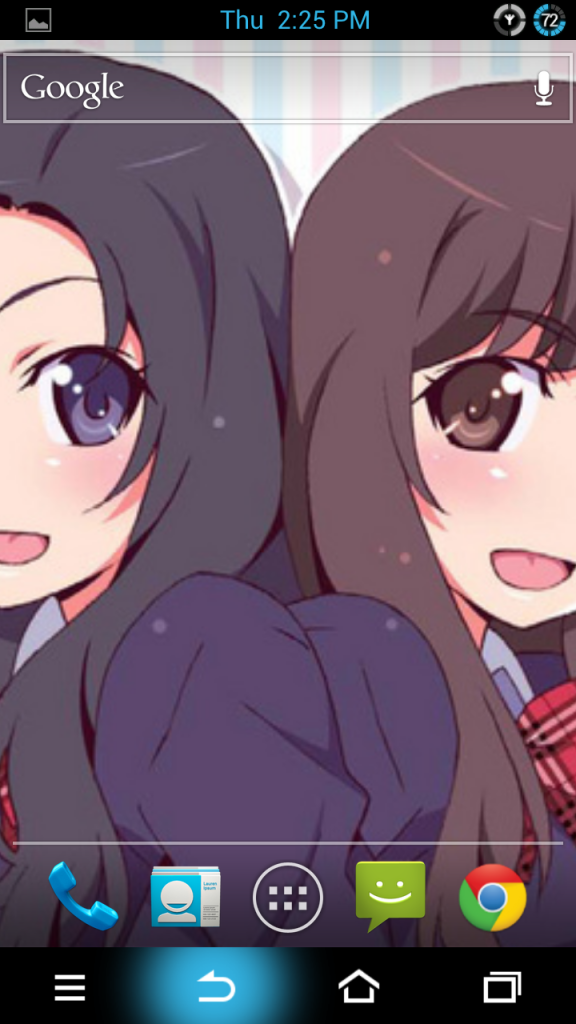
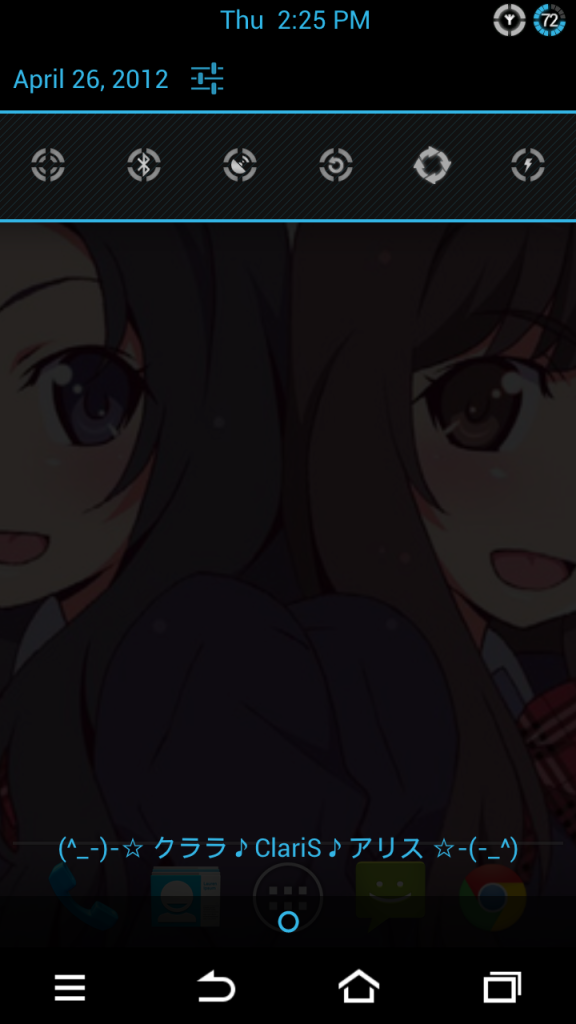
tablet mode...not bad..
○ Galaxy Nexus V9 ○, latest Google flagship
○ Galaxy Nexus V9 ○, latest Google flagship
|
|
 Apr 26 2012, 12:59 PM Apr 26 2012, 12:59 PM
|
 
Senior Member
641 posts Joined: Dec 2005 From: KL~   
|
tablet mode...not bad..
|
|
|
|
|
|
Apr 26 2012, 01:20 PM
|

Senior Member
2,759 posts Joined: Oct 2011 From: ★クララ - ClariS - アリス★
|
Hoolm finally fix his mod and his b 34 circle is awesome~ is like mini UI overhaul~
|
|
|
Apr 26 2012, 01:57 PM
|

Senior Member
1,079 posts Joined: Jun 2008
|
QUOTE(raven143 @ Apr 26 2012, 12:41 PM) seems pretty and nice  |
|
|
Apr 26 2012, 02:01 PM
|
|
Senior Member
2,759 posts Joined: Oct 2011 From: ★クララ - ClariS - アリス★
|
Having Tablet mode on this screen isn't practical anyway
 It makes the whole UI cramp in small screen~ |
|
|
Apr 26 2012, 02:15 PM
|

Senior Member
2,967 posts Joined: Jan 2003 
|
QUOTE(droid13579 @ Apr 26 2012, 01:20 PM) Hoolm finally fix his mod and his b 34 circle is awesome~ is like mini UI overhaul~ Any screen cap? |
|
|
Apr 26 2012, 02:40 PM
|
|
Senior Member
2,759 posts Joined: Oct 2011 From: ★クララ - ClariS - アリス★
|
Hoolm Circle Mod, includes
CircleMod for status bar, His own version of toggles, CircleMod of Unicorn Porn now become Circle Porn 1.0 live wallpaper and Navigation keys light is using his version which is much beautiful and not dull. MIUI navi keys icons are not included~ My Version is AOKP, he has another version as well for other ROMs. http://circlesmod.dk/?s=dl&vl=gnexus Samples: » Click to show Spoiler - click again to hide... « This post has been edited by droid13579: Apr 26 2012, 02:41 PM |
|
|
|
|
|
Apr 26 2012, 02:52 PM
|
|
Senior Member
2,967 posts Joined: Jan 2003
|
There's this nice looking battery circle that comes with Stunner ROM for GNote. Sorry, don't have screen cap. lol.
|
|
|
Apr 26 2012, 02:54 PM
|
|
Senior Member
2,759 posts Joined: Oct 2011 From: ★クララ - ClariS - アリス★
|
QUOTE(Harddisk @ Apr 26 2012, 02:52 PM) There's this nice looking battery circle that comes with Stunner ROM for GNote. Sorry, don't have screen cap. lol. You can find those at UOT kitchen~ They even include HTC sense style and MIUI alike~**I Know I have the boring interface then other members here** |
|
|
Apr 26 2012, 03:09 PM
|

Junior Member
312 posts Joined: Apr 2006
|
QUOTE(opera33 @ Apr 26 2012, 12:59 PM) tablet mode...not bad.. yeah. cool isnt it? QUOTE(monked @ Apr 26 2012, 01:57 PM) seems pretty and nice quick quick download. lol. giving it a runQUOTE(droid13579 @ Apr 26 2012, 02:01 PM) Having Tablet mode on this screen isn't practical anyway agree.. havent seen it in person so giving it a shot. Even Franco gives his tumbs up. should give it a try.. no harm. It makes the whole UI cramp in small screen~  |
|
|
Apr 26 2012, 03:54 PM
|

Senior Member
7,723 posts Joined: Jan 2005
|
QUOTE(mya7976 @ Apr 25 2012, 11:31 PM) anyone ?? even best if next nexus using Exynos Qual Core:LATEST NEWS should it call good news ?? sammy make next nexus again http://www.sammobile.com/2012/04/25/samsun...on-nexus-phone/ http://www.digitimes.com/news/a20120425PD205.html |
|
|
Apr 26 2012, 03:57 PM
|

Senior Member
4,282 posts Joined: Apr 2008
|
QUOTE(djlah @ Apr 26 2012, 03:54 PM) even best if next nexus using Exynos Qual Core: the S3 is using quad core Exynos 4, but not that good, as it is still cortex A9. But if its the new generation Exynos 5 that uses cortex A15, then different story.  |
|
|
Apr 26 2012, 03:58 PM
|
|
Senior Member
2,759 posts Joined: Oct 2011 From: ★クララ - ClariS - アリス★
|
Problem is... open source hardware?
I wish the audio chip they use would be wolfson~ This post has been edited by droid13579: Apr 26 2012, 03:59 PM |
|
|
Apr 26 2012, 04:05 PM
|
|
Senior Member
7,723 posts Joined: Jan 2005
|
QUOTE(phantomash @ Apr 26 2012, 03:57 PM) the S3 is using quad core Exynos 4, but not that good, as it is still cortex A9. But if its the new generation Exynos 5 that uses cortex A15, then different story. Yes, Cortex A15 lagi best |
|
|
|
|
|
Apr 26 2012, 04:22 PM
|
|
Senior Member
4,282 posts Joined: Apr 2008
|
QUOTE(droid13579 @ Apr 26 2012, 03:58 PM) Problem is... open source hardware? where did you get those miui nav buttons?I wish the audio chip they use would be wolfson~ |
|
|
Apr 26 2012, 04:34 PM
|

Junior Member
423 posts Joined: Apr 2005
|
i remember some youtubers.. i think is from pocketnow.. mention that a dual core a15 can be faster than a quad a9
|
|
|
Apr 26 2012, 04:36 PM
|
|
Senior Member
2,759 posts Joined: Oct 2011 From: ★クララ - ClariS - アリス★
|
QUOTE(phantomash @ Apr 26 2012, 04:22 PM) where did you get those miui nav buttons? http://www.mediafire.com/?7dleq4rx3r8o8mqExtract MIUIsystemUI.apk Select res Select drawable-hdpi Look for these files ic_sysbar_back ic_sysbar_back_land ic_sysbar_menu_big ic_sysbar_menu_land_big ic_sysbar_recent ic_sysbar_recent_land ic_sysbar_back ic_sysbar_back_land [MIUI don't have search key, so I use HTC One X search keys which match with MIUI ones] Copy all them then paste on new file and transfer to sdcard of your Galaxy Nexus How to copy and mod? -Open Root Explorer>System>app>long press SystemUI.apk select extract -Go to extracted> "Back key" > find your just made folder with MIUI softkeys>"menu">Multiple select all of them>copy into the extracted system.UI which is the path [res>drawable_xhdpi>paste there] -zip the extracted file and name it SystemUI.apk -then paste to /system/ enable r/w then change permission to rw-r--r-- -then only you paste into /system/app -the device will auto reboot or you manually reboot. -if success, you get MIUI keys if you fail, nandroid backup because likely bootloop due to wrong permissions. This post has been edited by droid13579: Apr 26 2012, 04:37 PM |
|
|
Apr 26 2012, 04:41 PM
Show posts by this member only | IPv6 | Post
#917
|

Senior Member
2,631 posts Joined: Dec 2005 From: Keramat 
|
QUOTE(0204 @ Apr 26 2012, 04:34 PM) i remember some youtubers.. i think is from pocketnow.. mention that a dual core a15 can be faster than a quad a9 true, they did discuss this in xda. a15 smaller than a9. beside who needs a phone with 4 core. |
|
|
Apr 26 2012, 04:43 PM
|
|
Senior Member
4,282 posts Joined: Apr 2008
|
QUOTE(droid13579 @ Apr 26 2012, 04:36 PM) http://www.mediafire.com/?7dleq4rx3r8o8mq holyshit, didn't expect it to be this much work Extract MIUIsystemUI.apk Select res Select drawable-hdpi Look for these files ic_sysbar_back ic_sysbar_back_land ic_sysbar_menu_big ic_sysbar_menu_land_big ic_sysbar_recent ic_sysbar_recent_land ic_sysbar_back ic_sysbar_back_land [MIUI don't have search key, so I use HTC One X search keys which match with MIUI ones] Copy all them then paste on new file and transfer to sdcard of your Galaxy Nexus How to copy and mod? -Open Root Explorer>System>app>long press SystemUI.apk select extract -Go to extracted> "Back key" > find your just made folder with MIUI softkeys>"menu">Multiple select all of them>copy into the extracted system.UI which is the path [res>drawable_xhdpi>paste there] -zip the extracted file and name it SystemUI.apk -then paste to /system/ enable r/w then change permission to rw-r--r-- -then only you paste into /system/app -the device will auto reboot or you manually reboot. -if success, you get MIUI keys if you fail, nandroid backup because likely bootloop due to wrong permissions. do you have one x buttons? |
|
|
Apr 26 2012, 04:55 PM
|

Junior Member
272 posts Joined: Jun 2010
|
QUOTE(droid13579 @ Apr 26 2012, 04:36 PM) http://www.mediafire.com/?7dleq4rx3r8o8mq sounds so complicated ~.~Extract MIUIsystemUI.apk Select res Select drawable-hdpi Look for these files ic_sysbar_back ic_sysbar_back_land ic_sysbar_menu_big ic_sysbar_menu_land_big ic_sysbar_recent ic_sysbar_recent_land ic_sysbar_back ic_sysbar_back_land [MIUI don't have search key, so I use HTC One X search keys which match with MIUI ones] Copy all them then paste on new file and transfer to sdcard of your Galaxy Nexus How to copy and mod? -Open Root Explorer>System>app>long press SystemUI.apk select extract -Go to extracted> "Back key" > find your just made folder with MIUI softkeys>"menu">Multiple select all of them>copy into the extracted system.UI which is the path [res>drawable_xhdpi>paste there] -zip the extracted file and name it SystemUI.apk -then paste to /system/ enable r/w then change permission to rw-r--r-- -then only you paste into /system/app -the device will auto reboot or you manually reboot. -if success, you get MIUI keys if you fail, nandroid backup because likely bootloop due to wrong permissions. |
|
|
Apr 26 2012, 05:05 PM
|
 
Elite
10,501 posts Joined: Oct 2009 From: Tamriel
|
QUOTE(Mx-ZAi @ Apr 26 2012, 04:55 PM) sounds so complicated ~.~ It's simple actually. It's just too many steps and caused the confusions... LOL! |
|
Topic ClosedOptions
|
| Change to: |  0.0285sec 0.0285sec
 0.58 0.58
 6 queries 6 queries
 GZIP Disabled GZIP Disabled
Time is now: 14th December 2025 - 04:41 AM |
 Quote
Quote