Welcome Guest ( Log In | Register )

Bump Topic Topic Closed RSS Feed
4 Pages < 1 2 3 4 >Bottom

Outline · [ Standard ] · Linear+

 SAMSUNG GALAXY NOTE™ | V9, Phone? Tablet? It's Note!!!

views
     
lhooipg
post Apr 4 2012, 10:43 AM

New Android User
******
Senior Member
1,403 posts

Joined: Oct 2009
QUOTE(SugarCoatedCandy @ Apr 4 2012, 10:36 AM)
It's your internal storage that its full.. move some stuff to your SD card..
Particularly the last time i encountered this, my titanium backup files were 6GB alone sitting on my internal drive.
*
How can that be? I still have more than 10GB of space leave..
lhooipg
post Apr 4 2012, 11:26 AM

New Android User
******
Senior Member
1,403 posts

Joined: Oct 2009
I'm gonna to try the MidNote 3.0 as well, that's why I try to install the TB but too bad unable to...hmm...
lhooipg
post Apr 4 2012, 12:43 PM

New Android User
******
Senior Member
1,403 posts

Joined: Oct 2009
I manage to flash the MidNote 3.0 already but got a bit confuse on step 15

13. DO NOT ENTER YOUR GOOGLE ACCOUNT name and password in this step, finish your setup
14. Now select "APEX LAUNCHER"
15. Open Market and install "Maps", set GPS "off"
16. Open Maps, answer "ignore" if wants to check positions settings
17. LOCATE YOUR POSITION (wifi or 3G data must be ON)

If on step 13 did not provide google account, how to launch the market and download the Maps?

lhooipg
post Apr 4 2012, 05:37 PM

New Android User
******
Senior Member
1,403 posts

Joined: Oct 2009
There is problem using the TW LAUNCHER in MidNote 3.0...once you select it, a while screen will blank out with vibrate every few second like 5 but with status bar....

And the battery is draining fast....will play around for 1 or 2 days see how, if no good will revert back to GB LC2

This post has been edited by lhooipg: Apr 4 2012, 05:50 PM
lhooipg
post Apr 4 2012, 07:15 PM

New Android User
******
Senior Member
1,403 posts

Joined: Oct 2009
QUOTE(benny888 @ Apr 4 2012, 06:05 PM)
If you read the notes don't use tw launcher
Use Nova or apex silky smooth
Battery life is much better than all gb rom's lb1 n lc1 I have tested
*
Ok, will try that...and 2 things would like to share..

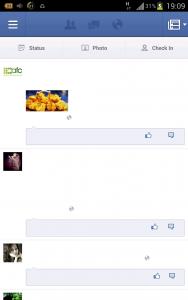
1) The Samsung keypad is not working
2) When launch FB, the screen will look like this:-
Attached Image

lhooipg
post Apr 4 2012, 08:38 PM

New Android User
******
Senior Member
1,403 posts

Joined: Oct 2009
QUOTE(benny888 @ Apr 4 2012, 07:33 PM)
No such issues for me at all
However I do read some users has same problem as yours
For Facebook - go check it up there is a solution , just replace 2 fonts and put in /system/fonts ; some user even  delete FB and reinstall it back and problem solved
Samsung keypad perfect for me but I don't use it. I only use Swype or Smart Keyboard Pro
*
Hi Benny,

Just curious, why my Baseband version is different what yours?I followed exactly the step as you provided and mine is different from yours..any idea? How do I have the same as yours?
Attached Image
lhooipg
post Apr 4 2012, 09:20 PM

New Android User
******
Senior Member
1,403 posts

Joined: Oct 2009
QUOTE(benny888 @ Apr 4 2012, 08:46 PM)
Sorry wrong info given earlier
You need to flash thro recovery the LP5 modem first - download the file MIDNOTE3.0_MODEM.zip at Midnote thread - post # 1
I have earlier flash it when on Stunner 4.3

You need LP5 modem or you will faced SOD
Thanks Benny, its working now the FB after flashing the modem.zip and copy over the 2 fonts to system/fonts...

thanks a lot...
lhooipg
post Apr 4 2012, 09:41 PM

New Android User
******
Senior Member
1,403 posts

Joined: Oct 2009
Find out another issue on Midnote 3.0....I try to change the display fonts but too bad don't have any to select, only one default so I click the 'Get Fonts Online'..after that screen blank for a while and display "Unfortunately, Setting has stopped"..

Attached Image
lhooipg
post Apr 4 2012, 10:21 PM

New Android User
******
Senior Member
1,403 posts

Joined: Oct 2009
QUOTE(benny888 @ Apr 4 2012, 10:15 PM)
Use free app my data Manager. Launch it it will list out in detail all apps using up data on both Mobile 3G and WiFi
The results is shown as cumulative figures in a month


Added on April 4, 2012, 10:18 pm
When I tap on it , lt launches Samsung Apps store - no freezing
Anyway easiest way is to use free app FONT CHANGER by Martino. You have so many choices of fonts from A to Z. Pick the one you want and just install the apk file. After install the fonts will appear at settings/display/font
*
ok thanks will give it a try...
lhooipg
post Apr 5 2012, 12:54 AM

New Android User
******
Senior Member
1,403 posts

Joined: Oct 2009
QUOTE(num123 @ Apr 5 2012, 12:39 AM)
hi guys is there any driver for galaxy note to sync with computer? cause i wanted to print a photo from galaxy note and my comp says usb is not recognized.
*
Install Kies will have the driver install as well

This post has been edited by lhooipg: Apr 5 2012, 12:55 AM
lhooipg
post Apr 5 2012, 08:25 AM

New Android User
******
Senior Member
1,403 posts

Joined: Oct 2009
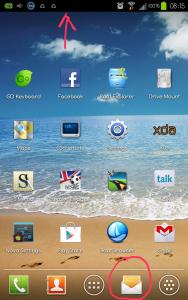
On Midnote 3.0 now and notice that when there is sms/msg came in, there is no notification on the bottom of the icon..only have at the top of the screen..
Attached Image
lhooipg
post Apr 5 2012, 10:24 AM

New Android User
******
Senior Member
1,403 posts

Joined: Oct 2009
QUOTE(benny888 @ Apr 5 2012, 10:16 AM)
I never use stock mail as so limited with features
Suggest you try freemail app K9 Mail . It has more features, too long to list here but major points:
- you can setup multiple email accounts
- you can select to view all mails together of all the accounts or see it separately
- you can set display features : font sizes in practically every aspect of your mail fro TO header right to message body
- you can set mail to remain on server after download
- you can set mail to be deleted on server after download
- you cans et mail to be deleted on phone if mails deleted on server
- you can set time from checking mail every one minute, 5 min, 10 min up to several hours - all up to you
- you can set size of each email download
= etc plus many many more
*
Yes agree K9 Mail is not bad but unfortunately it did not work for my company Exchange 2003 even I have the same configuration setting as my previous E72...have try all sort of combination of setting but no result.

Now looking for other mail client which is working for Exchange 2003....

lhooipg
post Apr 5 2012, 02:11 PM

New Android User
******
Senior Member
1,403 posts

Joined: Oct 2009
QUOTE(SugarCoatedCandy @ Apr 5 2012, 02:00 PM)
Funny enuff uncle... after i rebooted a couple of times just now.. it finally worked!! Thanks thanks!!  thumbup.gif

Now i just need GB stock fonts to fix my facebook and keyboard issues sad.gif
*
For FB try this http://forum.xda-developers.com/showpost.p...&postcount=1857

For keyboard, scroll down to 'Not Working' section and try it but it did not work for me..
http://forum.xda-developers.com/showthread.php?t=1511841
lhooipg
post Apr 5 2012, 03:14 PM

New Android User
******
Senior Member
1,403 posts

Joined: Oct 2009
QUOTE(SugarCoatedCandy @ Apr 5 2012, 02:48 PM)
Rox!  brows.gif You da man hahahaha.. Thanks.. it took ages looking for that font pack.. Got it both fixed! Yipeedoodahhh.. Now life returns as normal.. hahahahha

Going to go play with my new toy..  icon_rolleyes.gif
*
glad its working for you.... rclxms.gif thumbup.gif
lhooipg
post Apr 5 2012, 04:29 PM

New Android User
******
Senior Member
1,403 posts

Joined: Oct 2009
QUOTE(christina1 @ Apr 5 2012, 04:23 PM)
Hi Guys,

do guys know any good software to monitor data usage.
*
Try My Data Manager or Onavo
lhooipg
post Apr 5 2012, 07:13 PM

New Android User
******
Senior Member
1,403 posts

Joined: Oct 2009
QUOTE(cweijian @ Apr 5 2012, 07:06 PM)
DAmn! i am in deep shit now. I followed the steps here http://forum.xda-developers.com/showthread.php?t=1511841
and right until Step  6 in CWM recovery and my screen is black in color with logo_a1.jpg draw failed. !! im stuck now... sifuuu i need help... sad.gif
*
6. After the flash, you will be in CWM recovery, do a reboot, then wait some minutes to build the caches, ONLY FIRST TIME you will see statusbar only. Now long press power button, then select "reboot" and WAIT TILL YOU WILL BE AGAIN IN FULL WORKING SYSTEM

have you done the above?
lhooipg
post Apr 5 2012, 07:26 PM

New Android User
******
Senior Member
1,403 posts

Joined: Oct 2009
QUOTE(cweijian @ Apr 5 2012, 07:19 PM)
No i could not pass this step. Right after click flash and now i get this logo_a1.jpg draw failed. I try to hold the power button but i'm forever stuck there. What can i do now.... ?
*
Try to flash again..
lhooipg
post Apr 5 2012, 11:04 PM

New Android User
******
Senior Member
1,403 posts

Joined: Oct 2009
wooo...there is update for Midnote 3.1 already...

http://forum.xda-developers.com/showthread.php?t=1511841
lhooipg
post Apr 5 2012, 11:30 PM

New Android User
******
Senior Member
1,403 posts

Joined: Oct 2009
anyone face issue whereby when receive email/sms there isn't any notification at the bottom of those icon which added either from widget or shortcut?

On top notification no problem, only the bottom don't have...any idea anyone?

I try to delete it and add again but still the same....
lhooipg
post Apr 5 2012, 11:38 PM

New Android User
******
Senior Member
1,403 posts

Joined: Oct 2009
QUOTE(ogiveyakuza @ Apr 5 2012, 11:32 PM)
message>setting>notification?
*
That one is on the status...not the icon itself...

4 Pages < 1 2 3 4 >Top
Topic ClosedOptions
 

Change to:
| Lo-Fi Version
0.0243sec    0.71    7 queries    GZIP Disabled
Time is now: 11th December 2025 - 08:13 AM