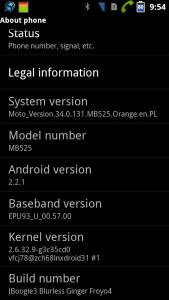
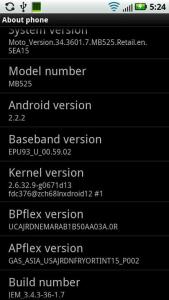
your earlier post shows that you are on 2.2.1 and this post shows you're on 2.2.2
did you do anything? i think best would be for you to install 2nd-init first. from there, the world of possibilities opens up, since installing a new rom is as easy as clicking install.
to install 2nd-init, go to this link, download the apk and run it. make sure USB debugging is on.
http://forum.xda-developers.com/showthread.php?t=1032212i attach the 1st page info for you. you should go read the info there. start from intall 2nd-init since you should already be rooted. and, get your own ROM that you want to install. CM7 not many ppl use. at least CM7.2 stable now, or MIUI or WIUI or CM9. Others, i think really not worth it
How to install CM7 Beta 6?
- First flash any Froyo leak of your choice (see 1)
- Turn USB Debugging ON
- Root via SuperOneClick
- Reboot
- Install 2nd Init Recovery Installer 1.4(see 12)
- Turn USB Debugging OFF
- Reboot your device 2 times
- Copy CM7 Beta 6, Google Apps 2.3.4(market, gtalk, etc.) and FixBrightness.zip to your SD Card
- Reboot your device, when the blue led lights at Motorola logo, press Volume Down to enter Bootmenu
- Go to "Set Default Bootmode" then select [2ND-INIT]
- Go to "[Custom Recovery] start"
- Select "wipe cache partition" then "wipe data/factory reset"
- Select "install zip from sdcard", "choose zip from sdcard", then select "update-cm-7.1.0-jordan-beta6-signed"
- Select "choose zip from sdcard", then select "gapps-gb-20110503-signed.zip"
- Select "choose zip from sdcard", then select "FixBrightness.zip"
- Select "+++++Go Back++++++" then "reboot your system now"
Thanks bro.
I'm merely touching the iceberg tips only now.
The 2.2.2 is flash earlier using RSD Lite as I go across on XDA.
coz I asked for a Flashing 101 steps there. as I don't really get how does an Android system works.
much to be known like what sits on top of what.
our Defy based is on a bootloader, then it comes to recovery mod, then it comes to a base rom right?
Btw, any chance you can share with me what is the screen about, like Baseband Version and Kernel Version.


 Jun 9 2012, 10:13 PM


 Quote
Quote


 logo and Android doll and stuck there forever until battery removed.


 0.0372sec
 0.76
0.76
 7 queries
 GZIP Disabled