Welcome Guest ( Log In | Register )

Bump Topic Topic Closed RSS Feed

Outline · [ Standard ] · Linear+

 SAMSUNG GALAXY NOTE™ | V7, Phone? Tablet? It's Note!!!

views
     
andyng
post Feb 4 2012, 11:15 AM

Getting Started
**
Junior Member
134 posts

Joined: Nov 2009


QUOTE(ogiveyakuza @ Feb 3 2012, 09:47 PM)
1-10% i think is normal, but 30-40% there must be something wrong...make sure no apps running on the background...setting>>application>>>running apps....


Added on February 3, 2012, 9:55 pmoff topic, uncle benny, u still use e71??? how come...?
*
mine depending on usage (screen on) the highest battery consumer is either Android OS or Display 30-40% each either/or...if low usage, the Android OS will be the highest consumer. is this not normal? if not mistaken, my wife's S2 also the same. (please not we are not heavy user)
andyng
post Feb 11 2012, 07:55 AM

Getting Started
**
Junior Member
134 posts

Joined: Nov 2009


search for "screen filter" in market...i use that to dim the screen when using in dark places...can set the % dimming to your preference...

QUOTE(Kelifu @ Feb 11 2012, 07:10 AM)
Morning guys. anyone know is that any app can reduct the brightness of the phone? Ori setting i already set minimum tapi i feel that still too bright for me. Ermm...


Added on February 11, 2012, 7:14 am
Oh, really? I will check it out later. Anyway last time when i using nokia phone, i did install this app too from ovi store. Tapi after full screen, thr picture become very blur. Dunno android will got this problem or not.
*
andyng
post Feb 13 2012, 03:59 PM

Getting Started
**
Junior Member
134 posts

Joined: Nov 2009


i just found out my battery dropped about 20% over the last 2 hours without any usage. phone was warm. checked the battery usage and it was awake for the last 2 hours, but i did not touch the phone. Android OS took the most power, sapping 40%, far ahead of others. so i reboot the phone to stop this.

is there anyway to find out what caused this? why did the phone stay awake for the last 2 hours with me using it? i have gmail app and k-9 email app running, but i checked usage of those, was normal.

my phone is stock, unrooted, on 2.3.6 LA1.

thanks.
andyng
post Feb 13 2012, 10:48 PM

Getting Started
**
Junior Member
134 posts

Joined: Nov 2009


i just found out my battery dropped about 20% over the last 2 hours without any usage. phone was warm. checked the battery usage and it was awake for the last 2 hours, but i did not touch the phone. Android OS took the most power, sapping 40%, far ahead of others. so i reboot the phone to stop this.

is there anyway to find out what caused this? why did the phone stay awake for the last 2 hours with me using it? i have gmail app and k-9 email app running, but i checked usage of those, was normal.

my phone is stock, unrooted, on 2.3.6 LA1.
andyng
post Feb 14 2012, 10:17 AM

Getting Started
**
Junior Member
134 posts

Joined: Nov 2009


QUOTE(benny888 @ Feb 13 2012, 11:11 PM)
Install betterybatterystats to find out what is waking the phone. Mine at idle standby most is 0.5%/hour with some active refresh of news, tweeter updates in background
What kernel are you on
Baseband is KL2
Kernel is LA1
updated via OTA

ok, installed BBS liao...will figure out how to use it...

normally i drain at 2.5% to 3% an hour at idle, with updates on K-9 and gmail, running JD Plus. yesterday had a huge drain in 2 hours and phone was warm...it was not normal...so need to check...

so, if and when i find the problem causing the wakelock, will i need to root to remove the problem?
andyng
post Feb 15 2012, 09:51 AM

Getting Started
**
Junior Member
134 posts

Joined: Nov 2009


QUOTE(andyng @ Feb 14 2012, 10:17 AM)
Baseband is KL2
Kernel is LA1
updated via OTA

ok, installed BBS liao...will figure out how to use it...

normally i drain at 2.5% to 3% an hour at idle, with updates on K-9 and gmail, running JD Plus. yesterday had a huge drain in 2 hours and phone was warm...it was not normal...so need to check...

so, if and when i find the problem causing the wakelock, will i need to root to remove the problem?
*
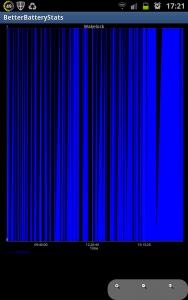
yesterday had a similar incident the battery drop by about 10% within less than one hour, and phone was warm again...checked betterbatterystats, yes there was a wakelock...but i dunno how to read and interpret the data...wanted to post up screen shots this morning, but realised the data is all gone because i charged last night and the data reset to since unplug this morning...will have to wait for it to happen again and save a file...

i'm really confused on how to use this betterbatterystats...any pointers from anyone?
andyng
post Feb 15 2012, 06:06 PM

Getting Started
**
Junior Member
134 posts

Joined: Nov 2009


ok, hope someone canhelp me here...i am encountering a sudden sharp drop in battery % again for 3rd day in a row...it happens at different time of the day...but i noticed it always starts happening when battery % reaches around 70%...

and so it just happened again, within 1 hour, battery drop from 72% to 55%, temperature rise from normal below 30C to a high 39C and rising, phone is warmer than normal. i have already reboot phone to stop this battery drain so that don't drain until finish.

but this time i have betterbatterystats (BBS) installed to record data of battery drain. and after looking thru BBS, i still don't know how and where to find this culprit…

I did a few screenshots to show…anyone can advice???

thanks

Attached Image

Attached Image

Attached Image

Attached Image

Attached Image

Attached Image

Attached Image

Attached Image

Attached Image

Attached Image

Attached Image

This post has been edited by andyng: Feb 15 2012, 06:08 PM
andyng
post Feb 15 2012, 06:55 PM

Getting Started
**
Junior Member
134 posts

Joined: Nov 2009


QUOTE(AMDunFreak @ Feb 15 2012, 06:28 PM)
if the pattern is when battery reach 70% then start to go haywire, maybe your JD (or battery saving app) goes crazy..

by the way, BBS, you need to printscreen before you restart phone, after restart phone, everything gone.

normally when i want to check BBS, i'll fully charge my phone, disconnect charger.
then go to BBS, then hit "menu", "more", "set custom ref"

then on main screen, second line, select "since custom ref"
*
the screenshots do include the data before i did the reboot...the data is "since charged", which is since reaching 100% charge early this morning around 7:49am.

yeah i do suspect JD might be screwing it up, but i did not see any strange behaviour of WiFi and Mobile Data connections. only Wifi was on during the period, but the phone got so warm so fast as if Mobile Data was on, but is was not.

I also suspect (again i could be very wrong) that it is K9 mail that is causing this, or whatsapp...but i really do not know because i don't understand the BBS data...

hope someone that knows how to analyse the BBS screenshots can tell me something.

thanks.
andyng
post Feb 15 2012, 09:22 PM

Getting Started
**
Junior Member
134 posts

Joined: Nov 2009


QUOTE(-Franc- @ Feb 15 2012, 08:19 PM)
how about u try to uninstall ur JD and monitor your batt for one day?
*
I'm gonna try reinstall k9 first and if still problem, reinstall jd, then whatsapp...
andyng
post Feb 15 2012, 09:59 PM

Getting Started
**
Junior Member
134 posts

Joined: Nov 2009


QUOTE(andyng @ Feb 15 2012, 09:22 PM)
I'm gonna try reinstall k9 first and if still problem, reinstall jd, then whatsapp...
*
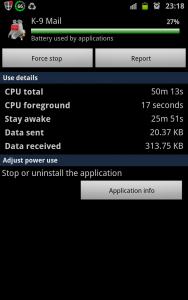
Now i charge back to 80% and let it idle and drain see if it happens again...then only will try reinstall k9...yeah...i think is k9 email...both bbs and battery usage show it as highest battery consumer...normally is not even in top 5...

Attached Image
andyng
post Feb 15 2012, 11:20 PM

Getting Started
**
Junior Member
134 posts

Joined: Nov 2009


QUOTE(AMDunFreak @ Feb 15 2012, 10:15 PM)
tap on the K9, see how many CPU time used?
*
Here it is...

Attached Image
andyng
post Feb 15 2012, 11:44 PM

Getting Started
**
Junior Member
134 posts

Joined: Nov 2009


QUOTE(AMDunFreak @ Feb 15 2012, 11:22 PM)
looks like it's the K9 apps causing your problem...
normally for apps, the CPU is few minutes only..
*
Yeah i suspect the same too...k9 is usually not even in the top5.

So far can't replicate the battery drain...i will uninstall and reinstall k9 amd see if it happens again tomorrow...
andyng
post Feb 16 2012, 01:03 AM

Getting Started
**
Junior Member
134 posts

Joined: Nov 2009


QUOTE(duxz @ Feb 16 2012, 12:56 AM)
other than k9 mail, what other email clients which is good and reliable and yet suck up less juice? i m on k9 all these while also but never notice it drains juice till you brought it up.
*
It normally uses very little battery power...i'm happy with it...maybe the app got corrupted somewhere and started running funny...before this incident, it only sucked lotsa battery on 2 occasions when i updated android version from 2.3.5 to 2.3.6 and again when update to 2.3.6 LA1...just reboot and fine...you only have a problem if it becomes a top3 battery consumer together with display and android os...if not the case, just continue using.
andyng
post Feb 16 2012, 04:26 PM

Getting Started
**
Junior Member
134 posts

Joined: Nov 2009


QUOTE(AMDunFreak @ Feb 15 2012, 11:22 PM)
looks like it's the K9 apps causing your problem...
normally for apps, the CPU is few minutes only..
*
i reinstalled K9 Mail, so far today the sudden power drain has not happened...

let's hope it does not happen again...

anyone encounter such problems with K9?

thanks for the help and guidance...


Added on February 16, 2012, 4:30 pm
QUOTE(honamd77 @ Feb 16 2012, 04:22 PM)
to get better..at least 24 hour.but after 2 hour applied can see the performance biggrin.gif
can feel soft and little sticky.rm50 per skin..
*
Hi. Mana boleh beli?

This post has been edited by andyng: Feb 16 2012, 04:30 PM
andyng
post Feb 16 2012, 05:36 PM

Getting Started
**
Junior Member
134 posts

Joined: Nov 2009


fallenangelz, pls PM me price and availability of the XOskins, and where to meet you...thanks.
andyng
post Feb 16 2012, 07:47 PM

Getting Started
**
Junior Member
134 posts

Joined: Nov 2009


QUOTE(andyng @ Feb 16 2012, 04:26 PM)
i reinstalled K9 Mail, so far today the sudden power drain has not happened...

let's hope it does not happen again...

anyone encounter such problems with K9?

thanks for the help and guidance...
and it happens again...6:00pm to 7:18pm, battery drop by 32% from 59% to 27%...again it is K9 Mail...

and i am beginning to see a pattern...it is when it receives a big email or email with big attachment like a hi-res graphic file, that this happens, i think... when i open the big email, there is a flickering box (macam graphic or something hang) with words "download the rest of the email?" or something like that... then after a few seconds, it stops flickering...noticed that yesterday too with a big email during the battery drain. must be some setting that is causing some problem receiving big emails or attachments...must study a bit of the settings...

if cannot solve, have to find another pushmail app...any recommendations? i use this for work emails...
andyng
post Feb 17 2012, 10:33 AM

Getting Started
**
Junior Member
134 posts

Joined: Nov 2009


QUOTE(Fallenangelz @ Feb 16 2012, 07:58 PM)
setting there cannot disable auto download attachments?
*
can't find such a setting yet, but there is a setting to set the max size of email to be fetched...will try that...thanks for the suggestion!
andyng
post Feb 20 2012, 09:57 AM

Getting Started
**
Junior Member
134 posts

Joined: Nov 2009


oh oh...i think i have a problem...

you know when you plug in the the charger and the phone sounds "boop-beep" to indicate charging...

mine when i plug in charger, sometimes it take some time before it "boop-beep"...and then randomly every few minutes it gives out the sound again... sometimes it stops charging and starts again randomly and status bar show "MTP Initialization"... i know this should only show if plugged in to USB on the PC, and then it immediately goes back to AC charging...this keeps on repeating itself every few minutes...something weird is happening...

any idea what is going on?

i have a feeling i'm gonna have to visit the Samsung service centre real soon...

This post has been edited by andyng: Feb 20 2012, 10:03 AM
andyng
post Feb 20 2012, 10:21 AM

Getting Started
**
Junior Member
134 posts

Joined: Nov 2009


QUOTE(Fallenangelz @ Feb 20 2012, 10:16 AM)
take a clean cloth or smtg to wipe ur usb port. got dust inside i suspect. if no then u can go line up at samsung service centre d.
*
wah that's gonna be difficult...such a small hole...i hope is just dust and not some broken pin or solder...thanks bro!

This post has been edited by andyng: Feb 20 2012, 10:29 AM
andyng
post Feb 20 2012, 10:27 AM

Getting Started
**
Junior Member
134 posts

Joined: Nov 2009


deleted text - how to delete this post?

This post has been edited by andyng: Feb 20 2012, 10:30 AM

2 Pages  1 2 >Top
Topic ClosedOptions
 

Change to:
| Lo-Fi Version
0.0282sec    0.59    7 queries    GZIP Disabled
Time is now: 11th December 2025 - 07:18 PM