Welcome Guest ( Log In | Register )

5 Pages < 1 2 3 4 > » Bottom

Outline · [ Standard ] · Linear+

 All About Harddisk Thread V4

views
     
mrbob
post May 14 2014, 06:10 PM

Casual
***
Junior Member
318 posts

Joined: May 2010
QUOTE(KUROsaki23 @ May 11 2014, 03:54 PM)
hye ...i got one problem, my hard drive status is error, can put file but every now and then keep asking for backup data and so on..can repair on my own or have to send for repair? -samsung internal 2tb
*
Not sure if any of the harddisk recovery companies in Malaysia would actually repair problem HDD. You could try speaking to them. Their services will not come cheap. Search for "harddisk recovery Malaysia" in Google.

If BIOS and OS can still see the HDD then there is a chance to still recover the data on your own. First you must know the SMART status of the HDD. Assuming that you run Windows on your machine, head to the following link to download CrystalDiskInfo, run it on your problem HDD and post the result here in the forum.

http://crystalmark.info/software/CrystalDi...fo/index-e.html


mrbob
post Jun 1 2014, 06:46 PM

Casual
***
Junior Member
318 posts

Joined: May 2010
QUOTE(KUROsaki23 @ May 24 2014, 12:00 AM)
» Click to show Spoiler - click again to hide... «

*
Hi

Thought you have RMA'ed the HDD and decided not to try anything on it.

Anyway problem could be due to HDD surface or R/W heads. In anyway, you should try to backup the data from the HDD using tools like PhotoRec on Hiren BootCD for the most damaged/stubborn files to get off the HDD. RMA is your easiest way rather than wasting time trying to low-level format etc. Just tell them the performance suffers too much to be any use for you.

Rgds,


mrbob
post Jun 2 2014, 08:49 PM

Casual
***
Junior Member
318 posts

Joined: May 2010
QUOTE(KUROsaki23 @ Jun 2 2014, 07:34 PM)
already try to ask, they say waranty finish already sad.gif so cant rma
*
Sorry to hear bout that. I hope you managed to get all your data.

Anyway, the first thing I would do is to confirm if it's surface related problem. Download HDTune free at http://www.hdtune.com/download.html and run the Error Scan function.

Read the FAQ here http://www.hdtune.com/faq_1.html

If problem is related to surface damage, you can run a chkdsk command from the Windows Bootup DVD -> Windows Repair command prompt. The command is "chkdsk /r /x". Windows will check on each HDD sector and mark the damaged sector.


mrbob
post Jul 2 2014, 01:24 PM

Casual
***
Junior Member
318 posts

Joined: May 2010
QUOTE(DreamScars @ Jun 28 2014, 08:53 PM)
guys, i heard that wd green has the head parking issue which causes high load cycle counts. assuming that i'm using it for a storage drive and constantly downloading(torrenting) videos and music to the drive, will it be an issue?

looking around for 2tb drives, are the seagate barracuda's solid? worried about its 1-year warranty as opposed to wd green's 2-years and wd red's 3 years.
*


QUOTE(wildwestgoh @ Jun 29 2014, 06:58 AM)

doh.gif Old news? If you're constantly accessing the HDD, then the head won't park, constant torrenting won't be an issue.
As for the warranty, Seagate has changed his to 2-year, if you're into warranty, get the SV35 (WDC AV Green equivalent) which has 3-year warranty, just add around RM20~40 more depends on location and shop.
*


DreamScars - There is always wdidle3 to manage the WD Green diskpark feature. I've heard that WD has improved the current version over the original Green which was problematic. You can also consider WD Blue/Red/Black instead, which has 2/3/5 yrs warranty respectively.

wildwestgoh - How's your experience with Seagate SV35? Do you run Windows or Linux with it? My experience with WD AV Green has been 50/50. My 1st unit (20 months old) on a Linux torrent box has been performing solid. The 2nd was DOA and the replacement unit is sitting in my Win PC. It seems to be working better with Linux than Windows.

This post has been edited by mrbob: Jul 2 2014, 04:20 PM
mrbob
post Jul 2 2014, 01:44 PM

Casual
***
Junior Member
318 posts

Joined: May 2010
Have you ever wondered what's the use of the unrecoverable read error (URE) measurement that is detailed in the specifications of your harddisk? If you are running RAID5 with HDDs that are 2TB or bigger, you should read the following 2 articles.

Why RAID 5 stops working in 2009 - http://www.zdnet.com/blog/storage/why-raid...ing-in-2009/162

Has RAID5 stopped working? (2013 update) - http://www.zdnet.com/has-raid5-stopped-working-7000019939/

If you have RAID installed, what are your options?

1) Run RAID6 or RAIDZ2 (ZFS equivalent of RAID6) or higher
2) Ensure you have a proper backup for your critical data
3) If you can afford it, buy HDDs that have better URE ratings for better security and performance


mrbob
post Jul 2 2014, 04:17 PM

Casual
***
Junior Member
318 posts

Joined: May 2010
QUOTE(super macgyver @ Jul 2 2014, 03:33 PM)
just have a hitachi 2tb failed with at least 60 bad sectors which just past feb 2014 warranty expiry date.
hope the new hitachi enterprise 5yr wrty hdd can longer than this faulty hitachi entry level hdd >.<
*
Wowzers! 5 years warranty! Anyway you'd probably be ready to upgrade to a larger capacity HDD when you reach the 3rd year. Hopefully by then 6TB HDDs would become more affordable. *Keeping*fingers*crossed*


mrbob
post Jul 3 2014, 07:13 PM

Casual
***
Junior Member
318 posts

Joined: May 2010
QUOTE(wildwestgoh @ Jul 2 2014, 05:26 PM)
I don't have SV35, wanting to get one but local stock is not available or dealer does not want to due to low demand.
I only have the WDC AVGP 3TB, working fine so far but that's less run due to only-plug-when-needed.
As for my another WDC Green (normal one; 2-year warranty) is also only-plug-when-needed, so I think it should prone less issue. *cross-finger* sweat.gif
*
Which vendor have you asked? Both Jayacom and Viewnet featured the HDD on last week's pricelist.

Checkout the StorageReview piece on WD AVGP - http://www.storagereview.com/western_digital_avgp_3tb_review


mrbob
post Jul 3 2014, 07:32 PM

Casual
***
Junior Member
318 posts

Joined: May 2010
QUOTE(super macgyver @ Jul 3 2014, 12:29 PM)
this hitachi 2tb already cost RM5xx ler, dun need get larger liao lor, as it is only save company data nia.  tongue.gif
*
This is what I have observed - Capacity of HDD doubles every 3 years. Price of HDD comes down with time as bigger capacity HDD is released.

Actually RM5xx for HGST Enterprise 2TB is quite a good deal considering the solid performance of their Enterprise range.
mrbob
post Jul 3 2014, 10:29 PM

Casual
***
Junior Member
318 posts

Joined: May 2010
QUOTE(wildwestgoh @ Jul 3 2014, 09:59 PM)
Vendor? Those are KL, if I'm in West Malaysia I won't have such hassle, I live in Kuching where vendor only import base on demand or for whatever reason.
Well, so far my drives has been... OK... I've not been using them for very long time, unlike my Samsung 2TB which is running 24/7, torrenting and shares purpose. sweat.gif
*
If you really want it you could try hikari85.

SV35 has a higher spin rate and can support 32 simultaneous video streams compared with AVGP's 12 streams. AVGP really shines at 24/7 ops with constant write especially in ext3/4 filesystems. I'll be moving my 2nd AVGP to my linux desktop soon.


mrbob
post Jul 4 2014, 09:49 AM

Casual
***
Junior Member
318 posts

Joined: May 2010
QUOTE(wildwestgoh @ Jul 4 2014, 08:02 AM)
Well, I'm fine with the AVGP, wasn't really a performance craver anyway, the SV35 is much expensive if I back-to-back order it here, Hkari85 is from Penang, postage could be much worst...  sweat.gif so yeah, I'll stick to whatever options I have right now, currently saving up for smaller case for pure NAS setup.
Looking at Linux setup for my future sharing options, Windows Server is faster though in terms of background performance, but I'll get to find out later. wink.gif
*
That's why I said if you really wanted to get your hands on it.

For storage and sharing, NAS is the best way to go. As for HDD performance, some are tuned to CIFS and some for NFS or even iSCSI. Have a look at StorageReview's findings as they put the different HDDs through different workloads.

Tom's Hardware shotout for WD Purple and SG SV35 seems to point to SV35 being tune to general write intensive apps and this has stirred my interest in the range.

http://www.tomshardware.com/reviews/survei...ce,3831-10.html

FYI I have lost 4 WD GPs to NTFS filesystems corruption. I'm very sure the SATA cables were not the cause of it. I have since made the happy move to EXT3/4 and ZFS.
mrbob
post Jul 8 2014, 10:43 AM

Casual
***
Junior Member
318 posts

Joined: May 2010
QUOTE(wildwestgoh @ Jul 4 2014, 01:46 PM)
Were you using RAID on those failed WD GPs? I believe the GPs is not cater for hardware RAID though hmm.gif
I'm cheap skate on using those NAS system, pretty expensive IMO, and I need apps that require runs on Windows (most of it) so yeah my requirement is different, will look into Linux alternatives. unsure.gif
*
Haha, no they weren't RAIDed. Although some FreeNAS forumers have tested and verified that WD GP could run RAID, I wouldn't risk putting my data on RAIDed GPs. My problematic WD GPs were all on external enclosures which I have used religiously to backup my data the last couple of years. All of them started showing NTFS problems - corrupted files, index etc despite healty SMART status.

I guess the heavy online backup workload I put the WD GPs through may have exceeded what it was designed for. But I think for your case backup and archive, WD GP would work perfectly.


mrbob
post Jul 8 2014, 10:47 AM

Casual
***
Junior Member
318 posts

Joined: May 2010
QUOTE(DreamScars @ Jul 8 2014, 10:39 AM)
thanks for the heads up, however like you i'm staying in kuching so not a lot of choice for hdd's here.
pc image only offers 1 year warranty for wd green and blue, 2 years for red and 3 years for black  sad.gif
*
WD would still honor the full warranty as stated on their website even if your Kuching vendor don't provide you full warranty support.
mrbob
post Jul 10 2014, 10:55 PM

Casual
***
Junior Member
318 posts

Joined: May 2010
QUOTE(wildwestgoh @ Jul 8 2014, 12:55 PM)
Green's problem is the head park issue, if you going to use it intensively, then Blue or Black, but my Black also have issue once and RMA it last year, there's always issue with every single HDD out there, problematic rate is another issue... sweat.gif
Otherwise get the AVGP which has extra 1-year warranty but of course need to back-to-back order for most retailer as it's not a common demand.
Black's warranty is good but you pay for the extra warranty, plus its heat issue is another which is too high for 24/7 usage, on a hot day can shoot up to 48C with fan blowing it... doh.gif That's in my room (really hot room) during "summer" in my main PC of which only runs in the night time right now due to the worries of overheating of the overall system. unsure.gif
*
GP's IntelliPower feature that parks the HDD head every 8 secs throughout its lifetime is not an issue if you use wdidle3. Some Reds were also affected by WD's adventurous step to introduce the IntelliPower in it too. Good thing they have decided to remove the IntelliPower feature in the later Reds. If you own any Reds , you can also use wdidle3 to check if it comes with IntelliPower switched on.

To ensure smooth operation of your HDDs, just watch these 3 - heat, shock/vibration and power. If you can care take of these, your HDD will have a good chance of lasting well after the warranty expires.

This post has been edited by mrbob: Jul 11 2014, 09:43 AM
mrbob
post Jul 10 2014, 10:59 PM

Casual
***
Junior Member
318 posts

Joined: May 2010
QUOTE(DreamScars @ Jul 9 2014, 06:28 PM)
im wondering if sv35 will be suitable for storing games or made as boot drive?  hmm.gif
*
WD Blue or Black or even SSDs would be good as bootup. sv35 and AVGP are great under constant writing mode - eg CCTV, torrenting, continuous video streaming etc.

WD Greens are great for archiving. Just google and see how to better protect your HDDs.
mrbob
post Jul 21 2014, 03:57 PM

Casual
***
Junior Member
318 posts

Joined: May 2010
user posted image

8TB and 10TB HDDs might be available soon as Seagate CEO confirms during quarterly earnings report announcement that "customer development kits" have been shipped out to major customers.

http://www.tweaktown.com/news/37434/seagat...year/index.html

http://www.kitguru.net/components/hard-dri...nt-hard-drives/

http://hothardware.com/News/Seagate-Announ...ews#!biO8uR


mrbob
post Aug 13 2014, 10:10 AM

Casual
***
Junior Member
318 posts

Joined: May 2010
QUOTE(carpathia @ Aug 12 2014, 12:41 PM)
Anyways, no more WD disk for me . This is especially fishy when WD offers FREE 1 year data recovery services now with their hard disk

http://www.ontrackdatarecovery.com.sg/dr-wd-my/
Here is my blog post on this matter. now how do i share this with WD malaysia
*
Ontrack gets all the free publicity with a major brand plus free ride to customer details when an interested end-user signs up. What more can a company ask for? They will be able to reach more potential customer this way faster then on their own. I doubt people will buy a harddisk just for the free limited time data recovery service. You already have plenty of free tools available that can readily do a quick recovery without taking the problem HDD apart.

I have got 2 dead Seagate HDDs (completely undetected at BIOS) and 2 WD greens with bad sectors. Running about 20 WDs (mostly Red) at anytime. Comparing between SG and WD, I'd rather go with WD for its FW stability. Both brands have their fair share of issues. Just need to make sure you cut out the vibrations, keep drives cool and keep a stable power to the HDDs.

This post has been edited by mrbob: Aug 13 2014, 10:18 AM
mrbob
post Aug 15 2014, 04:32 PM

Casual
***
Junior Member
318 posts

Joined: May 2010
QUOTE(carpathia @ Aug 14 2014, 01:44 PM)
Agree that wd is better than seagate but I still don't want wd. Looking at buffalo as alternative. I recalled Hitachi and Samsung is out of the business right?
*
Try taking the Buffalo apart and you will find *surprise*surprise* ...Seagate. Good thing you're on 2.5", a friend had his 3.5" buffalo ext killed twice - dead HDD. First time he RMAd and the replacement died just outside the 2 year warranty. Took it apart but the Seagate HDD inside couldn't be detected by the BIOS. He since bought 2 x WD MyBook and have been boasting about their stability. Don't ask me, I'd rather just use internal HDDs and NAS. And even so, I still encountered a DOA WD Green CCTV. Managed to get it exchanged.

QUOTE(wildwestgoh @ Aug 14 2014, 01:53 PM)
Neither is better than the other, it's "luck", some can use over decade, some broke within few days doh.gif
Hitachi is still active but only on 2.5"? Correct me on this.
Samsung's HDD is bought by Seagate.
*
Actually Hitachi is still pretty much alive even after being bought over by WD 2 years ago. Head over to storagereview for all their recent consumer HDDs releases. Its just that the distributor in Malaysia sucks big time. Seagate has been selling 6TB desktop HDDs in the US. It will be awhile before they are available here. http://www.newegg.com/Product/Product.aspx...N82E16822178520. Give it until Q2 next year for the 6TB consumer HDDs to come down in price.

This post has been edited by mrbob: Aug 15 2014, 04:40 PM
mrbob
post Aug 15 2014, 05:17 PM

Casual
***
Junior Member
318 posts

Joined: May 2010
Wrote this a couple weeks ago during some free time with a thought of helping others understand the 3 main focus - heat, shock/vibration and power. Taking care of these can help determine the useful lifespan of your hard drives.

Now in case you are wondering why I have left out water as an obvious hard drive killer, I am making the assumption that you KNOW that operating ANY electrical equipment in the presence water will fry the equipment and possibly you along with it too. So let's get on with the first part.

A) HEAT

If you have started with a healthy hard drive free from manufacturing defect etc, high temperature is the No 1 killer for your hard drive.

Google's "Failure Trends in a Large Disk Drive Population" http://research.google.com/archive/disk_failures.pdf is a good study on general trends of hard disks in data centers. Although other studies such as Backblaze does not find any co-relations between failure rates and temperatures (Backblaze's study covers up to 30°C), Google's study tracked temperatures from 15°C to 50°C.

user posted image

Google's findings showed higher failure rates for:

- Hard disk temperatures above 45°C

- Temperatures below 25°C

- Aging hard disk drives (3 years and older) with average temperatures 40°C and above

According to a similar study "Datacenter Scale Evaluation of the Impact of Temperature on Hard Disk Drive Failures" http://www.cs.virginia.edu/~gurumurthi/papers/acmtos13.pdf released by Microsoft and the University of Virginia, when temperatures reached 50°C, average failure rate increased 79% when compared to hard disks operating in 40°C environment.

QUOTE
Temperature Management in Data Centers: Why Some (Might) Like It Hot" http://www.cs.toronto.edu/~bianca/papers/temperature_cam.pdf concluded that there is a co-relation between hard drive temperature and Latent Sector Errors (bad sectors). Exponential increase for temperatures above 50C.

Latent sector errors (LSEs) are a common failure mode, where individual sectors on a disk become inaccessible, and the data stored on them is lost... increase in error rates tends to be linear, rather than exponential, except for very high temperatures (above 50C).


From the studies above, we can conclude that temperature above 50°C can kill your hard drive and create a lot of bad sectors in the process. Also the ideal target temperature for hard drive operation seems to be around 30°C - 45°C.

So what you can do to keep your hard disks running in the target temperature?

1) Ensure good airflow in chassis. A cramped up chassis that impedes airflow will only trap heat. If you have dust-filters installed on your PC, remember to clean them regularly.

2) Make sure that you have good airflow in the room that you are running the PC. The airflow in your PC can only run as cool as the room that it is operating in so it is a great idea to turn on the air-conditioning.

3) Monitor your PC's temperature especially the harddisks more so if you tend to overclock your PC. There are plenty of software available in Windows platform - Hard Disk Sentinel, HD Tune, Speedfan, HWmonitor, CrystalDiskInfo etc. For Linux - hddtemp, lm-sensors, smartctl or the basic smartd etc. Ubuntu and Mint comes with built-in sensors app that you can turn on.

4) Hard disks spinning at 7200rpm tend to run hotter than 5k drives, so you may want to increase the rate of airflow if you have upgraded from a 5k drive to higher spin rate.

5) Use "Green" hard drives. They generally have power saving features that allows them to sip power compares to the always-on enterprise HDDs. The idea is less power being used = less heat being dissipated into the chassis.

6) Idle your hard disks when not in use. Idle drives will dissipate less heat.

7) Lastly, run an energy efficient PSU. An Inefficient PSUs will introduce heat to your chassis through dissipation as it converts electrical power. More about this later.


mrbob
post Aug 15 2014, 05:41 PM

Casual
***
Junior Member
318 posts

Joined: May 2010
Now for the second part.

B) Shock/Vibration

We will look at the next cause of hard drive failure - shock (cause by external factors) and vibration (cause by internal factors).

Hard drive is a delicate piece of equipment and are particularly sensitive to external physical impacts, even if the impact is on the PC. This include any 2D or 3D-type of movement such as knocking, bumping, jarring, dropping etc can shock the read/write heads while it hovers just microns (millionths of an inch) above the spinning platter causing the head to crash on the surface of the platter destroying any data that is stored on the damaged area.

user posted image

This initial crash could often create countless numbers of fine particles from the crashed area that can land onto other areas causing even more head crashes as the heads move over these particles. As the effects of these head crashes snowballs you will start experiencing significant damage and data loss, and very possibly ending up with a useless drive down the road.

Nowadays most notebooks comes with built-in active hard drive protection which can be useful to some extend. However it is strongly advisable to avoid moving your notebook around while it is in operation.

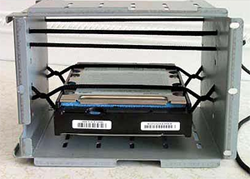
While external impacts can be easily controlled, the harder one to control are vibrations caused by the hard drive's internal spindle motor and platters, rotational movement of the actuator (read/write head arm) etc and when they are installed in the same drive cage with other drives in close proximity, the resulting rotational momentum (Rotational Vibration or RV) can sometimes creating harmonics that create sharply higher vibration forces that can easily knock a read/write head off track.

"Performance Impact of External Vibration on Consumer-grade and Enterprise-class Disk Drives" https://www.dtc.umn.edu/publications/reports/2005_08.pdf published by Thomas Ruwart and Lu Yingping concludes that

QUOTE
vibration transmission through physical coupling can be mitigated by the correct choice of packaging.


Hard drive manufacturers have built-in RV sensors and active protection system to minimize the impact of the vibration in their enterprise range hard drives. Some higher end consumer hard drives features their own built-in vibration reduction system.

Some IT enthusiasts have come up with creative ways to mitigate vibrations. Here are some examples:

user posted image
http://img703.imageshack.us/img703/4194/hddsusp1.jpg
http://www2.picturepush.com/photo/a/115534...mg/11553400.jpg
http://img128.imageshack.us/img128/9121/img12504tn.jpg

So what can you do about this?

1) Make sure that you don't move, bump, kick, tilt, jar, drop or even press the top-shell of the hard drive especially while it is in operation. Always treat it with love and respect.

2) It is worth buying hard drive that have built-in vibration control mechanism. If you are running an array, you will still benefit from getting an enterprise range hard drive as it will have build-in RV sensors plus more advanced anti-vibration mechanism.

3) Invest in a chassis that comes with hard drive rubber/silicon dampeners. You can also search Amazon or Newegg to get off-the-shelf anti-vibration kit.

4) Or if you're a builder, you can make yourself an anti-vibration system and post a picture back on this thread for all to admire.

5) Get external drives that have active/passive protection eg Transcend external hard drives. http://www.transcend-info.com/Products/No-284

This post has been edited by mrbob: Aug 16 2014, 04:30 PM
mrbob
post Aug 15 2014, 07:08 PM

Casual
***
Junior Member
318 posts

Joined: May 2010
QUOTE(NightFelix @ Aug 15 2014, 06:49 PM)
Guys. Got one question here.

I got some old HDD like year 2008-2010. Which like around 40GB or 80GB.. What can do with them? hmm.gif
*
Errr... use them in your test machines ie Linux, FreeBSD etc

5 Pages < 1 2 3 4 > » Top
 

Change to:
| Lo-Fi Version
0.0523sec    0.61    7 queries    GZIP Disabled
Time is now: 1st December 2025 - 04:29 PM