SΛMSUNG Galaxy W (I8150) Official Thread V4, Be intelligent; read thoroughly.
SΛMSUNG Galaxy W (I8150) Official Thread V4, Be intelligent; read thoroughly.
|
|
 Feb 4 2012, 12:48 PM Feb 4 2012, 12:48 PM
Return to original view | Post
#1
|
 
Junior Member
498 posts Joined: Apr 2009 
|
Hi guys. Gonna get myself one Galaxy W today. May i know what should i do to it to make it faster and stuff? Is it advisable to root? And lastly, may i know what is COW Rom you guys were talking about? I'm new
|
|
|
|
|
|
Feb 5 2012, 12:20 AM
Return to original view | Post
#2
|
|
Junior Member
498 posts Joined: Apr 2009
|
Hello , new here. Got my galaxy W today and charged it for 8 hrs. But I find that my phone's battery drain like water flowing. I used for awhile wordy 87% left. Any idea why?
 |
|
|
Feb 5 2012, 01:09 AM
Return to original view | Post
#3
|
|
Junior Member
498 posts Joined: Apr 2009
|
QUOTE(hdslr cinematography @ Feb 5 2012, 12:33 AM) u on 3g? or wifi? I use wifi for about 20 mins . Go market place download apps , then try out about 5 apps for about 5 mins. I used whatsapp along too. Use for about 30mins drain till 87% . Is it normal? Btw, i did use packet data to try out for 5 mins or so. QUOTE(game4life @ Feb 5 2012, 12:34 AM) wifi + data on? what's the screen on time? I use wifi for about 20 mins . Go market place download apps , then try out about 5 apps for about 5 mins. I used whatsapp along too. Use for about 30mins drain till 87% . Is it normal? I used data packet for 5 mins or so. I'm new here. So may i know whats screen on time? QUOTE(IwanAGP @ Feb 5 2012, 12:52 AM) My personal usage statistics Why you use so lil one?? Unrooted, Stock 2.3.6 ROM Standby, Wifi off, 3G off, no application active 1% can sustain 3 hours Standby, Wifi off, 3G On, no application using 3G(pure standby) 3% per hour Portable Hotspot(tethering), screen off, 1% per minute Play game... Infinity % per minute(never really notice this but I know it drain like hell) Using Data(3G) about same or consume even more than playing games. I'm starting to worry about my battery . :/ |
|
|
Feb 5 2012, 01:27 AM
Return to original view | Post
#4
|
|
Junior Member
498 posts Joined: Apr 2009
|
QUOTE(IwanAGP @ Feb 5 2012, 01:12 AM) Standby and using is totally different case. This phone does wonder with standby but it drains pretty fast when you're using. Like today... My class starts at 2, 1.30 i get in class till 5 finish class. Quite boring class, keep hand itchy play GPS Status(to test GPS) then once in a while facebook a while this this that that... from 1.30 around 54% then 5pm finish class left 8% Ohh . Okay . Now only i know . Thanks  QUOTE(XeactorZ @ Feb 5 2012, 01:14 AM) charge few more times then okay already Alright ! The shopkeeper told me to charge 8 hours when you're using it for the first time. don't worry and no need charge 8hours, just charge until it full can already  QUOTE(game4life @ Feb 5 2012, 01:15 AM) go to settings>about phone>battery usage>display Display is 66% . I disabled alot of stuff. Animations i put to some animations only. Any diff?it seems normal to me. if i'm browsing non stop, it will drain about 10% for 30 mins. |
|
|
Feb 5 2012, 01:44 AM
Return to original view | Post
#5
|
|
Junior Member
498 posts Joined: Apr 2009
|
QUOTE(game4life @ Feb 5 2012, 01:37 AM) if you don't mind, you can lower down the brightness I made it the lowest brigthness since i bought it   |
|
|
Feb 5 2012, 11:01 AM
Return to original view | Post
#6
|
|
Junior Member
498 posts Joined: Apr 2009
|
QUOTE(hdslr cinematography @ Feb 5 2012, 01:51 AM) prolly got running apps behind your screen. use advanced task killer to kill the running apps Advanced task killer must download ah?  QUOTE(shiki_arc @ Feb 5 2012, 02:18 AM) Cancel your auto rotate can prolong battery life. My phone can last 1 whole day if surfing and gaming and music. lol. I think my battery can last quite long if just music, uo to 2 or 3 day , maybe.. Alright ! I removed it already  thanks thanks  |
|
|
|
|
|
Feb 5 2012, 12:01 PM
Return to original view | Post
#7
|
|
Junior Member
498 posts Joined: Apr 2009
|
Guys, when do you root your phone? Isn't it risky if you root it when you have warranty with samsung? And is it advisable to root our phones?
|
|
|
Feb 5 2012, 02:33 PM
Return to original view | Post
#8
|
|
Junior Member
498 posts Joined: Apr 2009
|
QUOTE(Dannyl @ Feb 5 2012, 02:26 PM) You root when you need to do things which requires root. For warranty claims, just unroot and/or flash back to stock ROM. Whether advisable to root your phone or not is up to you. If you don't require root access, why do it? Peer pressure? I heard you can underclock it to increase the battery life . So i'm kinda interested in that feature now . Not only that but also for the apps. |
|
|
Feb 5 2012, 02:58 PM
Return to original view | Post
#9
|
|
Junior Member
498 posts Joined: Apr 2009
|
QUOTE(Feinberg1 @ Feb 5 2012, 02:54 PM) ya , i wanna know too, any solution for un-rooted phones ? There's a tutorial in the first page in how to root . I'm still not sure how but gotta learn. |
|
|
Feb 5 2012, 07:29 PM
Return to original view | Post
#10
|
|
Junior Member
498 posts Joined: Apr 2009
|
Wow guys. My battery was used for 4 h 17 MIN . Most of the time it is in idle state . I used like 10 mins to download apps and it dropped from 99% to 97 % . that was alright. Then it went idle for 3 hours straight and it drained 4% ! Last night it went idle for 8 hrs an it only drained 1%. Is this normal?
Plus, everytime i use advance task killer, I would minimize it and go back to the app to check if there are any other apps running. And it shows that i'm running gallery, whatsapp, google search, market,email, maps, and social hub . Any idea why? :confused: This post has been edited by ~@Sharks@~: Feb 5 2012, 07:30 PM |
|
|
Feb 5 2012, 07:50 PM
Return to original view | Post
#11
|
|
Junior Member
498 posts Joined: Apr 2009
|
QUOTE(game4life @ Feb 5 2012, 07:45 PM) 8 hours drain 1% is normal and task killer is not necessary. android will handle the memory Hi bro. Thanks for replying. I think i did not explain properly. Ps. Last night idle for 8 hours drain 1%. Today i idle only for 3 hrs but drain 4%. Is this normal when battery percentage is high?the default task manager is enough, clear the ram if you want to do heavy task such as gaming. |
|
|
Feb 5 2012, 08:23 PM
Return to original view | Post
#12
|
|
Junior Member
498 posts Joined: Apr 2009
|
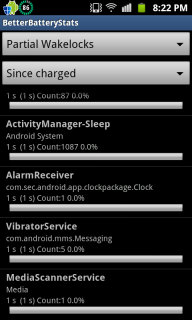
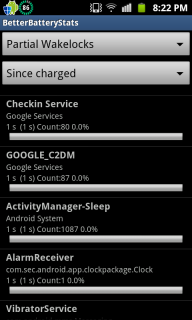
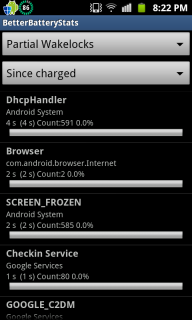
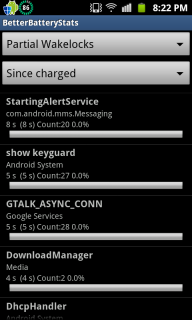
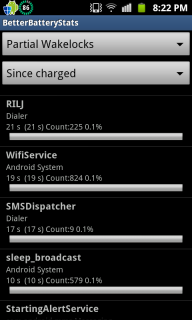
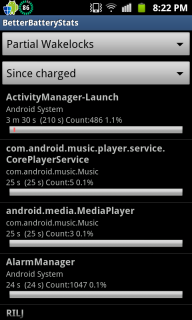
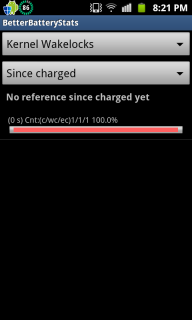
QUOTE(game4life @ Feb 5 2012, 08:00 PM) wifi on? Do i post both kernel and partial? Wifi offdownload better battery stats. http://forum.xda-developers.com/showthread.php?t=1179809 post the picture of wakelocks here |
|
|
Feb 5 2012, 08:51 PM
Return to original view | Post
#13
|
|
Junior Member
498 posts Joined: Apr 2009
|
QUOTE(game4life @ Feb 5 2012, 08:45 PM) yes same with me » Click to show Spoiler - click again to hide... « Here you go  Btw, Wifi was off just now. I on it to download the app itself. This post has been edited by ~@Sharks@~: Feb 5 2012, 09:02 PM |
|
|
|
|
|
Feb 5 2012, 09:56 PM
Return to original view | Post
#14
|
|
Junior Member
498 posts Joined: Apr 2009
|
QUOTE(cowithgun @ Feb 5 2012, 09:47 PM) According to what you say: Hi. Thanks for the reply 4h 17min - 100%-99% 10 mins internet - 99%-97% 3 hours idle - 97%-93% 8 hours sleep - 93%-92% Total = 15 hours 27 mins = 8% usage This is very good already. It would be more accurate if you can post your battery usage. Go to Setting, About phone, Battery usage, tap on the graph you can see if your phone is active or in sleep from the graph. Added on February 5, 2012, 9:48 pm Press Home button, hold it, press screen off. Let go both.  I used till 76 percent ystd night. Then went to sleep till this morn 76 % - 75 % Then this afternoon use cable to transfer stuff so i charge till 99% . Came back and used it for 10 mins surfing 99% - 97 Then i took a nap . Did not use the phone so jst off screen for 3 hrs without nything running 97 - 93 % I'm kinda paranoid as I'm still a newb. Need sifus to enlighten me |
|
|
Feb 7 2012, 10:56 AM
Return to original view | Post
#15
|
|
Junior Member
498 posts Joined: Apr 2009
|
Guys, the amount of apps you have will affect ur battery life in sleep mode?
When the first time i charge my phone, the phone only drains 1% For 9 hrs when in sleep mode Now, 4-5% for 9hrs in sleep mode. Just curious. |
|
|
Feb 7 2012, 12:05 PM
Return to original view | Post
#16
|
|
Junior Member
498 posts Joined: Apr 2009
|
QUOTE(IwanAGP @ Feb 7 2012, 11:02 AM) Background services. Yes... Alright. Thanks bro. |
|
|
Feb 10 2012, 10:13 PM
Return to original view | Post
#17
|
|
Junior Member
498 posts Joined: Apr 2009
|
Hi guys ! I need special help from sifus. I'm gonna be adventurous and root my phone . I'm a first timer in android. Mind giving me instructions for noobs like me?
|
|
|
Feb 10 2012, 10:21 PM
Return to original view | Post
#18
|
|
Junior Member
498 posts Joined: Apr 2009
|
QUOTE(game4life @ Feb 10 2012, 10:17 PM) http://forum.xda-developers.com/showthread.php?t=1317394 use recovery method. it's the easiest way to root Do i have to backup any of my apps and contacts etc etc? If i want to unroot just get the file from that website and run it ? Thanks bro . |
|
|
Feb 10 2012, 10:41 PM
Return to original view | Post
#19
|
|
Junior Member
498 posts Joined: Apr 2009
|
I've rooted it already ! I know it's just the beginning but what are roms? Are roms like firmware? I would want to try Cow's rom as i am interested in the battery life, killing off services and the RAM.
|
|
|
Feb 10 2012, 10:48 PM
Return to original view | Post
#20
|
|
Junior Member
498 posts Joined: Apr 2009
|
Downloading Nandroid to perform backup. Learning from this website http://www.androidpolice.com/2010/04/16/co...od-rom-manager/
Please correct me if i'm doing any mistakes. Thanks sifus. |
|
Topic ClosedOptions
|
| Change to: |  0.0431sec 0.0431sec
 0.37 0.37
 7 queries 7 queries
 GZIP Disabled GZIP Disabled
Time is now: 15th December 2025 - 03:06 PM |
 Quote
Quote