

Some questions to all W users here who has successfully flash their phone.
1.Which recovery mod did you used?
2.How did you flash the recovery, via ADB or Odin?
SΛMSUNG Galaxy W (I8150) Official Thread V4, Be intelligent; read thoroughly.
SΛMSUNG Galaxy W (I8150) Official Thread V4, Be intelligent; read thoroughly.
|
|
 Feb 5 2012, 05:04 PM Feb 5 2012, 05:04 PM
Return to original view | Post
#1
|
 
Junior Member
297 posts Joined: Jul 2010 
|
Some questions to all W users here who has successfully flash their phone.
1.Which recovery mod did you used? 2.How did you flash the recovery, via ADB or Odin? |
|
|
|
|
|
Feb 5 2012, 08:06 PM
Return to original view | Post
#2
|
|
Junior Member
297 posts Joined: Jul 2010
|
QUOTE(Besanth @ Feb 5 2012, 05:14 PM) Odin. I kept getting "Please Connect Phones" message, connected under "Download Mode", Debug check or uncheck the result is still the same. I was getting unable to install driver message too, guess the drivers' are missing. But then I am so sure I've already installed em. |
|
|
Feb 5 2012, 08:16 PM
Return to original view | Post
#3
|
|
Junior Member
297 posts Joined: Jul 2010
|
QUOTE(shiki_arc @ Feb 5 2012, 06:04 PM) I used ADB cuz damn Odin did not work. lol. install ADB and manually do it.. Tried ADB too, were you using Android Commander or the ADB from SDK Manager?I got this when I try using the code. 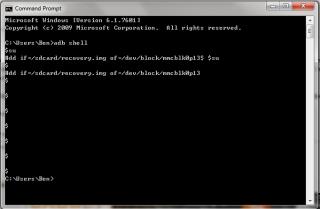
|
|
|
Feb 5 2012, 11:41 PM
Return to original view | Post
#4
|
|
Junior Member
297 posts Joined: Jul 2010
|
QUOTE(shiki_arc @ Feb 5 2012, 09:47 PM) I installed SDK manager. Then followed the code given for RZrecovery installation. After that, just enter recovery, clear cache and install cows ROM..no problem here. Yeap, I've set it. Doesn't matter now, able to get the recovery rom working =P and after command SU, it will give a #, then you paste the next command. mine just do this and ok liao. And if u using SDK installer, you did set environmental path? Thanks for the advice |
|
|
Feb 6 2012, 12:00 AM
Return to original view | Post
#5
|
|
Junior Member
297 posts Joined: Jul 2010
|
QUOTE(game4life @ Feb 5 2012, 08:19 PM) you are right but killing apps is a bad idea. http://lifehacker.com/5650894/android-task...ouldnt-use-them Thanks a lot it works now =)for me, i only kill the app if the app is not responding Added on February 5, 2012, 8:22 pm reinstall the usb driver http://forum.xda-developers.com/showthread.php?t=961956 Added on February 6, 2012, 12:02 am QUOTE(Besanth @ Feb 5 2012, 11:49 PM) I've successfully installed Cow's OC version of ROM in my Galaxy W with the help of my brother I've some problems using that rom myself.I've wipe cache, wipe data, format system. But when I try to install, a "Installation Aborted" message will show. Any ideas why ? This post has been edited by xchaosdragon: Feb 6 2012, 12:02 AM |
|
|
Feb 6 2012, 12:32 AM
Return to original view | Post
#6
|
|
Junior Member
297 posts Joined: Jul 2010
|
QUOTE(cowithgun @ Feb 6 2012, 12:13 AM) Nice! Good luck testing it! I was using CWM to run it. That was the OC ver of the rom, now trying the non-OC ver to see if it has the same results.Added on February 6, 2012, 12:20 am Normal usage, I have not experience any lag. But I was testing the other day when I fill up the phone with 4 or 5 app, occupied more than 300mb, the low memory killer starts killing App in background, i got lag like 15 seconds. but after that it's normal. if this is the behaviour, it is as expected because i really want to tweak the low memory killer in such a way that it is suitable for running 1 app at the time. the running app will have more RAM by making low memory killer more aggressive. you can change that though! you can install V6 Supercharger and use a different options. for example, if u multitask a lot, u can use the script to configure that. again, i have been using my ROM since I first made them, normal use, i dont experience lag but, again, i use class 10 32gig sd card (brand DNA - not much choice) duno if it help... but so far, no one can beat my antutu score yet hehe - 4381Added on February 6, 2012, 12:22 am Which App? If can, I will try install it and test it out. You can help me to diagnose it a lot if you do this: adb logcat > log.txt in your phone, start the install the App. let it abort. control-c the adb logcat. give me the log.txt Added on February 6, 2012, 1:03 amNormal version seems to work fine, applied same method over the joined rom parts uploaded on mediafire, but still with no avail. Mr.Cow, please do let me know how I can help you =) And not to forget, thank you so much for this. This post has been edited by xchaosdragon: Feb 6 2012, 01:03 AM |
|
|
|
|
|
Feb 7 2012, 12:26 PM
Return to original view | Post
#7
|
|
Junior Member
297 posts Joined: Jul 2010
|
QUOTE(Dan Peng @ Feb 7 2012, 11:45 AM) Can i have feedback from you users. What problems do you face while using this phone. Any complaints? Also how long will the battery last on using hours. 3.7 inch screen feels great to use on hand. What are good accessories for this phone? What comes in the box? What are the different types of screen protector and what different effects it gives. Also are the Beats by Dr. Dre selling at RM 40 real or fake ones, it's the in ear headphone type. No news for ICS yet? Battery life is satisfying, provided if you are not using it heavily. The box comes with a charger, a usb cable, a headphone with mic, and some manuals. To me there are two general categories for SP, Clear and Matte. Clear protects the screen, while the screen display remain less or unaffected, requires a lot wiping of fingerprints. Matte protects the screen, slightly affecting the display, fingerprints free. The original beats headphone is around RM 800 to RM 1.1k. Be the judge yourself. Don't think it will get an ICS update, has galaxy s will probably not get it as well due to the spec's limitation. However you can either wait for custom roms. Added on February 7, 2012, 12:26 pm QUOTE(wyh @ Feb 7 2012, 12:23 PM) Eh where to get Stock Recovery ? See the first page.This post has been edited by xchaosdragon: Feb 7 2012, 12:28 PM |
|
|
Feb 8 2012, 09:54 AM
Return to original view | Post
#8
|
|
Junior Member
297 posts Joined: Jul 2010
|
Anyway may I know how to manually remove Zeam =)
I love the launcher and all, but the application drawer is an eyesore. |
|
|
Feb 8 2012, 03:48 PM
Return to original view | Post
#9
|
|
Junior Member
297 posts Joined: Jul 2010
|
QUOTE(shiki_arc @ Feb 8 2012, 03:17 PM) help pls Nope, all you need to do is wipe cache and dalvik, you can wipe dalvin by selecting "advance" at the CWM menu. As for myself, I clear the user data too =x So far I haven't got any FCs yet from this rom. & thx in advance^^ & thx in advance^^Just to clear, i need to completely wipe my internal memory?then put the zip in there and flash? |
|
|
Mar 5 2012, 11:18 AM
Return to original view | Post
#10
|
|
Junior Member
297 posts Joined: Jul 2010
|
QUOTE(n8210 @ Mar 5 2012, 11:07 AM) I think I read before on this forum on how to slower down the crt animation so that it looks nicer. But i can't find it.. anyone know how to slow down the crt animation? Thanks. Open up the cow panel and enable v-sync. |
|
|
Mar 5 2012, 03:09 PM
Return to original view | Post
#11
|
|
Junior Member
297 posts Joined: Jul 2010
|
QUOTE(dindang2win @ Mar 5 2012, 01:17 PM) That's seem complicated but i will give a shot Supercharger is already integrated into CWG's rom.Added on March 5, 2012, 1:24 pm i can't let go my awesome looking good go launcher & widjet. otherwise my sgw look plain! i want to try that v6 supercharger thing. hopefully will work. Added on March 5, 2012, 1:27 pm i can't let go my awesome looking good go launcher & widjet. otherwise my sgw look plain! i want to try that v6 supercharger thing. hopefully will work. But if you prefer a more aggressive setting, you may download the script and choose some other options. Added on March 5, 2012, 3:11 pm QUOTE(cloudwan @ Mar 5 2012, 11:43 AM) with v-syn enable u will get lower antutu scores IIANM.. True, but the CRT animation w/o v-sync is really an eye-sore. This post has been edited by xchaosdragon: Mar 5 2012, 03:11 PM |
|
|
Mar 5 2012, 03:47 PM
Return to original view | Post
#12
|
|
Junior Member
297 posts Joined: Jul 2010
|
QUOTE(anderyna @ Mar 5 2012, 03:21 PM) i just got my phone few days ago, weird if it always restarts on its own, after its light dim down o.0 It never happened to me. I suggest you to call up the store you bought from and ask for their assistance. |
|
|
Mar 5 2012, 04:43 PM
Return to original view | Post
#13
|
|
Junior Member
297 posts Joined: Jul 2010
|
QUOTE(lee1234 @ Mar 5 2012, 04:25 PM) Hi all, my phone is not rooted. I want to move the gameloft data to external sd card. I try to google and I found this. As mentioned, "This method is for rooted Android phones".is anyone tried this?? is this working for not rooted phone? http://forum.xda-developers.com/showthread.php?t=1457761 P.S : And also it is for Galaxy SL and S, not for SGW. This post has been edited by xchaosdragon: Mar 5 2012, 04:44 PM |
|
|
Mar 5 2012, 04:47 PM
Return to original view | Post
#14
|
|
Junior Member
297 posts Joined: Jul 2010
|
QUOTE(~@Sharks@~ @ Mar 5 2012, 02:06 PM) Can anyone help me here? Stock rom using Odin too for download mode? The "Odin" word is supposed to be present when you are in Download Mode.I don't think your warranty will be voided if you were to use Odin to flash to stock roms. Added on March 5, 2012, 4:49 pm QUOTE(~@Sharks@~ @ Mar 5 2012, 02:06 PM) Can anyone help me here? Stock rom using Odin too for download mode? The "Odin" word is supposed to be present when you are in Download Mode.I don't think your warranty will be voided if you were to use Odin to flash to stock roms. This post has been edited by xchaosdragon: Mar 5 2012, 04:49 PM |
|
Topic ClosedOptions
|
| Change to: |  0.0452sec 0.0452sec
 0.48 0.48
 7 queries 7 queries
 GZIP Disabled GZIP Disabled
Time is now: 11th December 2025 - 07:19 AM |
 Quote
Quote