P.S> I mean move all APPS & files to the ext SD..

This post has been edited by cloudwan: Feb 10 2012, 04:01 PM
SΛMSUNG Galaxy W (I8150) Official Thread V4, Be intelligent; read thoroughly.
|
|
 Feb 10 2012, 04:00 PM Feb 10 2012, 04:00 PM
Return to original view | Post
#1
|
 
Senior Member
8,525 posts Joined: Jan 2003 From: The Jungle Of Pahang  
|
Just wanna ask eh, i rooted my W yesterday, nao running rooted on stock rom.. i was wondering could we move everything from the internal SD to the external SD? The reason i ask is that my Ext is a 16gb card, plus i was thinking wanna do a data backup & store it in my int SD, last nite done it with Titanium everything bekap inside int SD the memory is full already.. dayummm..
P.S> I mean move all APPS & files to the ext SD.. This post has been edited by cloudwan: Feb 10 2012, 04:01 PM |
|
|
|
|
|
Feb 16 2012, 03:14 PM
Return to original view | Post
#2
|
|
Senior Member
8,525 posts Joined: Jan 2003 From: The Jungle Of Pahang
|
Haihhhhh me & my smaller bro using W too.. His is digi set mine i got from a local shop, so far no problem with our W's.. Tho i do face prob with the camera sometimes not functioning.. more to software prob i think.. hmmmm
|
|
|
Feb 24 2012, 04:46 PM
Return to original view | Post
#3
|
|
Senior Member
8,525 posts Joined: Jan 2003 From: The Jungle Of Pahang
|
Hmmm... Using cow's latest rom but without the oc part.. seems ok, but have to use diff launcher.. the builtin zeam launcher wasn't working from day one..missing all the icons & even shortcut to the drawer all is missing.. weird..
 |
|
|
Feb 24 2012, 09:55 PM
Return to original view | Post
#4
|
|
Senior Member
8,525 posts Joined: Jan 2003 From: The Jungle Of Pahang
|
QUOTE(AlexLai @ Feb 24 2012, 07:06 PM) Ahh... seems like that ones some of us experienced problems with Zeam. True, i read it here, didnt thought i would face it too..   |
|
|
Feb 28 2012, 10:36 AM
Return to original view | Post
#5
|
|
Senior Member
8,525 posts Joined: Jan 2003 From: The Jungle Of Pahang
|
QUOTE(barista @ Feb 28 2012, 10:23 AM) I am very pissed off with Samsung. Bought the phone in December last year. Used less than 1 week already died. The shop send for repair and gave me all sorts of story until today. My money gone, I don't have my phone. Although they tell me Samsung will give replacement but March coming and I still don't have my phone! I am pretty much stuck in no where land. I want a refund, I don't want the phone anymore. Pui!! Sorry to hear about that bro..  |
|
|
Feb 29 2012, 07:56 PM
Return to original view | Post
#6
|
|
Senior Member
8,525 posts Joined: Jan 2003 From: The Jungle Of Pahang
|
QUOTE(~@Sharks@~ @ Feb 29 2012, 07:53 PM) Yup I think it was overheating. The back was hot. My speed was only 8xx and wasn't running anything. I think it rebooted and went back to 1401 Hz. Then started rebooting. Try here to download the original firmware:I can't enter CWM. Cause it keeps rebooting at samsung screen. I can enter download mode though. ( Home + Power + Volume Down ) . Do I flash back to 2.3.6? Can I get the firmware from samsung site? Thanks cow. http://www.sammobile.com/firmware/ |
|
|
|
|
|
Feb 29 2012, 10:00 PM
Return to original view | Post
#7
|
|
Senior Member
8,525 posts Joined: Jan 2003 From: The Jungle Of Pahang
|
QUOTE(kopiPeng @ Feb 29 2012, 09:04 PM) Why every time my RAM will drop to 50+/350 after I switched ON my phone for around 2 days (48hours).... Instead of restarting why don't u just clear the memory using android own task manager? i always do that for extra ram space.. By that time, I must restart my phone to become 16x/350 RAM back...If I dint restart, my phone will be abit laggy or even hang.... Why my phone RAM will suddenly gone like this??? Android memory management really so bad??? =( |
|
|
Feb 29 2012, 11:08 PM
Return to original view | Post
#8
|
|
Senior Member
8,525 posts Joined: Jan 2003 From: The Jungle Of Pahang
|
QUOTE(IwanAGP @ Feb 29 2012, 10:08 PM) Erm... If unrooted, on stock rom, clear memory only gives you some memory. For my case, i rooted, still stock rom, applied v6 supercharger, it changes how the clear memory works too. It clears totally everything. Even launcher and those notification icon(some apps like 3g watchdog/onavo/viber) on top Hmmm notice that when i was using stock rom too but now using kezra-planes rom, stable so far plus when i clear memory it really does clear out quite a chunk of it.. Erm... Because android tends to keep those frequently used data inside ram for fast access. I get what you mean. I know because i've gone through that. There's no way to get back the ram. Just restarting it is the easiest. You can also try loading a full flash webpage. That will force android to kill all the running apps due to the amount of memory needed to load those flash content. You will find that when you exit your 'Internet'. Your ram will be around 1XXMB/351MB. Means nearly 200mb free ram. This is what I observed. But I don't think restart is such a big prob. I always restart  Tested twice cow's rom also but it didnt suit me, plus when on it i donno why there were some issues with my phone.. |
|
|
Feb 29 2012, 11:42 PM
Return to original view | Post
#9
|
|
Senior Member
8,525 posts Joined: Jan 2003 From: The Jungle Of Pahang
|
QUOTE(destiney @ Feb 29 2012, 11:22 PM) Added on February 29, 2012, 11:07 pm USB isit? After you install kies, (without usb debugging mode ticked), you can just go to My Computer. You can see your phone as portable device(or something like that). From there you can access your phone and copy files out directly. Or if you want it to be in Mass Storage mode, Go to settings->applications->development->Tick usb debugging. After you tick this, Kies won't work. If you want to use back kies, just untick it. Now you can see your USB Storage and External SD as single drives in your 'My computer' i used the usb debugging mode to access but and removable disk G: appear. I clicked on it and error - please insert a disk to removable disk(G) sigh..anyone encounter such problem..? This post has been edited by cloudwan: Feb 29 2012, 11:43 PM |
|
|
Mar 3 2012, 12:54 AM
Return to original view | Post
#10
|
|
Senior Member
8,525 posts Joined: Jan 2003 From: The Jungle Of Pahang
|
Also a new happy so far user of Cow's Bionic ROM
 » Click to show Spoiler - click again to hide... « Homescreen using Sony Xperia Live Wallpaper APK.. It just fits with cow's new theme This post has been edited by cloudwan: Mar 3 2012, 12:54 AM |
|
|
Mar 3 2012, 01:16 AM
Return to original view | Post
#11
|
|
Senior Member
8,525 posts Joined: Jan 2003 From: The Jungle Of Pahang
|
QUOTE(nickyap12 @ Mar 3 2012, 01:11 AM) i have done so however when i wanted to install update from sd... it says Ur 1st time trying custom rom?E: short of /tmp/sideload/package.zip(no space left on device) anyone now what i need to do?? Whats ur freespace for the int SD? Have u try to copy all ur pics video music into ur PC 1st, then retry?.. BTW ur using RZRecovery instead of stock recovery right? |
|
|
Mar 3 2012, 11:43 AM
Return to original view | Post
#12
|
|
Senior Member
8,525 posts Joined: Jan 2003 From: The Jungle Of Pahang
|
QUOTE(ayapism @ Mar 3 2012, 11:34 AM) please help me.. i just bought my phone yesterday and today i'm planning to transfer all of my videos, games and apps into my phone. U install KIES already? Last time i install KIES it solved my prob..sadly, when i plugged in the USB, there is a popup says 'device driver was not succesfully installed'.. what to do?? |
|
|
Mar 3 2012, 05:33 PM
Return to original view | Post
#13
|
|
Senior Member
8,525 posts Joined: Jan 2003 From: The Jungle Of Pahang
|
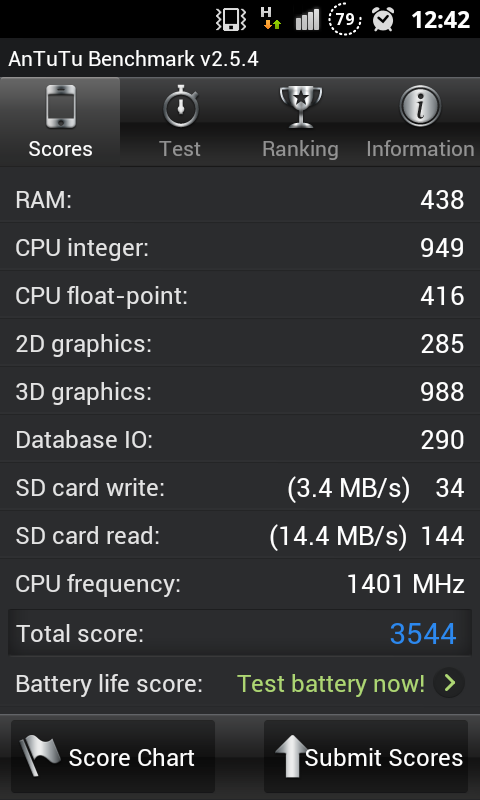
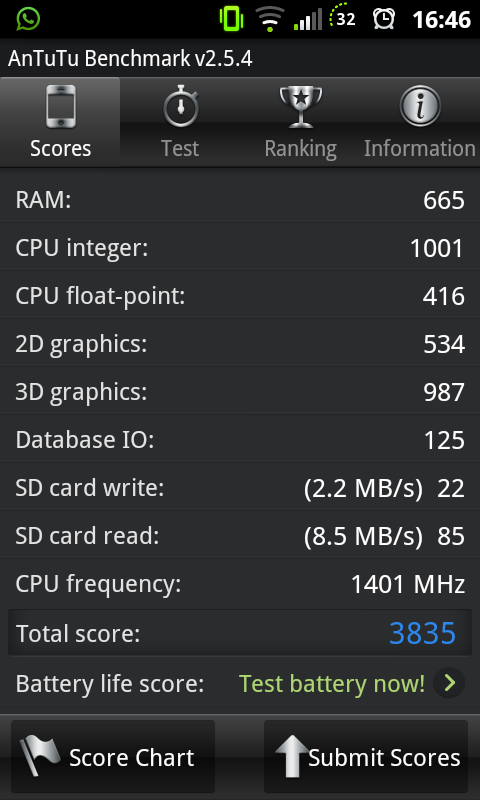
QUOTE(zaku90 @ Mar 3 2012, 05:29 PM) this is the score when i'm using Cow in Black OC Did u try to change the setting to faster at cowpanel in ur app drawer?» Click to show Spoiler - click again to hide... « this is when i use the latest Bionic Cow » Click to show Spoiler - click again to hide... « any good explaination why i cant reach 4k score???  I got mine 4.5k when i choose faster, but graphic wise smooth is better when using ur W.. For benchmark try it on faster  |
|
|
|
|
|
Mar 3 2012, 05:43 PM
Return to original view | Post
#14
|
|
Senior Member
8,525 posts Joined: Jan 2003 From: The Jungle Of Pahang
|
QUOTE(zaku90 @ Mar 3 2012, 05:39 PM) what setting?? which app drawer?? LOL... Look inside at all ur apps, there should be a cowpanel app.. open it.. |
|
|
Mar 3 2012, 05:55 PM
Return to original view | Post
#15
|
|
Senior Member
8,525 posts Joined: Jan 2003 From: The Jungle Of Pahang
|
QUOTE(zaku90 @ Mar 3 2012, 05:51 PM) Lol, i didnt even notice that apps was there... Pick fast then just enable it.. by default it will highlight fast eventho u already set smooth or vice versa..by default it selected fast.. so change it to smooth?? Try it see if it could help ur points a bit.. Still can't help about ur IO or SD card marks tho This post has been edited by cloudwan: Mar 3 2012, 05:56 PM |
|
|
Mar 3 2012, 08:05 PM
Return to original view | Post
#16
|
|
Senior Member
8,525 posts Joined: Jan 2003 From: The Jungle Of Pahang
|
QUOTE(zaku90 @ Mar 3 2012, 06:11 PM) After change to fast, manage to get 4137... but cow using non oc already 4909... Well i guess it could have been done with a good SDcard plus maybe his rom was fully without any bloatwares or any unneeded apps..  Why do u really need to bother actually? I think u better stop worrying bout the benchmark & just enjoy the goodness that the rom brings to ur W yoo  |
|
|
Mar 3 2012, 08:26 PM
Return to original view | Post
#17
|
|
Senior Member
8,525 posts Joined: Jan 2003 From: The Jungle Of Pahang
|
QUOTE(zaku90 @ Mar 3 2012, 08:22 PM) i'm using class 4 16Gb Sandisk... Omai, Sandisk class 4 16Gb is much worser than my Kingston class 4 meh? I always thought they were much better.. |
|
|
Mar 4 2012, 01:00 PM
Return to original view | Post
#18
|
|
Senior Member
8,525 posts Joined: Jan 2003 From: The Jungle Of Pahang
|
QUOTE(wmd3477 @ Mar 4 2012, 12:53 PM) is it the only option?how about stock phone like mine? U can always try root and installing apps2sd app, tho i never tested it so i could not comment more than that.. |
|
|
Mar 4 2012, 01:31 PM
Return to original view | Post
#19
|
|
Senior Member
8,525 posts Joined: Jan 2003 From: The Jungle Of Pahang
|
QUOTE(Claire Farron @ Mar 4 2012, 12:31 PM) Nice review If u have the money why not going for the S Plus? Any other known issues i should know about this phone ? I'm considering to get either this or Galaxy S Plus Bigger internal mem 8/16gb, AMOLED + Corning Glass somemore.. Other spec the same as W |
|
|
Mar 4 2012, 01:59 PM
Return to original view | Post
#20
|
|
Senior Member
8,525 posts Joined: Jan 2003 From: The Jungle Of Pahang
|
QUOTE(Claire Farron @ Mar 4 2012, 01:47 PM) Since the other specs not so different i thought i might as well just get the Galaxy W, can save money Well i tested my friend SGII, its screen does have better black, but then again W screen is no slouch either, way better than ACE & Y screen for sure.. is the AMOLED really worth the extra buck ? can really notice different between Galaxy W and S Plus screen ? and i just found out about Galaxy R, that one got dual core right ? i'm considering that one too now If its me and i have the money i dont mind forgoing the AMOLED screen for a dual core cpu HP like R, my friend in SG is using it and he has no complaints The thing that isnt that good is that in Msia its only AP right? hmmmm |
|
Topic ClosedOptions
|
| Change to: |  0.0405sec 0.0405sec
 0.32 0.32
 7 queries 7 queries
 GZIP Disabled GZIP Disabled
Time is now: 12th December 2025 - 05:43 AM |
 Quote
Quote