Outline ·
[ Standard ] ·
Linear+
SΛMSUNG Galaxy W (I8150) Official Thread V4, Be intelligent; read thoroughly.
|
game4life
|
 Feb 10 2012, 05:13 PM Feb 10 2012, 05:13 PM
|

|
QUOTE(ngkhanmein @ Feb 10 2012, 04:19 PM) u made the alpha 0 version? i'm proud of u.. SGX540 PAWN MALI 400 http://forum.xda-developers.com/showthread.php?t=1292180what? 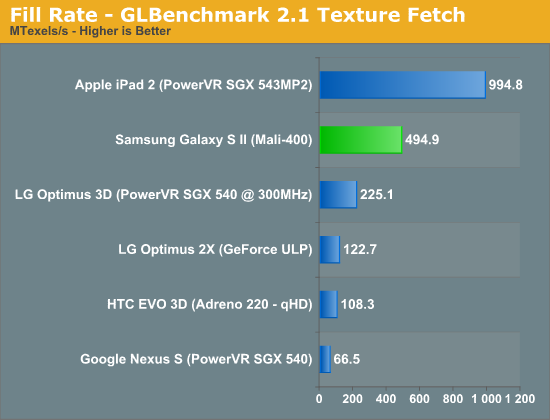 http://www.anandtech.com/show/4686/samsung...st-redefined/17This post has been edited by game4life: Feb 10 2012, 05:14 PM http://www.anandtech.com/show/4686/samsung...st-redefined/17This post has been edited by game4life: Feb 10 2012, 05:14 PM |
|
|
|
|
|
game4life
|
Feb 10 2012, 05:31 PM
|
|
|
QUOTE(ngkhanmein @ Feb 10 2012, 05:25 PM) of course sgx543mp2 is better than mali 400, it's a dual core gpu  |
|
|
|
|
|
game4life
|
Feb 10 2012, 05:32 PM
|
|
|
QUOTE(IwanAGP @ Feb 10 2012, 05:31 PM) I try 6 first... Erm... My Script Manager no Wording 'Run As Root' i need to tick the SU isit? yes, tick SU |
|
|
|
|
|
game4life
|
Feb 10 2012, 05:49 PM
|
|
|
QUOTE(IwanAGP @ Feb 10 2012, 05:38 PM) Now... This step I can't find this directory. Enlighten me! the script will autorun. if you want to check whether the script is running, reboot and re-run the script and check for the current minfrees value. it should the same with prior v6 minfrees 
Added on February 10, 2012, 5:56 pmQUOTE(ngkhanmein @ Feb 10 2012, 05:36 PM) so mali 400 better or adreno 220? mali 400 is better but it depends on drivers This post has been edited by game4life: Feb 10 2012, 05:56 PM |
|
|
|
|
|
game4life
|
Feb 10 2012, 06:10 PM
|
|
|
QUOTE(IwanAGP @ Feb 10 2012, 06:05 PM) @.@ Then what's wrong with the step? Anyway... I found the directory.  Now on Option 6. How if I want to apply other option? Just run the script again and run them right? Hell yeah... My homescreen is totally LOCKED. ROCKS!  nothing wrong, it's for old version. yes, you just need to run the script again  |
|
|
|
|
|
game4life
|
Feb 10 2012, 10:17 PM
|
|
|
QUOTE(~@Sharks@~ @ Feb 10 2012, 10:13 PM) Hi guys ! I need special help from sifus. I'm gonna be adventurous and root my phone . I'm a first timer in android. Mind giving me instructions for noobs like me?  use recovery method. it's the easiest way to root |
|
|
|
|
|
game4life
|
Feb 10 2012, 10:25 PM
|
|
|
QUOTE(~@Sharks@~ @ Feb 10 2012, 10:21 PM) Do i have to backup any of my apps and contacts etc etc? If i want to unroot just get the file from that website and run it ? Thanks bro . no need to backup. if you want to unroot it, use the unroot via recovery  |
|
|
|
|
|
game4life
|
Feb 10 2012, 10:34 PM
|
|
|
QUOTE(nickyap12 @ Feb 10 2012, 10:29 PM) need help here... whenever my apps have update and show in notification area i can only update one apps update. the rest wont be shown in the notification area again. if i want to view all the available update how can i do so?? go to market>menu>my apps |
|
|
|
|
|
game4life
|
Feb 10 2012, 10:41 PM
|
|
|
QUOTE(IwanAGP @ Feb 10 2012, 10:38 PM) I just did it less than 6 hours ago. Follow the recovery method. Download the update.zip file and copy into USB Storage(Internal SD). Boot into recovery and directly apply the update. Upon pressing the apply update and chosen the file, it takes only 5s or so. Then you reboot your phone. Done! Definitely NO. Just tested it just now hehe... Guys... I rooted my phone, at first downclock to 1GHz, smooth. Now downclock to 800MHz with min frequency set to 125MHz. Still running smooth. Scrolling, gaming(where's my water, angry bird...) no lag at all. But I applied V6 Supercharger script. May that be the difference? Still stock TWLAUNCHER with STOCK 2.3.6ROM.  better battery life |
|
|
|
|
|
game4life
|
Feb 10 2012, 10:51 PM
|
|
|
QUOTE(~@Sharks@~ @ Feb 10 2012, 10:48 PM) Downloading Nandroid to perform backup. Learning from this website http://www.androidpolice.com/2010/04/16/co...od-rom-manager/ Please correct me if i'm doing any mistakes. Thanks sifus. don't use that, it might brick your phone. use this http://forum.xda-developers.com/showthread.php?t=1446593if you want to find anything about galaxy w http://forum.xda-developers.com/forumdisplay.php?f=1474
Added on February 10, 2012, 10:53 pmQUOTE(megeligeli @ Feb 10 2012, 10:50 PM) how to use the v6 supercharger script?  |
|
|
|
|
|
game4life
|
Feb 10 2012, 11:24 PM
|
|
|
QUOTE(~@Sharks@~ @ Feb 10 2012, 10:54 PM) Alright Thanks ! Luckily you helped . Just only installed and was finding for the model already. 
Added on February 10, 2012, 10:59 pmHey game4life, I have downloaded the SDK and from what i read from the forum, I need to download the ancora for flashing? Thanks use odin, it's easier 1. download odin http://dl.dropbox.com/u/47601401/ODIN___An...S_for_I8150.rar2. download recovery-clockwork-5.5.0.4-ancora.tar.md5 http://www.mediafire.com/?c9diay46cfllu3i3. Select the ops file, and enable one package in options, then load the md5 file with the One Package button  4. boot into download mode and connect usb cable 5. click start to flash. don't disconnect the usb, wait until it reboot successfuly |
|
|
|
|
|
game4life
|
Feb 10 2012, 11:38 PM
|
|
|
QUOTE(~@Sharks@~ @ Feb 10 2012, 11:36 PM) Download mode is Recovery mode right? So when go into recovery mode put in the usb cable and press start?  no, download mode is vol down + home + power button 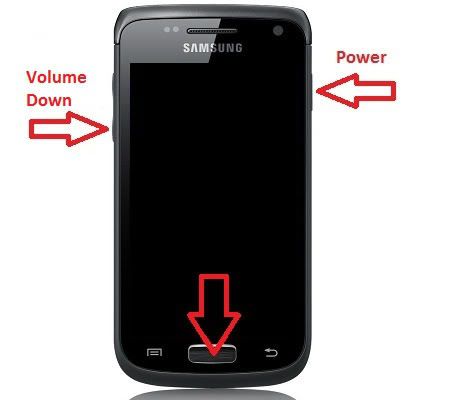 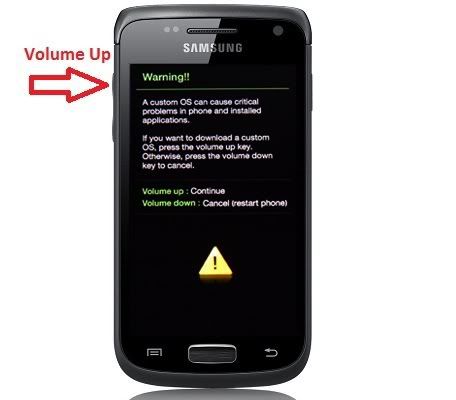 |
|
|
|
|
|
game4life
|
Feb 10 2012, 11:45 PM
|
|
|
QUOTE(~@Sharks@~ @ Feb 10 2012, 11:44 PM) I've started it . IT rebooted and It still shows RESET on odin without anything hapenning . Is this normal ? it's normal |
|
|
|
|
|
game4life
|
Feb 10 2012, 11:53 PM
|
|
|
QUOTE(~@Sharks@~ @ Feb 10 2012, 11:48 PM) It shows pass already . So how do i backup everything in my phone now before i go to custom roms? reboot into clockworkmod recovery How to navigate in menus: Volume buttons = go up and down Home button = select Power button = go back choose backup and restore |
|
|
|
|
|
game4life
|
Feb 11 2012, 12:01 AM
|
|
|
QUOTE(~@Sharks@~ @ Feb 10 2012, 11:56 PM) So Clockworkmod recovery is by holding Power + Home and volume up , right?  Thanks for helping me all this while bro Appreciate it   yes. you can also go to app drawer and launch cwm. there's an option to reboot into cwm recovery |
|
|
|
|
|
game4life
|
Feb 11 2012, 12:04 AM
|
|
|
QUOTE(~@Sharks@~ @ Feb 11 2012, 12:03 AM) I am in!  Press backup and restore then got alot choices. I chose backup. Is that the correct one? Sorry for asking so many questions yes, it's correct. happy flashing |
|
|
|
|
|
game4life
|
Feb 11 2012, 11:44 AM
|
|
|
QUOTE(qamarzam @ Feb 11 2012, 11:12 AM) Need help here.. Im stuck at odin mode..everything as advise but after 30 min pressing start, i still stuck at recovery.img download.. no pass message or phone reboot..is it normal? how long does it take to flash cwm?  manage to flash cwm..  Download back odin,ancora ops and recovery.md5.. less than 2 mins finish.. maybe the download is corrupted, luckily you manage to flash it back |
|
|
|
|
|
game4life
|
Feb 12 2012, 12:47 AM
|
|
|
QUOTE(driots @ Feb 12 2012, 12:37 AM) Sorry.... mind to ask. how to root using recovery method. Do u have the link and file..... |
|
|
|
|
|
game4life
|
Feb 12 2012, 01:06 AM
|
|
|
QUOTE(~@Sharks@~ @ Feb 12 2012, 12:58 AM) Got my phone to run the cow's rom ! Now how do i transfer all my stuff using samsung's programs? Can't even transfer songs or connect to it in the first place.  just connect via usb storage, go to settings>applications>development>tick usb debugging. i never use kies  |
|
|
|
|
|
game4life
|
Feb 12 2012, 09:52 PM
|
|
|
QUOTE(Besanth @ Feb 12 2012, 09:47 PM) I have done a few edits on the first page some error Some RAM is reserved for GPU and CPU processes, the device does have 1GB of RAM but some of it must be reserved for the phone processes itself. |
|
|
|
|



 Quote
Quote
 0.0486sec
 0.54
0.54
 7 queries
 GZIP Disabled