

Problem here ! I've downloaded ClockWork Rom Manager and it seems that it can't detect my model. IT doesn't have Galaxy W :/
SΛMSUNG Galaxy W (I8150) Official Thread V4, Be intelligent; read thoroughly.
SΛMSUNG Galaxy W (I8150) Official Thread V4, Be intelligent; read thoroughly.
|
|
 Feb 10 2012, 10:50 PM Feb 10 2012, 10:50 PM
Return to original view | Post
#21
|
 
Junior Member
498 posts Joined: Apr 2009 
|
Problem here ! I've downloaded ClockWork Rom Manager and it seems that it can't detect my model. IT doesn't have Galaxy W :/
|
|
|
|
|
|
Feb 10 2012, 10:54 PM
Return to original view | Post
#22
|
|
Junior Member
498 posts Joined: Apr 2009
|
QUOTE(game4life @ Feb 10 2012, 10:51 PM) don't use that, it might brick your phone. use this http://forum.xda-developers.com/showthread.php?t=1446593 Alright Thanks ! Luckily you helped . Just only installed and was finding for the model already. if you want to find anything about galaxy w http://forum.xda-developers.com/forumdisplay.php?f=1474   Added on February 10, 2012, 10:59 pmHey game4life, I have downloaded the SDK and from what i read from the forum, I need to download the ancora for flashing? Thanks This post has been edited by ~@Sharks@~: Feb 10 2012, 10:59 PM |
|
|
Feb 10 2012, 11:36 PM
Return to original view | Post
#23
|
|
Junior Member
498 posts Joined: Apr 2009
|
QUOTE(game4life @ Feb 10 2012, 11:24 PM) use odin, it's easier Download mode is Recovery mode right? So when go into recovery mode put in the usb cable and press start? 1. download odin http://dl.dropbox.com/u/47601401/ODIN___An...S_for_I8150.rar 2. download recovery-clockwork-5.5.0.4-ancora.tar.md5 http://www.mediafire.com/?c9diay46cfllu3i 3. Select the ops file, and enable one package in options, then load the md5 file with the One Package button  4. boot into download mode and connect usb cable 5. click start to flash. don't disconnect the usb, wait until it reboot successfuly  |
|
|
Feb 10 2012, 11:44 PM
Return to original view | Post
#24
|
|
Junior Member
498 posts Joined: Apr 2009
|
QUOTE(game4life @ Feb 10 2012, 11:38 PM) no, download mode is vol down + home + power button I've started it . IT rebooted and It still shows RESET on odin without anything hapenning . Is this normal ?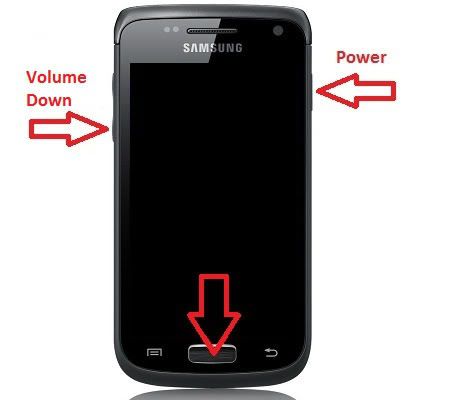 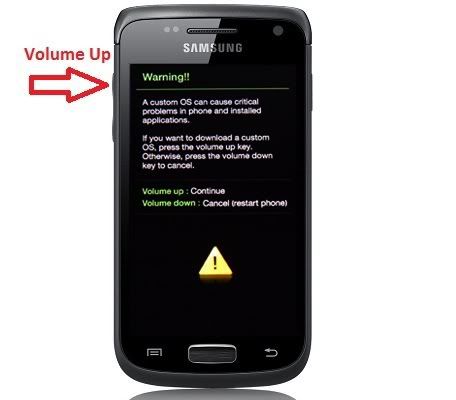 |
|
|
Feb 10 2012, 11:48 PM
Return to original view | Post
#25
|
|
Junior Member
498 posts Joined: Apr 2009
|
QUOTE(game4life @ Feb 10 2012, 11:45 PM) it's normal It shows pass already  . So how do i backup everything in my phone now before i go to custom roms? . So how do i backup everything in my phone now before i go to custom roms? |
|
|
Feb 10 2012, 11:56 PM
Return to original view | Post
#26
|
|
Junior Member
498 posts Joined: Apr 2009
|
QUOTE(game4life @ Feb 10 2012, 11:53 PM) reboot into clockworkmod recovery So Clockworkmod recovery is by holding Power + Home and volume up , right? How to navigate in menus: Volume buttons = go up and down Home button = select Power button = go back choose backup and restore  Thanks for helping me all this while bro Appreciate it  |
|
|
|
|
|
Feb 11 2012, 12:03 AM
Return to original view | Post
#27
|
|
Junior Member
498 posts Joined: Apr 2009
|
QUOTE(game4life @ Feb 11 2012, 12:01 AM)  yes. you can also go to app drawer and launch cwm. there's an option to reboot into cwm recovery yes. you can also go to app drawer and launch cwm. there's an option to reboot into cwm recovery Press backup and restore then got alot choices. I chose backup. Is that the correct one? Sorry for asking so many questions Press backup and restore then got alot choices. I chose backup. Is that the correct one? Sorry for asking so many questions  |
|
|
Feb 11 2012, 12:19 AM
Return to original view | Post
#28
|
|
Junior Member
498 posts Joined: Apr 2009
|
QUOTE(game4life @ Feb 11 2012, 12:04 AM) yes, it's correct. happy flashing Thanks ! I think i've got the hang of it !  Am downloading Cow's Rom now . Am downloading Cow's Rom now .  |
|
|
Feb 11 2012, 01:56 AM
Return to original view | Post
#29
|
|
Junior Member
498 posts Joined: Apr 2009
|
OMG. After i downloaded Cow's Rom . I joined it and installed the zip . After samsung and Galaxy W screen pop out, i get black screen! What happened?
I have restored and everything is back to normal. May i know how to use your rom , Cow. My battery was overheating and it showed black screen.  Thanks Thanks This post has been edited by ~@Sharks@~: Feb 11 2012, 02:01 AM |
|
|
Feb 11 2012, 03:50 PM
Return to original view | Post
#30
|
|
Junior Member
498 posts Joined: Apr 2009
|
QUOTE(mrlonely78 @ Feb 11 2012, 11:51 AM) what cow rom version u try to flash? some phone doesnt support oc rom of cow and also non oc rom of cow since he has undervoltage the processor, different than the stock rom. try to use cow slim version for your phone I have no idea version i downloaded. But it's on xda forums and there are two parts for it to be downloaded on Mediafire. May i know where i can Download the slim version?And how do i kill unwanted services ? I underclocked my phone but i seem to notice it drains more battery than stock. Or am i just noticing it wrong? -Edit- I think i downloaded the OC verz This post has been edited by ~@Sharks@~: Feb 11 2012, 04:44 PM |
|
|
Feb 12 2012, 12:58 AM
Return to original view | Post
#31
|
|
Junior Member
498 posts Joined: Apr 2009
|
Got my phone to run the cow's rom ! Now how do i transfer all my stuff using samsung's programs? Can't even transfer songs or connect to it in the first place.
 |
|
|
Feb 12 2012, 01:35 AM
Return to original view | Post
#32
|
|
Junior Member
498 posts Joined: Apr 2009
|
QUOTE(game4life @ Feb 12 2012, 01:06 AM) just connect via usb storage, go to settings>applications>development>tick usb debugging. i never use kies OH okay thanks! Do u have any idea why when i set wallpaper it enlarges the pic sooo big? And how do i revert back to the cow's ics wallpaper? QUOTE(IwanAGP @ Feb 12 2012, 01:13 AM) Even I'm using stock rom I also never bother to use KIES after first experience. Not useful at all... Keep plug in plug out battery wont spoil meh? :/ WTF... Btw... Why are you squeezing them out? My friend rooted, flashed custom rom nexus S they still maintain 351MB. I just don't quite understand  |
|
|
Feb 12 2012, 10:17 AM
Return to original view | Post
#33
|
|
Junior Member
498 posts Joined: Apr 2009
|
QUOTE(Besanth @ Feb 12 2012, 01:42 AM) You have to set the one with three boxes, not the single box one. (The choice bottom of the picture when they ask you to resize it). The box one is horizontal another one is vertical right? I tried both but still can't work |
|
|
|
|
|
Feb 13 2012, 03:19 PM
Return to original view | Post
#34
|
|
Junior Member
498 posts Joined: Apr 2009
|
QUOTE(strife91 @ Feb 12 2012, 08:07 PM) Anyone know if there is a way to use some others music other than android system on notifications ringtone? Download ringdroid. You can edit musics in ur phone to be your ringtone. Edit as in only use that part you want until the end or whenever you like |
|
|
Feb 17 2012, 04:11 PM
Return to original view | Post
#35
|
|
Junior Member
498 posts Joined: Apr 2009
|
Cow. I'm using your black OC version
. And i have a question. Why when i receive messages , it doesn't show on the msg icon that i have any msgs or notify me on the bar on top? |
|
|
Feb 21 2012, 03:43 PM
Return to original view | Post
#36
|
|
Junior Member
498 posts Joined: Apr 2009
|
Cow. Love your black OC rom! But one thing i noticed is, it reboots itself sometimes. It's not a frequent thing that happens but rarely lah.
One more is i find that my USB storage keeps disconnecting sometimes when i off the screen. Then it will reconnect again. The samsung's clock also doesn't update the time properly. Have to remove widget then add again. Any solution to these problems? |
|
|
Feb 21 2012, 07:21 PM
Return to original view | Post
#37
|
|
Junior Member
498 posts Joined: Apr 2009
|
QUOTE(cowithgun @ Feb 21 2012, 06:32 PM) about the reboot problem, please tell me which CPU governor you using and what's the max and lowest frequency? i suspect some CPU governors i added are not as stable as others. so far, i am using OnDemandX, with max 1.4ghz and lowest 245mhz, have not encounter any reboot. I am using Antutu CPU from android market. The lowest i go would be 358 - 7xx . Highest is Normal stock frequency. about USB disconnect, i suspect hardware problem. cant be sure, but it should not be related to ROM/kernel since the only changes i made is swap and increase the buffer. i guess you are refering to Samsung Clock widget that does not update. if happen if u "Clear Memory". it happen even on stock ROM. i recommend not to use "Clear memory". android take care of its memory. moveover, the Cow In Black has 100mb more zram, so you should not worry too much about the memory. hardware problem? Okay i feel a bit paranoid now. On stock rom i have never encountered this problem before =OOkay! Noted! Never knew about that. Thanks! And can i make a backup of this current Black Rom? I want to flash back to stock rom and check if it's a hardware problem :/ |
|
|
Feb 21 2012, 10:28 PM
Return to original view | Post
#38
|
|
Junior Member
498 posts Joined: Apr 2009
|
QUOTE(cowithgun @ Feb 21 2012, 07:38 PM) CPU governor are things like "OnDemand", "SmartAssV2", etc. You can change that using tool such as "Antutu CPU master". If you have not change that before, it should be running on "OnDemand" by default, this should have no stability problem since it is the same as in the stock ROM. Based on your explanation, you have not OC the phone as well. So, your phone reboot should be OC issue. And since it is not related to CPU governor (you using default OnDemand), the only thing left could be the undervolting which I set on 1.4ghz so that it save more battery. If auto reboot happen often, you should try the non-oc version instead. One more thing, one of the best thing about my ROM is having all those kind of CPU governors so that you can try and find the one that suit you the best. For example, MinMax should give you really really smooth lag-free experience, but at the expense of a bit more battery life. OnDemandX should give you more battery life if you switch on/off screen often like me because of its early suspend API. Try experiment with them. It'd be a waste if you dont. Wow. I didn't know all of these until you explained it to me. Thanks! Will try out on demand. Hardly use my phone but i always check the screen So the reconnection of usb storage does not have anything to do with this right? Do i send to samsung and ask them about it? |
|
|
Feb 29 2012, 07:18 PM
Return to original view | Post
#39
|
|
Junior Member
498 posts Joined: Apr 2009
|
Cow , I seriously need your help. Freaking out here
 . .Have been using your Oc rom and I found out it reboots quite frequently as I posted last time. This time I went to tuition and let it go idle. It was alright. I checked it by pressing the home button. But after my tuition , I found it rebooting at Samsung screen. After every 1 second it reboots again. Keeps going like that. I try going to recovery mode but can't even enter. I took out everything but still happening. What's the problem? Help pleaseeeee    Edit Cow I can enter download mode, what can I do? Do I use Odin? This post has been edited by ~@Sharks@~: Feb 29 2012, 07:31 PM |
|
|
Feb 29 2012, 07:53 PM
Return to original view | Post
#40
|
|
Junior Member
498 posts Joined: Apr 2009
|
QUOTE(cowithgun @ Feb 29 2012, 07:44 PM) WOW! what is ur max cpu speed? it look like overheating to me! take out battery, let it cool down. Yup I think it was overheating. The back was hot. My speed was only 8xx and wasn't running anything. I think it rebooted and went back to 1401 Hz. Then started rebooting. boot into CWM, flash back to stock or something.... I can't enter CWM. Cause it keeps rebooting at samsung screen. I can enter download mode though. ( Home + Power + Volume Down ) . Do I flash back to 2.3.6? Can I get the firmware from samsung site? Thanks cow. |
|
Topic ClosedOptions
|
| Change to: |  0.0423sec 0.0423sec
 0.79 0.79
 7 queries 7 queries
 GZIP Disabled GZIP Disabled
Time is now: 14th December 2025 - 11:17 AM |
 Quote
Quote