Welcome Guest ( Log In | Register )

Bump Topic Topic Closed RSS Feed

Outline · [ Standard ] · Linear+

 The SSD Thread V2, Faster Better Greener Unbreakable!

views
     
chronous
post May 18 2012, 05:23 PM

Regular
******
Senior Member
1,145 posts

Joined: Oct 2009

Thinking to move on to SSD. But i'm still cannot find HDD caddy for my current notebook HDD. Planning to remove the DVD drive and use it as external USB drive. But this will contribute to much heavier notebook.
chronous
post May 18 2012, 09:26 PM

Regular
******
Senior Member
1,145 posts

Joined: Oct 2009

QUOTE(SSJBen @ May 18 2012, 08:16 PM)
Do you really need your DVD drive that badly?
Most programs or movies now a days can be gotten digitally anyways.

Unless you're going on business where you might have to use DVDs for presentation or something. But even then, you could always result into using flash drive as storage capacity medium anyways.

My notebook is setup like this now:
- HDD slot using a 2.5" 7200rpm 500GB HDD
- Removed DVD drive and installed a Crucial M4 64GB in its place.

Windows installed on the SSD obviously and all my other files is on the 500GB.
If I need to install huge programs (like photoshop or microsoft office or games even), I would then just get the .iso files and use PowerISO to install it on the HDD.

To me honestly, it's the best way to use a notebook today.
*
Thanks for replying. No, i don't need the DVD drive that badly but i might use it to burn something sometimes. That's why I want to find external enclosure for it. About the SSD, I also plan to do like what you did with your notebook, put my existing 640GB for my data and SSD for windows and applications. tongue.gif

Currently using SSD on my office laptop (Lenovo X220). Not a high end one, 80GB Intel branded.

chronous
post May 18 2012, 09:38 PM

Regular
******
Senior Member
1,145 posts

Joined: Oct 2009

QUOTE(skycrawler @ May 18 2012, 09:36 PM)
What laptop do u use?
*
Asus N45SF. The spec can be found on my siggy. Thanks
chronous
post May 18 2012, 09:53 PM

Regular
******
Senior Member
1,145 posts

Joined: Oct 2009

QUOTE(skycrawler @ May 18 2012, 09:42 PM)
should be using 12.7mm caddy bay
*
I tried to search last time, but not available in Malaysia.
chronous
post May 21 2012, 01:47 AM

Regular
******
Senior Member
1,145 posts

Joined: Oct 2009

QUOTE(Mr.Lonely @ May 21 2012, 01:34 AM)
tongue.gif  no offense the m4 in the box look imitation to my eyes or the pic too blurry ?
*
Had a same doubt here. Where and how much you bought it?
chronous
post May 29 2012, 10:32 PM

Regular
******
Senior Member
1,145 posts

Joined: Oct 2009

Considering an 180 GB Intel 520. Is it worth it? Performance wise, is it anywhere near OCZ Vertex 4?
chronous
post May 30 2012, 07:06 PM

Regular
******
Senior Member
1,145 posts

Joined: Oct 2009

QUOTE(bashir3 @ May 30 2012, 06:59 PM)
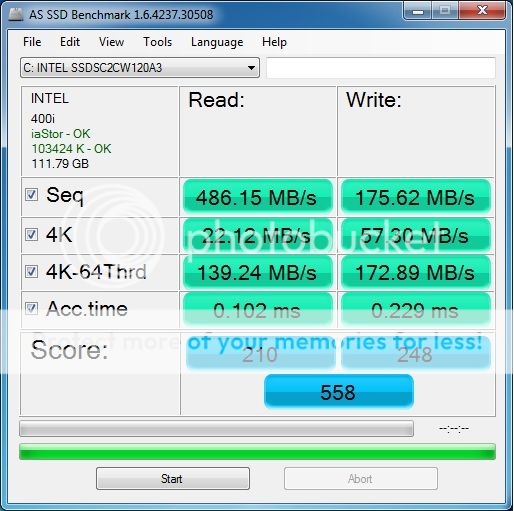
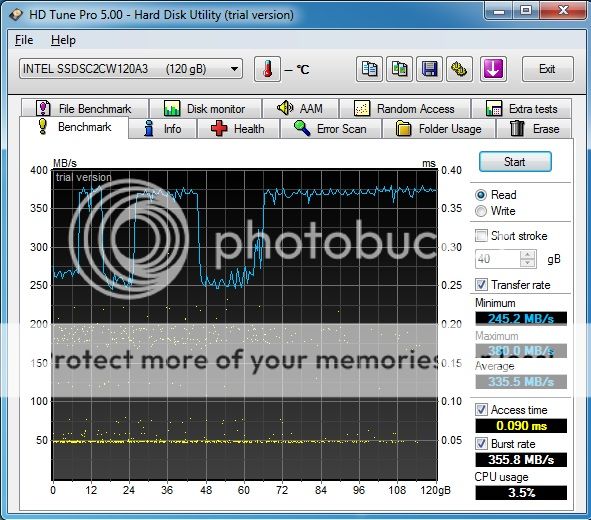
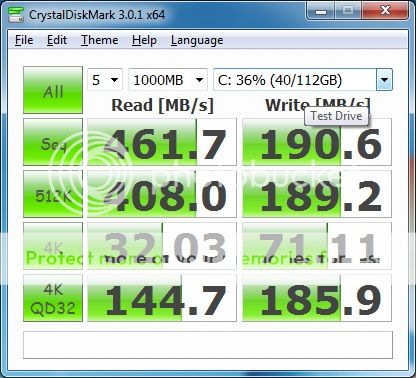
My first SSD just got it few hours ago. Intel 520 120GB running on i5 2500K 3.30Ghz Asus P8P67 Pro 4GB Corsair Vengence DDR3 RAM

Here are the results of some benchmarks I ran:

» Click to show Spoiler - click again to hide... «


Please comment and let me know if I further optimazation is required. I connected the SSD to a Intel SATA6 port.
Thanks.
*
Looks great. How much it cost you?
chronous
post May 31 2012, 07:41 PM

Regular
******
Senior Member
1,145 posts

Joined: Oct 2009

I read somewhere that Vertex 4 don't have performance degradation issue while accessing compressible data anymore. Any Vertex 4 user can confirm this?
chronous
post Jun 2 2012, 02:25 AM

Regular
******
Senior Member
1,145 posts

Joined: Oct 2009

QUOTE(-oc-gassa @ Jun 2 2012, 02:23 AM)
sure la... but grey market price..
*
What do you mean by grey market price?
chronous
post Jun 2 2012, 04:15 AM

Regular
******
Senior Member
1,145 posts

Joined: Oct 2009

QUOTE(vincent5195 @ Jun 2 2012, 03:01 AM)
can i ask Intel 520 180gb for (USD 205), 240gb (USD 256) worth for the price?
*
I've seen that price somewhere. Some blue logo company employee? brows.gif
chronous
post Jun 5 2012, 08:05 PM

Regular
******
Senior Member
1,145 posts

Joined: Oct 2009

QUOTE(amyhs99 @ Jun 5 2012, 06:24 PM)
I think no.. Is it the cd that comes with the drive? smile.gif


Added on June 5, 2012, 6:25 pmBtw, im on AMD FX4100 and Asus M5A99X EVO..
*
IINM, Intel RST only works with Intel chipsets. icon_rolleyes.gif
chronous
post Jun 8 2012, 07:27 AM

Regular
******
Senior Member
1,145 posts

Joined: Oct 2009

QUOTE(sonixmedia @ Jun 7 2012, 10:27 PM)
I think my Asus P8Z68-V should be sata-3 capable..
how much is those SDD mentioned and i thought only intel drive can be use for the SRT?
*
Yes, Z68 chipset should have 2 Intel SATA3 port. And Intel SRT is not limited to Intel SSD only. Hope that helps icon_rolleyes.gif
chronous
post Jun 11 2012, 06:19 PM

Regular
******
Senior Member
1,145 posts

Joined: Oct 2009

QUOTE(picy91 @ Jun 11 2012, 06:14 PM)
Need help guys..
Cant update my Corsair Force 3 firmware..
Any suggestion?
Using Crosshair V Formula..
Thanks in advance
smile.gif
*
What is the error? You using the SSD as external device before attempting firmware update right? icon_rolleyes.gif
chronous
post Jun 17 2012, 04:41 PM

Regular
******
Senior Member
1,145 posts

Joined: Oct 2009

QUOTE(Alfsaw @ Jun 17 2012, 04:19 PM)
Hi guys, im new to SSDs and been wanting to ask:

1. I have a budget of roughly around RM450-500, any recommendations or suggestion to what brand or capacity i can get.
2. Currently using Win 7 HP 64bit OEM installed licence on HDD, if i were to get a SSD and move the OS there, can i still maintain the same licence?

Help me out guys!
*
IINM, no need to call Microsoft. OEM license will detect your system motherboard serial only. Can reactivate using the online way. icon_rolleyes.gif
chronous
post Jun 17 2012, 09:46 PM

Regular
******
Senior Member
1,145 posts

Joined: Oct 2009

QUOTE(jayjaynyc @ Jun 17 2012, 09:08 PM)
hi all,

I just built a new desktop... using an Intel SSD 330 60GB as the primary drive. Working very well so far.

Got a question.... can this SSD fit and work in my DELL XPS M1530 also?... sick of it keep crashing HDDs... replaced 4 already so far.
*
Yes, no problem as this SSD comes in 2.5" which is same size as laptop HDD.
chronous
post Jun 19 2012, 12:33 PM

Regular
******
Senior Member
1,145 posts

Joined: Oct 2009

QUOTE(nuhzul @ Jun 19 2012, 11:12 AM)
i'm planning to upgrade my ASUS 1015b from harddisk to ssd.
i'm looking for any cheap 60 gb ssd for the upgrade
mainly use my netbook for surfing, watching movies and typing..

my only questions are is it worth to upgrade and what performance expected to improve given the processor just C-50?

my fear is the problems that i encountered not solve after changing to ssd. (my problems is slow response when surfing internet using firefox. sometimes become not responsive..)
*
I think it will still be the same. Your problem is your CPU processing power and RAM maybe.
chronous
post Jun 22 2012, 09:37 PM

Regular
******
Senior Member
1,145 posts

Joined: Oct 2009

QUOTE(Sky.Live @ Jun 22 2012, 09:34 PM)
my almost empty windows 8 RP took up 44GB.. no application installed yet
*
R u sure? wtf 44GB just for Windows.
chronous
post Jun 22 2012, 10:29 PM

Regular
******
Senior Member
1,145 posts

Joined: Oct 2009

My Intel X25 80GB

user posted image

Uploaded with ImageShack.us

doh.gif Cannot compete with today's SSD shakehead.gif
chronous
post Jul 3 2012, 09:08 PM

Regular
******
Senior Member
1,145 posts

Joined: Oct 2009

QUOTE(bontotalan @ Jul 3 2012, 07:48 PM)
Sata 3 is the blue cable right?

Damn i have no sata 3 cable in stock.... My firmware currently 000F, thats the newest right?
*
IINM, you can use normal SATA cable. The speed is based on your motherboard SATA 3 port and your SSD. Not the SATA cable.
chronous
post Jul 11 2012, 12:28 PM

Regular
******
Senior Member
1,145 posts

Joined: Oct 2009

QUOTE(andrewtho @ Jul 11 2012, 11:47 AM)
Hi guys, if I purchase an OEM SSD, it does not come with a bracket right. Is it possible if I operate the SSD without a bracket? Will it affect or damage it?
*
No, because the SSD have no moving parts. You can also stick it to your casing.

2 Pages  1 2 >Top
Topic ClosedOptions
 

Change to:
| Lo-Fi Version
0.0471sec    0.84    7 queries    GZIP Disabled
Time is now: 12th December 2025 - 09:07 AM