Welcome Guest ( Log In | Register )

Bump Topic Topic Closed RSS Feed
7 Pages « < 4 5 6 7 >Bottom

Outline · [ Standard ] · Linear+

 The SSD Thread V2, Faster Better Greener Unbreakable!

views
     
everling
post Jul 20 2012, 03:33 PM

Look at all my stars!!
*******
Senior Member
3,591 posts

Joined: Feb 2008
QUOTE(SomeoneElse @ Jul 20 2012, 02:25 PM)
Guys I'm planning to use  a intel 330 series 120GB as my main and only storage drive, with no HDD. The thing is, how much space will be needed for all the 'necessary' softwares and programmes such as windows 7 ,  and other complulsory programmes ? I'm assuming my games/movies/songs will take around 30-40GB . Will 120GB be enough?
*
Yes, it may be enough. My Windows 7 and Program Files takes about 30-40GiB as well.

But please don't expect your 120GB SSD to have 120GiB of capacity. Most 120GBs have only 111.7GiB of actual capacity. This is because of a unit conversion issue, 1GB = 0.976GiB.
everling
post Jul 24 2012, 01:41 PM

Look at all my stars!!
*******
Senior Member
3,591 posts

Joined: Feb 2008
QUOTE(mugen @ Jul 23 2012, 06:03 PM)
Need some comments from the experts here. Comment if this applies to the same case for Mac.
*
While all the replies are technically correct, they have missed one important thing.

While SSDs do indeed have a write limit, that limit is currently high enough that I would be very surprised if a normal user in an unoptimised OS can completely exhaust the write limit of today's SSDs in five years, or even eight years for that matter. I can show you the calculations that supports that statement if you want.

Your SSD is much more likely to fail due to manufacturing defect or external damage (eg: lightning strike) long before it wears out from writing too much.
everling
post Jul 25 2012, 05:01 PM

Look at all my stars!!
*******
Senior Member
3,591 posts

Joined: Feb 2008
QUOTE(udin901 @ Jul 25 2012, 03:52 PM)
really?  blink.gif
what i mean is bf3 long loading time when to get ingame. already got gtx580 for my FPS.. smile.gif
soo..ill just stick to use my p55 mobo with the crucial m4 in sata2_0. blush.gif

btw..what is raid0?
*
Really.

For your BF3, you are more likely to be bottlenecked by your CPU than to be bottlenecked by an SSD over SATA 3.0 Gb/s, check with your Windows Task Manager. If BF3 is not optimised for multi-core operations and one of your cores is maxed out at 100%, then you need a CPU with superior single-thread performance to get significant performance gains. Getting a SATA 6.0 Gb/s motherboard or PCI-E card will probably not help you in any way.

RAID-0 requires at least two HDDs or two SSDs. By treating the two storage devices as one single storage device in a particular manner, it enables you to double your performance. The downside however, is if one of the components fail, then you lose all your data in all the storage devices configured in RAID-0. It's fast, but caries a slight increase in risk and is typically not needed for home users who already have an SSD; you are still more likely to be bottlenecked by your CPU.
everling
post Jul 27 2012, 08:22 PM

Look at all my stars!!
*******
Senior Member
3,591 posts

Joined: Feb 2008
QUOTE(wildwestgoh @ Jul 27 2012, 07:14 PM)
Generally, like I say before, get the Intel 320 that you have listed, otherwise just go for the size that comfortable (budget) for you. If you only need fast boot time, any SSD will work for you.
*
You mean the myitmall seller at https://forum.lowyat.net/topic/1659160? That isn't a good deal, as I have gotten a 256GB Crucial M4 SSD for about RM700~ and that seller is listing a 160GB Intel 320 for RM700. You can even get a 180GB Intel 330 for RM549 at retail.

This post has been edited by everling: Jul 27 2012, 08:23 PM
everling
post Jul 28 2012, 06:24 PM

Look at all my stars!!
*******
Senior Member
3,591 posts

Joined: Feb 2008
QUOTE(EdwinCodec @ Jul 28 2012, 02:26 PM)
Hmm. Thanks for the reply but no offence, that doesn't really answer my question sad.gif.

In terms of reliability will be m4 but m4 will be outdated soon and whereby the intel 520 is still pretty new + it's sandforce, i've not really experienced the sandforce problem. I currently owns a m4 with me, so I'm thinking whether to get back the same model or try intel.
*
If you want to try Intel, why not the 330? I'd choose either the M4 or the 330.
everling
post Jul 28 2012, 11:29 PM

Look at all my stars!!
*******
Senior Member
3,591 posts

Joined: Feb 2008
QUOTE(CyberTroop @ Jul 28 2012, 11:20 PM)
As for the AHCI drivers, any idea where I can get the drivers from? I searched google and couldn't find any of that drivers for my Asus P6T motherboard
*
Try to find the P6T page on Asus's website and it will probably have a download drivers option somewhere nearby.
everling
post Jul 31 2012, 04:33 PM

Look at all my stars!!
*******
Senior Member
3,591 posts

Joined: Feb 2008
QUOTE(udin901 @ Jul 31 2012, 03:26 PM)
my ssd will arrive tomorow..now i dont have brackets..>.< how ah...bracket here very pricey..
*
While I wouldn't recommend it, not using a bracket is an option, if the SSD is located in a stable position and you are mindful of the fact that your SSD isn't fastened down.
everling
post Aug 1 2012, 09:49 AM

Look at all my stars!!
*******
Senior Member
3,591 posts

Joined: Feb 2008
QUOTE(udin901 @ Aug 1 2012, 09:41 AM)
what do you mean by fastened down? hmm.gif
*
Screwed with screws. Duct taped to a surface. Sticky taped.

Take a look at salimbest83's photo. It is an example of an SSD not fastened down.
everling
post Aug 2 2012, 02:18 PM

Look at all my stars!!
*******
Senior Member
3,591 posts

Joined: Feb 2008
QUOTE(benlaw @ Aug 2 2012, 02:05 PM)
hi 120gb
pls help decide
corsair force or c4  or intel series 330?
*
Intel 330 or Crucial M4.


Added on August 2, 2012, 2:19 pm
QUOTE(lucidlts @ Aug 2 2012, 01:23 PM)
wait for it then? tongue.gif
most ssd face performance bottleneck on sata 2 (tried samsung 830 64gb, crucial m4 64gb @my friend's house)
*
The performance bottlenecks are clear when benchmarked. But usually not very visible on normal operations like booting or running programs.

This post has been edited by everling: Aug 2 2012, 02:19 PM
everling
post Aug 2 2012, 02:30 PM

Look at all my stars!!
*******
Senior Member
3,591 posts

Joined: Feb 2008
QUOTE(SSJBen @ Aug 2 2012, 02:25 PM)
Now I don't know about you, I think that extra $5 is a lot more justified in getting a Marvell controller than a Phison controller (traditionally, Phison is pretty slow in 4k performance).
*
The Phison controller's lacklustre random performance makes it undesirable for me. It will need to be significantly cheaper to even start being acceptable in my opinion.

This post has been edited by everling: Aug 2 2012, 02:30 PM
everling
post Aug 3 2012, 04:25 PM

Look at all my stars!!
*******
Senior Member
3,591 posts

Joined: Feb 2008
QUOTE(wildwestgoh @ Aug 3 2012, 04:20 PM)
Great post, now someone should put this + SATA3 benchies to the first post (push to next thread version as well) so when we recommend we can just ask them look at first post, easy yes? wink.gif
This post summarize everything about those peoples' doubt to get SATA3 SSD! icon_rolleyes.gif
*
It might be better to get someone with an Intel-based motherboard with both SATA 3.0 Gb/s and 6.0 Gb/s ports, and then have them post the boot time benchmarks using the different SATA ports. It is straightforwardly simple and eliminates any doubts due to different hardware component performances.
everling
post Aug 3 2012, 04:49 PM

Look at all my stars!!
*******
Senior Member
3,591 posts

Joined: Feb 2008
QUOTE(salimbest83 @ Aug 3 2012, 04:42 PM)
im just using h77 mobo only.
what intel mobo have sata 6?
*
H77 has two SATA 6.0 Gb/s ports and four SATA 3.0 Gb/s ports. You can do the test that I have suggested. smile.gif
everling
post Aug 7 2012, 11:20 AM

Look at all my stars!!
*******
Senior Member
3,591 posts

Joined: Feb 2008
QUOTE(louislw @ Aug 7 2012, 01:45 AM)
isit normal tht the write speed is 150++mb? for intel 520?
*
For Sandforce-based SSDs, use ATTO Disk Benchmark to do the benchmarking. Tools like CrystalDiskMark use random data for their tests, which Sandforce-based SSDs do not handle well.
everling
post Aug 7 2012, 11:52 AM

Look at all my stars!!
*******
Senior Member
3,591 posts

Joined: Feb 2008
QUOTE(louislw @ Aug 7 2012, 11:48 AM)
the problem is when i first benchmark the score... the write read speed is 460mb and 190 write... now is 460read 150 write... how come decreased?
*
"Used" SSDs are always a bit slower, because the NAND chips they use needs to erase "old" data first before they can write new data. Benchmarking a lot will quickly render any SSD into a "used" state. Especially with CrystalDiskMark's default setting of writing about 20GB of data per full test.
everling
post Aug 7 2012, 11:55 AM

Look at all my stars!!
*******
Senior Member
3,591 posts

Joined: Feb 2008
QUOTE(louislw @ Aug 7 2012, 11:53 AM)
so isit normal for intel ssd 520 120gb going on 150mb on write speed?
*
That I do not know. But I would recommend that you do at least one test run with ATTO first. If it should still show ~150MB performance on write, then there might be a problem.
everling
post Aug 7 2012, 12:09 PM

Look at all my stars!!
*******
Senior Member
3,591 posts

Joined: Feb 2008
QUOTE(louislw @ Aug 7 2012, 11:58 AM)
here's the result...

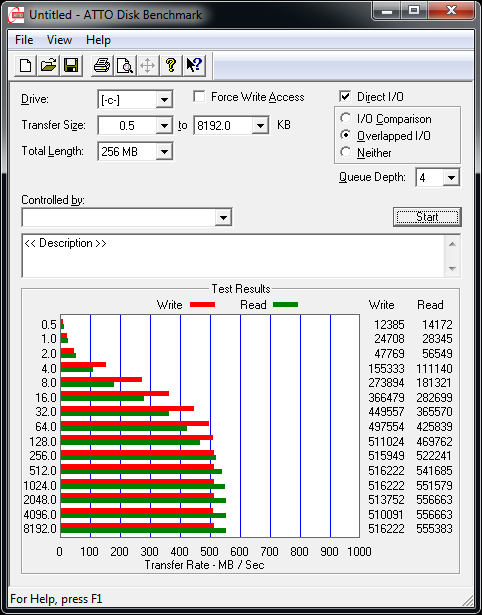
user posted image
*
Looks like everything is fine then. Read and write is hitting past 500MB/s.

This is how Sandforce-based SSDs behave. Poorly on random and incompressible data and very well on compressible data, and all the manufacturers uses the compressible data performance for their advertising.
everling
post Aug 7 2012, 12:12 PM

Look at all my stars!!
*******
Senior Member
3,591 posts

Joined: Feb 2008
QUOTE(louislw @ Aug 7 2012, 12:11 PM)
phew... i thought got problem biggrin.gif thx everling for the software
*
You're welcome. smile.gif
everling
post Aug 8 2012, 01:33 AM

Look at all my stars!!
*******
Senior Member
3,591 posts

Joined: Feb 2008
QUOTE(clawhammer @ Aug 7 2012, 04:28 PM)
Normally I just do a diskpart and "clean" it. Works like a charm for me and I regain the speed smile.gif You can try it too.
*
Thanks for the tip!

I also use diskpart and "clean" my SSDs, but my goal was to configure my partitions. I hadn't thought about using "clean" for restoring performance. I should try that one day on my old Kingston SSD as its benchmark performance has dropped over the years.

QUOTE(farizul @ Aug 7 2012, 11:06 PM)
result after doing ssd optimization step ( i refer to link provided on the first page ).
*
The performance doesn't seem to be improved.
everling
post Aug 8 2012, 09:43 AM

Look at all my stars!!
*******
Senior Member
3,591 posts

Joined: Feb 2008
QUOTE(ReXXaR @ Aug 8 2012, 05:20 AM)
Is there any other guide for optimization?
*
Not all optimisations will improve raw performance. Disabling the automatic defragmentation for instance doesn't effect your raw performance, but it does improve your SSD's lifespan.

QUOTE(AdamNg @ Aug 8 2012, 08:06 AM)
New build with SSD (120GB). Should I partition it? Or just leave it like that with OS & some applications...
*
You do need to create at least one partition in order to install the OS. As for having multiple partitions, don't create them if it is in a desktop and you have HDDs. If you are on a laptop, you could create them if you like. My laptop's Windows 7 64-bit partition was only 40GB in size until recently.

QUOTE(yewMP5 @ Aug 8 2012, 09:22 AM)
All sifus ....120gb ssd issit enough for win7 64bit + 1 antivirus software? any reliable brand can suggest? Intel? hmm.gif
*
120GB is more than plenty, like I said above, 40GB is spacious enough for non-gaming needs.

Intel's 330 Series is a good SSD brand for anyone new or old to SSDs. They're cheap, fast, and reliable.

This post has been edited by everling: Aug 8 2012, 09:44 AM
everling
post Aug 8 2012, 04:57 PM

Look at all my stars!!
*******
Senior Member
3,591 posts

Joined: Feb 2008
QUOTE(refnulf @ Aug 8 2012, 10:05 AM)
I was thinking maybe get a smaller SSD at first, but then might as well get the 512GB now and then something bigger later when prices fall and there's the 1TB available. Secondary hard drive can be slow since it's just for media, etc.
*
512GB is a bit much for the average user in my opinion. I think that 120GB to 256GB, paired with a large storage HDD, is a sweet spot between price and useful capacity.

7 Pages « < 4 5 6 7 >Top
Topic ClosedOptions
 

Change to:
| Lo-Fi Version
0.0492sec    0.41    7 queries    GZIP Disabled
Time is now: 4th December 2025 - 07:28 PM