Welcome Guest ( Log In | Register )

Outline · [ Standard ] · Linear+

Unifi TP-Link TL-WR1043ND, with Custom Unifi firmware

views
     
sooooloooong
post Apr 29 2012, 01:48 PM

New Member
*
Newbie
4 posts

Joined: Apr 2009


Hello all,

I have manage to set up my TL-WR1043ND on OpenWRT and it is all working properly when connecting the IPTV directly to the said router.

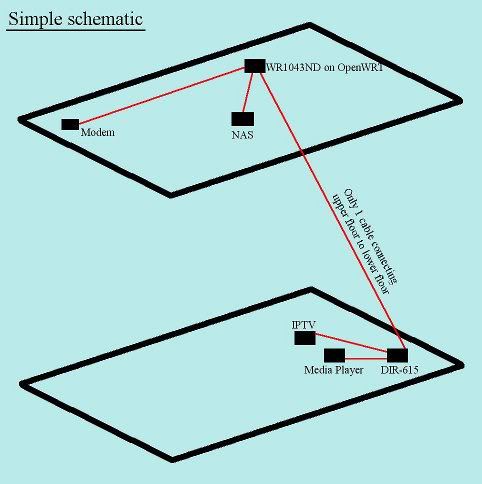
The problem I am having now is I have only one (CAT 5E, CAT 6??) cable running from upper floor to lower floor and I have a media player which also require a direct connection to the router.

I am thinking of alternative connection making use of the original router (DIR-615) as shown in the schematic below.

user posted image

How could I configure the 2 routers to work as above?

Help appreciated.

Thank you.

This post has been edited by sooooloooong: Apr 29 2012, 02:09 PM
sooooloooong
post Apr 29 2012, 07:32 PM

New Member
*
Newbie
4 posts

Joined: Apr 2009


QUOTE(ckboon @ Apr 29 2012, 03:32 PM)
hmmm... from what i know, you needa pull 2 cat5/6, 1 for IPtv and 1 for normal vlan500, as there's no trunk port on the router, but you can configure vlan500 and vlan600 manually on both dlink and openwrt.

so tis will be my recommendation

openwrt vlan 500 - dlink vlan 500 - media player

openwrt vlan 600 - dlink vlan 600 - iptv
unless there's an option to configure trunk port for both dlink and openwrt, then 1 cable should be enough

smile.gif
*
Thanks for the info. At least I don't waste my time trying different configuration.


QUOTE(jovial @ Apr 29 2012, 06:23 PM)
get a lan cable splitter...
lhttp://www.amazon.com/Cables-Go-37133-Splitter-Combiner/dp/B000Q5UMEI
*
That is an idea and thanks for the info. Perhaps, I could custom one myself at home. From what I know, the LAN connection only use 4 of 8 wires within each cable. So technically, I could have 2 LAN ports through the same CAT 5/6 cable.
sooooloooong
post May 2 2012, 03:44 PM

New Member
*
Newbie
4 posts

Joined: Apr 2009


QUOTE(debbierowe @ May 2 2012, 12:59 PM)
i very the enjoy my TL-WR1043ND wub.gif

sharing my experience...

lesson learn: dunno why the router i bought TP-Link TL-WR1043ND with UNIFI sticker and UNIFI MODE to choose...

i setup & reset so many times using the setup gudeline + quick setup
cannot get my WLAN working

then i tried flash KLSEET's firmware, step by step instruction from his website...

a few hicups, at the last step i finished setup, reboot and try open "google" but cant... then i check back, and realized... dunno why the unifi ID &  password set back to "username" ... then i re-enter ID & Pass & reboot

then it works!!!!!!!!!!!!!!!!!!!

thanks to KLSEET ..........!!!
*
Likewise, I agree that the TL-WR1043ND is one of the best router around.

I nearly brick my router (due to some itchy hand trying to set the Vlan to run two ports through one cable; so be very careful) and have been doing a lot of reading to save the router. It would seem to me that the TL-WR1043ND is the MOST referred router in OpenWRT site/forum/wiki/community. Kudos to that!!! rolleyes.gif

The only thing which I could find some complain is the WiFi which seem a bit weak compared to my old router (Netgear).


p.s. I gain some understanding on how Vlan work from the extensive reading. In general, do not make any changes to Vlan1 interface and you will be able to gain access to the router. While OpenWRT provides very good GUI for Vlan and bridging interface, there seem to be some bugs in it which was mentioned on quite a few threads/tickets within the OpenWRT community. With this in mind, should I have not purchase the TL-WR1043ND router, I am more likely to choose the Mikrotic RB751G-2HnD or RB751U-2HnD instead. Forget about Asus, simply too expensive.

This post has been edited by sooooloooong: May 2 2012, 05:43 PM

 

Change to:
| Lo-Fi Version
0.0257sec    0.29    7 queries    GZIP Disabled
Time is now: 3rd December 2025 - 03:57 PM