Welcome Guest ( Log In | Register )

Bump Topic Topic Closed RSS Feed
3 Pages  1 2 3 >Bottom

Outline · [ Standard ] · Linear+

 SΛMSUNG Galaxy W (I8150) Official Thread V3, Be a WISE user - Please read 1st page

views
     
Darkz01
post Jan 3 2012, 11:01 PM

Getting Started
**
Junior Member
223 posts

Joined: Jan 2010
hi guys...
bought this phone on xmas eve... biggrin.gif

i can see that most of u guys got trouble with low space for internal memory...
especially with gameloft games...
i dunno if anyone already post/mention bout this...
if anyone already posted bout this app...
feel free to delete my post... biggrin.gif

have u guys try this app??
GL to SD...
u can get it from market (FOC)...
https://market.android.com/details?id=com.s...ListglApp&hl=en

it can transfer your gameloft games to external SD...
works perfectly for me...

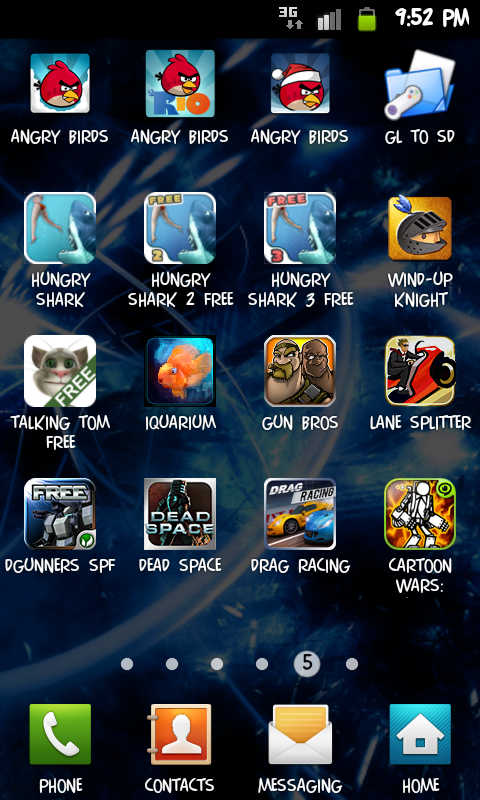
here as a result for me after transfer all my games to external...
» Click to show Spoiler - click again to hide... «
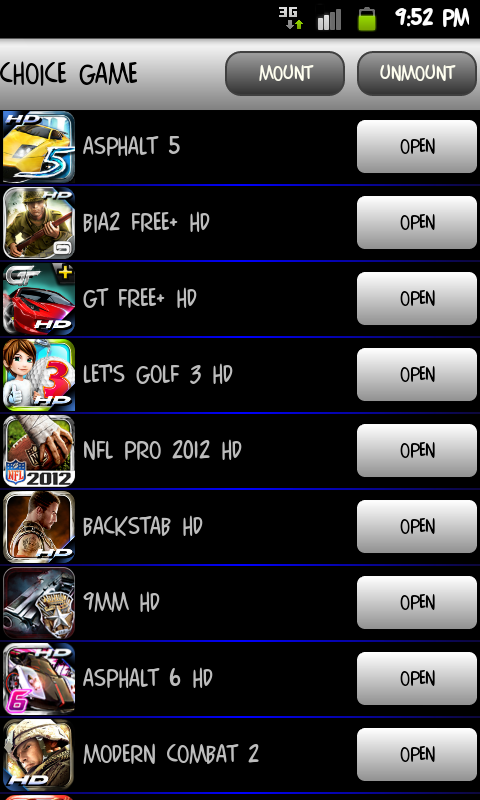
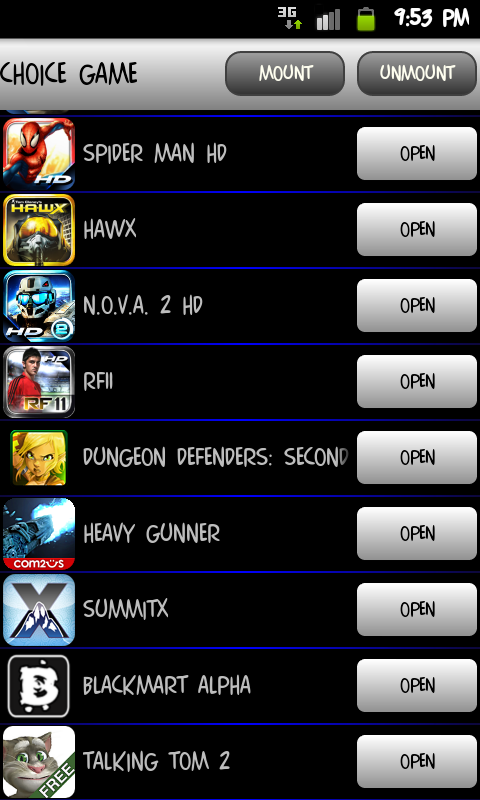
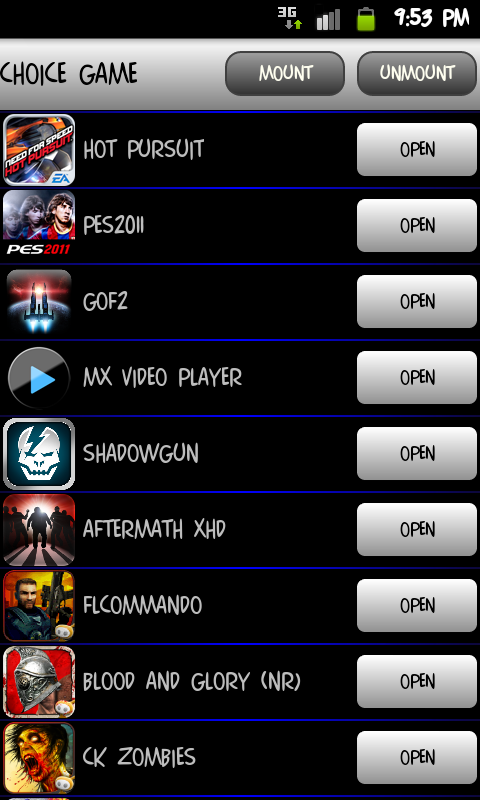
it transfer all data files from
sdcard/gameloft/games/(ur games file)
to
sdcard/external_sd/games/(ur games file)

the best part is...
it also can moves data files from android folders.
so any app or games data file stored in sdcard/android/data can be transfer to external memory (sdcard/external_sd/data.

thats why u can see in my screenshots above got games other than gameloft games.

This post has been edited by Darkz01: Jan 3 2012, 11:05 PM
Darkz01
post Jan 3 2012, 11:11 PM

Getting Started
**
Junior Member
223 posts

Joined: Jan 2010
QUOTE(ekudz @ Jan 3 2012, 11:07 PM)
need to patch or not? or just install GL to SD and we can transfer the file? really jeles with all ur games laa..
*
owh forgot to mention the most important part...
u must root ur phone...
after rooted...
just install the app...
u are good to go to transfer ur data files...
thats all...
Darkz01
post Jan 3 2012, 11:20 PM

Getting Started
**
Junior Member
223 posts

Joined: Jan 2010
QUOTE(ekudz @ Jan 3 2012, 11:11 PM)
doh.gif  rclxub.gif
*
wait...
u still didnt root ur phone??
just follow the instruction in 1st post link...(i learned from that website too)
takes less than 5 minutes to root the phone...

just a reminder...
it cannot transfer all ur games data files...
transferable only in gameloft and data folder...

if the games data folder not in either those two folders...
then it its just gonna sit in ur internal memory...

example like these games...
» Click to show Spoiler - click again to hide... «
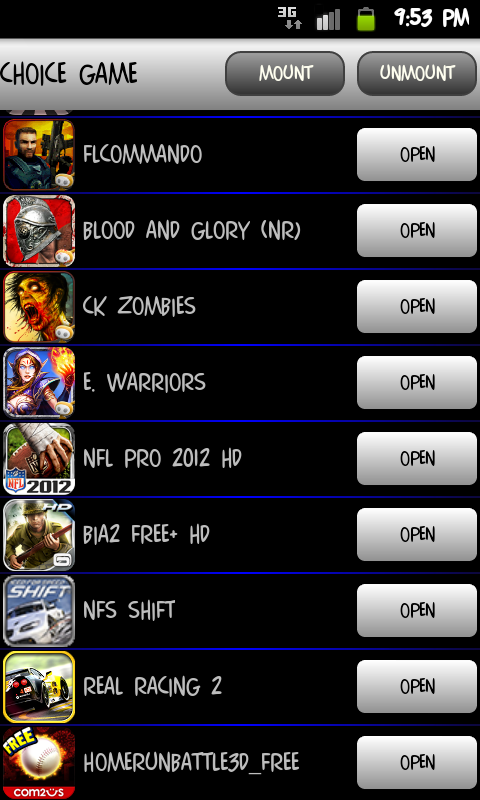

i cant move the games as the data files is not in sdcard/gameloft/games/ or sdcard/android/data

This post has been edited by Darkz01: Jan 3 2012, 11:22 PM
Darkz01
post Jan 3 2012, 11:28 PM

Getting Started
**
Junior Member
223 posts

Joined: Jan 2010
QUOTE(ekudz @ Jan 3 2012, 11:25 PM)
is it really easy? nvr try it before .. 1st android phone... afraid x jadi only ..
*
i know how/what u feel...
coz its my 1st time too before... biggrin.gif
1st time using android after a decade using symbian...

at 1st i think its a lil bit confusing and hard to do it...
but after finished root my phone...
im surprised that its really easy to do it...

This post has been edited by Darkz01: Jan 3 2012, 11:29 PM
Darkz01
post Jan 4 2012, 12:06 AM

Getting Started
**
Junior Member
223 posts

Joined: Jan 2010
yup agreed...
it using the same technique...

i dunno...
maybe its just me...
yours seems like too much hassle to do it...

if use gl to sd...
just install then move the application that listed by the app...
then it will move the data folder to external memory...
no need to manually delete the data folder in internal memory as it has been done by the app...

and it also auto unmount when exit...
so no worries if forgot to unmount when quit the app..

for new games installation...
just run the apk file...
then when prompt for download additional data...
just exit the game...

then open gl to sd...
open the game u just installed in that app and download the additional data files as usual...
it will be automatically download to external memory instead of internal...

didnt see this when i 1st read ur post....
QUOTE(cowithgun @ Jan 3 2012, 11:48 PM)
I don't have other games, but for Gun Bros, to move games data to your external sd card, during download, simply select to download data files into your Internal Memory.

Then, move your downloaded files to your external sd card. You can find those files in /data/data/com.glu.gunbros_free/app_save (175mb). Say, you move this to /sdcard/external_sd/data/com.glu.gunbros_free/app_save

Then, u can remove the original folder (/data/data/com.glu.gunbros_free/app_save)

Finally, simply create a softlink to point to the new folder:

CODE
su
cd /data/data/com.glu.gunbros_free/
ln -s /sdcard/external_sd/data/com.glu.gunbros_free/app_save app_save

*
good way to transfer all other games that cant be move by gl to sd...
might gonna try it when i get my new 32gb memory card...

but 1 question...
how do you make/create softlink point...
can u teach on how to do it??

This post has been edited by Darkz01: Jan 4 2012, 12:13 AM
Darkz01
post Jan 4 2012, 12:18 AM

Getting Started
**
Junior Member
223 posts

Joined: Jan 2010
QUOTE(cowithgun @ Jan 4 2012, 12:15 AM)
it's just like any *nix, use the "ln" command as stated in the code section of my post. but you can only use that on your Device memory (that's why u should download Gun Bros data into Device memory). This is because the device memory uses EXT4 partitions. You cannot use softlink in your USB storage / external sd card since they are FAT.
*
rclxub.gif
dayummm...
looks like i still got a looooooooong journey to fully utilize android...
seriously...
its like a culture shock to me when i bought my 1st android phone (galaxy w)... biggrin.gif

This post has been edited by Darkz01: Jan 4 2012, 12:19 AM
Darkz01
post Jan 4 2012, 01:26 PM

Getting Started
**
Junior Member
223 posts

Joined: Jan 2010
QUOTE(RedLC @ Jan 4 2012, 06:28 AM)
can anyone confirm that this W can play asphalt 6 hd
thx
*
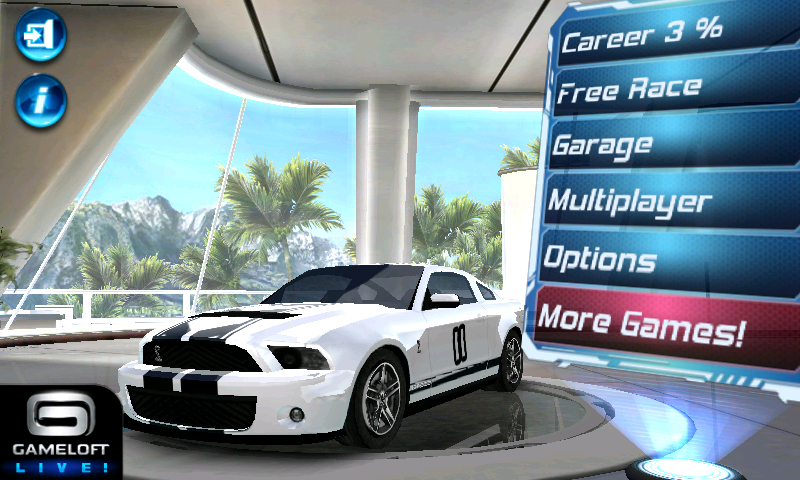
confirmed can play....
this is my phone screenshot...

» Click to show Spoiler - click again to hide... «
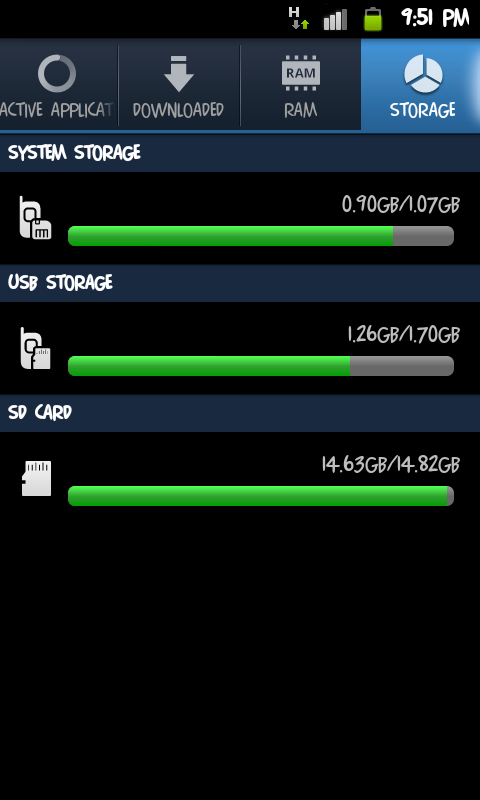

bought it from gameloft website @RM6...
they will give u apk file specially for gt-i8150...

dont buy from market coz thats not compatible eventho it says compatible...
luckily i got refund for that...


Darkz01
post Jan 4 2012, 03:53 PM

Getting Started
**
Junior Member
223 posts

Joined: Jan 2010
how to check firmware?
and what is the latest firmware?
Darkz01
post Jan 6 2012, 03:57 PM

Getting Started
**
Junior Member
223 posts

Joined: Jan 2010
QUOTE(Cliffrison @ Jan 6 2012, 03:53 PM)
My battery only last for around 7 hours after I play games, online and download apps

is this normal? rclxub.gif
*
pretty normal to me...
i played 9mm hd for about 3 hours straight then see the battery status it show got about 4-5 hours left...

This post has been edited by Darkz01: Jan 6 2012, 03:58 PM
Darkz01
post Jan 6 2012, 05:33 PM

Getting Started
**
Junior Member
223 posts

Joined: Jan 2010
QUOTE(Cliffrison @ Jan 6 2012, 04:00 PM)
wah so fast ar  rclxub.gif
I charge this phone everyday since I bought it 2 days ago  rclxub.gif  rclxub.gif  rclxub.gif
*
welcome to the smartphone world...
u must change ur charging habit lol...
charge it whenever and wherever u can... biggrin.gif
Darkz01
post Jan 7 2012, 07:53 PM

Getting Started
**
Junior Member
223 posts

Joined: Jan 2010
QUOTE(azrieqb @ Jan 7 2012, 11:00 AM)
Hello guys ! How long until u receive the ewarrany sms? Bought the SGW for 1 weeks edy but still no sms. Is it normal, or i got con? LOL. Thanks in advance.
*
mine...
got sms from samsung 3 days after bought the phone...
bought from small shop at plaza alam sentral only... biggrin.gif
Darkz01
post Jan 8 2012, 05:29 PM

Getting Started
**
Junior Member
223 posts

Joined: Jan 2010
QUOTE(bsboon @ Jan 8 2012, 05:19 PM)
anybody who just bought SGW or about to buy, pls aware that this phone no chance to go to recovery mode if u crash your OS, i just send back my SGW back to service center, i tried vol- + power button , it won't go recovery...
soft or hard reset doesn't work home + vol- + power button also failed.......
I crashed my phone just like that ..... after charging overnight, morning i founf my phone not detecting SD card, then i try restarting..... the my phone keep rebooting after passing samsung logo.... quite annoying !!!!
Actually i can repair most of the android problems , especially Galaxy Tab, easy to flash custom,recovery or etc but
this SGW new platform.... u're prohibited to do that.....Anybody got advise......?
*
i was once got same problem like u....
boot up keep looping...

luckily manage to solved it by remove the battery only... biggrin.gif

Darkz01
post Jan 8 2012, 06:05 PM

Getting Started
**
Junior Member
223 posts

Joined: Jan 2010
lol...
im using papago...
and it can get satellite not more than 1 minute...
seriously i like it coz previously on my nokia phone need to take around half an hour to lock on satellite...
even with A-GPS...

camera is not the strong element for this phone....
but im quite ok with it.
atleast it can be my substitute camera if i forgot to bring my digicam when i go out....

here are sample pic of my son taken from my phone...
» Click to show Spoiler - click again to hide... «

u do know kids like to moving around right....
well this phone can snap the pic with minimal blur image even the subject keeps moving...


i think your unit is spoiled perhaps...

This post has been edited by Darkz01: Jan 8 2012, 06:21 PM
Darkz01
post Jan 8 2012, 06:17 PM

Getting Started
**
Junior Member
223 posts

Joined: Jan 2010
QUOTE(alpha91 @ Jan 8 2012, 06:08 PM)
hey, is your papago pay one ?
*
nope...
the shopkeeper install it for free when i bought it...
Darkz01
post Jan 9 2012, 03:40 PM

Getting Started
**
Junior Member
223 posts

Joined: Jan 2010
QUOTE(IwanAGP @ Jan 9 2012, 03:30 PM)
doh.gif Sorry if I misleaded you then... Anyway... kaskus.us is hosted by Indonesian in US server??? I'm not used to reading forum in Malay @.@ need long time to finish a page. Swt...
*
its hosted by indonesian...
not malaysian... sweat.gif
Darkz01
post Jan 9 2012, 06:41 PM

Getting Started
**
Junior Member
223 posts

Joined: Jan 2010
wheeee....
success on installing SFIV on my phone....

here the vid of gameplay...biggrin.gif

Darkz01
post Jan 10 2012, 01:54 AM

Getting Started
**
Junior Member
223 posts

Joined: Jan 2010
QUOTE(XeactorZ @ Jan 9 2012, 09:53 PM)
try backup your phone then hard reset it

and anyone can share the street fighter 4 apk link ??
need it ><
*
soon u must check ur PM.... biggrin.gif
just woke up after take some rest from an accident with a car this evening... sweat.gif
luckily nothing happen to my phone... biggrin.gif

QUOTE(ekudz @ Jan 9 2012, 09:54 PM)
how big is the SF4 files?
*
not really big compared to other gameloft games...
around 1.3gb only...

QUOTE(XeactorZ @ Jan 9 2012, 10:02 PM)
is store in internal or microsd ??
*
as usual the internal...
but u can move it to external by using any method as we discussed it before from previous post/threads....
Darkz01
post Jan 10 2012, 03:32 AM

Getting Started
**
Junior Member
223 posts

Joined: Jan 2010
Newly installed on my phone...

GTAIII (run smoothly without any lag)
Counter Strike Mini (hate the aimbot)
Siegecraft (beautiful game)

by the way...
anyone have tried onlive??
if yes how was it on galaxy w??

Darkz01
post Jan 11 2012, 12:43 AM

Getting Started
**
Junior Member
223 posts

Joined: Jan 2010
Real Steel yo!!!...


but too bad got no atom and zeus...
the control not really that lancar...
sometimes have to press two times then only the robot throw a punch... sweat.gif
the content in game kinda limited...
perhaps there will be an update for this game in future that will fill up the holes...
anyway this game is fun and have a good potentials...
Darkz01
post Jan 11 2012, 05:12 PM

Getting Started
**
Junior Member
223 posts

Joined: Jan 2010
QUOTE(ekudz @ Jan 11 2012, 02:43 PM)
really GTA3 no lag? wow .. how u do it .. i uninstalled GTA3 because gameplay movement like MATRIX .. hehehe!!~
*
wow that slow??
mine not really 100% smooth...
sometimes its stutter (not lag) for about 1-2 sec then its ok back...
here my vid for u to see...


u can see the stutter when i start whack the pedestrian for a sec...
then its back to normal...

i just do what i learned from xda forum...
delete some audio files (radio sound)
and use improved graphic by using SE xplay punya gta3.set

QUOTE(and.inc @ Jan 11 2012, 03:42 PM)
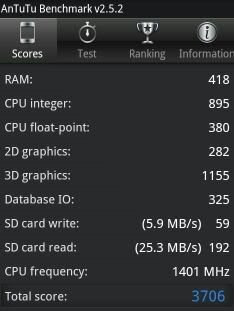
My Antutu benchmark using stock ROM 2.3.5....

user posted image

Let us compare....smile.gif
*
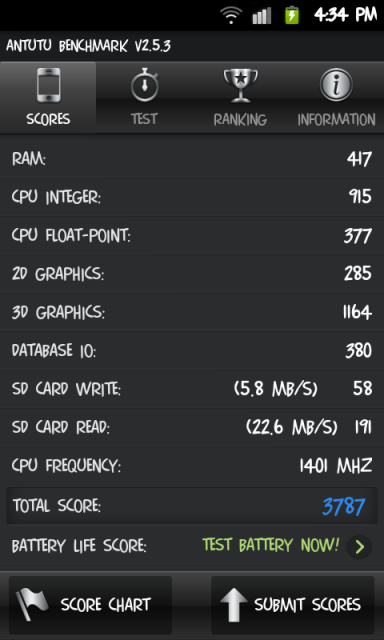
here is mine...
using stock rom too...
user posted image

3 Pages  1 2 3 >Top
Topic ClosedOptions
 

Change to:
| Lo-Fi Version
0.0396sec    0.86    7 queries    GZIP Disabled
Time is now: 8th December 2025 - 09:00 PM