Outline ·
[ Standard ] ·
Linear+
SΛMSUNG Galaxy W (I8150) Official Thread V3, Be a WISE user - Please read 1st page
|
game4life
|
 Jan 18 2012, 10:06 AM Jan 18 2012, 10:06 AM
|

|
QUOTE(nic_doggy @ Jan 18 2012, 08:59 AM) NOOO COW~~~~ im download the plain version on ur XDA thread http://www.megaupload.com/?d=5ZUOBOE0 (Plain) then i copy the zip files to internal memory , use the CWM to install the zip files , before i flash ur rom , mine rom is 2.3.6 rooted !  after installed than i turn on my phone and keep on said : SORRY BLA BLA BLA BLA BLA BLA ~~~~ (i forgot dy) then FC!!!  before flashing the rom, do a full wipe via recovery wipe data/factory reset wipe cache wipe dalvik cache |
|
|
|
|
|
game4life
|
Jan 18 2012, 10:43 AM
|
|
|
QUOTE(nic_doggy @ Jan 18 2012, 10:24 AM) yes. if there's a fc after flashing the rom, you need to wipe data and cache  |
|
|
|
|
|
game4life
|
Jan 18 2012, 10:56 AM
|
|
|
QUOTE(nic_doggy @ Jan 18 2012, 10:49 AM) but i think i wait for the new cow rom better !!! he said come with ICS theme there  i love ics theme soo muchhh!!!!  btw, thx yaaaa!!! how was the performence ??? awesome ??  i don't own galaxy w, just came here to help  |
|
|
|
|
|
game4life
|
Jan 18 2012, 04:22 PM
|
|
|
QUOTE(Cliffrison @ Jan 18 2012, 04:17 PM) use nandroid right?  if you want to restore your apps after flashing new rom, use titanium backup |
|
|
|
|
|
game4life
|
Jan 18 2012, 06:29 PM
|
|
|
QUOTE(carlover88 @ Jan 18 2012, 05:06 PM) i tried to restore my stock rom with nandroid after restoring when i boot it stucked at the boot screen edit:should i just send it to the shop where i bought my phone from? bootloop? try wipe data and wipe cache |
|
|
|
|
|
game4life
|
Jan 18 2012, 07:26 PM
|
|
|
QUOTE(carlover88 @ Jan 18 2012, 07:18 PM) the problem is i acidently deleted the backup lol feeling so stupid now restore via odin QUOTE(game4life @ Jan 14 2012, 07:19 PM) 1.download 2.3.5 http://www.hotfile.com/dl/135871758/0bd57b...J3_XME.zip.htmlpass: samfirmware.com 2.download odin http://dl.dropbox.com/u/47601401/ODIN___An...S_for_I8150.rar and extract 3.extract I8150DXKJ5_I8150OLBKJ3_XME.zip and reboot your phone into download mode (vol down + home + power) 4. start odin (make sure kies is not running in the background) and input the file ops=Ancora.ops tick one package one package=I8150DXKJ5_I8150OLBKJ3_I8150DXKJ5_HOME.tar.md5 Should look like this  5.connect the USB cable 6.click start to flash and wait. do no disconnect the usb cable. it will reboot when it finishes |
|
|
|
|
|
game4life
|
Jan 20 2012, 07:33 PM
|
|
|
QUOTE(and.inc @ Jan 20 2012, 06:59 PM) While downloading happened again blank screen n still. 1.5GHz OD Am going back to none OC ROM... the stable overclock speeds will vary. some device can withstand 1.5Ghz and some may not (even though the chipset is the same). if you want to overclock your phone, increase the frequency a little bit. if your phone crashes you have found your limit |
|
|
|
|
|
game4life
|
Jan 20 2012, 08:49 PM
|
|
|
QUOTE(carlover88 @ Jan 20 2012, 08:21 PM) anyone know how to fix bootloop problem? what did you do with your phone? |
|
|
|
|
|
game4life
|
Jan 20 2012, 11:28 PM
|
|
|
QUOTE(barjoyai @ Jan 20 2012, 11:00 PM) i'm currently on stock 2.3.6 how do i get the CWM recovery? do i need to root 1st? i wanted the CWM so i can make backup of my current rom. Planning to install cow's rom..i'm a bit confused now you need to root first use the recovery method http://forum.xda-developers.com/showthread.php?t=1317394then download cwm (recovery-clockwork-5.5.0.4-ancora.tar.md5) http://forum.xda-developers.com/showthread.php?t=1446593download odin http://dl.dropbox.com/u/47601401/ODIN___An...S_for_I8150.rarSelect the ops file, and enable one package in options, then load the md5 file with the One Package button. reboot your phone into download mode (vol down + home + power button) and connect usb. click start to flash. don't disconnect the usb, wait until it reboot successfuly |
|
|
|
|
|
game4life
|
Jan 21 2012, 11:32 AM
|
|
|
QUOTE(Cliffrison @ Jan 21 2012, 11:20 AM) If I do factory reset, will my backup in nandroid gone? dont tick format usb storage |
|
|
|
|
|
game4life
|
Jan 21 2012, 11:24 PM
|
|
|
QUOTE(Cliffrison @ Jan 21 2012, 11:08 PM) How to create Folder in App List? now my menu so many apps looks so messy  edit>add folder |
|
|
|
|
|
game4life
|
Jan 21 2012, 11:34 PM
|
|
|
QUOTE(Cliffrison @ Jan 21 2012, 11:29 PM) can't edit I mean those apps at app drawer using stock launcher? while in menu, tap the left capacitive button, edit>drop the app to 'add folder' |
|
|
|
|
|
game4life
|
Jan 22 2012, 12:09 AM
|
|
|
QUOTE(Cliffrison @ Jan 21 2012, 11:57 PM) lol, i thought you are using touchwiz. you can't create folder in app drawer if you are using launcherpro |
|
|
|
|
|
game4life
|
Jan 22 2012, 12:21 AM
|
|
|
QUOTE(Cliffrison @ Jan 22 2012, 12:13 AM) go launcher or touchwiz 4.5 http://forum.xda-developers.com/showthread.php?t=1061883 i'm using it with ics theme This post has been edited by game4life: Jan 22 2012, 12:22 AM Attached thumbnail(s)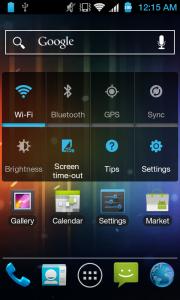
|
|
|
|
|
|
game4life
|
Jan 22 2012, 12:38 AM
|
|
|
QUOTE(driots @ Jan 22 2012, 12:35 AM) need help..... trying to root my SGW. Anyone can tell me whether my SGW already rooted. Attached is when I do the rooting....... just root using recovery method. it's easier and simple http://forum.xda-developers.com/showthread.php?t=1317394 |
|
|
|
|
|
game4life
|
Jan 22 2012, 01:00 AM
|
|
|
QUOTE(driots @ Jan 22 2012, 12:55 AM) just want to confirm... internal sd = usb storage yes  |
|
|
|
|
|
game4life
|
Jan 22 2012, 11:38 AM
|
|
|
QUOTE(driots @ Jan 22 2012, 11:31 AM) U can update to 2.3.6 than root it wt the recovery method. I just done rooting this way yesterday and no issue.
Added on January 22, 2012, 11:35 amI tried but i'm stuck at the recovery step. can't install the recovery file don't know wats wrong. Another things is tat i can't get comunication between the devices and command window. Can help...... use cwm download cwm (recovery-clockwork-5.5.0.4-ancora.tar.md5) http://forum.xda-developers.com/showthread.php?t=1446593download odin http://dl.dropbox.com/u/47601401/ODIN___An...S_for_I8150.rarSelect the ops file, and enable one package in options, then load the md5 file with the One Package button. reboot your phone into download mode (vol down + home + power button) and connect usb. click start to flash. don't disconnect the usb, wait until it reboot successfuly This post has been edited by game4life: Jan 22 2012, 12:18 PM |
|
|
|
|
|
game4life
|
Jan 22 2012, 12:04 PM
|
|
|
QUOTE(Lucasadu @ Jan 22 2012, 11:43 AM) guys, need help.... Flashing recovery is very simple, all you need is root access on your phone, and adb on computer. You just copy downloaded recovery on internal sdcard. Then disconect phone from copmuter. Make sure that USB debugging is on. Now connect it again but don't connect phone memory (computer shouldn't see sdcard and internal memory in Windows explorer), open command prompt and got directory where adb is installed[SIZE=7]..... where is the directory?? i just simply key in adb shell in command prompt but is show adb is not recognize.... noob here....cham....  anyone care to share his experience with me?  just flash cwm recovery, it's easier QUOTE(game4life @ Jan 22 2012, 11:38 AM) use cwm download cwm (recovery-clockwork-5.5.0.4-ancora.tar.md5) http://forum.xda-developers.com/showthread.php?t=1446593download odin http://dl.dropbox.com/u/47601401/ODIN___An...S_for_I8150.rarSelect the ops file, and enable one package in options, then load the md5 file with the One Package button. reboot your phone into download mode (vol down + home + power button) and connect usb. click start to flash. don't disconnect the usb, wait until it reboot successfuly |
|
|
|
|
|
game4life
|
Jan 22 2012, 12:18 PM
|
|
|
QUOTE(Lucasadu @ Jan 22 2012, 12:17 PM) i see, thanks... but the link of odin dint work.... fixed  |
|
|
|
|
|
game4life
|
Jan 22 2012, 01:47 PM
|
|
|
QUOTE(Lucasadu @ Jan 22 2012, 01:36 PM) how to use cwm to flash custom rom? dave the custom rom zip file in internal sd, then open odin, choose ops, enable 'in one package' then choose the recovery-clockwork-5.5.0.4-ancora.tar.md5, then?? sorry...im noob... just copy the custom rom zip file to internal sd and reboot into cwm recovery, install zip from sd card how to reboot into cwm recovery http://forum.xda-developers.com/showthread.php?t=1390234This post has been edited by game4life: Jan 22 2012, 01:49 PM |
|
|
|
|



 Quote
Quote
 0.0524sec
 0.23
0.23
 7 queries
 GZIP Disabled