

MyGKernel v1.1.1 support init.d ?
SAMSUNG GALAXY S II Official thread V22, NEW Users be SMARTuser - PLS read Page 1
SAMSUNG GALAXY S II Official thread V22, NEW Users be SMARTuser - PLS read Page 1
|
|
 Dec 21 2011, 10:01 PM Dec 21 2011, 10:01 PM
Return to original view | Post
#1
|
 
Senior Member
2,471 posts Joined: Jan 2003  
|
MyGKernel v1.1.1 support init.d ?
|
|
|
|
|
|
Dec 21 2011, 10:18 PM
Return to original view | Post
#2
|
|
Senior Member
2,471 posts Joined: Jan 2003
|
QUOTE(pikachu01 @ Dec 21 2011, 10:00 PM) If you're using CWM5, you have to follow these steps: tried already...still getting status 0...not sure where is going wrongNote: For a successful flash, you have to toggle Signature Verification ON -OFF and Script Assets ON -OFF, then flash it from internal storage. Some Galaxy Note users are also facing this.  |
|
|
Dec 21 2011, 10:35 PM
Return to original view | Post
#3
|
|
Senior Member
2,471 posts Joined: Jan 2003
|
QUOTE(pikachu01 @ Dec 21 2011, 10:32 PM) Try manually copying the files. You can do this for all except for the libsqlite and bin files addons. Those will need to be done at the CWM. Doing that while your phone is running will bootloop your OS. manually copy to where?? and which to copy? i saw got 3 folder after extractThis post has been edited by gsan: Dec 21 2011, 10:39 PM |
|
|
Dec 22 2011, 10:37 PM
Return to original view | Post
#4
|
|
Senior Member
2,471 posts Joined: Jan 2003
|
QUOTE(pikachu01 @ Dec 21 2011, 10:46 PM) Use Root Explorer/ Root Browser to extract them to the hierarchies (except META_INF). There should be a system folder and a sdcard folder as well right? manually copy them and aunch /sdcard/bolt_scripts/remount9100 as Root (The skull icon) and as Boot (The wheel icon).Those are the actual paths in your phone as well. but then when i go to /system/etc/init.d/ no file inside it |
|
|
Dec 22 2011, 10:58 PM
Return to original view | Post
#5
|
|
Senior Member
2,471 posts Joined: Jan 2003
|
QUOTE(destEX @ Dec 22 2011, 10:41 PM) you open the thunderbolt .zip files, inside also got system/etc/init.d then inside got files, then copy that files from your computer into the phone when i type sysctl -a | grep vm using terminal emulator, it say not found... |
|
|
Dec 22 2011, 11:08 PM
Return to original view | Post
#6
|
|
Senior Member
2,471 posts Joined: Jan 2003
|
QUOTE(antt00 @ Dec 22 2011, 11:05 PM) did you type 'su' first? yes |
|
|
|
|
|
Dec 22 2011, 11:20 PM
Return to original view | Post
#7
|
|
Senior Member
2,471 posts Joined: Jan 2003
|
QUOTE(pikachu01 @ Dec 22 2011, 11:11 PM) Your busybox is either an older version or not having sysctl bundled into it. You should install stericson's busybox and install it to the current path busybox is installed (if not installed, install it to /system/xbin). dirty_ratio = 20dirty_background_ratio = 5 vfs_cache_pressure = 100 i use root brower to copy the files manually This post has been edited by gsan: Dec 22 2011, 11:23 PM |
|
|
Dec 22 2011, 11:55 PM
Return to original view | Post
#8
|
|
Senior Member
2,471 posts Joined: Jan 2003
|
QUOTE(pikachu01 @ Dec 22 2011, 11:44 PM) Your init.d files are not chmodded rwx-rwx-rwx probably. yaya... but i check the init.d, it is rwx-rwx-rwx already...Also, when you type su in terminal emulator, you'll get a superuser prompt asking if you will allow or not (first time only). Did you see the prompt? This post has been edited by gsan: Dec 22 2011, 11:57 PM |
|
|
Dec 23 2011, 12:46 PM
Return to original view | Post
#9
|
|
Senior Member
2,471 posts Joined: Jan 2003
|
QUOTE(pikachu01 @ Dec 23 2011, 09:23 AM) Did you install busybox to /system/xbin? yes, installed already |
|
|
Dec 23 2011, 06:37 PM
Return to original view | Post
#10
|
|
Senior Member
2,471 posts Joined: Jan 2003
|
QUOTE(pikachu01 @ Dec 23 2011, 05:10 PM) Nope. Juwe's RAM app implements LMK for just the Linux LMK. It doesn't tweak the Dalvik LMK causing a mismatch where memory is freed on one side but not the other. i still not successful install your tweak...Best is to use Supercharger or ThunderBolt!'s own LMK. |
|
|
Dec 23 2011, 07:17 PM
Return to original view | Post
#11
|
|
Senior Member
2,471 posts Joined: Jan 2003
|
QUOTE(1wildcat1 @ Dec 23 2011, 06:41 PM) do it manually like me mind to share how u do manually? because I also do manually but i check the sysctl -a | grep vm, the result is not same as  dirty_ratio = 80 dirty_background_ratio = 65 vfs_cache_pressure = 1 i already manually copy etc, lib & xbin folder into phone system... This post has been edited by gsan: Dec 23 2011, 07:20 PM |
|
|
Dec 23 2011, 07:26 PM
Return to original view | Post
#12
|
|
Senior Member
2,471 posts Joined: Jan 2003
|
QUOTE(pikachu01 @ Dec 23 2011, 07:23 PM) It's an addon. You just flash it on top of what you've already flashed which folder? init.d folder? yes... Added on December 23, 2011, 7:24 pm Did you set the permissions to rwx-rwx-rwx? |
|
|
Dec 23 2011, 07:34 PM
Return to original view | Post
#13
|
|
Senior Member
2,471 posts Joined: Jan 2003
|
QUOTE(pikachu01 @ Dec 23 2011, 07:32 PM) Not only the folder, but the files as well. there are 4 files inside /system/etc/init.d but when i want to set permission, it say read only...If it's still failing to get the correct values, install the latest superuser (install the latest superuser binary from there) then install busybox installer from stericson and install busybox to /system/xbin. |
|
|
|
|
|
Dec 23 2011, 07:37 PM
Return to original view | Post
#14
|
|
Senior Member
2,471 posts Joined: Jan 2003
|
QUOTE(antt00 @ Dec 23 2011, 07:34 PM) Root explorer? Change to r/w at the top. Press the button. ok.. done for the 4 files... try again... but still get not correct value... already (install the latest superuser binary from there) and install busybox installer from stericson and install busybox to /system/xbin. |
|
|
Dec 23 2011, 08:54 PM
Return to original view | Post
#15
|
|
Senior Member
2,471 posts Joined: Jan 2003
|
QUOTE(antt00 @ Dec 23 2011, 07:43 PM) Again what kernel your using? myGkernel v1.1.1 |
|
|
Dec 24 2011, 11:14 AM
Return to original view | Post
#16
|
|
Senior Member
2,471 posts Joined: Jan 2003
|
@pikachu01
flashed to superatom kernel v1.2, finally can get the correct value with your tweak. btw, so many addon, which one is suitable for I9100G?? This post has been edited by gsan: Dec 24 2011, 11:16 AM |
|
|
Dec 26 2011, 10:01 PM
Return to original view | Post
#17
|
|
Senior Member
2,471 posts Joined: Jan 2003
|
finally got myself maxis internet plan...
do I need to enable 3G only can get faster speed? btw, what's the diff. between G, H and H+ ? |
|
|
Dec 26 2011, 11:40 PM
Return to original view | Post
#18
|
|
Senior Member
2,471 posts Joined: Jan 2003
|
QUOTE(kazama82 @ Dec 26 2011, 10:19 PM) can..but no guarantee can?.. If I only enable GSM, mean I only get G speed? ..since no official ICS for sgs2 yet..unofficial got la.. ..since no official ICS for sgs2 yet..unofficial got la..Added on December 26, 2011, 10:20 pm H+ is the fastest..Im using maxis 1GB data plan..and so far never used beyond 800mb..since too many wifi around.. |
|
|
Dec 31 2011, 02:05 PM
Return to original view | Post
#19
|
|
Senior Member
2,471 posts Joined: Jan 2003
|
any recommended data watcher? noticed that surfing fb is sucking my bandwidth...just open and check in sux 1mb
|
|
|
Jan 1 2012, 12:17 PM
Return to original view | Post
#20
|
|
Senior Member
2,471 posts Joined: Jan 2003
|
Post for fun, G version can hit 6.1k actually
 SuperROM v1.0 + Superatom kernel v1.1 SuperROM v1.0 + Superatom kernel v1.1Attached thumbnail(s) 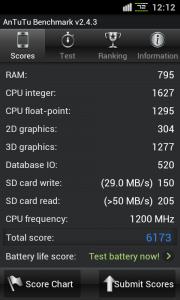
|
|
Topic ClosedOptions
|
| Change to: |  0.0476sec 0.0476sec
 0.53 0.53
 7 queries 7 queries
 GZIP Disabled GZIP Disabled
Time is now: 3rd December 2025 - 11:03 AM |
 Quote
Quote