Welcome Guest ( Log In | Register )

Bump Topic Topic Closed RSS Feed

Outline · [ Standard ] · Linear+

 SAMSUNG GALAXY NOTE™ | V5, RRP RM2299

views
     
Edoras
post Jan 7 2012, 11:49 AM

Regular
******
Senior Member
1,134 posts

Joined: Jan 2003
QUOTE(benny888 @ Jan 7 2012, 11:41 AM)
If your phone is rooted, buy Titanium Backup Pro - best tool to backup and restore all your apps and supporting data. This is the best app for Android - it is so good when it was at the developmental stage I donated another 4 X of the offered price to the developer before it was released officially to the Market
*
Thanks for the advice benny.
If I backup my current Rooted 2.3.5 ROM, and if I lost this root when I install new Stock ROM, can I revert back to the Rooted 2.3.5 using ODIN and still have it rooted without going to the process of Re-rooting again?

Edoras
post Jan 7 2012, 12:00 PM

Regular
******
Senior Member
1,134 posts

Joined: Jan 2003
What's the difference between ClockworkMod Recovery and CWM Manager? Both have same function?
Edoras
post Jan 7 2012, 12:24 PM

Regular
******
Senior Member
1,134 posts

Joined: Jan 2003
QUOTE(benny888 @ Jan 7 2012, 12:09 PM)
CWM manager is just an apps which you can launch . It will offer you similar options as ClockworkMod recovery. The difference is you run it as an app while CWM recovery you activate it through the 3 hard buttons ( with phone off, vol up+home=power)
Both offer same functions


Added on January 7, 2012, 12:14 pm
Your question I don't quite understand ??

You use ODIN on PC to flash back a stock 2.3.5 rom - you will lose root + CWM
You need to use zergrush exploit and the Chainfire kernel file to root and have CWM restored back

When you use CWM to backup your 2.3.5 rooted rom, restoring it back through CWM recovery will give you back exactly 100% your last backup status

Actually is simple, don;t confuse yourself making it so complicate
*
Maybe I need to rephrase it back.
PC ODIN will not be able to flash 2.3.5 rooted ROM, right? If this is the case, my question previously is invalid.

The correct way to flash a previous rooted 2.3.5 is via CWM Manager only (which requires to be Rooted in the first place). Sorry for the noob questions. But I learn a lot in the past couple of days after reading and doing the rooting. I have never own or learn about Android before.


Added on January 7, 2012, 12:30 pm
QUOTE(ckyned @ Jan 7 2012, 12:08 PM)
ClockworkMod Recovery == when u boot up.  CWM Manager == the apps inside your apps drawer that will trigerred ClockworkMod Recovery when u want to restore/backup/install rom/wiping data
*
I have installed CWM Manager.
Is it advisable to install ClockworkMod Recovery too? Can the current Recovery find the Custom/Backup in the SD? I think thats what ClockworkMod does - able to find the backups in the SD, right?

EDIT/UPDATED: OK - I think I know now about both CWM Manager and ClockworkMod Recovery... tongue.gif

This post has been edited by Edoras: Jan 7 2012, 12:36 PM

Edoras
post Jan 7 2012, 01:51 PM

Regular
******
Senior Member
1,134 posts

Joined: Jan 2003
QUOTE(ckyned @ Jan 7 2012, 12:40 PM)
LoL, CWM already packed with ClockworkMod Recovery. the only recovery I know is ClockworkMod. SD? let's be more specific cause there's 2 SD. internal & external. CWManager without ClockworkMod is nothing because Clockworkmod is the one that doing all the jobs.  nod.gif
*
Thanks ckyned... smile.gif

Now, may I know where can I found any awesome Cooke Custom ROMS for me to flash to my SGN?
Hope these ones are stable.

Edoras
post Jan 7 2012, 04:23 PM

Regular
******
Senior Member
1,134 posts

Joined: Jan 2003
Funny - it cannot find the zip file of the ROCKET ROM. Somehow, when I downloaded the zip file, it automatically unzip and I saved it the SD. What shall I do? Should I zip it back?

This post has been edited by Edoras: Jan 7 2012, 04:40 PM
Edoras
post Jan 7 2012, 05:11 PM

Regular
******
Senior Member
1,134 posts

Joined: Jan 2003
QUOTE(benny888 @ Jan 7 2012, 04:51 PM)
Yes this is a very good rom. After testing so many others is my favorite
*
Do I need to wipe the data?
Edoras
post Jan 7 2012, 11:58 PM

Regular
******
Senior Member
1,134 posts

Joined: Jan 2003
Cool...! Now I am on Rocket Rom. As a newbie rhis is my first time to.flash a custom Rom.
More.smoother...

Edoras
post Jan 8 2012, 12:11 AM

Regular
******
Senior Member
1,134 posts

Joined: Jan 2003
QUOTE(ckyned @ Jan 7 2012, 05:56 PM)
if u on stock rom. mostly yes. but try do cache & dalvik wipe 1st. if failed to boot up, do a full wipe. remember to do a nandroid backup 1st with CWM.  icon_idea.gif
*
Yeah... It was in a bootloop and thus I need to do the wipe then reflash again.

Edoras
post Jan 8 2012, 07:08 AM

Regular
******
Senior Member
1,134 posts

Joined: Jan 2003
QUOTE(ckyned @ Jan 8 2012, 12:18 AM)
congrats. now im bet u will flash some more.  tongue.gif
*
I have also downloaded CheckROM (will try this to compare).
Can you recommend any good sites to download good and stable ROMS? smile.gif

ANother question: If I have a new 16GB external SD, how do I copy or move all the contents from the old 1GB SD to the new SD? Is it as simple as just copy the contents to computer HDD and later copy back to the new SD?
Edoras
post Jan 8 2012, 07:30 AM

Regular
******
Senior Member
1,134 posts

Joined: Jan 2003
QUOTE(ckyned @ Jan 8 2012, 07:20 AM)
i just go to xda forum because many dev might post their work there.
your could try copy all the data to new SD card. it should work i suppose.
*
Thanks ckyned.
I also found this site - http://theunlockr.com/category/roms-2/andr...laxy-note-roms/
It still points back to XDA Forum


Added on January 8, 2012, 7:32 am
QUOTE(benny888 @ Jan 8 2012, 07:22 AM)
Yes just copy over will be fine
Roms all at the xda thread
*
Thanks benny.

I want to buy 16 GB micro-SD.
Which type is the best (Class 10?)? How much is it normally in Low Yat Plaza? Less than RM 100?
I think I want to go there today.


This post has been edited by Edoras: Jan 8 2012, 07:34 AM
Edoras
post Jan 8 2012, 12:08 PM

Regular
******
Senior Member
1,134 posts

Joined: Jan 2003
I bought the Titanium Backup Pro and downloaded the Titanium Backup*Root.
But somehow the Titanium Backup Pro seems to remain the Free version.
The payment status is "purchased" and I logged in the same Google account.
What happened??
I have deleted the free version and reinstall back but nothing happen.
How do I know I am at Paid version. I suspected I am still at Free version because a couple of red boxes at "Hypershell", "Fast/Auto app install", "Dropbox" all are disabled and the box "Pro version: $5.99" is still displayed there.

UPDATE

Problem solved by using Root uninstaller and uninstalled both apps and later re-install them back.

This post has been edited by Edoras: Jan 8 2012, 12:16 PM
Edoras
post Jan 8 2012, 07:09 PM

Regular
******
Senior Member
1,134 posts

Joined: Jan 2003
QUOTE(ckyned @ Jan 8 2012, 02:58 PM)
Rocket rom v15 anyone? LoL
*
Yes, I would like to try..!. now downloading process... biggrin.gif

Edoras
post Jan 8 2012, 07:15 PM

Regular
******
Senior Member
1,134 posts

Joined: Jan 2003
QUOTE(JIMMY OUTLAWS @ Jan 8 2012, 07:12 PM)
Shinzan....

Finally i managed to root using your method...CF-R...WITH only to chose cook ROM....can u recomend me which one ....

Tq
*
As for me, I used this method to Root plus CWM - http://androidforums.com/galaxy-note-all-t...3-n-finish.html
Then, use CWM Manager to install custom ROMs... smile.gif


Added on January 8, 2012, 7:18 pm
QUOTE(ckyned @ Jan 8 2012, 07:15 PM)
now u getting the hots flashing roms.  tongue.gif
easy like ABC.  laugh.gif
*
I wanted to try the Rocket ROM... It seems much smoother than my Stock 2.3.5.
I hope it doesn't have that problem waking up from sleep (which I have in 2.3.5).

10 more minutes to finish downloading.... tongue.gif
Thanks guys for showing me the way! rclxms.gif

This post has been edited by Edoras: Jan 8 2012, 07:18 PM
Edoras
post Jan 8 2012, 08:58 PM

Regular
******
Senior Member
1,134 posts

Joined: Jan 2003
QUOTE(shychenko @ Jan 8 2012, 08:43 PM)
I lost my S-pen...where can i buy this...n how much.pls help
*
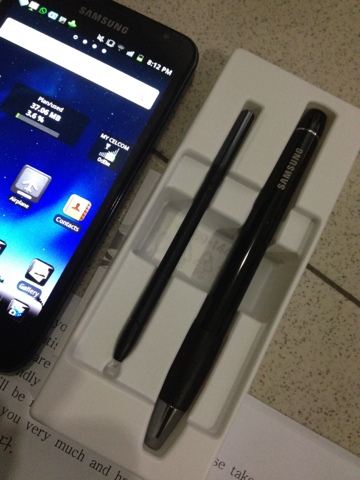
If you buy S Pen Holder, you will get extra pen.

user posted image

Price = US 53.00 from eBay

This post has been edited by Edoras: Jan 8 2012, 08:59 PM
Edoras
post Jan 8 2012, 09:01 PM

Regular
******
Senior Member
1,134 posts

Joined: Jan 2003
QUOTE(CrossX @ Jan 8 2012, 08:58 PM)
ya i did... this is the 5th time i flashed CheckROM today. even with the new v2.5 there's still complaints about bootloops with abyssnote 2.8 or when they install other mods....
*
This morning I installed CheckROM v2. Did a wipe out before flashing.
No problem but I don't like it. Now revert back to Rocket Rom.

Edoras
post Jan 9 2012, 12:22 AM

Regular
******
Senior Member
1,134 posts

Joined: Jan 2003
Currently installed V15 Rocket ROM... Wait and see how it performs... ;-)

3 Pages < 1 2 3Top
Topic ClosedOptions
 

Change to:
| Lo-Fi Version
0.0426sec    0.20    7 queries    GZIP Disabled
Time is now: 8th December 2025 - 10:31 PM