Welcome Guest ( Log In | Register )

Bump Topic Topic Closed RSS Feed

Outline · [ Standard ] · Linear+

 The Official iPhone 4S Discussion Thread v5!

views
     
gouken
post Dec 21 2011, 01:59 PM

On my way
****
Senior Member
630 posts

Joined: Dec 2011
QUOTE(ericpires @ Dec 21 2011, 09:00 AM)
iphone 4 and 4s not much difference only. And don't buy it because of Siri, its best to wait for iphone 5 smile.gif
*
I heard iPhone 2020 is even greater, it comes with 25MP Camera and SIRI that can speaks in both Hokkien and Hakka...so it's best to wait for 2020 LOL
gouken
post Dec 21 2011, 02:12 PM

On my way
****
Senior Member
630 posts

Joined: Dec 2011
On a more serious note if you have an iPhone 4 and thinking need to upgrade or not, you just need to ask yourself ONE question - Can you wait for about a year for iPhone 5?

For some its Yes but for me, it's No because I really need the 1080p HD video cam and higher resolution camera because of my newborn baby. I'm too lazy to carry around multiple gadgets and i think the best camera is the one thats always with you..furthermore, I need the camera to be fast, unlike the iPhone 4 unacceptable slow startup...and the extra stuffs like SIRI, noticeable speedier web surfing, faster apps startup time, smoother hires settings for 3D games and fix death grip problem is all sweet desserts to the purchase.


gouken
post Dec 22 2011, 01:05 AM

On my way
****
Senior Member
630 posts

Joined: Dec 2011
QUOTE(rajivshm @ Dec 22 2011, 12:20 AM)
yalo... agreed...

soon im gona conclude the iphone is only good for showing off style and "gaya", but not in features.... could i conclude that?
*
Imagine a world where everyone come to conclusion to things that way...there will be no more mission impossible agents LOL
gouken
post Dec 22 2011, 05:53 PM

On my way
****
Senior Member
630 posts

Joined: Dec 2011
QUOTE(PaEsch4tz @ Dec 22 2011, 05:26 PM)
32 fits better. ive used it and now its good. got use much space but still left much.
*
+1

For most iPhone users:
16GB is ok for iPhone4 but NOT enough for iPhone 4S, because of the 1080p HD video recording, it fills up real quick even if you only use the video cam occasionally.
So to save yourself from the pain of offload the video to your computer frequently, get the 32GB. Unless you hardly ever use video recording, then 16GB should be enough.

For heavy users:
You know well you've been collecting loads of video/photo in your library and never delete them, you have whole season of TV shows waiting to be watched one fine day when you are on a vacation, you are a heavy Flickr/Instagram users taking picture of every meals you have, you have a insanely large music library dating back to the 70s musics, you need all your whole office PDF/documents on your phone all the time, you install every new hot games that is out and keeping them installed. You think you'll skip iPhone 5 and decided to upgrade only after 2-3 years. Get the 64GB.

For those who sell their phone often:
There'll always be buyers for 16GB, 32GB and 64GB and the prices will usually depreciates similarly for each models. Maybe 16GB will be easier to sell later compared to 64GB because the asking price will be lower.
gouken
post Dec 22 2011, 06:02 PM

On my way
****
Senior Member
630 posts

Joined: Dec 2011
QUOTE(andrewyulm @ Dec 22 2011, 05:54 PM)
sigh you guys are lucky la, the 9A406 works for u.
i've updated to 9A406, set up as new phone, tried restore as backup before also, network reset all that jazz,
and im STILL at 34% battery with
4 hours 37 minutes usage
8 hours 12 minutes standby

barely half a day =\
*
9A406 is only to resolve SIM card problems, not battery.
Don't border updating because its a huge download (800+MB) and the pain of backuping your phone and stuff.
Just wait for 5.1

The best way to resolve the battery issue now is still to do a fresh clean state install without restoring, like a new phone.

And on the issue of Backup/Restore, just avoid using iCloud Backup now, it will be a nightmare waiting for 1 minute for each photo to be restored. Backup via iTunes.

gouken
post Dec 22 2011, 11:51 PM

On my way
****
Senior Member
630 posts

Joined: Dec 2011
QUOTE(XiuKeong @ Dec 22 2011, 05:59 PM)
Maybe you should tweak some settings.

This was my 9A405 battery life. I'm yet to test 9A406.
» Click to show Spoiler - click again to hide... «

*
Looking at your screenshot, it shows you got plug in to charge in between...of course get that battery life la ;p


gouken
post Dec 23 2011, 12:05 AM

On my way
****
Senior Member
630 posts

Joined: Dec 2011
QUOTE(WhatMan @ Dec 22 2011, 09:12 PM)
I charge my iPhone 4S @ 100% around midnight. Leaving wifi on, next morning I discover it was at 68%, yet the 'usage' was 46 minutes, despite the fact I went to sleep right after doing full charge.

So how was the phone reduce to that amount of charge when I slept the whole night and the phone was put to standby mode (lock)?
*
Most likely caused by an app, in fact most battery problems on ios 5 (regardless of iPhone 3GS/4/4S) are caused by apps that were not optimized/coded well with all the new APIs and features in iOS 5. Examples are apps that try to connect/crash continuously in the background, draining battery in the process.

Goto About>Diagnostics and Usage to find some clues from the crash report/plists to this potential problematic app/apps


Added on December 23, 2011, 12:10 am
QUOTE(XiuKeong @ Dec 22 2011, 11:59 PM)
Nope. That screenshot is already 2% and it's night time. Of course have to charge it before going to bed.

That time was from 4pm fully charged until the next day I plug in the charger.
*
Oh ok, I see.

I'm testing mine now and I will take the screenshot just before I charge, more accurate wink.gif

This post has been edited by gouken: Dec 23 2011, 12:10 AM
gouken
post Dec 24 2011, 05:13 PM

On my way
****
Senior Member
630 posts

Joined: Dec 2011
QUOTE(suadrif @ Dec 24 2011, 12:52 PM)
i thought the best way to preserve battery life is by doing trickle charges?
as mentioned fact, lithium ion battery does not require 0% discharged.
it should be working well if u charge it at least below 20%.
here is the guide on how to perform trickle charge by battery doctor (top 5 paid apps in appstore):

1. Let your battery runs out below than 20%. Mostly i used until 5% or 10%.
2. Full charge your battery to 100% continuously. DO NOT disconnect your charger after reach 100%.
3. Trickle charge your phone, which means, leave it charging ongoing. Trickle charge can be at least 10 mins and up to 2 hours. Most of the time i trickle charge my iphone about 1 hour. It is what recommended by battery doctor itself.

Fact (not myth) behind trickle charge: when your battery is 100% fully charge, it is actually not 100% recharged. it is just the indicator / sensor shows that its already reach minimum level of 100%.
*
The best way to preserve your iPhone battery is actually to plug in to power all the time wink.gif

I know this sounds silly but if you spend most of the time in front of your computer while working, just plug it in and continue charging it. This way you will not waste your battery charge cycles. Lithium ion battery especially Apple will not overcharge and once it's full it will auto switch off and use from DC. Unplug it and use it like normal when you need to go out. Once a month, trickle charge for extra 2 hours for 100% and let it drain to 0% without pluging in. Leave it off for at least 5 hours and recharge back to 100% and turn back on. This will both calibrate back your battery and keeping the electrolyte inside running healthy.

This method is for those who want their phone to hold charges well above 80% after more than 3-years of usage. I did the same for my 3GS and it's battery is still superb.

For most users though, normal charge-use-discharge-use is fine and can replace the battery with use up charge cycles after 3-years.
gouken
post Dec 24 2011, 09:44 PM

On my way
****
Senior Member
630 posts

Joined: Dec 2011
QUOTE(zul_mbbs @ Dec 24 2011, 07:38 PM)
hello my fellow 4s gang...wanna ask something..can we use debit card instead of credit card in order to buy apps from itunes.
anyone have use dbit cad??
*
Sk2stall.com


gouken
post Dec 25 2011, 09:36 AM

On my way
****
Senior Member
630 posts

Joined: Dec 2011
QUOTE(Batman @ Dec 24 2011, 11:21 PM)
almost same as urs..

user posted image
*
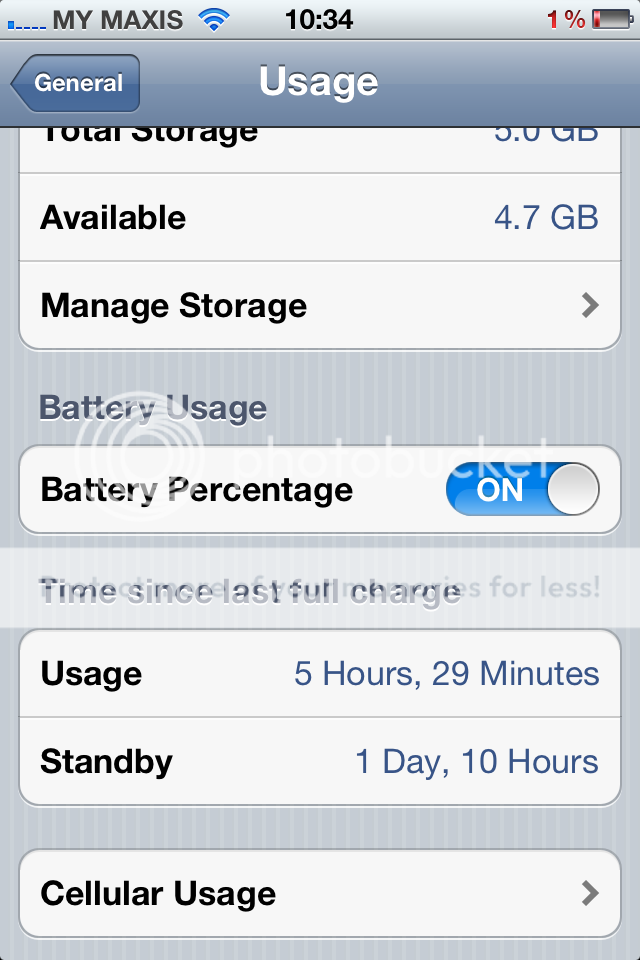
user posted image

Same as mine, quite close to what Apple claimed that for 3G is about 6 hours. So much better than my hopeless so-called high end Samsung Androids

This post has been edited by gouken: Dec 25 2011, 09:38 AM
gouken
post Dec 25 2011, 09:42 AM

On my way
****
Senior Member
630 posts

Joined: Dec 2011
QUOTE(macbookproguy @ Dec 24 2011, 11:24 PM)
BATERRY SUCKS! Before i sleep 100% (FULLY CHARGED AT 2Am,when i wake up @ 10am,My battery left 50%! WTH BATTERY?!
*
Not normal, I suspect caused by some apps connecting and crashing in the background at nite continuously. Check the crash report from Diagnostics and Usage. It should be 94-98% when idle for that long.
gouken
post Dec 27 2011, 11:05 AM

On my way
****
Senior Member
630 posts

Joined: Dec 2011
QUOTE(carlosnest @ Dec 27 2011, 10:43 AM)
My iPhone4S Battery Usage

user posted image

Is this status consider good or bad?
*
Same as mine..thats about right. thumbup.gif
Apple estimates about 6 hours.
gouken
post Dec 27 2011, 03:05 PM

On my way
****
Senior Member
630 posts

Joined: Dec 2011
QUOTE(Eidilfitrix @ Dec 27 2011, 02:34 PM)
Hi there bro smile.gif

For LiIon Battery, it is advisable to charge it when it is at 30 - 40% that is to preserve battery cycles and battery life.

If you always charge it from 1 to 2%, it will burden the battery.

Always do a full charge (empty the battery and charge it back to full once a month to calibrate the battery)

Always charge the battery when it is at half or 30% to prevent damage to the battery smile.gif

http://batteryuniversity.com/learn/article...based_batteries
*
whoa, that's alot of misinformation there bro. jus an advice, it will be more helpful to others if you read more before posting this.

below are common facts that you can find from all those reliable sources including from Apple and wiki:

1. For LiIon battery, you can charge at ANYTIME (not half, 30% or 40%) unlike nickel-based batteries
2. It will not burden or damage the battery if you charge it at 1% or even when the phone turn off by itself because there is a reserve battery after it is switch off for battery protection.
3. You don't need to ALWAYS do full charge, the diminishing cycles are automatically calculated internally from the total 1,000 cycles available for Apple LiIon batteries. This means, if you use your iPhone until 40% and charge it back to 100% (used 60%), and then you use up and it drop to 20% (used 80%), and you charge again to 100% and it drop to 40% later (used 40%). So the total use-up cycles for that duration will be 2 cycles from the 1000 available because (60%+80%+60%=200%=2 cycles).
4. The maximum duration of time you need to do a full charge is ONCE a month, not ALWAYS. And this battery calibrating exercise is to make the battery level reading more accurate on your iPhone and keep the juice inside active running. But if you want to do full charge always also can, thats the good thing about LiIon batteries, you can charge whatever ways you want.
5. In fact, the best way to preserve your iPhone battery is actually to plug in to power all the time.


I know this sounds silly but if you spend most of the time in front of your computer while working, just plug it in and continue charging it. This way you will not waste your battery charge cycles. Lithium ion battery especially Apple will not overcharge and once it's full it will auto switch off and use from DC. Unplug it and use it like normal when you need to go out. Once a month, trickle charge for extra 2 hours for 100% and let it drain to 0% without pluging in. Leave it off for at least 5 hours and recharge back to 100% and turn back on. This will both calibrate back your battery and keeping the electrolyte inside running healthy.

This method is for those who want their phone to hold charges well above 80% after more than 3-years of usage. I did the same for my 3GS and it's battery is still superb.

For most users though, normal charge-use-discharge-use is fine and can replace the battery with use up charge cycles after 3-years.

Apple Batteries Information Page

This post has been edited by gouken: Dec 27 2011, 03:11 PM
gouken
post Dec 27 2011, 03:14 PM

On my way
****
Senior Member
630 posts

Joined: Dec 2011
QUOTE(andyfriends @ Dec 27 2011, 03:12 PM)
i din know abt this too
hmm i tot the longer u charge it/randomly charging it, it will destroy the batt.
*
thats old nickel-based batteries..it's ridiculous how often those people from phone shops still giving such obsolete advice to customers. no wonder so many ppl confused. doh.gif
gouken
post Dec 27 2011, 04:15 PM

On my way
****
Senior Member
630 posts

Joined: Dec 2011
QUOTE(andyfriends @ Dec 27 2011, 03:28 PM)
if i charge my batt like below 20% and if i use the batt app, shall i ignor it and unplug when is full or stil have to follow and give extra 2 hours charge each time?
*
either way oso can, it's up to you. if you do trickle charge, youll notice your battery can lasts abit longer for single charge.
my advice is not to worry too much about battery maintenance for your iPhone. just enjoy your phone and charge it whenever you need to.
the problem of memory problem and overchraging are bygone history. and using an apple products especially, they are quite in the forefront of
battery technology, we don't need to fret to much over this.

but one fact remains, any battery regardless how well we maintain it, will diminish in performance the day we started using it.


Added on December 27, 2011, 4:20 pm
QUOTE(kahjye @ Dec 27 2011, 03:29 PM)
is it okay to leave my phone charged eventho it reached 100% ?

cause i wanna use the phone`s internet via usb.. sad.gif
*
no problem, i've been doing this for my iPhones and MBP for years and their battery performance still above 80% of design capacity.

UNLESS your charger is faulty or not the genuine one, inadvertently charged to a higher than specified voltage.

This post has been edited by gouken: Dec 27 2011, 04:20 PM

gouken
post Dec 27 2011, 04:24 PM

On my way
****
Senior Member
630 posts

Joined: Dec 2011
QUOTE(kenjixx @ Dec 27 2011, 03:32 PM)
this method is suitable for all product that is using LiIon battery right?
*
yup, especially Apple products because they are leading the industry in battery technology R&D


Added on December 27, 2011, 4:26 pm
QUOTE(Eidilfitrix @ Dec 27 2011, 03:42 PM)
I got the info for LiIon battery from here http://batteryuniversity.com/learn/article...to_charge_table
*
try reading slowly and the phrases used wink.gif

This post has been edited by gouken: Dec 27 2011, 04:26 PM
gouken
post Dec 27 2011, 06:26 PM

On my way
****
Senior Member
630 posts

Joined: Dec 2011
QUOTE(rathian_mhfu @ Dec 27 2011, 06:07 PM)
Guys..how to delete newsstand icon in our iphone without jailbreak?any way?
*
Tak bole but you can throw it into a folder by dragging another app to another app to create folder and right before you release it drag the newsstand app instead (need to be quick)...this hack will crash when the newsstand is tap though...

user posted image

This post has been edited by gouken: Dec 27 2011, 06:29 PM
gouken
post Dec 28 2011, 03:28 PM

On my way
****
Senior Member
630 posts

Joined: Dec 2011
QUOTE(macbookproguy @ Dec 28 2011, 02:16 PM)
How do i set Song as my iphone ringtone?
*
This will probably be the most unApple-like experience you will ever faced using an Apple product. There are 15-steps to do that if you really want to know wink.gif
gouken
post Dec 29 2011, 10:47 AM

On my way
****
Senior Member
630 posts

Joined: Dec 2011
user posted image

A quite good and comprehensive guide from iBooks Store. And it's FREE.
gouken
post Dec 29 2011, 04:17 PM

On my way
****
Senior Member
630 posts

Joined: Dec 2011
QUOTE(se2nd @ Dec 29 2011, 02:02 PM)
Not found searching in the ibook libary. Where do you download it.
*

Probably not available for Malaysia iBooks stall..get the US iTunes account

2 Pages  1 2 >Top
Topic ClosedOptions
 

Change to:
| Lo-Fi Version
0.0232sec    0.87    7 queries    GZIP Disabled
Time is now: 18th December 2025 - 05:44 AM