

demmmm yesterday just format.. now still dloading
Battlefield 3 Origin Backup Method
Battlefield 3 Origin Backup Method
|
|
 Jun 11 2013, 11:40 PM Jun 11 2013, 11:40 PM
|
 
Junior Member
330 posts Joined: Aug 2009 From: Manjung  
|
demmmm yesterday just format.. now still dloading
|
|
|
|
|
|
Aug 21 2013, 03:18 PM
|

Newbie
0 posts Joined: Jun 2013
|
QUOTE(AsuKi @ Dec 7 2011, 04:53 PM) Hey guys, it's been quite a mystery how to backup battlefield 3, I found a working solution. (test on Windows 7 64-bit) for 32 bit OS Delete every "\wow6432node\" in the registry so it would look like this Step 1 # Open regedit > go to "HKEY_LOCAL_MACHINE\SOFTWARE\Wow6432Node\EA Games\Battlefield 3" > right click > Export > save as bf3.reg Step 2 # Navigate to your origin games directory. Step 3 # Copy the battefield 3 folder to your backup location. Step 4 # Install Origin on the new PC. Step 5 # Copy the backup back into your Origin games folder. Step 6 # Run the registry file and add to registry. Open Origin, it will say preparing for a while until the process completes checking the files. example data on bf3.reg Windows Registry Editor Version 5.00 [HKEY_LOCAL_MACHINE\SOFTWARE\Wow6432Node\EA Games] [HKEY_LOCAL_MACHINE\SOFTWARE\Wow6432Node\EA Games\Battlefield 3] "GDFBinary"="C:\\Program Files (x86)\\Origin Games\\Battlefield 3\\GDFBinary_en_US.dll" "GameExplorer"="{16DD7F7E-2EE1-4BD6-8008-FC2DB292220F}" "DisplayName"="Battlefield 3™" "Locale"="en_US" "Product GUID"="{78225C16-4123-488A-BCE3-C83DC933C9CF}" "Install Dir"="C:\\Program Files (x86)\\Origin Games\\Battlefield 3\\" original posting and credit to BF3 Backup  [HKEY_LOCAL_MACHINE\SOFTWARE\EA Games] if it say preparing update, you can pretty sure ignore it, when you joining server if it asking you to update, you can also say "not now" work for me, play at CC using porto HDD. but you have to make sure theres isnt any new updates after you copy to the Porto HDD |
|
|
Aug 24 2013, 10:51 PM
|

Senior Member
1,372 posts Joined: Nov 2004 From: Heritage Waterfront City
|
guys, any chance to recover my gamefiles so that i no need to re-download the whole 20gb file again?
just re-format my pc now  |
|
|
Aug 24 2013, 11:14 PM
|

Senior Member
2,058 posts Joined: Mar 2011 From: Today: 9:03 AM 
|
QUOTE(MjMax15 @ Aug 24 2013, 10:51 PM) guys, any chance to recover my gamefiles so that i no need to re-download the whole 20gb file again? take from your friend. boss, apasal boleh forget bf3 just re-format my pc now  |
|
|
Aug 25 2013, 01:37 AM
|
|
Senior Member
1,372 posts Joined: Nov 2004 From: Heritage Waterfront City
|
QUOTE(patienceGNR @ Aug 24 2013, 11:14 PM) take from your friend. boss, apasal boleh forget bf3  the game itself secured(another partition), but once i re-install origin, then set the directory from setting, it failed to detect BF3 and others. the game itself secured(another partition), but once i re-install origin, then set the directory from setting, it failed to detect BF3 and others.why just not like steam, no problem for me, same situation, still can detect game again |
|
|
Aug 25 2013, 04:53 PM
|

Senior Member
5,367 posts Joined: Aug 2009
|
QUOTE(MjMax15 @ Aug 24 2013, 10:51 PM) guys, any chance to recover my gamefiles so that i no need to re-download the whole 20gb file again? Copy from others lol.just re-format my pc now No other way  |
|
|
|
|
|
Aug 25 2013, 05:52 PM
|
|
Senior Member
1,372 posts Joined: Nov 2004 From: Heritage Waterfront City
|
QUOTE(Mr.Docter @ Aug 25 2013, 04:53 PM) Copy from others lol. but the ori file still in my hdd No other way  |
|
|
Aug 25 2013, 07:23 PM
|
|
Senior Member
5,367 posts Joined: Aug 2009
|
QUOTE(MjMax15 @ Aug 25 2013, 05:52 PM) but the ori file still in my hdd Then copy the file to C:\Program Files (x86)\Origin Games and then open Origin > right click at BF3 icon > download. It should proceed to read the file and continue to installation. |
|
|
Aug 25 2013, 09:34 PM
|
|
Senior Member
1,372 posts Joined: Nov 2004 From: Heritage Waterfront City
|
QUOTE(Mr.Docter @ Aug 25 2013, 07:23 PM) Then copy the file to C:\Program Files (x86)\Origin Games and then open Origin > right click at BF3 icon > download. IDK why. ea still downloading my game although i copied the entire folder to the directoryIt should proceed to read the file and continue to installation. *sigh.. Attached thumbnail(s) 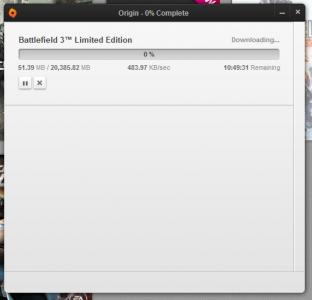
|
|
|
Aug 25 2013, 10:01 PM
|
|
Senior Member
5,367 posts Joined: Aug 2009
|
QUOTE(MjMax15 @ Aug 25 2013, 09:34 PM) IDK why. ea still downloading my game although i copied the entire folder to the directory Stop the download, quit Origin, start Origin back, right click on BF3, click Repair Install.*sigh.. |
|
|
Aug 25 2013, 10:17 PM
|
|
Senior Member
1,372 posts Joined: Nov 2004 From: Heritage Waterfront City
|
QUOTE(Mr.Docter @ Aug 25 2013, 10:01 PM) Stop the download, quit Origin, start Origin back, right click on BF3, click Repair Install. cancelled the download,and follow as u said but nothing about repair install.. maybe im missing something? Attached thumbnail(s) 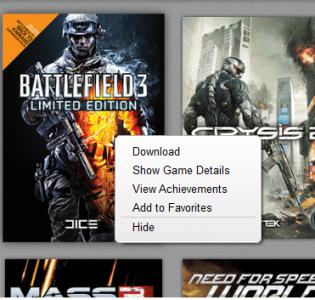
|
|
|
Aug 26 2013, 08:21 AM
|
|
Senior Member
5,367 posts Joined: Aug 2009
|
QUOTE(MjMax15 @ Aug 25 2013, 10:17 PM) cancelled the download, You sure you paste the old files into the BF3 folder?and follow as u said but nothing about repair install.. maybe im missing something? |
|
|
Aug 26 2013, 09:19 AM
|
|
Senior Member
1,372 posts Joined: Nov 2004 From: Heritage Waterfront City
|
QUOTE(Mr.Docter @ Aug 26 2013, 08:21 AM) You sure you paste the old files into the BF3 folder? yup.ive done this on steam, all works. really dissapointed for origin. now at home downloading the whole 20gb game @ 60% since last night. perhaps i can back to action soon dont know why, seems my hhd space no effect. maybe origin overwrite my previous bf3 already. thanks mr docter  |
|
|
Aug 26 2013, 09:21 AM
|
|
Senior Member
5,367 posts Joined: Aug 2009
|
QUOTE(MjMax15 @ Aug 26 2013, 09:19 AM) yup. I done the procedure countless of time before this, and all works like charms.ive done this on steam, all works. really dissapointed for origin. now at home downloading the whole 20gb game @ 60% since last night. perhaps i can back to action soon dont know why, seems my hhd space no effect. maybe origin overwrite my previous bf3 already. thanks mr docter Sorry can't help bro, happy waiting downloading too |
|
|
Sep 18 2013, 03:48 PM
|

Senior Member
4,339 posts Joined: Jan 2003 From: Bora-bora u jelly? Special: Age of multi-monitor 
|
QUOTE(Mr_47 @ Mar 12 2013, 02:23 AM) 1. Copy the game folder "Battlefield 3" from Origin <install path>\Origin Games\Battlefield 3 2. On the machine that doesn't have BF3 installed start the download and pause it immediately (when it gets to 0.01%), this will give origin a chance to create the folder on your computer. 3. Replace the "Battlefield 3" folder with the one you copied. 4. Resume installation, if everything is right, it should jump to 99% and download a couple of things and you're done! this is the best QUOTE(xeqush007 @ Mar 12 2013, 01:59 PM)  good one! good one!QUOTE(Mr_47 @ Mar 14 2013, 06:00 PM) c easy i tell u... normal download install, pause, copy paste then resume , finally a very fast solution to setup the whole game still the best , tested on win 7 64 win 8 64faster setup = faster seat bucket = faster kill = faster colonel LVL100 ha aha h ahahah  |
| Change to: |  0.0225sec 0.0225sec
 0.69 0.69
 6 queries 6 queries
 GZIP Disabled GZIP Disabled
Time is now: 9th December 2025 - 04:24 PM |
 Quote
Quote