Welcome Guest ( Log In | Register )

Outline · [ Standard ] · Linear+

 How to increase my battlefield 3 framerate?, Increasing my battlefield frame rate....

views
     
TSDotRaW
post Dec 3 2011, 09:08 PM, updated 15y ago

New Member
*
Junior Member
27 posts

Joined: Dec 2011
I need your help everyone....

My PC specs are:
**Intel dual core E5300 2.6ghz ( didn't overclock )
**Nvidia GeForce GTS450 (stock clock is 783mhz, I down clocked it to 740mhz because I'm scared it will hard lock during battlefield like some people do with their card, please correct me if I'm wrong so I can revert it back to normal )
**3GB ram
**1280x720 monitor refresh rate 60ghz.
**Windows 7 professional 32bit

I play battlefield multiplayer with 15-55, average 30 fps with EVERYTHING set to low. Except for my resolution is set at 1280x720. Fps drop below 25 during heavy battle.

I need to know are there any other tweaks to improve my fps. Currently using gamebooster to help. And no, I don't want to buy a any new card or CPU for now. So what else can I do? Overclock my gpu? Overclock my CPU? Is it safe?

Please input any suggestion to increase my fps without buying anything new. Thanks in advance for those who's helping!

This post has been edited by DotRaW: Dec 4 2011, 03:19 PM
Funkypeanuts
post Dec 3 2011, 09:23 PM

New Member
*
Junior Member
26 posts

Joined: Jun 2008


QUOTE(DotRaW @ Dec 3 2011, 09:08 PM)
I need your help everyone....

My PC specs are:
**Intel dual core E5300 2.6ghz ( didn't overclock )
**Nvidia GeForce GTS450 (stock clock is 783mhz, I down clocked it to 740mhz because I'm scared it will hard lock during battlefield like some people do with their card, please correct me if I'm wrong so I can revert it back to normal )
**3GB ram
**1280x720 monitor refresh rate 60ghz.

I play battlefield multiplayer with 15-55, average 30 fps with EVERYTHING set to low. Except for my resolution is set at 1280x720. Fps drop below 25 during heavy battle.

I need to know are there any other tweaks to improve my fps. Currently using gamebooster to help. And no, I don't want to buy a any new card or CPU for now. So what else can I do? Overclock my gpu? Overclock my CPU? Is it safe?

Please input any suggestion to increase my fps without buying anything new. Thanks in advance for those who's helping!
*
I'm running a 9600GT and i think i'm playing at a better FPS than yours.. have'nt benchmark it tho.. I'm using an E7200 same RAM and about the same resolution.
TSDotRaW
post Dec 3 2011, 09:32 PM

New Member
*
Junior Member
27 posts

Joined: Dec 2011
QUOTE(Funkypeanuts @ Dec 3 2011, 09:23 PM)
I'm running a 9600GT and i think i'm playing at a better FPS than yours.. have'nt benchmark it tho.. I'm using an E7200 same RAM and about the same resolution.
*
What's your fps?
Luftwacko
post Dec 3 2011, 09:34 PM

On my way
****
Senior Member
682 posts

Joined: Jan 2008


2 questions:

1. is ur CPU using a default heatsink or custom one?
2. what's the wattage of ur PSU? (true power, not max output)

depending on ur answer, u may or may not safely overclock ur CPU/GPU.
TSDotRaW
post Dec 3 2011, 09:48 PM

New Member
*
Junior Member
27 posts

Joined: Dec 2011
QUOTE(Luftwacko @ Dec 3 2011, 09:34 PM)
2 questions:

1. is ur CPU using a default heatsink or custom one?
2. what's the wattage of ur PSU? (true power, not max output)

depending on ur answer, u may or may not safely overclock ur CPU/GPU.
*
Well I'm not really a computer parts pro. But to answer your question.

1. I never touched or modify my CPU before. So.. I'm not really sure. I'm not sure what's a heatsink either ):

2. The sticker on my PSU says 210watts. Not sure if thy is true or max.

Sorry if I'm not detailed enough.
Luftwacko
post Dec 3 2011, 10:17 PM

On my way
****
Senior Member
682 posts

Joined: Jan 2008


then im afraid that the only solution that i can think of atm is to lower ur reso even further.
Hornet
post Dec 3 2011, 10:46 PM

What?
*******
Senior Member
4,251 posts

Joined: Jan 2003
From: Malacca, Malaysia, Earth


Yeah, the game really uses all 4 cores if you have it. It does takes a lot of CPU power, so any extra performance you can squeeze out from overclocking will help.

Overclocking by increasing the frequency is safe, worst that could happen is your CPU crash when its unstable.

But the dangerous part is increasing the voltage (which is done to allow higher clock speed), too much voltage will permanently damage your CPU, so don't do it unless you know what you're doing
Invince_Z
post Dec 3 2011, 10:50 PM

!M4 !3eY0nC! 1337!!!!
*******
Senior Member
2,748 posts

Joined: Sep 2006
From: 1337 1@nD Y(",)


get a quaddie man. even a 96gt can play smoother than urs with quaddie. i get 60fps with all low using quaddie n 98gt..sumore at 1600x900 reso if that's gonna change ur mind

This post has been edited by Invince_Z: Dec 3 2011, 10:51 PM
TSDotRaW
post Dec 4 2011, 12:09 AM

New Member
*
Junior Member
27 posts

Joined: Dec 2011
Oh well... then is overclocking my CPU safe?
Luftwacko
post Dec 4 2011, 12:51 AM

On my way
****
Senior Member
682 posts

Joined: Jan 2008


QUOTE(DotRaW @ Dec 4 2011, 12:09 AM)
Oh well... then is overclocking my CPU safe?
*
not with intel's stock heatsink.
Stab Your Back
post Dec 4 2011, 01:05 AM

Getting Started
**
Junior Member
100 posts

Joined: Oct 2011
From: Ipoh Perak


what are the best choices cpu am3 socket? for bf3

currently using anthlon II X2 250 i always having screen lag i wonder my cpu is weak and nid to upgrade,gpu is HD6850

This post has been edited by Stab Your Back: Dec 4 2011, 01:07 AM
slickz
post Dec 4 2011, 09:29 AM

Exalted Senior Elite Member
*******
Senior Member
2,149 posts

Joined: Jan 2003
From: Behind you! Look!


I use the same gc, only difference is that I am using i5 2.8 Ghz and 10 GB RAM.

I get between 48 to 29 fps, depending on screen activity. Most settings on high, dx11 mode, 1680X 1050.

Oh and make sure u get a 64 bit OS to take advantage of all that RAM above 4GB.
TSDotRaW
post Dec 4 2011, 03:18 PM

New Member
*
Junior Member
27 posts

Joined: Dec 2011
QUOTE(slickz @ Dec 4 2011, 09:29 AM)
I use the same gc, only difference is that I am using i5 2.8 Ghz and 10 GB RAM.

I get between 48 to 29 fps, depending on screen activity. Most settings on high, dx11 mode, 1680X 1050.

Oh and make sure u get a 64 bit OS to take advantage of all that RAM above 4GB.
*
Lol so I should upgrade to 64bit? I'm currently using windows 7.
slickz
post Dec 4 2011, 03:41 PM

Exalted Senior Elite Member
*******
Senior Member
2,149 posts

Joined: Jan 2003
From: Behind you! Look!


Yeah. I'm on win 7 as well
Invince_Z
post Dec 4 2011, 06:18 PM

!M4 !3eY0nC! 1337!!!!
*******
Senior Member
2,748 posts

Joined: Sep 2006
From: 1337 1@nD Y(",)


QUOTE(DotRaW @ Dec 4 2011, 12:09 AM)
Oh well... then is overclocking my CPU safe?
*
u need aftermarket cooler + good airflow casing, or invest on liquid cool, which will only increase fps by so much..get a quaddy man. ur GC is suffering from CPU bottleneck. don't u pity her? tongue.gif
TSDotRaW
post Dec 4 2011, 06:20 PM

New Member
*
Junior Member
27 posts

Joined: Dec 2011
QUOTE(Invince_Z @ Dec 4 2011, 06:18 PM)
u need aftermarket cooler + good airflow casing, or invest on liquid cool, which will only increase fps by so much..get a quaddy man. ur GC is suffering from CPU bottleneck. don't u pity her? tongue.gif
*
Aw man. Then I might consider buying a quad core then. Which quad is the cheapest but have good performance?
Invince_Z
post Dec 4 2011, 06:33 PM

!M4 !3eY0nC! 1337!!!!
*******
Senior Member
2,748 posts

Joined: Sep 2006
From: 1337 1@nD Y(",)


QUOTE(DotRaW @ Dec 4 2011, 06:20 PM)
Aw man. Then I might consider buying a quad core then. Which quad is the cheapest but have good performance?
*
what mobo u use? can the mobo use quaddy as well?
TSDotRaW
post Dec 5 2011, 07:18 PM

New Member
*
Junior Member
27 posts

Joined: Dec 2011
QUOTE(Invince_Z @ Dec 4 2011, 06:33 PM)
what mobo u use? can the mobo use quaddy as well?
*
Sorry for being a noob at this but is there a way to see what's my mobo without taking out my casing?
Invince_Z
post Dec 5 2011, 08:02 PM

!M4 !3eY0nC! 1337!!!!
*******
Senior Member
2,748 posts

Joined: Sep 2006
From: 1337 1@nD Y(",)


use CPU-Z. run it, under Mainboard tab, there'll be info regarding ur mobo.
clieman
post Dec 5 2011, 09:53 PM

Enthusiast
*****
Senior Member
730 posts

Joined: Nov 2006
From: Shah Alam


QUOTE(DotRaW @ Dec 3 2011, 09:08 PM)
I need your help everyone....

My PC specs are:
**Intel dual core E5300 2.6ghz ( didn't overclock )
**Nvidia GeForce GTS450 (stock clock is 783mhz, I down clocked it to 740mhz because I'm scared it will hard lock during battlefield like some people do with their card, please correct me if I'm wrong so I can revert it back to normal )
**3GB ram
**1280x720 monitor refresh rate 60ghz.
**Windows 7 professional 32bit

I play battlefield multiplayer with 15-55, average 30 fps with EVERYTHING set to low. Except for my resolution is set at 1280x720. Fps drop below 25 during heavy battle.

I need to know are there any other tweaks to improve my fps. Currently using gamebooster to help. And no, I don't want to buy a any new card or CPU for now. So what else can I do? Overclock my gpu? Overclock my CPU? Is it safe?

Please input any suggestion to increase my fps without buying anything new. Thanks in advance for those who's helping!
*
1. Get a quad core CPU
2. Get a 256 bit GPU card (i.e. higher end GTX460+, AMD HD5870+)
3. 4GB RAM
4. Win 7 64 bit

BF3 uses around 1.5GB RAM at some map.
Stab Your Back
post Dec 6 2011, 12:44 AM

Getting Started
**
Junior Member
100 posts

Joined: Oct 2011
From: Ipoh Perak


guys my screen is lagging but its playable still,would really like if you can help me set that make it smooth 100%

its not about quality or gpu HD6850,tested,even for now im running on low,still have that lag feeling

http://valid.canardpc.com/show_oc.php?id=2133630
TSDotRaW
post Dec 6 2011, 04:40 PM

New Member
*
Junior Member
27 posts

Joined: Dec 2011
QUOTE(Invince_Z @ Dec 4 2011, 06:33 PM)
what mobo u use? can the mobo use quaddy as well?
*
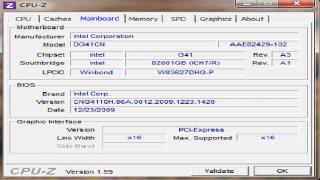
This is my mobo. Can it insert a quad?


Attached thumbnail(s)
Attached Image
slepth
post Dec 6 2011, 05:01 PM

Getting Started
**
Junior Member
188 posts

Joined: Apr 2006
ai... kids this days

http://en.wikibooks.org/wiki/A_Beginner...moving_the_crap
Invince_Z
post Dec 6 2011, 09:42 PM

!M4 !3eY0nC! 1337!!!!
*******
Senior Member
2,748 posts

Joined: Sep 2006
From: 1337 1@nD Y(",)


QUOTE(DotRaW @ Dec 6 2011, 04:40 PM)
This is my mobo. Can it insert a quad?
*
ur mobo? >> DG41CN

this is the list of compatible procs, seems like quaddy compatible >> DG41CN Proc List

This post has been edited by Invince_Z: Dec 6 2011, 09:45 PM
secondrate
post Dec 9 2011, 06:50 PM

Wolf
******
Senior Member
1,483 posts

Joined: Jan 2009
From: PJ
QUOTE(Invince_Z @ Dec 3 2011, 10:50 PM)
get a quaddie man. even a 96gt can play smoother than urs with quaddie. i get 60fps with all low using quaddie n 98gt..sumore at 1600x900 reso if that's gonna change ur mind
*
I use medium and 1280x0124.
lepo
post Dec 19 2011, 06:02 PM

Casual
***
Junior Member
382 posts

Joined: Jul 2006


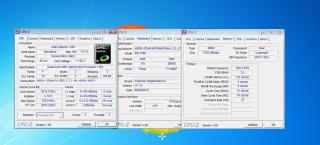
Guy, why i still got lag...

framerate only 20-30...laggy...

gc 5770 gigabyte

This post has been edited by lepo: Dec 19 2011, 06:04 PM


Attached thumbnail(s)
Attached Image
Eugene91
post Dec 19 2011, 06:20 PM

Look at all my stars!!
*******
Senior Member
6,109 posts

Joined: Dec 2008
From: Mike India Romeo India


QUOTE(lepo @ Dec 19 2011, 06:02 PM)
Guy, why i still got lag...

framerate only 20-30...laggy...

gc 5770 gigabyte
*
What settings r u on ? hmm.gif

I'm on High (shadows medium, AA off) @1920x1080 getting 3X-4Xfps

With i3 2100, 4GB DDR3 & HD5770@900/1250

Are you on the latest driver?

Maybe your CPU clock?

This post has been edited by Eugene91: Dec 19 2011, 06:21 PM
lepo
post Dec 19 2011, 06:32 PM

Casual
***
Junior Member
382 posts

Joined: Jul 2006


Before im using amd x2 5000 oc to 2.9ghz..
hurm, the performance not much change..
i just notice my psu fan is not working..
will that effect the performance?

yup, the latest driver..8.92

This post has been edited by lepo: Dec 19 2011, 06:32 PM
Eugene91
post Dec 19 2011, 06:45 PM

Look at all my stars!!
*******
Senior Member
6,109 posts

Joined: Dec 2008
From: Mike India Romeo India


your cpu seems to be bottlenecking your 5770 then.. even with your Opteron 4 cores it's not that good it seems mmm

Here's a CPU hierarchy chart http://www.tomshardware.com/reviews/gaming...ing,3052-5.html

Aren't you suppose to have Catalyst 11.12?

This post has been edited by Eugene91: Dec 19 2011, 06:45 PM
lepo
post Dec 19 2011, 06:50 PM

Casual
***
Junior Member
382 posts

Joined: Jul 2006


Catalyst already 11.12..
Upgrade again >.<, opteron still cannot handle BF3 >.<
emohardstyle
post Jan 16 2012, 11:18 PM

Getting Started
**
Junior Member
145 posts

Joined: Apr 2010
From: Melaka


i got Asus GTS450 overclocked (810mhz)..
running on 1360x768 resolution..
average fps 35+
everything on ultra

This post has been edited by emohardstyle: Jan 16 2012, 11:19 PM
SubRoutine
post Jan 18 2012, 12:29 PM

Getting Started
**
Junior Member
202 posts

Joined: Aug 2007


E8400 @ Stock 2.8ghz
ATI 4850 1GB
Reso: 1360 x 768
Everything else on low/off except textures, high

Running on w7 32 bit tho, i have 4gig ram but of course only 3.25 usable.

Does running w7 64bit really make a difference? I can reformat my pc no problem but i dont really feel tempted if it doesnt come with any significant boost.
squall0833
post Jan 18 2012, 01:20 PM

Regular
******
Senior Member
1,473 posts

Joined: Oct 2006
From: Jupiter


lower resolution, but maybe not much help,

ur current cpu is very limited, bottlenecks ur gpu at BF3, cpu heavy usage even on quad cores sad.gif,
gpu - maybe performs better with faster cpu, but not much improvement, bf3 really need a faster gpu
ram need at least 4GB

This post has been edited by squall0833: Jan 18 2012, 01:29 PM
MjMax15
post Jan 18 2012, 11:38 PM

Uncle Scrooge is back!
******
Senior Member
1,372 posts

Joined: Nov 2004
From: Heritage Waterfront City


Like all above said, pls get quaddie cpu coz this game is fully utilize all cores. Mine still playable with all low 30-40 fps with res 1440px with hd4770. Hahaha..
emohardstyle
post Feb 21 2012, 11:20 PM

Getting Started
**
Junior Member
145 posts

Joined: Apr 2010
From: Melaka


change cpu?

Hou_JaI
post Feb 22 2012, 11:29 AM

Regular
******
Senior Member
1,129 posts

Joined: Jan 2003


several things u can do:

1. get a good heatsink fan, overclock the proc to 4.0 GHz
2. upgrade ur ram to 8 gb
3. get a better gpu

sadly framerate doesn't come for free ...
leongkokloon
post Feb 22 2012, 01:38 PM

Regular
******
Senior Member
1,415 posts

Joined: Dec 2009
Im also having same problem... framerate around 15-25 during intense shooting eventho everything set to low...

here is my specs:
AMD anthlon x2 4200+
MSI mobo AM2
HD 6770 1Gb
4Gb Ram
Windows 7 x64

running on 1260x768 (if not mistaken) also get 15-20+ fps only anyone can help?
MjMax15
post Feb 24 2012, 12:51 PM

Uncle Scrooge is back!
******
Senior Member
1,372 posts

Joined: Nov 2004
From: Heritage Waterfront City


QUOTE(MjMax15 @ Jan 18 2012, 11:38 PM)
Like all above said, pls get quaddie cpu coz this game is fully utilize all cores. Mine still playable with all low 30-40 fps with res 1440px with hd4770. Hahaha..
*
QUOTE(leongkokloon @ Feb 22 2012, 01:38 PM)
Im also having same problem... framerate around 15-25 during intense shooting eventho everything set to low...

here is my specs:
AMD anthlon x2 4200+
MSI mobo AM2
HD 6770 1Gb
4Gb Ram
Windows 7 x64

running on 1260x768 (if not mistaken) also get 15-20+ fps only anyone can help?
*
obviously, its ur proc. bottlenecking...
Boldnut
post Feb 24 2012, 09:24 PM

Look at all my stars!!
*******
Senior Member
2,209 posts

Joined: Nov 2010
QUOTE(SubRoutine @ Jan 18 2012, 12:29 PM)
E8400 @ Stock 2.8ghz
ATI 4850 1GB
Reso: 1360 x 768
Everything else on low/off except textures, high

Running on w7 32 bit tho, i have 4gig ram but of course only 3.25 usable.

Does running w7 64bit really make a difference? I can reformat my pc no problem but i dont really feel tempted if it doesnt come with any significant boost.
*

either u get a quad core or OC ur CPU to ~3.6GHz. Thats pretty much the safe limit of E8400. 400FSB @ 3.6GHz...

I am not sure about Battlefield 3 on dual core since I never play BF3 on my dual core rig, but on Games like Dragon age origin, I get a significant boost by OC my CPU even I am using 9800GT only. 3.2GHz(200FSB) to 3.83GHz(333FSB). I think yours can hit higher near to 4GHz, but I am not sure if ur motherboard can handle >400FSB or not. If it is G41 chipset kiss goodbye to OCing because the FSB wall is @ 340FSB.

This post has been edited by Boldnut: Feb 24 2012, 09:29 PM
leongkokloon
post Feb 26 2012, 08:34 AM

Regular
******
Senior Member
1,415 posts

Joined: Dec 2009
QUOTE(MjMax15 @ Feb 24 2012, 12:51 PM)
obviously, its ur proc. bottlenecking...
*
What is the meaning processor bottlenecking? i always here this term... but not sure what is it.. mind explain?
wilsonphua
post Feb 26 2012, 09:54 AM

Gear Up. Game On.
*******
Senior Member
2,152 posts

Joined: Nov 2008
QUOTE(leongkokloon @ Feb 26 2012, 08:34 AM)
What is the meaning processor bottlenecking? i always here this term... but not sure what is it.. mind explain?
*
Based on Wikipedia, a bottleneck is a phenomenon where the performance or capacity of an entire system is limited by a single or limited number of components or resources.


In short, if your processor is weak (probably dual core), but you have a high end graphic card, your processor will limit the power of your graphic card.

In other words, your weak processor limits the performance of your graphic card.
JML
post Feb 27 2012, 08:50 PM

Getting Started
**
Junior Member
269 posts

Joined: Sep 2006
Sorry nub question.. How to measure fps?
wilsonphua
post Feb 27 2012, 09:21 PM

Gear Up. Game On.
*******
Senior Member
2,152 posts

Joined: Nov 2008
QUOTE(JML @ Feb 27 2012, 08:50 PM)
Sorry nub question.. How to measure fps?
*
Download the program called "Fraps".

Start the program.

Play the games.

There's a yellow number shown on the game.

30 FPS is the minimum for smooth gameplay.

Less than 30 FPS is considered lagging, less than 20 FPS makes the game feels like a slide show and it makes u feel like vomiting.

More than 30 FPS is good.
JML
post Feb 28 2012, 05:27 PM

Getting Started
**
Junior Member
269 posts

Joined: Sep 2006
Alright will try it out thx

Yea sry double... Yesterday left it here on iphone so i thought i have not submit the post yet..
Sorry...

This post has been edited by JML: Feb 28 2012, 05:38 PM
wilsonphua
post Feb 28 2012, 05:35 PM

Gear Up. Game On.
*******
Senior Member
2,152 posts

Joined: Nov 2008
QUOTE(JML @ Feb 28 2012, 05:27 PM)
Sorry nub question.. How to measure fps?
*
LOL. I just answered your question.
squall0833
post Feb 28 2012, 06:46 PM

Regular
******
Senior Member
1,473 posts

Joined: Oct 2006
From: Jupiter


QUOTE(JML @ Feb 27 2012, 08:50 PM)
Sorry nub question.. How to measure fps?
*
I suggest you to use MSI Afterburner, it's based on Rivatuner,

it is for both NVIDIA and AMD cards (EVGA Precision also same, but only for NVIDIA)

you can choose to shows what info in game

FPS, GPU Temp, GPU Usage, GPU Clock, Memory Clock, Fan Speed and so on.
» Click to show Spoiler - click again to hide... «

*note,
in this example, the user set the text size very large, you can adjust it to small as u like
also this user didnt select to show FPS, of coz you can if u want to smile.gif

adjustable text size, color, gpu overclocking, fan controller, manual or customize auto fan control ( very useful)


it's best for those who are worry about the temperature when playing game, and the gpu operating status, you can see everything in game realtime

This post has been edited by squall0833: Feb 28 2012, 06:52 PM
MjMax15
post Feb 28 2012, 07:01 PM

Uncle Scrooge is back!
******
Senior Member
1,372 posts

Joined: Nov 2004
From: Heritage Waterfront City


QUOTE(leongkokloon @ Feb 26 2012, 08:34 AM)
What is the meaning processor bottlenecking? i always here this term... but not sure what is it.. mind explain?
*
QUOTE(wilsonphua @ Feb 26 2012, 09:54 AM)
Based on Wikipedia, a bottleneck is a phenomenon where the performance or capacity of an entire system is limited by a single or limited number of components or resources.
In short, if your processor is weak (probably dual core), but you have a high end graphic card, your processor will limit the power of your graphic card.

In other words, your weak processor limits the performance of your graphic card.
*
this^
its like on highway, 3 lanes became 2 lanes and become 1 lane...ull see the massive congested there.

QUOTE(squall0833 @ Feb 28 2012, 06:46 PM)
I suggest you to use MSI Afterburner, it's based on Rivatuner,

it is for both NVIDIA and AMD cards    (EVGA Precision also same, but only for NVIDIA)

you can choose to shows what info in game

FPS, GPU Temp, GPU Usage, GPU Clock, Memory Clock, Fan Speed and so on.
» Click to show Spoiler - click again to hide... «

*note,
in this example, the user set the text size very large, you can adjust it to small as u like
also this user didnt select to show FPS, of coz you can if u want to smile.gif

adjustable text size, color, gpu overclocking, fan controller, manual or customize auto fan control ( very useful)
it's best for those who are worry about the temperature when playing game, and the gpu operating status, you can see everything in game realtime
*
nice. can i use msi afterburner for my ati card?
i want to see realtime temperature.
frostbiteengine
post Mar 1 2012, 09:26 AM

Getting Started
**
Junior Member
95 posts

Joined: Feb 2012
From: Melaka,Durian Tunggal


I feel weird with my pc ......
I'm running Core 2 Duo e6320 1.86GHz ,4GB ram ddr2 and hd6770 gpu and can play bf3 on ultra 1080p at 28~ 60 fps O.O ...... ?? was'nt that sound odd ?

can anyone tell me what's going on ?
devillightning1
post May 13 2012, 10:37 PM

Getting Started
**
Junior Member
246 posts

Joined: Apr 2012
From: A house somewhere...


QUOTE(frostbiteengine @ Mar 1 2012, 09:26 AM)
I feel weird with my pc ......
I'm running Core 2 Duo e6320 1.86GHz ,4GB ram ddr2 and hd6770 gpu and can play bf3 on ultra 1080p at 28~ 60 fps  O.O ...... ?? was'nt that sound odd ?

can anyone tell me what's going on ?
*
dafuq? my GTX 570 OCed runs MP Ultra at 30-40FPS only? or you are looking at the sky? tongue.gif
finalmakers
post Jul 8 2012, 03:42 AM

Getting Started
**
Junior Member
223 posts

Joined: Jul 2010
From: Kluang Johore


hello...wanna ask about my laptop spec...
if i play this game with

Processor = Intel® Core™ i7 2670QM Processor
Motherboard = Intel® HM65 Express Chipset
Memory RAM = Kingston 8GB DDR3 1333
Graphics Card = NVIDIA® GeForce® GT 555M 2GB DDR3 VRAM

do you guys think i can play it smoothly?...
sry for a noob questions...smile.gif
wilsonphua
post Jul 11 2012, 12:11 AM

Gear Up. Game On.
*******
Senior Member
2,152 posts

Joined: Nov 2008
QUOTE(finalmakers @ Jul 8 2012, 03:42 AM)
hello...wanna ask about my laptop spec...
if i play this game with

Processor = Intel® Core™ i7 2670QM Processor
Motherboard = Intel® HM65 Express Chipset
Memory RAM = Kingston 8GB DDR3 1333
Graphics Card = NVIDIA® GeForce® GT 555M 2GB DDR3 VRAM

do you guys think i can play it smoothly?...
sry for a noob questions...smile.gif
*
You can run Battlefield 3 at medium settings. I guess your laptop runs at HD+ resolution of 1600x900. Try to lower down your settings if you want to get smooth 30fps and above.
finalmakers
post Jul 11 2012, 01:59 PM

Getting Started
**
Junior Member
223 posts

Joined: Jul 2010
From: Kluang Johore


QUOTE(wilsonphua @ Jul 11 2012, 12:11 AM)
You can run Battlefield 3 at medium settings. I guess your laptop runs at HD+ resolution of 1600x900. Try to lower down your settings if you want to get smooth 30fps and above.
*
Thanks bro for ur answer.. biggrin.gif
sniper69
post Jul 13 2012, 09:17 AM

.: One Shot One Kill :. .+|Level 9 Type Shit|+.
*******
Senior Member
7,173 posts

Joined: Jan 2003
From: PCH


i put everything on Ultra except AA, i off, hoyeah
gotrice
post Sep 23 2012, 01:13 AM

New Member
*
Newbie
0 posts

Joined: Sep 2012


QUOTE(DotRaW @ Dec 3 2011, 05:08 AM)
I need your help everyone....

My PC specs are:
**Intel dual core E5300 2.6ghz ( didn't overclock )
**Nvidia GeForce GTS450 (stock clock is 783mhz, I down clocked it to 740mhz because I'm scared it will hard lock during battlefield like some people do with their card, please correct me if I'm wrong so I can revert it back to normal )
**3GB ram
**1280x720 monitor refresh rate 60ghz.
**Windows 7 professional 32bit

I play battlefield multiplayer with 15-55, average 30 fps with EVERYTHING set to low. Except for my resolution is set at 1280x720. Fps drop below 25 during heavy battle.

I need to know are there any other tweaks to improve my fps. Currently using gamebooster to help. And no, I don't want to buy a any new card or CPU for now. So what else can I do? Overclock my gpu? Overclock my CPU? Is it safe?

Please input any suggestion to increase my fps without buying anything new. Thanks in advance for those who's helping!
*
My specs are:
**Intel Quad Core Q8200 2.33ghz(no overclock)
**ATI Radeon 4350
**6GB RAM
**Windows 7 Ultimate 32bit
**1440x900(don't know refresh rate)
What program or special instructions should I use to increase my fps? I would really prefer that I don't have to buy a new video card, pls give me all possible solutions!!
SUSweyyt
post Sep 25 2012, 12:24 AM

Getting Started
**
Junior Member
88 posts

Joined: Feb 2012


QUOTE(gotrice @ Sep 23 2012, 01:13 AM)
My specs are:
**Intel Quad Core Q8200 2.33ghz(no overclock)
**ATI Radeon 4350
**6GB RAM
**Windows 7 Ultimate 32bit
**1440x900(don't know refresh rate)
What program or special instructions should I use to increase my fps? I would really prefer that I don't have to buy a new video card, pls give me all possible solutions!!
*
All i can say is ur graphic card is too weak.
blue16
post Sep 28 2012, 11:56 AM

Metal Box-Blue16
****
Senior Member
618 posts

Joined: Dec 2006
From: Metal Box Enterprise JB
try this

creata a notepad

put these inside

WorldRender.SpotLightShadowmapResolution 256
RenderDevice.TrippleBufferingEnable 0
RenderDevice.ForceRenderAheadLimit 1
Render.DrawFps 1
WorldRender.FxaaEnable 0
RenderDevice.Dx11Enable 0
Render.PerfOverlayEnable 0
PostProcess.DynamicAOEnable 0
Render.DeviceVSyncEnable 0
WorldRender.MotionBlurEnable 0

then save as .cfg

tell me the outcome =]
SomethingSweet
post Sep 28 2012, 01:45 PM

New Member
*
Newbie
3 posts

Joined: Apr 2012


QUOTE(gotrice @ Sep 23 2012, 01:13 AM)
My specs are:
**Intel Quad Core Q8200 2.33ghz(no overclock)
**ATI Radeon 4350
**6GB RAM
**Windows 7 Ultimate 32bit
**1440x900(don't know refresh rate)
What program or special instructions should I use to increase my fps? I would really prefer that I don't have to buy a new video card, pls give me all possible solutions!!
*
mine almost same with yours..

Intel Quad Core Q8300
Ati Radeon 6970
Win 7 64bit
8GB ram
Crucial M4 SSD
running at 1920 x 1080
fps average around 40++
running on medium setting
so far so good....it would be better if i have i5 CPU ...but not going to upgrade at the moment...
still playable... rclxms.gif
SUSrman83
post Oct 23 2012, 04:51 PM

Getting Started
**
Junior Member
52 posts

Joined: Sep 2010


Running bf3 on :-
I5 2400, gtx 670, 8gb ram
Ultra everything @ 80-120 fps
But you gotta watch out for them killer maps man.namely capsian and bandar.in those maps mine will drop to 50ish.
SoulLeapers
post Oct 23 2012, 05:02 PM

New Member
*
Junior Member
27 posts

Joined: Mar 2011


QUOTE(rman83 @ Oct 23 2012, 04:51 PM)
Running bf3 on :-
I5 2400, gtx 670, 8gb ram
Ultra everything @ 80-120 fps
But you gotta watch out for them killer maps man.namely capsian and bandar.in those maps mine will drop to 50ish.
*
50 is not low thumbup.gif
omaigad
post Oct 25 2012, 02:52 PM

Getting Started
**
Junior Member
138 posts

Joined: Dec 2011
From: some where out there


is pentium D 3.4 Ghz with 9800gt can run this game at least 30fps?

planning to get E8400...still dual core but read it somewhere there is a lot

different although both dual core...
AceKendy
post Oct 25 2012, 05:30 PM

Getting Started
**
Junior Member
230 posts

Joined: Nov 2011
From: The Benthic Zone


I prefer to play bf3 on the lowest setting possible.

It feels weird when I'm playing on ultra, the lights or the shading or something else...just feel that its effecting my personal skill. the enemy are harder to spot when you are playing on ultra, especially on maps with a lot of stuffs such as grand bazaar.
devillightning1
post Nov 1 2012, 07:49 AM

Getting Started
**
Junior Member
246 posts

Joined: Apr 2012
From: A house somewhere...


QUOTE(AceKendy @ Oct 25 2012, 05:30 PM)
I prefer to play bf3 on the lowest setting possible.

It feels weird when I'm playing on ultra, the lights or the shading or something else...just feel that its effecting my personal skill. the enemy are harder to spot when you are playing on ultra, especially on maps with a lot of stuffs such as grand bazaar.
*
GTX 680 and im playing on all low for max FPS...Performance vs Image Quality, i vote performance thumbup.gif
AceKendy
post Nov 1 2012, 10:21 AM

Getting Started
**
Junior Member
230 posts

Joined: Nov 2011
From: The Benthic Zone


QUOTE(devillightning1 @ Nov 1 2012, 08:49 AM)
GTX 680 and im playing on all low for max FPS...Performance vs Image Quality, i vote performance  thumbup.gif
*
Mine still runs around 90~100FPS on ultra, but yeah...it just feels weird playing on ultra.

Performance > All (Even teh eye-candy).
Mr.Docter
post Nov 1 2012, 02:54 PM

Doctorpreneurs
*******
Senior Member
5,367 posts

Joined: Aug 2009


QUOTE(AceKendy @ Oct 25 2012, 05:30 PM)
I prefer to play bf3 on the lowest setting possible.

It feels weird when I'm playing on ultra, the lights or the shading or something else...just feel that its effecting my personal skill. the enemy are harder to spot when you are playing on ultra, especially on maps with a lot of stuffs such as grand bazaar.
*
LOL and I thought I was the only one with your preference.

Maybe we are too amaze looking at the eye-candy graphic rather than concentrating on pawning them enemy laugh.gif
devillightning1
post Nov 1 2012, 03:58 PM

Getting Started
**
Junior Member
246 posts

Joined: Apr 2012
From: A house somewhere...


QUOTE(Mr.Docter @ Nov 1 2012, 02:54 PM)
LOL and I thought I was the only one with your preference.

Maybe we are too amaze looking at the eye-candy graphic rather than concentrating on pawning them enemy laugh.gif
*
On ultra it just felt the mouse is laggy...
Mr.Docter
post Nov 1 2012, 04:15 PM

Doctorpreneurs
*******
Senior Member
5,367 posts

Joined: Aug 2009


QUOTE(devillightning1 @ Nov 1 2012, 03:58 PM)
On ultra it just felt the mouse is laggy...
*
What's the average FPS on Ultra?
devillightning1
post Nov 1 2012, 04:40 PM

Getting Started
**
Junior Member
246 posts

Joined: Apr 2012
From: A house somewhere...


OCed is about 70-80 95% of the time, unless some big explosive happens in front of you...but I prefer 90-100+ FPS for competitive gaming

Edit: Just tested the game on medium and it reached 150FPS...so low gotta be more consistent...

This post has been edited by devillightning1: Nov 1 2012, 09:57 PM
haziqk10
post Nov 1 2012, 05:03 PM

Getting Started
**
Junior Member
231 posts

Joined: May 2009


Mine also set all low except the mesh setting (high/ultra)
devillightning1
post Nov 6 2012, 01:41 AM

Getting Started
**
Junior Member
246 posts

Joined: Apr 2012
From: A house somewhere...


QUOTE(haziqk10 @ Nov 1 2012, 05:03 PM)
Mine also set all low except the mesh setting (high/ultra)
*
Mesh medium enuf...mesh = details over distance, not view distance
WiLeKiyO
post Nov 11 2012, 10:12 PM

Look at all my stars!!
*******
Senior Member
5,144 posts

Joined: Oct 2009
330M GPU on my lappy, even all is low at 1900x900, 20fps is the max I can go.

I want to play BF3 so badly.
Blackops981
post Nov 11 2012, 10:33 PM

Getting Started
**
Junior Member
82 posts

Joined: Apr 2011
From: Kuala Lumpur, MY


Tumpang tered, has anyone of you removed the blue filter?
JML
post Nov 24 2012, 07:58 PM

Getting Started
**
Junior Member
269 posts

Joined: Sep 2006
what is blue filter?
devillightning1
post Nov 29 2012, 06:50 PM

Getting Started
**
Junior Member
246 posts

Joined: Apr 2012
From: A house somewhere...


QUOTE(JML @ Nov 24 2012, 07:58 PM)
what is blue filter?
*
Go to youtube and look at tehfussion videos and you will know lol tongue.gif metro and seine crossings are the worst without blue filter reminds me of the good ol bf2 days
Shiniz
post Dec 5 2012, 02:28 AM

Getting Started
**
Junior Member
112 posts

Joined: Jul 2011
yea get a quad core PC...mine my graphic card is better..but games this days utilize too much CPU cores...rather than graphic card..planning to upgrade to i7 sometime next year
devillightning1
post Dec 7 2012, 05:35 PM

Getting Started
**
Junior Member
246 posts

Joined: Apr 2012
From: A house somewhere...


Wan to use Realmware color tweaker, but scare kena ban
IceWolf1102
post Jul 3 2013, 08:56 PM

New Member
*
Newbie
0 posts

Joined: Jul 2013


i'm having similar issues...

I bought a GTS 450 2gb pci-e the other week to replace my GTS 250 1gb pci-e so I could play DX11 games like Crysis 3 and the like.. anyways I love to play BF3 and are part of a BF3 clan, and before I switched out the GTS 250 with the 450 I was getting between 65 - 120 fps on BF3 and I was very happy with that, but now I am using the GTS 450 i'm getting no higher then 28 - 35 fps on BF3.. and sometimes even lower then 28.

I don't understand how a newer card with more onboard ram can be worse fps wise then a older card with less onboard ram?? :\ I have the latest drivers at time of writing this (320.49 WHQL) and I am running Windows 7 Home Premium with 8gb ram.

Someone please help! I really need to get this fixed so I can start playing BF3 again.. and so I can play BF4 as well.

thanks guys..
MjMax15
post Jul 10 2013, 08:54 AM

Uncle Scrooge is back!
******
Senior Member
1,372 posts

Joined: Nov 2004
From: Heritage Waterfront City


QUOTE(Blackops981 @ Nov 11 2012, 10:33 PM)
Tumpang tered, has anyone of you removed the blue filter?
*
QUOTE(devillightning1 @ Nov 29 2012, 06:50 PM)
Go to youtube and look at tehfussion videos and you will know lol tongue.gif metro and seine crossings are the worst without blue filter reminds me of the good ol bf2 days
*
wah..never noticed about this one ohmy.gif
yeah after removing the filter seems got better natural color..
but how to do it? icon_question.gif
gbwedward
post Jul 11 2013, 10:52 AM

Getting Started
**
Junior Member
259 posts

Joined: Dec 2006
From: 1000101


QUOTE(IceWolf1102 @ Jul 3 2013, 08:56 PM)
i'm having similar issues...

I bought a GTS 450 2gb pci-e the other week to replace my GTS 250 1gb pci-e so I could play DX11 games like Crysis 3 and the like.. anyways I love to play BF3 and are part of a BF3 clan, and before I switched out the GTS 250 with the 450 I was getting between 65 - 120 fps on BF3 and I was very happy with that, but now I am using the GTS 450 i'm getting no higher then 28 - 35 fps on BF3.. and sometimes even lower then 28.

I don't understand how a newer card with more onboard ram can be worse fps wise then a older card with less onboard ram?? :\ I have the latest drivers at time of writing this (320.49 WHQL) and I am running Windows 7 Home Premium with 8gb ram.

Someone please help! I really need to get this fixed so I can start playing BF3 again.. and so I can play BF4 as well.

thanks guys..
*
lol this is abit late but just to let u know, 450 is actually a weaker card than 250. If u really wanted to enjoy BF3 & 4, u would have to get at least a x60 card(x could be 5,6,7). More video ram does not make the card better, very common mistake made by beginners. It only matters if u wanna have multiple monitors running on ur PC.


IceWolf1102
post Jul 28 2013, 12:06 AM

New Member
*
Newbie
0 posts

Joined: Jul 2013


QUOTE(gbwedward @ Jul 11 2013, 12:52 PM)
lol this is abit late but just to let u know, 450 is actually a weaker card than 250. If u really wanted to enjoy BF3 & 4, u would have to get at least a x60 card(x could be 5,6,7). More video ram does not make the card better, very common mistake made by beginners. It only matters if u wanna have multiple monitors running on ur PC.
*
Really? blink.gif that's very odd.. just curious, how can a 450 (dx 11) be weaker then my old 250 (dx 10)? please explain this to me.. lol tongue.gif

This post has been edited by IceWolf1102: Jul 28 2013, 12:07 AM
gbwedward
post Jul 28 2013, 09:29 PM

Getting Started
**
Junior Member
259 posts

Joined: Dec 2006
From: 1000101


QUOTE(IceWolf1102 @ Jul 28 2013, 12:06 AM)
Really? blink.gif that's very odd.. just curious,  how can a 450 (dx 11) be weaker then my old 250 (dx 10)? please explain this to me.. lol  tongue.gif
*
just because the card can support dx11 doesn't mean it's superior to a card that doesn't.

it's hard to explain but it's got a lot to do with the clock speed, the memory bandwidth, the interface width, the tessellation rate and all. The VRAM should be the least of your concern as most cards nowadays comes with a standard 2gb or more.. but it doesn't mean it's better tho

for most part, the more expensive it is.. the better. For a card that could play BF3 with no problem.. u have to invest at least 800 on GPU alone to meet the recommended spec. Well, that's just for GPU.. u still got ur CPU and PSU. No matter how good ur card is, without a good CPU.. it'll just bottleneck ur GPU
Mr_47
post Sep 18 2013, 03:56 PM

***NOT MODERATOR *** Post : +10,000,000,00 Warn: 100%
*******
Senior Member
4,339 posts

Joined: Jan 2003
From: Bora-bora u jelly? Special: Age of multi-monitor


all on max fps >150

on ultra fxaa

can pwn u sux u dn pwn ppl


Change to:
| Lo-Fi Version
0.0630sec    0.21    6 queries    GZIP Disabled
Time is now: 9th December 2025 - 05:01 AM