Outline ·
[ Standard ] ·
Linear+
How to increase my battlefield 3 framerate?, Increasing my battlefield frame rate....
|
TSDotRaW
|
 Dec 3 2011, 09:08 PM, updated 15y ago Dec 3 2011, 09:08 PM, updated 15y ago
|
New Member


|
I need your help everyone....
My PC specs are:
**Intel dual core E5300 2.6ghz ( didn't overclock )
**Nvidia GeForce GTS450 (stock clock is 783mhz, I down clocked it to 740mhz because I'm scared it will hard lock during battlefield like some people do with their card, please correct me if I'm wrong so I can revert it back to normal )
**3GB ram
**1280x720 monitor refresh rate 60ghz.
**Windows 7 professional 32bit
I play battlefield multiplayer with 15-55, average 30 fps with EVERYTHING set to low. Except for my resolution is set at 1280x720. Fps drop below 25 during heavy battle.
I need to know are there any other tweaks to improve my fps. Currently using gamebooster to help. And no, I don't want to buy a any new card or CPU for now. So what else can I do? Overclock my gpu? Overclock my CPU? Is it safe?
Please input any suggestion to increase my fps without buying anything new. Thanks in advance for those who's helping!
This post has been edited by DotRaW: Dec 4 2011, 03:19 PM
|
|
|
|
|
|
TSDotRaW
|
Dec 3 2011, 09:32 PM
|
New Member
|
QUOTE(Funkypeanuts @ Dec 3 2011, 09:23 PM) I'm running a 9600GT and i think i'm playing at a better FPS than yours.. have'nt benchmark it tho.. I'm using an E7200 same RAM and about the same resolution. What's your fps? |
|
|
|
|
|
TSDotRaW
|
Dec 3 2011, 09:48 PM
|
New Member
|
QUOTE(Luftwacko @ Dec 3 2011, 09:34 PM) 2 questions: 1. is ur CPU using a default heatsink or custom one? 2. what's the wattage of ur PSU? (true power, not max output) depending on ur answer, u may or may not safely overclock ur CPU/GPU. Well I'm not really a computer parts pro. But to answer your question. 1. I never touched or modify my CPU before. So.. I'm not really sure. I'm not sure what's a heatsink either ): 2. The sticker on my PSU says 210watts. Not sure if thy is true or max. Sorry if I'm not detailed enough. |
|
|
|
|
|
TSDotRaW
|
Dec 4 2011, 12:09 AM
|
New Member
|
Oh well... then is overclocking my CPU safe?
|
|
|
|
|
|
TSDotRaW
|
Dec 4 2011, 03:18 PM
|
New Member
|
QUOTE(slickz @ Dec 4 2011, 09:29 AM) I use the same gc, only difference is that I am using i5 2.8 Ghz and 10 GB RAM. I get between 48 to 29 fps, depending on screen activity. Most settings on high, dx11 mode, 1680X 1050. Oh and make sure u get a 64 bit OS to take advantage of all that RAM above 4GB. Lol so I should upgrade to 64bit? I'm currently using windows 7. |
|
|
|
|
|
TSDotRaW
|
Dec 4 2011, 06:20 PM
|
New Member
|
QUOTE(Invince_Z @ Dec 4 2011, 06:18 PM) u need aftermarket cooler + good airflow casing, or invest on liquid cool, which will only increase fps by so much..get a quaddy man. ur GC is suffering from CPU bottleneck. don't u pity her?  Aw man. Then I might consider buying a quad core then. Which quad is the cheapest but have good performance? |
|
|
|
|
|
TSDotRaW
|
Dec 5 2011, 07:18 PM
|
New Member
|
QUOTE(Invince_Z @ Dec 4 2011, 06:33 PM) what mobo u use? can the mobo use quaddy as well? Sorry for being a noob at this but is there a way to see what's my mobo without taking out my casing? |
|
|
|
|
|
TSDotRaW
|
Dec 6 2011, 04:40 PM
|
New Member
|
QUOTE(Invince_Z @ Dec 4 2011, 06:33 PM) what mobo u use? can the mobo use quaddy as well? This is my mobo. Can it insert a quad? Attached thumbnail(s)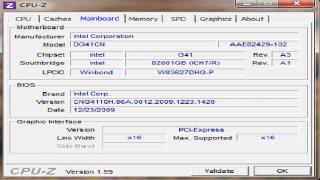
|
|
|
|
|



 Quote
Quote

 0.0180sec
 0.64
0.64
 7 queries
 GZIP Disabled