Welcome Guest ( Log In | Register )

Bump Topic Topic Closed RSS Feed
7 Pages « < 4 5 6 7 >Bottom

Outline · [ Standard ] · Linear+

 SΛMSUNG Galaxy W (I8150) Official Thread V2, A Wonder, A Galaxy S+ in disguise

views
     
cowithgun
post Dec 20 2011, 09:38 PM

A cow that can play notebook & phone
*******
Senior Member
2,248 posts

Joined: Sep 2010
QUOTE(mrlonely78 @ Dec 20 2011, 12:35 PM)
adb root and adb remount got error.

C:\android-sdk>adb root
adbd cannot run as root in production builds

C:\android-sdk>adb remount
remount failed: Operation not permitted

i need to push google maps 6.0.3 to system app but when push got error like this.

adb remount
adb push /Google maps6.0.3-ownhere.apk /system/app

C:\android-sdk\installer>adb push "Google Maps v6.0.3 ownhere.apk" /system/app
failed to copy 'Google Maps v6.0.3 ownhere.apk' to '/system/app/Google Maps v6.0
.2 ownhere.apk': Permission denied
*
Dude, have you rooted your phone?

If so, just use adb shell then su... then can remount system to rw....
cowithgun
post Dec 22 2011, 10:58 AM

A cow that can play notebook & phone
*******
Senior Member
2,248 posts

Joined: Sep 2010
QUOTE(CAC@MBO @ Dec 22 2011, 09:02 AM)
@cow, see. XD
I play so hard >< ~

user posted image
B&G NR by andrew_wang916, on Flickr


Added on December 22, 2011, 9:54 amdamn, the media scanner problem come back again, this time is on USB storage. Damn, should I really need to enable the USB debugging mode?
this help prevent this such fxxx annoying problem? argh.
*
LOL, if you fight me, you will still lost biggrin.gif look at my stat biggrin.gif I still keep the game for some fun slashing thumbup.gif

I always just use USB debugging mode, I think the driver its better than the Sammy portable phone stuff...


Attached thumbnail(s)
Attached Image
cowithgun
post Dec 22 2011, 11:12 AM

A cow that can play notebook & phone
*******
Senior Member
2,248 posts

Joined: Sep 2010
QUOTE(CAC@MBO @ Dec 22 2011, 11:06 AM)
haha. you got use the stat, I didn't use. only items. looks like we have the total same item. lolz.
I didn't upgrade stats. lolz. no time.  tongue.gif

Icic. damn, now my media scanner seem got problem. later try reboot again and see, hope its ok.
don't want to do factory reset and reinstall everything. T_T  cry.gif
doing backup now. aiks. ><
ok, this time I will on usb debugging mode. damn.
last time and this time , never on usb debugging mode.
btw, what means by "the driver its better than the Sammy portable phone stuff..." ?
tak faham.  rclxub.gif
give some lesson. thank you.  brows.gif
*
If you didn't enable the USB debugging, you phone will be identified as I8150 device in your computer. When you copy/move stuff from this device, Sammy driver will be used. It will alert you if you trying to copy things that it suspect cannot be viewed by phone, sometimes, it will convert stuff for you as well. Trying hard to be smart.

When you enable it, you only see 2 additional storages.

They are actually using different driver. I prefer to use it only as storage.
cowithgun
post Dec 22 2011, 11:46 AM

A cow that can play notebook & phone
*******
Senior Member
2,248 posts

Joined: Sep 2010
QUOTE(CAC@MBO @ Dec 22 2011, 11:25 AM)
I see. Ya, the sammy drive quite annoying, and useless. =,="
after enable, need reboot?
cause now i enable, then plug in usb, saw 2 new storage but can't get into it.
guess it need reboot? >,<
*
I dont remember if need to reboot, coz I enabled that long time ago... You need to pull down the top menu, select USB mass storage, "connect" to start using it.

Check out some free game offered by Sammy for this Christmas:

http://sammyhub.com/2011/12/19/samsung-app...galaxy-devices/

I check Gamehub in SGW, got 1 new free game (other than Siderman, Shrek Kart, golf, etc):

GT Racing: Motor Acedemy Free++

Or issit old game already? It's free, so, I am downloading biggrin.gif

ps: the damn game need permission such as send and receive SMS... doh.gif ok, not installing!

This post has been edited by cowithgun: Dec 22 2011, 11:49 AM
cowithgun
post Dec 22 2011, 12:00 PM

A cow that can play notebook & phone
*******
Senior Member
2,248 posts

Joined: Sep 2010
QUOTE(CAC@MBO @ Dec 22 2011, 11:57 AM)
oh ya, pull down and press. I forgot dy. XD thanks for the remind.

GT racing long time got dy.
send and receive sms? got ?
well, I got it from another "source" so I can patch and keep data in external sd.
haha. I just check my apk and try reinstall, don't have the permission to send and receive sms. LOL
different version gua. ><
*
May be only in "free" version sad.gif It also will auto-start after phone reboot. Crazy... no wonder they want to give it free!

Is it fun to play? I dont have a single racing game in my phone... If fun, I will try strip the permissions out...
cowithgun
post Dec 22 2011, 12:32 PM

A cow that can play notebook & phone
*******
Senior Member
2,248 posts

Joined: Sep 2010
QUOTE(CAC@MBO @ Dec 22 2011, 12:14 PM)
auto start at boot? mine 1 also no have.  tongue.gif
haha. want PM you or not? kaka.
quite fun lo, thats also the only racing game I got in phone,
aslphat 6, NFS and others, never try yet, but I only love drifting game,
like Dirt 2, Dirt 3 on PC games. too bad phone 1 can't find any yet.
the GT racing quite ok, data only 100-200mb nia.
I just love the Lamborgini inside the games, but quite hard to play? lolz.
just try for 15 min last time.
btw, the media scanner problem seem no problem dy.  thumbup.gif
well, after delete files, the media scanner auto run, but finish within secs as usual.
then try usb debugging, transfer file, then disconnect, the media scanner also finish within secs as usual.

later try reboot see. >< hope its ok. say Amen.  tongue.gif
*
emm.. may be i ll skip the game then... racing not really my type of game.. i don't trust any APK outside of Android market. heck, even some app in Android Market cannot be trusted. sweat.gif
cowithgun
post Dec 22 2011, 02:20 PM

A cow that can play notebook & phone
*******
Senior Member
2,248 posts

Joined: Sep 2010
QUOTE(annoymous1234 @ Dec 22 2011, 12:33 PM)
cowithgun i dont understand a thing.. i download the apktool edi them what?  icon_question.gif
*
Sorry that it cannot be any more easier to understand. Here is my best ability to describe this, if still cannot understand, may be this is not for you. smile.gif Just mark this as spam. sweat.gif

obviously, you need Android SDK (http://developer.android.com/sdk/index.html) and Java Development Kit (JDK) as well... download the JDK1.6 from here:
http://www.oracle.com/technetwork/java/jav...oad-346242.html

(No root is needed)

once done, put your APK into a directory and follow the steps i listed previously to decode it. for example, if you put blood and glory APK into c:\tmp: . Start cmd or a shell:

Step 1:
CODE
cd /tmp
java -jar apktool.jar decode com.glu.gladiator-2.apk


Step 2:
it will decode the blood and glory APK into its own directory. inside that directory, there is a file called AndroidManifest.xml. you need to open it with notepad, or anything to edit it. Locate and remove the following lines from the file, then save the file.

CODE
<uses-permission android:name="android.permission.RECEIVE_BOOT_COMPLETED" />
<receiver android:name="com.urbanairship.CoreReceiver">
<intent-filter>
<action android:name="android.intent.action.BOOT_COMPLETED" />
<action android:name="android.intent.action.ACTION_SHUTDOWN" />
</intent-filter>
</receiver>


Step 3:
Once done, you can now repack the APK:
3. Rebuild APK. Go back to your command prompt and type this:
CODE
java -jar apktool.jar build gladiator

Once done, a new APK will be generated in /gladiator/dist/ This is the new installer that no longer has permissions you stripped. But before you can install it on your phone, you need to sign it with your key.

Step 4:
Sign APK (*important to use jdk1.6 and not 1.7)
CODE
"\jdk1.6.0_29\bin\jarsigner" -verbose -keystore your_keystore gladiator\dist\com.glu.gladiator-2.apk your_key_alias


Step 5:
For good practice, it is recommended you do byte alignment on your APK as well:
CODE
\android-sdk\tools\zipalign -v 4 com.glu.gladiator-2.apk g.apk

This will generate another APK file called g.apk. This is the APK you need to install to your phone.

Step 6:
If you have not done so, remove your old game first, then, you can copy the g.apk to your phone, or use the Android SDK to install it:
CODE
adb install g.apk

Once done, you will have a a new Blood and Gladiator game in your phone that will not auto-start when phone start.

This post has been edited by cowithgun: Dec 22 2011, 02:37 PM

cowithgun
post Dec 22 2011, 02:49 PM

A cow that can play notebook & phone
*******
Senior Member
2,248 posts

Joined: Sep 2010
QUOTE(annoymous1234 @ Dec 22 2011, 02:45 PM)
i manage to extract the apk, edited the file and now trying to assemble it back but im getting this error.

[attachmentid=2599236]
*
your build command should be:
CODE
java -jar apktool.jar build com.glu.gladiator-2


where com.glu.gladiator-2 is the directory extract (without .apk)
cowithgun
post Dec 22 2011, 02:50 PM

A cow that can play notebook & phone
*******
Senior Member
2,248 posts

Joined: Sep 2010
QUOTE(CAC@MBO @ Dec 22 2011, 02:46 PM)
@cow, the JAVA SE JDK, take which 1? so many?
mine is window 7 32 bit? so take window x86 de?
*
ya, take this: jdk-6u25-windows-i586.exe
cowithgun
post Dec 22 2011, 03:04 PM

A cow that can play notebook & phone
*******
Senior Member
2,248 posts

Joined: Sep 2010
QUOTE(CAC@MBO @ Dec 22 2011, 02:57 PM)
nope, it moveto external SD.
you'll see reduce size of system storage, no change to USB storage, and increase in external SD.
=)
ok. thanks. try it when free. tonight have to teach friend quantitative technique(maths stuff).
lolz. when any problem, I'll pm you , COW. XD hahaha  rclxms.gif


Added on December 22, 2011, 3:00 pmbtw cow, I found a file call .thumbnail inside the internal storage, inside the DCIM, the file is 117mb, walao.
yours ? mind to share how big ? lolz
*
sure biggrin.gif

i dont have ANY .thumbnail file in my phone biggrin.gif that file mostly generated by your Windows when you connect the phone and browse using Explorer. can safely delete.
cowithgun
post Dec 22 2011, 03:42 PM

A cow that can play notebook & phone
*******
Senior Member
2,248 posts

Joined: Sep 2010
QUOTE(annoymous1234 @ Dec 22 2011, 03:39 PM)
i think i made it biggrin.gif cowithgun how to cofirm that the apk now won't start at boot?
*
LOL. you can reboot your phone, and go to Setting, App, Blood and Glory. See that there is no more "Force Stop". Meaning it's not running! Good job! You can use the same trick to remove any other permission...
cowithgun
post Dec 22 2011, 03:43 PM

A cow that can play notebook & phone
*******
Senior Member
2,248 posts

Joined: Sep 2010
QUOTE(CAC@MBO @ Dec 22 2011, 03:41 PM)
when you install, you'll see the permission require?
then the start at boot wouldn't show gua... XD

right cow?  biggrin.gif  lol
*
ya, can check in the Permission when installing. and can check the Permission in Setting, App as well.
cowithgun
post Dec 22 2011, 03:43 PM

A cow that can play notebook & phone
*******
Senior Member
2,248 posts

Joined: Sep 2010
QUOTE(annoymous1234 @ Dec 22 2011, 03:41 PM)
oh cannot install. it says got problem with parsing =(
*
What is the exact error?
cowithgun
post Dec 22 2011, 04:01 PM

A cow that can play notebook & phone
*******
Senior Member
2,248 posts

Joined: Sep 2010
QUOTE(annoymous1234 @ Dec 22 2011, 03:47 PM)
when i try to install in my phone it says "parse error. there is a problem parsing the package"
*
Most likely you did not sign the APK. Verify you sign it correctly by:

jarsigner -verify /com.glu.gladiator/dist/com.glu.gladiator.apk

tell me what you get?

cowithgun
post Dec 22 2011, 05:46 PM

A cow that can play notebook & phone
*******
Senior Member
2,248 posts

Joined: Sep 2010
QUOTE(CAC@MBO @ Dec 22 2011, 05:12 PM)
bad news, the media scanner problem come again (2nd time).
this time it skip usb storage straight scan sd card (finish scan within 1-3sec),
then it media scan again( dont know scan what), and hang forever.
Holy cow, the USB problem really bugging me, damn.
Factory reset again? aikss...
*
Happened after you remove .thumbnails ???
cowithgun
post Dec 22 2011, 05:50 PM

A cow that can play notebook & phone
*******
Senior Member
2,248 posts

Joined: Sep 2010
QUOTE(mydragoon @ Dec 22 2011, 05:21 PM)
interesting... just curious and sorry if its already answered or obvious... dun normally hang out at this thread...

step4... what is 'your key'. where to get from?

also... when installing the g.apk... this apps/ apk is now like those on getjar -- as in, cannot get updates from market if there's a new version?
*
You can generate your key using keytool, or from Eclipse. (Read more here: http://developer.android.com/guide/publish...p-signing.html)

You will still get update notification even after you strip the permission and sign it on your own because the update actually look for package name, i.e: com.glu.gladiator , etc...

However, if you chose to install those update, the permissions of the new update will take place.
cowithgun
post Dec 22 2011, 05:51 PM

A cow that can play notebook & phone
*******
Senior Member
2,248 posts

Joined: Sep 2010
Like to play Simcity with Asteroid Defense 2? laugh.gif


Attached thumbnail(s)
Attached Image
cowithgun
post Dec 22 2011, 10:09 PM

A cow that can play notebook & phone
*******
Senior Member
2,248 posts

Joined: Sep 2010
QUOTE(AlexLai @ Dec 22 2011, 06:41 PM)
What on earth cow...?  laugh.gif
*
Lol torturing those asteroid. Bad asteroid!
cowithgun
post Dec 22 2011, 10:13 PM

A cow that can play notebook & phone
*******
Senior Member
2,248 posts

Joined: Sep 2010
QUOTE(annoymous1234 @ Dec 22 2011, 07:48 PM)
give up for the apk thing sad.gif
*
Lol. plenty of time to test when you free later. Don't give up.

Worst case, just don't play glu game.
cowithgun
post Dec 23 2011, 03:31 AM

A cow that can play notebook & phone
*******
Senior Member
2,248 posts

Joined: Sep 2010
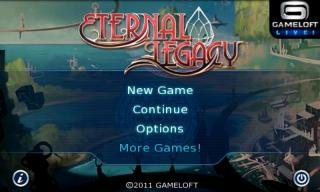
Finally able to play Eternal Legacy HD on my SGW

This post has been edited by cowithgun: Dec 23 2011, 03:32 AM


Attached thumbnail(s)
Attached Image

7 Pages « < 4 5 6 7 >Top
Topic ClosedOptions
 

Change to:
| Lo-Fi Version
0.0445sec    0.70    7 queries    GZIP Disabled
Time is now: 11th December 2025 - 03:48 PM